編輯:關於Android編程
在應用開發中,有時我們需要用代碼計算布局的高度,可能需要減去狀態欄(status bar)的高度。狀態欄高度定義在Android系統尺寸資源中status_bar_height,但這並不是公開可直接使用的,例如像通常使用系統資源那樣android.R.dimen.status_bar_height。但是系統給我們提供了一個Resource類,通過這個類我們可以獲取資源文件。下邊是在Activity中獲取的方法
 public int getStatusBarHeight() {
  int result = 0;
  int resourceId = getResources().getIdentifier("status_bar_height", "dimen", "android");
  if (resourceId > 0) {
      result = getResources().getDimensionPixelSize(resourceId);
  }
  return result;
}
	/**
	 * 獲得狀態欄的高度
	 *
	 * @param context
	 * @return
	 */
	public static int getStatusHeight(Context context) {

		int statusHeight = -1;
		try {
			Class clazz = Class.forName("com.android.internal.R$dimen");
			Object object = clazz.newInstance();
			int height = Integer.parseInt(clazz.getField("status_bar_height")
					.get(object).toString());
			statusHeight = context.getResources().getDimensionPixelSize(height);
		} catch (Exception e) {
			e.printStackTrace();
		}
		return statusHeight;
	}
我們可以看到得到的結果是一樣的。當然,獲取狀態欄的高度方法是不是就只有以上兩種呢,當然不是,下邊再介紹一種獲取狀態欄高度的方法,不過不推薦使用,因為這個方法依賴於WMS(窗口管理服務的回調)。
	Rect rectangle= new Rect();
	Window window= getWindow();
	window.getDecorView().getWindowVisibleDisplayFrame(rectangle);
	int statusBarHeight= rectangle.top;
 安卓開發之自定義控件TipView仿QQ長按後的提示窗口
先上效果圖:之前用手機QQ時,一直很覺得這個窗口提示挺不錯的,今天將它大概地實現了一遍。一、對TipView定義一些成員變量// 一些狀態變量private static
 一個Activity的顯示過程總結(四)
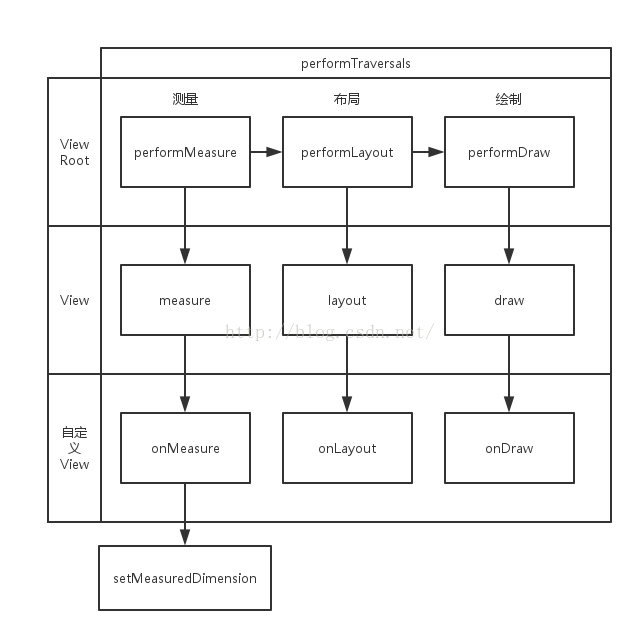
上一篇博客我們講到了ViewRoot中與UI相關的三個重要步驟:performMeasure(測量)、performLayout(布局)和performDraw(繪制),
 android 跨應用程序廣播發送接受
廣播作為android的四大組件之一,適用的地方還是很多,多用來特定條件情況下的通知。例如,開機,鬧鈴,電池電量過低等等。但還可以自定義廣播,用來兩個應用程序的通知。曾經
 Android Fragment 真正的完全解析(上)
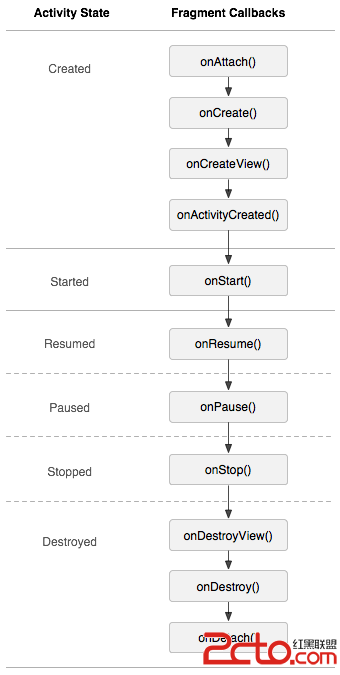
自從Fragment出現,曾經有段時間,感覺大家談什麼都能跟Fragment談上關系,做什麼都要問下Fragment能實現不~~~哈哈,是不是有點過~~~ 本篇博客力求為