編輯:關於Android編程
	private void startExplicitIntentWithComponent() {
		Intent intent = new Intent();
		ComponentName component = new ComponentName(com.example.photocrop, com.example.photocrop.MainActivity);
		intent.setComponent(component);
		startActivity(intent);
	}

	private void startExplicitIntentWithClassName() {
		Intent intent = new Intent();
		intent.setClassName(com.example.photocrop, com.example.photocrop.MainActivity);
		startActivity(intent);
	}
但是,從源碼裡面去看,發現setClassName也是借助了ComponentName實現了Explicit Intent。源碼如下:
    public Intent setClassName(String packageName, String className) {
        mComponent = new ComponentName(packageName, className);
        return this;
    }
然後,在給出一個Implict Intent的代碼示例。我這裡用一個Activity標注一些Intent Filter為例,然後在寫一個Intent用於啟動它。
在當前應用的AndroidManifest.xml中,給SendIntentType類增加了intent-filter,action的名字為“justtest”,category的名字為“justcategory”。啟動該Activity的代碼如下:
	private void startImplictIntent() {
		Intent intent = new Intent();
		intent.setAction(justaction);
		intent.addCategory(justcategory);
		startActivity(intent);
	}
系統在匹配Implict Intent的過程中,將以Intent Filter列出的3項內容為參考標准,具體步驟如下: 首先匹配IntentFilter的Action,如果Intent設置的action不滿足IntentFilter的Action,則匹配失敗。如果IntentFilter未設定Action或者設定的Action相同,則匹配成功。然後檢查IntentFilter的Category,匹配方法同Action的匹配相同,唯一例外的是當Category為CATEGORY_DEFAULT的情況。最後檢查Data。
			// 處理該package的activity信息
			N = pkg.activities.size();
			r = null;
			for (i = 0; i < N; i++) {
				PackageParser.Activity a = pkg.activities.get(i);
				a.info.processName = fixProcessName(pkg.applicationInfo.processName, a.info.processName,
						pkg.applicationInfo.uid);
				mActivities.addActivity(a, activity);
			}
上面代碼中,有兩個比較重要的數據結構,如下圖所示。 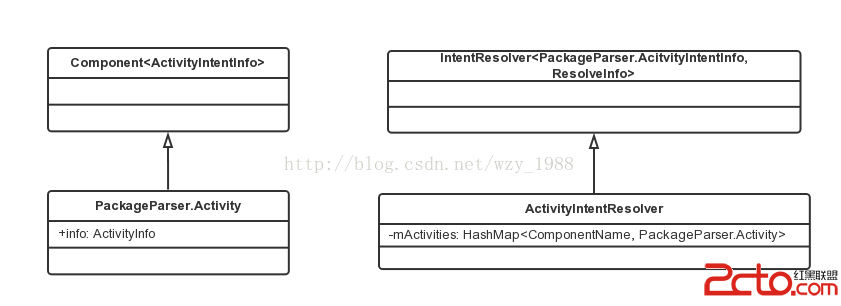 結合代碼和上圖的數據結構,可知: mAcitivitys為ActivityIntentResolver類型,是PKMS的成員變量,用於保存系統中所有與Activity相關的信息。此數據結構內部也有一個mActivities變量,它以ComponentName為key,保存PackageParser.Activity對象。從APK中解析得到的所有和Acitivity相關的信息(包括XML中聲明的IntentFilter標簽)都由PackageParser.Activity來保存。 前面代碼中調用addActivity函數完成了私有信息的公有化。addActivity函數的代碼如下:
		public final void addActivity(PackageParser.Activity a, String type) {
			final boolean systemApp = isSystemApp(a.info.applicationInfo);
			mActivities.put(a.getComponentName(), a);
			final int NI = a.intents.size();
			for (int j = 0; j < NI; j++) {
				PackageParser.ActivityIntentInfo intent = a.intents.get(j);
				if (!systemApp && intent.getPriority() > 0 && activity.equals(type)) {
					// 非系統APK的priority必須為0
					intent.setPriority(0);
				}
				addFilter(intent);
			}
		}
接下來看一下addFilter函數。函數源碼如下:
    public void addFilter(F f) {
    	// mFilters保存所有IntentFilter信息
        mFilters.add(f);
        int numS = register_intent_filter(f, f.schemesIterator(),
                mSchemeToFilter,       Scheme: );
        int numT = register_mime_types(f,       Type: );
        if (numS == 0 && numT == 0) {
            register_intent_filter(f, f.actionsIterator(),
                    mActionToFilter,       Action: );
        }
        if (numT != 0) {
            register_intent_filter(f, f.actionsIterator(),
                    mTypedActionToFilter,       TypedAction: );
        }
    }
這裡又出現了幾種數據結構,它們的類似都是ArrayMap
    private final int register_intent_filter(F filter, Iterator i,
            ArrayMap dest, String prefix) {
        if (i == null) {
            return 0;
        }

        int num = 0;
        while (i.hasNext()) {
            String name = i.next();
            num++;
            addFilter(dest, name, filter);
        }
        return num;
    }
然後又是一個addFilter函數,明顯是一個函數重載,我們來看一下這個addFilter的實現:
    private final void addFilter(ArrayMap map, String name, F filter) {
        F[] array = map.get(name);
        if (array == null) {
            array = newArray(2);
            map.put(name,  array);
            array[0] = filter;
        } else {
            final int N = array.length;
            int i = N;
            while (i > 0 && array[i-1] == null) {
                i--;
            }
            if (i < N) {
                array[i] = filter;
            } else {
                F[] newa = newArray((N*3)/2);
                System.arraycopy(array, 0, newa, 0, N);
                newa[N] = filter;
                map.put(name, newa);
            }
        }
    }
其實代碼還是很簡單的,如果F數組存在,則判斷容量,不夠則擴容,夠的話就找到位置插入。如果F數組不存在,則創建一個容量為2的數組,將0號元素賦值為該filter。
    @Override
    public List queryIntentActivities(Intent intent,
                                                   int flags) {
        return queryIntentActivitiesAsUser(intent, flags, mContext.getUserId());
    }

    /** @hide Same as above but for a specific user */
    @Override
    public List queryIntentActivitiesAsUser(Intent intent,
                                                   int flags, int userId) {
        try {
            return mPM.queryIntentActivities(
                intent,
                intent.resolveTypeIfNeeded(mContext.getContentResolver()),
                flags,
                userId);
        } catch (RemoteException e) {
            throw new RuntimeException(Package manager has died, e);
        }
    }
可以看到,queryIntentActivities的真正實現是在PackageManagerService.java中,函數代碼如下:
public List可以看到,Explicit Intent的實現較為簡單,我們重點來看一下Implict Intent實現。Implicit Intent調用了queryIntent方法,我們來看一下queryIntent的實現代碼:queryIntentActivities(Intent intent, String resolvedType, int flags, int userId) { if (!sUserManager.exists(userId)) return Collections.emptyList(); enforceCrossUserPermission(Binder.getCallingUid(), userId, false, query intent activities); ComponentName comp = intent.getComponent(); if (comp == null) { if (intent.getSelector() != null) { intent = intent.getSelector(); comp = intent.getComponent(); } } if (comp != null) { // Explicit的Intent,直接根據component得到對應的ActivityInfo final List list = new ArrayList (1); final ActivityInfo ai = getActivityInfo(comp, flags, userId); if (ai != null) { final ResolveInfo ri = new ResolveInfo(); ri.activityInfo = ai; list.add(ri); } return list; } // reader synchronized (mPackages) { final String pkgName = intent.getPackage(); if (pkgName == null) { // Implicit Intent return mActivities.queryIntent(intent, resolvedType, flags, userId); } final PackageParser.Package pkg = mPackages.get(pkgName); if (pkg != null) { // 指定了包名的Intent return mActivities.queryIntentForPackage(intent, resolvedType, flags, pkg.activities, userId); } return new ArrayList (); } }
public List繼續跟蹤到IntentResolver.java的queryIntent方法,源碼如下:queryIntent(Intent intent, String resolvedType, int flags, int userId) { if (!sUserManager.exists(userId)) return null; mFlags = flags; return super.queryIntent(intent, resolvedType, (flags & PackageManager.MATCH_DEFAULT_ONLY) != 0, userId); }
    public List queryIntent(Intent intent, String resolvedType, boolean defaultOnly,
            int userId) {
        String scheme = intent.getScheme();

        ArrayList finalList = new ArrayList();

        // 最多有4輪匹配操作
        F[] firstTypeCut = null;
        F[] secondTypeCut = null;
        F[] thirdTypeCut = null;
        F[] schemeCut = null;

        // If the intent includes a MIME type, then we want to collect all of
        // the filters that match that MIME type.
        if (resolvedType != null) {
            int slashpos = resolvedType.indexOf('/');
            if (slashpos > 0) {
                final String baseType = resolvedType.substring(0, slashpos);
                if (!baseType.equals(*)) {
                    if (resolvedType.length() != slashpos+2
                            || resolvedType.charAt(slashpos+1) != '*') {
                        // Not a wild card, so we can just look for all filters that
                        // completely match or wildcards whose base type matches.
                        firstTypeCut = mTypeToFilter.get(resolvedType);
                        secondTypeCut = mWildTypeToFilter.get(baseType);
                    } else {
                        // We can match anything with our base type.
                        firstTypeCut = mBaseTypeToFilter.get(baseType);
                        secondTypeCut = mWildTypeToFilter.get(baseType);
                    }
                    // Any */* types always apply, but we only need to do this
                    // if the intent type was not already */*.
                    thirdTypeCut = mWildTypeToFilter.get(*);
                } else if (intent.getAction() != null) {
                    // The intent specified any type ({@literal *}/*).  This
                    // can be a whole heck of a lot of things, so as a first
                    // cut let's use the action instead.
                    firstTypeCut = mTypedActionToFilter.get(intent.getAction());
                }
            }
        }

        // If the intent includes a data URI, then we want to collect all of
        // the filters that match its scheme (we will further refine matches
        // on the authority and path by directly matching each resulting filter).
        if (scheme != null) {
            schemeCut = mSchemeToFilter.get(scheme);
        }

        // If the intent does not specify any data -- either a MIME type or
        // a URI -- then we will only be looking for matches against empty
        // data.
        if (resolvedType == null && scheme == null && intent.getAction() != null) {
            firstTypeCut = mActionToFilter.get(intent.getAction());
        }

        FastImmutableArraySet categories = getFastIntentCategories(intent);
        if (firstTypeCut != null) {
            buildResolveList(intent, categories, debug, defaultOnly,
                    resolvedType, scheme, firstTypeCut, finalList, userId);
        }
        if (secondTypeCut != null) {
            buildResolveList(intent, categories, debug, defaultOnly,
                    resolvedType, scheme, secondTypeCut, finalList, userId);
        }
        if (thirdTypeCut != null) {
            buildResolveList(intent, categories, debug, defaultOnly,
                    resolvedType, scheme, thirdTypeCut, finalList, userId);
        }
        if (schemeCut != null) {
            buildResolveList(intent, categories, debug, defaultOnly,
                    resolvedType, scheme, schemeCut, finalList, userId);
        }
        sortResults(finalList);

        return finalList;
    }
具體的查詢匹配過程是由buildResolveList函數完成了。查詢的匹配實現我就不貼代碼了,大家自己去查詢看就好了。 Android之帶group指示器的ExpandableListView(自寫)
我們都知道Android缺省的ExpandableListView的group header無法固定在界面上,當向下滾動後,不能對當前顯示的那些child 指示出它們歸屬
 android實現模擬加載中的效果
最近閒著沒事做了一個Android小程序,具體如下:效果圖:原始界面點擊按鈕運行 運行後界面實現代碼:public class Mai
 android從源碼帶你熟悉DigitalClock 數字時針的應用以及它的使用場景
在android如果表示數字時針一般用DigitalClock,這個類是google給我們開發者提供的一個方便的類實現數字時針的功能,現在就寫個demo,為什麼要講這個類
 Android接收和發送短信處理
關於短信接收處理方面,當前已經有一些app做的比較好了,比如發給手機發驗證碼驗證的問題,很多app在手機接收到驗證碼後,不需要輸入,就直接可以跳過驗證界面,這就是用到了對