編輯:關於Android編程
修改文件:
packages/apps/Bluetooth/src/com/android/bluetooth/opp/BluetoothOppReceiveFileInfo.java
相關代碼片段:
    public static BluetoothOppReceiveFileInfo generateFileInfo(Context context, int id) {

        ContentResolver contentResolver = context.getContentResolver();
        Uri contentUri = Uri.parse(BluetoothShare.CONTENT_URI + "/" + id);
        String filename = null, hint = null, mimeType = null;
        long length = 0;
        Cursor metadataCursor = null;
        try {
            metadataCursor = contentResolver.query(contentUri, new String[] {
                BluetoothShare.FILENAME_HINT, BluetoothShare.TOTAL_BYTES, BluetoothShare.MIMETYPE
                }, null, null, null);
        } catch (SQLiteException e) {
            if (metadataCursor != null) {
                metadataCursor.close();
            }
            metadataCursor = null;
            Log.e(Constants.TAG, "generateFileInfo: " + e);
        } catch (CursorWindowAllocationException e) {
            metadataCursor = null;
            Log.e(Constants.TAG, "generateFileInfo: " + e);
        }

        if (metadataCursor != null) {
            try {
                if (metadataCursor.moveToFirst()) {
                    hint = metadataCursor.getString(0);
                    length = metadataCursor.getLong(1);
                    mimeType = metadataCursor.getString(2);
                }
            } finally {
                metadataCursor.close();
                if (V) Log.v(Constants.TAG, "Freeing cursor: " + metadataCursor);
                metadataCursor = null;
            }
        }

        File base = null;
        StatFs stat = null;

        if (Environment.getExternalStorageState().equals(Environment.MEDIA_MOUNTED)) {
            String root = Environment.getExternalStorageDirectory().getPath();
            base = new File(root + Constants.DEFAULT_STORE_SUBDIR);
            if (!base.isDirectory() && !base.mkdir()) {
                if (D) Log.d(Constants.TAG, "Receive File aborted - can't create base directory "
                            + base.getPath());
                return new BluetoothOppReceiveFileInfo(BluetoothShare.STATUS_FILE_ERROR);
            }
            stat = new StatFs(base.getPath());
        } else {
            if (D) Log.d(Constants.TAG, "Receive File aborted - no external storage");
            return new BluetoothOppReceiveFileInfo(BluetoothShare.STATUS_ERROR_NO_SDCARD);
        }

        /*
         * Check whether there's enough space on the target filesystem to save
         * the file. Put a bit of margin (in case creating the file grows the
         * system by a few blocks).
         */
        if (stat.getBlockSize() * ((long)stat.getAvailableBlocks() - 4) < length) {
            if (D) Log.d(Constants.TAG, "Receive File aborted - not enough free space");
            return new BluetoothOppReceiveFileInfo(BluetoothShare.STATUS_ERROR_SDCARD_FULL);
        }

        filename = choosefilename(hint);
        if (filename == null) {
            // should not happen. It must be pre-rejected
            return new BluetoothOppReceiveFileInfo(BluetoothShare.STATUS_FILE_ERROR);
        }
        String extension = null;
        int dotIndex = filename.lastIndexOf(".");
        if (dotIndex < 0) {
            if (mimeType == null) {
                // should not happen. It must be pre-rejected
                return new BluetoothOppReceiveFileInfo(BluetoothShare.STATUS_FILE_ERROR);
            } else {
                extension = "";
            }
        } else {
            extension = filename.substring(dotIndex);
            filename = filename.substring(0, dotIndex);
        }

        if ((filename != null) && (filename.getBytes().length > OPP_LENGTH_OF_FILE_NAME)) {
          /* Including extn of the file, Linux supports 255 character as a maximum length of the
           * file name to be created. Hence, Instead of sending OBEX_HTTP_INTERNAL_ERROR,
           * as a response, truncate the length of the file name and save it. This check majorly
           * helps in the case of vcard, where Phone book app supports contact name to be saved
           * more than 255 characters, But the server rejects the card just because the length of
           * vcf file name received exceeds 255 Characters.
           */
          try {
              byte[] oldfilename = filename.getBytes("UTF-8");
              byte[] newfilename = new byte[OPP_LENGTH_OF_FILE_NAME];
              System.arraycopy(oldfilename, 0, newfilename, 0, OPP_LENGTH_OF_FILE_NAME);
              filename = new String(newfilename, "UTF-8");
          } catch (UnsupportedEncodingException e) {
              Log.e(Constants.TAG, "Exception: " + e);
          }
          if (D) Log.d(Constants.TAG, "File name is too long. Name is truncated as: " + filename);
        }

        filename = base.getPath() + File.separator + filename;
        // Generate a unique filename, create the file, return it.
        String fullfilename = chooseUniquefilename(filename, extension);

        if (!safeCanonicalPath(fullfilename)) {
            // If this second check fails, then we better reject the transfer
            return new BluetoothOppReceiveFileInfo(BluetoothShare.STATUS_FILE_ERROR);
        }
        if (V) Log.v(Constants.TAG, "Generated received filename " + fullfilename);

        if (fullfilename != null) {
            try {
                new FileOutputStream(fullfilename).close();
                int index = fullfilename.lastIndexOf('/') + 1;
                // update display name
                if (index > 0) {
                    String displayName = fullfilename.substring(index);
                    if (V) Log.v(Constants.TAG, "New display name " + displayName);
                    ContentValues updateValues = new ContentValues();
                    updateValues.put(BluetoothShare.FILENAME_HINT, displayName);
                    context.getContentResolver().update(contentUri, updateValues, null, null);

                }
                return new BluetoothOppReceiveFileInfo(fullfilename, length, new FileOutputStream(
                        fullfilename), 0);
            } catch (IOException e) {
                if (D) Log.e(Constants.TAG, "Error when creating file " + fullfilename);
                return new BluetoothOppReceiveFileInfo(BluetoothShare.STATUS_FILE_ERROR);
            }
        } else {
            return new BluetoothOppReceiveFileInfo(BluetoothShare.STATUS_FILE_ERROR);
        }

    }

    private static boolean safeCanonicalPath(String uniqueFileName) {
        try {
            File receiveFile = new File(uniqueFileName);
            if (sDesiredStoragePath == null) {
                sDesiredStoragePath = Environment.getExternalStorageDirectory().getPath() +
                    Constants.DEFAULT_STORE_SUBDIR;
            }
            String canonicalPath = receiveFile.getCanonicalPath();

            // Check if canonical path is complete - case sensitive-wise
            if (!canonicalPath.startsWith(sDesiredStoragePath)) {
                return false;
            }

	    	return true;
        } catch (IOException ioe) {
            // If an exception is thrown, there might be something wrong with the file.
            return false;
        }
    }
修改方法:
root 就是存儲的根目錄。如果需要將其修改之外部存儲,修改此處的賦值即可。
如果需要修改子目錄,修改base的拼接賦值即可。
此處修改需要注意,如果修改root或者base,則需要給sDesiredStoragePath重新賦值,使其一致,否則會導致safeCanonicalPath()判斷會失敗。
需要使完整的路徑合法,否則無法接收文件。
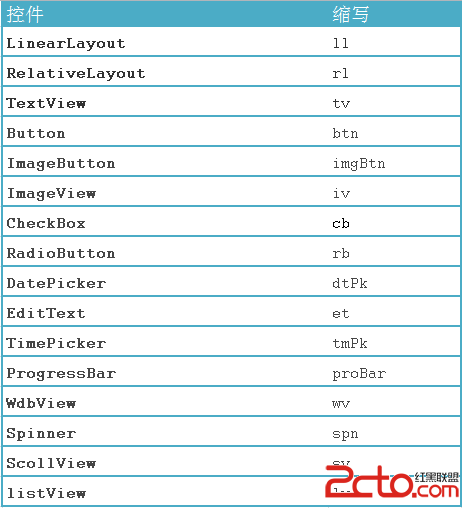 最佳實踐之 Android代碼規范
命名規范包命名規范采用反域名命名規則,包名全部小寫,連續的單詞只是簡單地連接起來,不使用下劃線,一級包名為com,二級包名為xxx(可以是公司域名或者個人命名),三級包名
 Android UI設計之(十四)自定義ViewGroup,實現絢麗的仿支付寶咻一咻雷達脈沖效果
去年春節的時候支付寶推行的集福娃活動著實火的不能再火了,更給力的是春晚又可以全民參與咻一咻集福娃活動,集齊五福就可平分億元大紅包,只可惜沒有敬業福…&hel
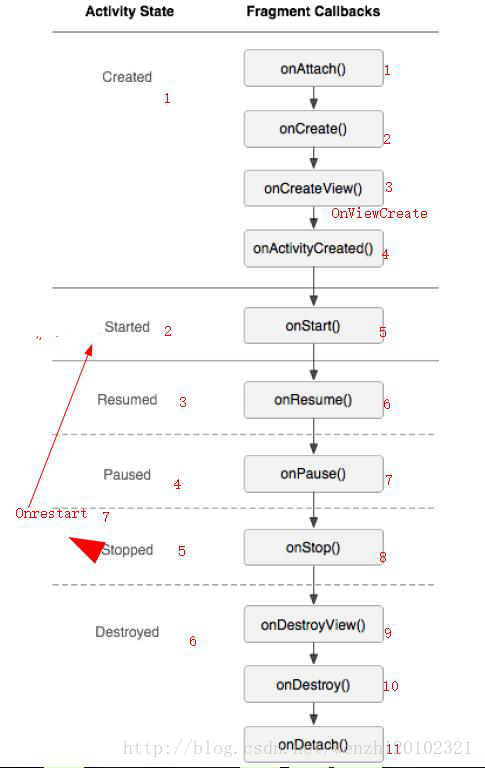 Android Fragment(動態,靜態)碎片詳解及總結
Android Fragment(動態,靜態)碎片詳解一.Fragment的相關概念(一)Fragment的基礎知識 &nb
 android sqlite另類用法(對象存取)
在andorid端使用sqlite數據庫是經常的事,通常來說都是對每個屬性對應一個字段,然後分字段的來讀取,但是今天我要說的不是這樣的。我們通過對象序列化來存取。因為一個