編輯:關於Android編程
(三)、Service與其客戶端的綁定如何實現,即跨進程調用問題。
服務於客戶端的綁定通過binder來實現的,就是客戶端去bind服務。來看看ContextImpl的bindServiceCommon方法
    private boolean bindServiceCommon(Intent service, ServiceConnection conn, int flags,
            UserHandle user) {
        IServiceConnection sd;
        if (mPackageInfo != null) {
            sd = mPackageInfo.getServiceDispatcher(conn, getOuterContext(),
                    mMainThread.getHandler(), flags);
        }
        try {
            IBinder token = getActivityToken();
            if (token == null && (flags&BIND_AUTO_CREATE) == 0 && mPackageInfo != null
                    && mPackageInfo.getApplicationInfo().targetSdkVersion
                    < android.os.Build.VERSION_CODES.ICE_CREAM_SANDWICH) {
                flags |= BIND_WAIVE_PRIORITY;
            }
            service.prepareToLeaveProcess();
            int res = ActivityManagerNative.getDefault().bindService(
                mMainThread.getApplicationThread(), getActivityToken(),
                service, service.resolveTypeIfNeeded(getContentResolver()),
                sd, flags, user.getIdentifier());
            if (res < 0) {
                throw new SecurityException(
                        Not allowed to bind to service  + service);
            }
            return res != 0;
        }
    }
然後會去LoadedApk.java裡面會創建用於跨進程連接的binder對象,就是一個ServiceDispatcher的InnerConnection。
    public final IServiceConnection getServiceDispatcher(ServiceConnection c,
            Context context, Handler handler, int flags) {
        synchronized (mServices) {
            LoadedApk.ServiceDispatcher sd = null;
            //這裡用一個map將所有的連接記錄都保存起來了
            ArrayMap map = mServices.get(context);
            if (map != null) {
                sd = map.get(c);
            }
            if (sd == null) {
                sd = new ServiceDispatcher(c, context, handler, flags);
                if (map == null) {
                    map = new ArrayMap();
                    mServices.put(context, map);
                }
                map.put(c, sd);
            } else {
                sd.validate(context, handler);
            }
            return sd.getIServiceConnection();
        }
    }
    static final class ServiceDispatcher {
        private final ServiceDispatcher.InnerConnection mIServiceConnection;
        private final ServiceConnection mConnection;

        private static class ConnectionInfo {
            IBinder binder;
            IBinder.DeathRecipient deathMonitor;
        }

        private static class InnerConnection extends IServiceConnection.Stub {
            final WeakReference mDispatcher;

            InnerConnection(LoadedApk.ServiceDispatcher sd) {
                mDispatcher = new WeakReference(sd);
            }
            //這個方法就是在ActivityManagerService中執行綁定鏈接時的方法調用
            //這裡的service毫無疑問就是遠程對象執行onBind時返回的那個咯
            //所以這裡才是服務端和客戶端傳遞一個binder對象的通道,因為這個過程涉及到兩個跨進程操作,所以這麼設計是必須也是合理的
            public void connected(ComponentName name, IBinder service) throws RemoteException {
                LoadedApk.ServiceDispatcher sd = mDispatcher.get();
                if (sd != null) {
                    sd.connected(name, service);
                }
            }
        }

        private final ArrayMap mActiveConnections
            = new ArrayMap();

        ServiceConnection getServiceConnection() {
            return mConnection;
        }

        IServiceConnection getIServiceConnection() {
            return mIServiceConnection;
        }

        public void connected(ComponentName name, IBinder service) {
            if (mActivityThread != null) {
                mActivityThread.post(new RunConnection(name, service, 0));
            } else {
                doConnected(name, service);
            }
        }

        public void death(ComponentName name, IBinder service) {
            .......................
        }
        //實際執行connect
        public void doConnected(ComponentName name, IBinder service) {
            ServiceDispatcher.ConnectionInfo old;
            ServiceDispatcher.ConnectionInfo info;

            synchronized (this) {
                if (mForgotten) {
                    // We unbound before receiving the connection; ignore
                    // any connection received.
                    return;
                }
                old = mActiveConnections.get(name);
                if (old != null && old.binder == service) {
                    // Huh, already have this one.  Oh well!
                    return;
                }

                if (service != null) {
                    // A new service is being connected... set it all up.
                    mDied = false;
                    info = new ConnectionInfo();
                    info.binder = service;
                    info.deathMonitor = new DeathMonitor(name, service);
                    try {
                        service.linkToDeath(info.deathMonitor, 0);
                        mActiveConnections.put(name, info);
                    } catch (RemoteException e) {
                        // This service was dead before we got it...  just
                        // don't do anything with it.
                        mActiveConnections.remove(name);
                        return;
                    }

                } else {
                    // The named service is being disconnected... clean up.
                    mActiveConnections.remove(name);
                }

                if (old != null) {
                    old.binder.unlinkToDeath(old.deathMonitor, 0);
                }
            }

            // If there was an old service, it is not disconnected.
            if (old != null) {
                mConnection.onServiceDisconnected(name);
            }
            // If there is a new service, it is now connected.
            // 眼熟了吧,這就是我們在綁定服務後獲取遠程對象代理的回調咯
            if (service != null) {
                mConnection.onServiceConnected(name, service);
            }
        }

        public void doDeath(ComponentName name, IBinder service) {
            mConnection.onServiceDisconnected(name);
        }

        private final class RunConnection implements Runnable {
            RunConnection(ComponentName name, IBinder service, int command) {
                mName = name;
                mService = service;
                mCommand = command;
            }

            public void run() {
                if (mCommand == 0) {
                    doConnected(mName, mService);
                } else if (mCommand == 1) {
                    doDeath(mName, mService);
                }
            }
        }
        private final class DeathMonitor implements IBinder.DeathRecipient
        {
            DeathMonitor(ComponentName name, IBinder service) {
                mName = name;
                mService = service;
            }

            public void binderDied() {
                death(mName, mService);
            }

            final ComponentName mName;
            final IBinder mService;
        }
 }
後面就是bind操作了,前面講生命周期時已經有提到過的,這裡再把那個方法列一下:
        int bindServiceLocked(IApplicationThread caller, IBinder token,
                Intent service, String resolvedType,
                IServiceConnection connection, int flags, int userId) {
            ....................
            ServiceLookupResult res =
                retrieveServiceLocked(service, resolvedType,
                        Binder.getCallingPid(), Binder.getCallingUid(), userId, true, callerFg);
            ....................
            try {
                if (unscheduleServiceRestartLocked(s, callerApp.info.uid, false)) {
                    if (DEBUG_SERVICE) Slog.v(TAG, BIND SERVICE WHILE RESTART PENDING:
                            + s);
                }
                ...................
                //bindings中添加一起綁定請求,後續requestServiceBindingsLocked()流程中處理綁定接口
                AppBindRecord b = s.retrieveAppBindingLocked(service, callerApp);
                ....................
                if ((flags&Context.BIND_AUTO_CREATE) != 0) {
                    s.lastActivity = SystemClock.uptimeMillis();
                    //如果攜帶的標志位中包含自動啟動,則進行創建服務的操作,代碼可以看前面,如果已經啟動了,其實是什麼操作也不干的
                    if (bringUpServiceLocked(s, service.getFlags(), callerFg, false) != null) {
                        return 0;
                    }
                }

                if (s.app != null) {
                    // This could have made the service more important.
                    mAm.updateLruProcessLocked(s.app, s.app.hasClientActivities, b.client);
                    mAm.updateOomAdjLocked(s.app);
                }

                if (s.app != null && b.intent.received) {
                    // Service is already running, so we can immediately
                    // publish the connection.
                    // 如果服務已經啟動並且有綁定過了,直接返回binder對象,這裡的conn就是前面提到的InnerConnection的代理,這裡看到了connected操作其實是由
// InnerConnection它來完成的 try { c.conn.connected(s.name, b.intent.binder); } catch (Exception e) { Slog.w(TAG, Failure sending service + s.shortName + to connection + c.conn.asBinder() + (in + c.binding.client.processName + ), e); } // If this is the first app connected back to this binding, // and the service had previously asked to be told when // rebound, then do so. // 從這裡可以看出,一般情況下,onBind只會執行一次,除非請求doRebind // 這個標志位是舊的客戶端全部unbind之後自動設置上的 if (b.intent.apps.size() == 1 && b.intent.doRebind) { requestServiceBindingLocked(s, b.intent, callerFg, true); } } else if (!b.intent.requested) { //服務還沒有綁定者,則執行後續操作將調用到onBind操作 requestServiceBindingLocked(s, b.intent, callerFg, false); } getServiceMap(s.userId).ensureNotStartingBackground(s); } finally { Binder.restoreCallingIdentity(origId); } return 1; }
大家有沒有在上面注意一個問題,InnerConnection中並沒有unConnected方法,那麼解綁的時候又是如何通過這個連接通道執行回調的呢?大家可以看看前面講的unBind流程中,裡面也是沒有任何地方會執行到這個操作的,它有的只是服務端的unBind和可能執行onDestory。那麼什麼時候會執行到ServiceConnection.onServiceDisconnected,事實上只有在遠程服務端那個binder死亡才會執行到的。這個就是通過為這個binder對象注冊一個IBinder.DeathRecipient,這是binder的死亡通知機制。這裡就不講了。
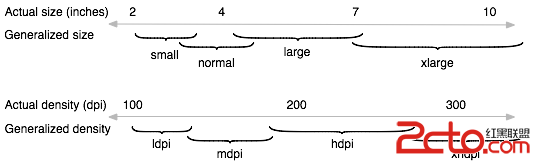 Android的屏幕多樣性支持
前言運行Android系統設備的屏幕尺寸和密度千變萬化。然而對於應用程序來說,Android系統為所有設備提供了一個統一的開發環境,並且由系統處理了大部分應
 【Android 仿微信通訊錄 導航分組列表-下】自定義View為RecyclerView打造右側索引導航欄IndexBar
一 概述我們用ItemDecoration為RecyclerView打造了帶懸停頭部的分組列表。其實Android版微信的通訊錄界面,它的分組title也不是懸停的,我們
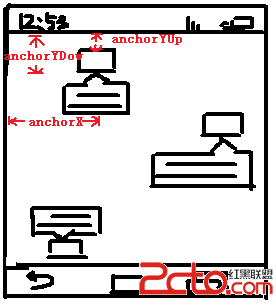 使用android.graphics.Path類自繪制PopupWindow背景
PopupWindow簡介PopupWindow是懸浮在當前activity上的一個容器,用它可以展示任意的內容。PopupWindow跟位置有關的API有下面幾個:sh
 Android WaveView實現水流波動效果
水流波動的波形都是三角波,曲線是正余弦曲線,但是Android中沒有提供繪制正余弦曲線的API,好在Path類有個繪制貝塞爾曲線的方法