編輯:關於Android編程
本文代碼以MTK平台Android 4.4為分析對象,與Google原生AOSP有些許差異,請讀者知悉。
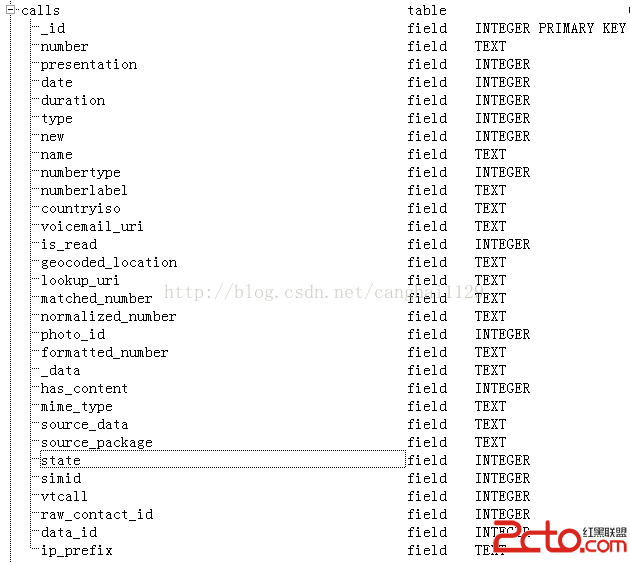
Android系統通話記錄存儲在聯系人數據庫contacts2.db中的calls表中,通話記錄(calllog)存儲到數據庫的時機可查看我之前的一篇博客Android4.4 Telephony流程分析——電話掛斷step39,系統提供了CallLogProvider這個ContentProvider來供外界訪問。我們來看本文將會使用到的CallLogProvider的代碼片段:
/**
 * Call log content provider.
 */
public class CallLogProvider extends ContentProvider {

......
    private static final int CALLS_JION_DATA_VIEW = 5;
    private static final int CALLS_JION_DATA_VIEW_ID = 6;
......
    private static final UriMatcher sURIMatcher = new UriMatcher(UriMatcher.NO_MATCH);
    static {
        sURIMatcher.addURI(CallLog.AUTHORITY, "calls", CALLS);
        sURIMatcher.addURI(CallLog.AUTHORITY, "calls/#", CALLS_ID);
        sURIMatcher.addURI(CallLog.AUTHORITY, "calls/filter/*", CALLS_FILTER);
        sURIMatcher.addURI(CallLog.AUTHORITY, "calls/search_filter/*", CALLS_SEARCH_FILTER);
        sURIMatcher.addURI(CallLog.AUTHORITY, "callsjoindataview", CALLS_JION_DATA_VIEW);
        sURIMatcher.addURI(CallLog.AUTHORITY, "callsjoindataview/#", CALLS_JION_DATA_VIEW_ID);
        sURIMatcher.addURI(CallLog.AUTHORITY, SearchManager.SUGGEST_URI_PATH_QUERY, SEARCH_SUGGESTIONS);
        sURIMatcher.addURI(CallLog.AUTHORITY, SearchManager.SUGGEST_URI_PATH_QUERY + "/*", SEARCH_SUGGESTIONS);
        sURIMatcher.addURI(CallLog.AUTHORITY, SearchManager.SUGGEST_URI_PATH_SHORTCUT + "/*", SEARCH_SHORTCUT);
    }
    private static final HashMap sCallsProjectionMap;
......
    private static final String mstableCallsJoinData = Tables.CALLS + " LEFT JOIN "
    + " (SELECT * FROM " +  Views.DATA + " WHERE " + Data._ID + " IN "
    + "(SELECT " +  Calls.DATA_ID + " FROM " + Tables.CALLS + ")) AS " + Views.DATA
            + " ON(" + Tables.CALLS + "." + Calls.DATA_ID + " = " + Views.DATA + "." + Data._ID + ")";
......
    private static final HashMap sCallsJoinDataViewProjectionMap;
......

    @Override
    public Cursor query(Uri uri, String[] projection, String selection, String[] selectionArgs,
            String sortOrder) {
        final SQLiteQueryBuilder qb = new SQLiteQueryBuilder();
     .......
        switch (match) {
......
            case CALLS_JION_DATA_VIEW: {
                qb.setTables(mstableCallsJoinData);
                qb.setProjectionMap(sCallsJoinDataViewProjectionMap);
                qb.setStrict(true);
                break;
            }

            case CALLS_JION_DATA_VIEW_ID: {
                qb.setTables(mstableCallsJoinData);//將查詢這個數據集合,mstableCallsJoinData前面已定義
                qb.setProjectionMap(sCallsJoinDataViewProjectionMap);
                qb.setStrict(true);
                selectionBuilder.addClause(getEqualityClause(Tables.CALLS + "." + Calls._ID,
                        parseCallIdFromUri(uri)));
                break;
            }
......
         }
      ......
    }
......
} 
下面是Dialer中通話記錄的加載時序圖,此圖只關注calllog數據的處理:
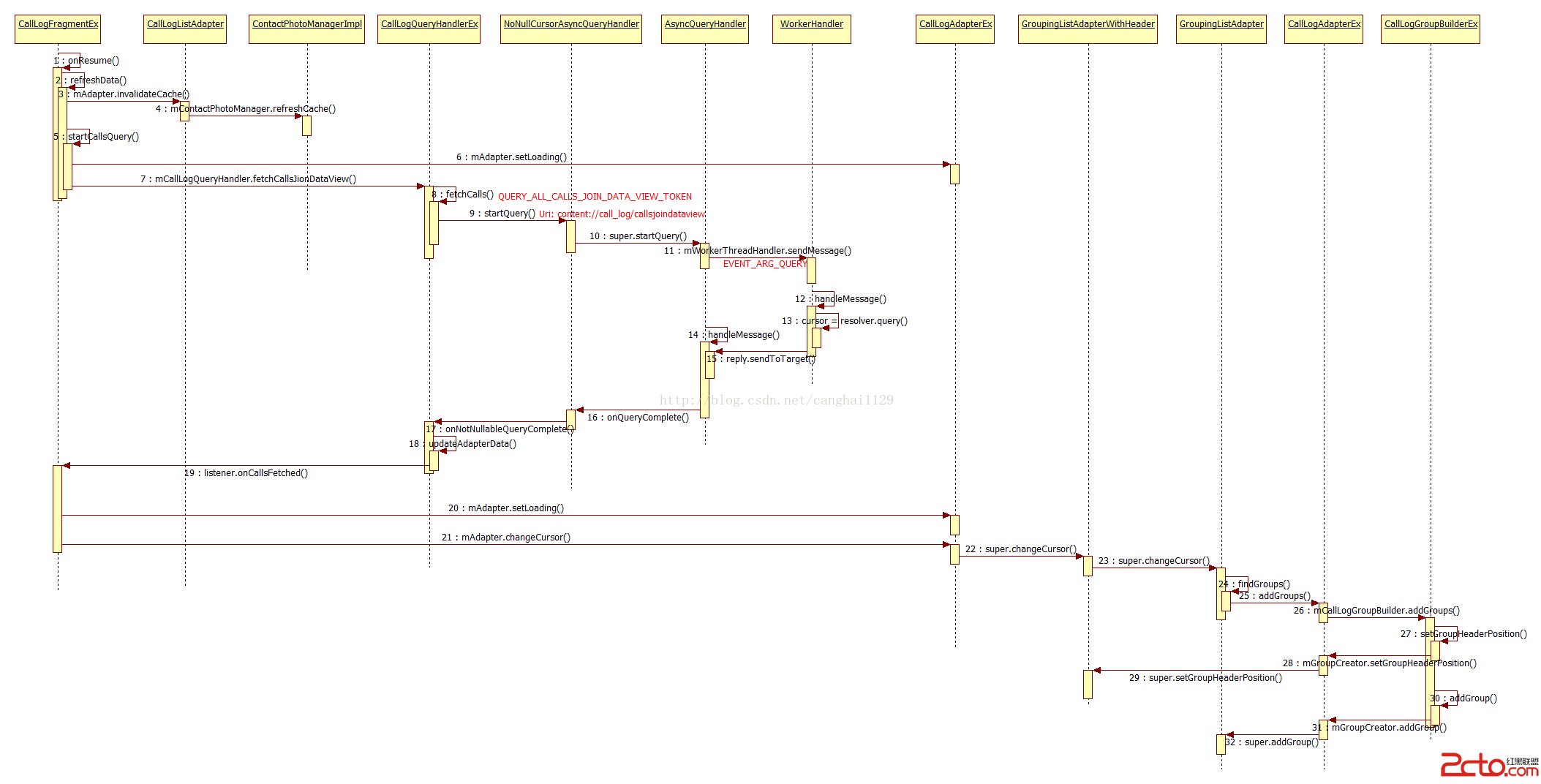
Dialer模塊是Android4.4之後才獨立處理的,整個模塊大部分的UI顯示都是使用Framgment實現。觸發通話記錄刷新加載的的操作比較多,如Fragment onResume()時、數據庫更新時、選擇了通話記錄過濾等,這些操作都會使用step2的refreshData()方法來查詢數據庫。
step3~step4,刷新通話記錄聯系人圖片緩存,聯系人圖片緩存使用的是LruCache技術,異步加載,後面再發博文分析。
step5,讀取sim卡過濾設置、通話類型設置,開始查詢,
    public void startCallsQuery() {
        mAdapter.setLoading(true);//step6,正在加載聯系人,此時聯系人列表不顯示為 空

        SharedPreferences prefs = PreferenceManager.getDefaultSharedPreferences(this.getActivity());
        int simFilter = prefs.getInt(Constants.SIM_FILTER_PREF, Constants.FILTER_SIM_DEFAULT);//要查看calllog的SIM卡
        int typeFilter = prefs.getInt(Constants.TYPE_FILTER_PREF, Constants.FILTER_TYPE_DEFAULT);//通話類型:來電?去電?未接?全部?
        mCallLogQueryHandler.fetchCallsJionDataView(simFilter, typeFilter);
        /* add wait cursor */
        int count = this.getListView().getCount();
        Log.i(TAG, "***********************count : " + count);
        mIsFinished = false;

        if (0 == count) {//現在列表中記錄為空,顯示等待加載控件
            Log.i(TAG, "call sendmessage");
            mHandler.sendMessageDelayed(mHandler.obtainMessage(WAIT_CURSOR_START),
                    WAIT_CURSOR_DELAY_TIME);
        }
}step9,設置查詢Uri,
        if (QUERY_ALL_CALLS_JOIN_DATA_VIEW_TOKEN == token) {
            queryUri = Uri.parse("content://call_log/callsjoindataview");
            queryProjection = CallLogQueryEx.PROJECTION_CALLS_JOIN_DATAVIEW;
        }
CallLogQueryHandlerEx、NoNullCursorAsyncQueryHandler抽象類、AsyncQueryHandler抽象類是繼承關系,繼承自Handler,
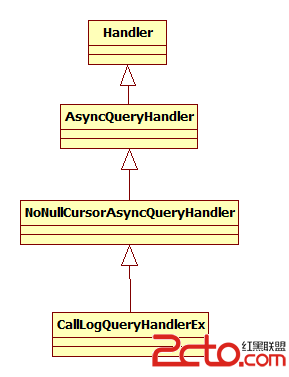
AsyncQueryHandler是Framework中提供的異步查詢類,定義在\frameworks\base\cZ喎?/kf/ware/vc/" target="_blank" class="keylink">vcmVcamF2YVxhbmRyb2lkXGNvbnRlbnSjrHN0ZXAxML2rsunRr8frx/O9u7j4y/yjrDxicj4KPC9wPgo8cD48L3A+CjxwcmUgY2xhc3M9"brush:java;"> public void startQuery(int token, Object cookie, Uri uri,
String[] projection, String selection, String[] selectionArgs,
String orderBy) {
// Use the token as what so cancelOperations works properly
Message msg = mWorkerThreadHandler.obtainMessage(token);//mWorkerThreadHandler是WorkerHandler的對象,也是一個Handler,與工作線程通信
msg.arg1 = EVENT_ARG_QUERY;
WorkerArgs args = new WorkerArgs();
args.handler = this;//this即AsyncQueryHandler,用於工作線程返回查詢結果Cursor
args.uri = uri;
args.projection = projection;
args.selection = selection;
args.selectionArgs = selectionArgs;
args.orderBy = orderBy;
args.cookie = cookie;
msg.obj = args;
mWorkerThreadHandler.sendMessage(msg);//查詢將在工作線程中進行
}
step12~step15,工作線程將查詢結果返回給AsyncQueryHandler的handleMessage()處理。
    protected class WorkerHandler extends Handler {
        public WorkerHandler(Looper looper) {
            super(looper);
        }

        @Override
        public void handleMessage(Message msg) {
            final ContentResolver resolver = mResolver.get();
            if (resolver == null) return;

            WorkerArgs args = (WorkerArgs) msg.obj;

            int token = msg.what;
            int event = msg.arg1;

            switch (event) {
                case EVENT_ARG_QUERY:
                    Cursor cursor;
                    try {
                        cursor = resolver.query(args.uri, args.projection,
                                args.selection, args.selectionArgs,
                                args.orderBy);
                        // Calling getCount() causes the cursor window to be filled,
                        // which will make the first access on the main thread a lot faster.
                        if (cursor != null) {
                            cursor.getCount();
                        }
                    } catch (Exception e) {
                        Log.w(TAG, "Exception thrown during handling EVENT_ARG_QUERY", e);
                        cursor = null;
                    }

                    args.result = cursor;//查詢結果cursor
                    break;

                    ......
            }

            // passing the original token value back to the caller
            // on top of the event values in arg1.
            Message reply = args.handler.obtainMessage(token); //args.handler就是上文提到的this
            reply.obj = args;
            reply.arg1 = msg.arg1; //EVENT_ARG_QUERY

            reply.sendToTarget();
        }
} @Override
protected final void onQueryComplete(int token, Object cookie, Cursor cursor) {
CookieWithProjection projectionCookie = (CookieWithProjection) cookie;
super.onQueryComplete(token, projectionCookie.originalCookie, cursor);
if (cursor == null) {//通話記錄為空,創建一個空的cursor返回
cursor = new EmptyCursor(projectionCookie.projection);
}
onNotNullableQueryComplete(token, projectionCookie.originalCookie, cursor);//step17
} @Override
public void onCallsFetched(Cursor cursor) {
.......
mAdapter.setLoading(false);//與step6對應
mAdapter.changeCursor(cursor);//更改CallLogListAdapter的cursor,刷新ListView
// when dialpadfrangment is in forgoround, not update dial pad menu item.
Activity activity = getActivity();
/// M: for refresh option menu;
activity.invalidateOptionsMenu();
if (mScrollToTop) {
//Modified by Lee 2014-06-30 for flip sms and call start
final HYListView listView = (HYListView)getListView();
//Modified by Lee 2014-06-30 for flip sms and call end
if (listView.getFirstVisiblePosition() > 5) {
listView.setSelection(5);
}
listView.setSelection(0);
mScrollToTop = false;
}
mCallLogFetched = true;
/** M: add :Bug Fix for ALPS00115673 @ { */
Log.i(TAG, "onCallsFetched is call");
mIsFinished = true;
mLoadingContainer.startAnimation(AnimationUtils.loadAnimation(getActivity(),
android.R.anim.fade_out));
mLoadingContainer.setVisibility(View.GONE);
mLoadingContact.setVisibility(View.GONE);
mProgress.setVisibility(View.GONE);
// hide calldetail view,let no call log warning show on all screen
if (mCallDetail != null) {
if (cursor == null || cursor.getCount() == 0) {
mCallDetail.setVisibility(View.GONE);
} else {
mCallDetail.setVisibility(View.VISIBLE);
}
}
mEmptyTitle.setText(R.string.recentCalls_empty);
/** @ }*/
destroyEmptyLoaderIfAllDataFetched();
// send message,the message will execute after the listview inflate
handle.sendEmptyMessage(SETFIRSTTAG); //設置ListView第一條可顯示的數據
}step26中是具體的分組規則、分組過程:
    public void addGroups(Cursor cursor) {
        final int count = cursor.getCount();
        if (count == 0) {
            return;
        }

        int currentGroupSize = 1;
        cursor.moveToFirst();
        // The number of the first entry in the group.
        String firstNumber = cursor.getString(CallLogQueryEx.CALLS_JOIN_DATA_VIEW_NUMBER);
        // This is the type of the first call in the group.
        int firstCallType = cursor.getInt(CallLogQueryEx.CALLS_JOIN_DATA_VIEW_CALL_TYPE);

        //The following lines are provided and maintained by Mediatek Inc.
        int firstSimId = cursor.getInt(CallLogQueryEx.CALLS_JOIN_DATA_VIEW_SIM_ID);
        int firstVtCall = cursor.getInt(CallLogQueryEx.CALLS_JOIN_DATA_VIEW_VTCALL);
        long firstDate = cursor.getLong(CallLogQueryEx.CALLS_JOIN_DATA_VIEW_DATE);
        if (0 != cursor.getCount()) {
            setGroupHeaderPosition(cursor.getPosition());
        }
        /// @}

        while (cursor.moveToNext()) {
            // The number of the current row in the cursor.
            final String currentNumber = cursor.getString(CallLogQueryEx.CALLS_JOIN_DATA_VIEW_NUMBER);
            final int callType = cursor.getInt(CallLogQueryEx.CALLS_JOIN_DATA_VIEW_CALL_TYPE);
            /// @}
            final boolean sameNumber = equalNumbers(firstNumber, currentNumber);
            final boolean shouldGroup;
            /// M: add @{
            final int simId = cursor.getInt(CallLogQueryEx.CALLS_JOIN_DATA_VIEW_SIM_ID);
            final int vtCall = cursor.getInt(CallLogQueryEx.CALLS_JOIN_DATA_VIEW_VTCALL);
            final long date = cursor.getLong(CallLogQueryEx.CALLS_JOIN_DATA_VIEW_DATE);
            final boolean isSameDay = CallLogDateFormatHelper.isSameDay(firstDate, date);
            /// @ }
            /// M: [VVM] voice mail should not be grouped.
            if (firstCallType == Calls.VOICEMAIL_TYPE || !sameNumber || firstCallType != callType
                    || firstSimId != simId || firstVtCall != vtCall || !isSameDay) { //看注釋
                // Should only group with calls from the same number, the same
                // callType, the same simId and the same vtCall values.
                shouldGroup = false; //這個條件下,ListView需要顯示一條記錄
            } else {
                shouldGroup = true; //同一個group ListView只顯示一條記錄,加上通話記錄數目
            }
            /// @}

            if (shouldGroup) {
                // Increment the size of the group to include the current call, but do not create
                // the group until we find a call that does not match.
                currentGroupSize++; //累加
            } else {
                // Create a group for the previous set of calls, excluding the current one, but do
                // not create a group for a single call.
                addGroup(cursor.getPosition() - currentGroupSize, currentGroupSize);
                if (!isSameDay) { //不是同一天的通話記錄,需要顯示Header(日期)
                    setGroupHeaderPosition(cursor.getPosition());
                }
                /// @}
                // Start a new group; it will include at least the current call.
                currentGroupSize = 1;
                // The current entry is now the first in the group.//上一條記錄為參考值,比較
                firstNumber = currentNumber;
                firstCallType = callType;
                /// M: add @{
                firstCallType = callType;
                firstSimId = simId;
                firstVtCall = vtCall;
                firstDate = date;
                /// @}
            }
        }

        addGroup(count - currentGroupSize, currentGroupSize);
        /// @}
    }
    public void setGroupHeaderPosition(int cursorPosition) {
        mHeaderPositionList.put(Integer.valueOf(cursorPosition), Boolean.valueOf(true));
} protected void addGroup(int cursorPosition, int size, boolean expanded) {
if (mGroupCount >= mGroupMetadata.length) {
int newSize = idealLongArraySize(
mGroupMetadata.length + GROUP_METADATA_ARRAY_INCREMENT);
long[] array = new long[newSize];
System.arraycopy(mGroupMetadata, 0, array, 0, mGroupCount);
mGroupMetadata = array;
}
long metadata = ((long)size << 32) | cursorPosition;
if (expanded) {
metadata |= EXPANDED_GROUP_MASK;
}
mGroupMetadata[mGroupCount++] = metadata;
}
通話記錄ListView和Adapter的數據綁定是在GroupingListAdapter中的getView()方法中,此類繼承自BaseAdapter,來看一下它的繼承結構:
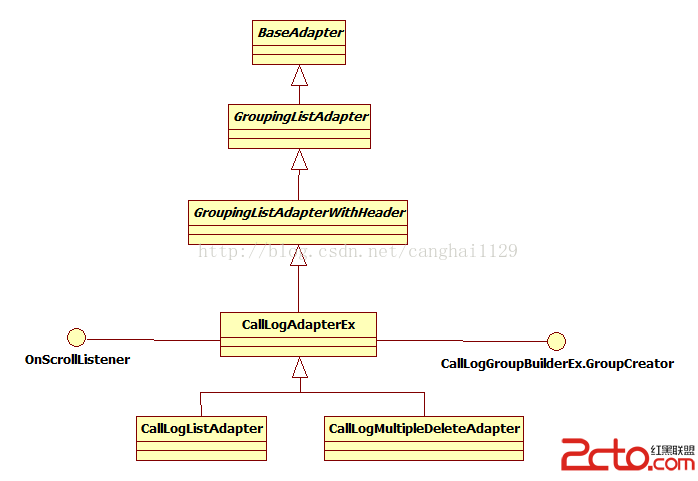 浏覽器中打開即可查看大圖。
未完待續,有不對的地方,請指正。
 非微信內置浏覽器中的網頁調起微信支付的方案研究
問題來源之前在app中集成過微信支付,此種微信支付方式為app支付,即在我們自己的應用中嵌入微信支付SDK,由Native代碼調起微信支付。後來由於業務需要在我們app的
 Android簡易實戰教程--第二十六話《網絡圖片查看器在本地緩存》
上一篇已經把王略中的圖片獲取到了。生活中有這麼些場景:微信聯網打開別人照片後,當手機斷網的時候再去點擊人家的額圖片還能完整看到。這時候,已經不是去網路中獲取圖片了,其實微
 Android仿QQ好友列表分組實現增刪改及持久化
Android自帶的控件ExpandableListView實現了分組列表功能,本案例在此基礎上進行優化,為此控件添加增刪改分組及子項的功能,以及列表數據的持久化。Dem
 Android應用開發中自定義ViewGroup的究極攻略
支持margin,gravity以及水平,垂直排列最近在學習android的view部分,於是動手實現了一個類似ViewPager的可上下或者左右拖動的ViewGroup