編輯:關於Android編程
本文代碼以MTK平台Android 4.4為分析對象,與Google原生AOSP有些許差異,請讀者知悉。
本文主要介紹sim卡數據的讀取過程,當射頻狀態處於准備狀態時,此時UiccCardApplication應處於AppState.APPSTATE_READY狀態,我們沿著這個信號跟蹤下去。閱讀本文時可先閱讀Android4.4 Telephony流程分析——SIM卡開機時的初始化一文,了解Radio和sim卡狀態更新過程。
先來看一下數據加載的序列圖:
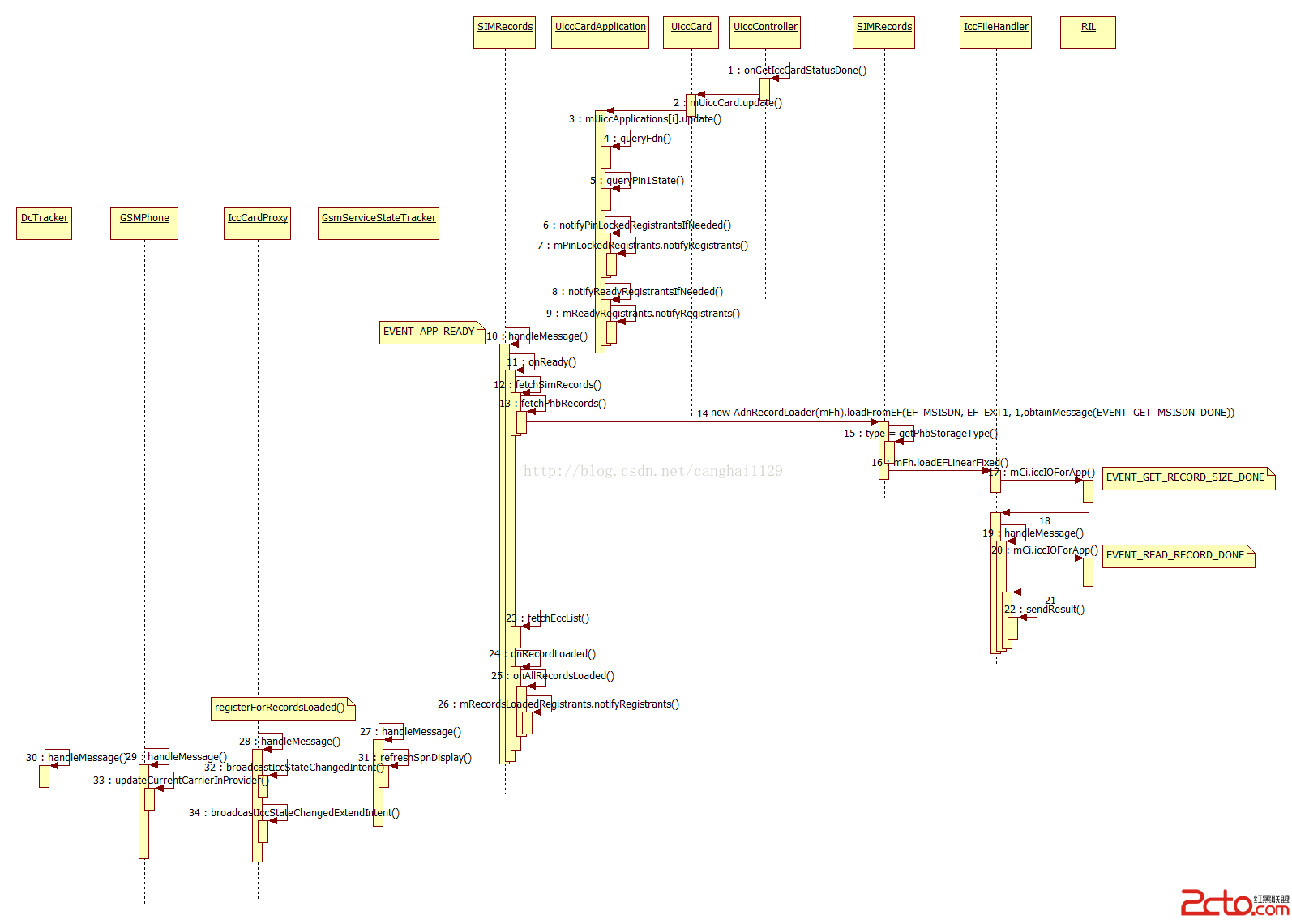
step1~step3,走的是更新過程,創建過程參考Android4.4 Telephony流程分析——SIM卡開機時的初始化一文step21之後的步驟。
step4,通過Modem查褮喎?/kf/ware/vc/" target="_blank" class="keylink">vc2ltv6i1xEZETii5zLaosqa6xSnK/b7doaM8L3A+CjxwPnN0ZXA1o6zNqLn9TW9kZW2y6dGvc2ltv6i1xHBpbjHXtMysoaM8L3A+CjxwPnN0ZXA2fnN0ZXA3o6y9q3BpbjHXtMyszajWqrP2yKWjrEljY0NhcmRQcm94ebvh16Ky4W1QaW5Mb2NrZWRSZWdpc3RyYW50c6GjPC9wPgo8cD5zdGVwOH5zdGVwOaOsvatzaW2/qHJlYWR517TMrLeis/bIpaGjPC9wPgo8cD48L3A+CjxwcmUgY2xhc3M9"brush:java;"> private void notifyReadyRegistrantsIfNeeded(Registrant r) {
if (mDestroyed) {
return;
}
if (mAppState == AppState.APPSTATE_READY) {
if (mPin1State == PinState.PINSTATE_ENABLED_NOT_VERIFIED ||
mPin1State == PinState.PINSTATE_ENABLED_BLOCKED ||
mPin1State == PinState.PINSTATE_ENABLED_PERM_BLOCKED) {
loge("Sanity check failed! APPSTATE is ready while PIN1 is not verified!!!");
// Don't notify if application is in insane state
return;
}
if (r == null) {
if (DBG) log("Notifying registrants: READY");
mReadyRegistrants.notifyRegistrants();
} else {
if (DBG) log("Notifying 1 registrant: READY");
r.notifyRegistrant(new AsyncResult(null, null, null));
}
}
}
如果此時pin1是被激活的,也就是sim卡開啟了pin1鎖,sim卡ready狀態就不會發出去。
監聽mReadyRegistrants狀態變化的對象很多,主要有:SIMRecords(同類的還有RuimRecords、IsimUiccRecords),IccCardProxy(會將SIM卡狀態廣播出去),GsmServiceStateTracker(會根據SIM狀態去注冊網絡),這裡主要說一下SIMRecords,讀取SIM的數據。
step12,fetchSimRecords()方法:
//MTK-END [mtk80601][111215][ALPS00093395]
    protected void fetchSimRecords() {
        mRecordsRequested = true;

        if (DBG) log("fetchSimRecords " + mRecordsToLoad);

        mCi.getIMSIForApp(mParentApp.getAid(), obtainMessage(EVENT_GET_IMSI_DONE));//讀IMSI
        mRecordsToLoad++;

        //iccFh.loadEFTransparent(EF_ICCID, obtainMessage(EVENT_GET_ICCID_DONE));
        //mRecordsToLoad++;

        // FIXME should examine EF[MSISDN]'s capability configuration
        // to determine which is the voice/data/fax line
        //new AdnRecordLoader(phone).loadFromEF(EF_MSISDN, EF_EXT1, 1,
                    //obtainMessage(EVENT_GET_MSISDN_DONE));
        //recordsToLoad++;

        // Record number is subscriber profile
        mFh.loadEFLinearFixed(EF_MBI, 1, obtainMessage(EVENT_GET_MBI_DONE));
        mRecordsToLoad++;

        mFh.loadEFTransparent(EF_AD, obtainMessage(EVENT_GET_AD_DONE));
        mRecordsToLoad++;

        // Record number is subscriber profile
        mFh.loadEFLinearFixed(EF_MWIS, 1, obtainMessage(EVENT_GET_MWIS_DONE));
        mRecordsToLoad++;


        // Also load CPHS-style voice mail indicator, which stores
        // the same info as EF[MWIS]. If both exist, both are updated
        // but the EF[MWIS] data is preferred
        // Please note this must be loaded after EF[MWIS]
        mFh.loadEFTransparent(
                EF_VOICE_MAIL_INDICATOR_CPHS,
                obtainMessage(EVENT_GET_VOICE_MAIL_INDICATOR_CPHS_DONE));
        mRecordsToLoad++;

        // Same goes for Call Forward Status indicator: fetch both
        // EF[CFIS] and CPHS-EF, with EF[CFIS] preferred.
        mFh.loadEFLinearFixed(EF_CFIS, 1, obtainMessage(EVENT_GET_CFIS_DONE));
        mRecordsToLoad++;
        mFh.loadEFTransparent(EF_CFF_CPHS, obtainMessage(EVENT_GET_CFF_DONE));
        mRecordsToLoad++;


        //getSpnFsm(true, null);

        mFh.loadEFTransparent(EF_SPDI, obtainMessage(EVENT_GET_SPDI_DONE));
        mRecordsToLoad++;

        //mFh.loadEFLinearFixed(EF_PNN, 1, obtainMessage(EVENT_GET_PNN_DONE));
        //recordsToLoad++;

        mFh.loadEFTransparent(EF_SST, obtainMessage(EVENT_GET_SST_DONE));
        mRecordsToLoad++;

        mFh.loadEFTransparent(EF_INFO_CPHS, obtainMessage(EVENT_GET_INFO_CPHS_DONE));
        mRecordsToLoad++;

        mFh.loadEFTransparent(EF_CSP_CPHS,obtainMessage(EVENT_GET_CSP_CPHS_DONE));
        mRecordsToLoad++;

        mFh.loadEFTransparent(EF_GID1, obtainMessage(EVENT_GET_GID1_DONE));
        mRecordsToLoad++;

        /*
          Detail description:
          This feature provides a interface to get menu title string from EF_SUME
        */
        if (mTelephonyExt != null) {
            if (mTelephonyExt.isSetLanguageBySIM()) {
                mFh.loadEFTransparent(EF_SUME, obtainMessage(EVENT_QUERY_MENU_TITLE_DONE));
                mRecordsToLoad++;
            }
        } else {
            loge("fetchSimRecords(): mTelephonyExt is null!!!");
        }

        fetchCPHSOns();

        // XXX should seek instead of examining them all
        if (false) { // XXX
            mFh.loadEFLinearFixedAll(EF_SMS, obtainMessage(EVENT_GET_ALL_SMS_DONE));
            mRecordsToLoad++;
        }

        if (CRASH_RIL) {
            String sms = "0107912160130310f20404d0110041007030208054832b0120"
                         + "fffffffffffffffffffffffffffffffffffffffffffffffffffffffffffffffffffff"
                         + "fffffffffffffffffffffffffffffffffffffffffffffffffffffffffffffffffff"
                         + "fffffffffffffffffffffffffffffffffffffffffffffffffffffffffffffffffffff"
                         + "fffffffffffffffffffffffffffffffffffffffffffffffffffffffffffffffffff"
                         + "ffffffffffffffffffffffffffffff";
            byte[] ba = IccUtils.hexStringToBytes(sms);

            mFh.updateEFLinearFixed(EF_SMS, 1, ba, null,
                            obtainMessage(EVENT_MARK_SMS_READ_DONE, 1));
        }
        if (DBG) log("fetchSimRecords " + mRecordsToLoad + " requested: " + mRecordsRequested);
        /*
        * Here, we assume that PHB is ready and try to read the entries.
        * If it is not, we will receive the event EVENT_PHB_READY later.
        * Then, we will ready the PHB entries again.
        */
        fetchPhbRecords();//讀adn聯系人

	fetchRatBalancing();
}step23,獲取SIM卡內置的緊急號碼,這個是由運營商定制的。
step24~step26,當需要load的數據都load完成,才會執行,再在onAllRecordsLoaded中發布mRecordsLoadedRegistrants通知。
    protected void onRecordLoaded() {
        // One record loaded successfully or failed, In either case
        // we need to update the recordsToLoad count
        mRecordsToLoad -= 1;
        if (DBG) log("onRecordLoaded " + mRecordsToLoad + " requested: " + mRecordsRequested);

        if (mRecordsToLoad == 0 && mRecordsRequested == true) {
            onAllRecordsLoaded();
        } else if (mRecordsToLoad < 0) {
            loge("recordsToLoad <0, programmer error suspected");
            mRecordsToLoad = 0;
        }
} private void broadcastIccStateChangedIntent(String value, String reason) {
synchronized (mLock) {
if (mQuietMode) {
log("QuietMode: NOT Broadcasting intent ACTION_SIM_STATE_CHANGED " + value
+ " reason " + reason);
return;
}
Intent intent = new Intent(TelephonyIntents.ACTION_SIM_STATE_CHANGED);
//intent.addFlags(Intent.FLAG_RECEIVER_REPLACE_PENDING);
intent.putExtra(PhoneConstants.PHONE_NAME_KEY, "Phone");
intent.putExtra(IccCardConstants.INTENT_KEY_ICC_STATE, value);
intent.putExtra(IccCardConstants.INTENT_KEY_LOCKED_REASON, reason);
intent.putExtra(PhoneConstants.GEMINI_SIM_ID_KEY, mSimId);
if (DBG) log("Broadcasting intent ACTION_SIM_STATE_CHANGED " + value
+ " reason " + reason + " sim id " + mSimId);
ActivityManagerNative.broadcastStickyIntent(intent, READ_PHONE_STATE,
UserHandle.USER_ALL);
}
}
public void broadcastIccStateChangedExtendIntent(String value, String reason) {
synchronized (mLock) {
if (mQuietMode) {
log("QuietMode: NOT Broadcasting extend intent ACTION_SIM_STATE_CHANGED " + value
+ " reason " + reason);
return;
}
Intent intent = new Intent(TelephonyIntents.ACTION_SIM_STATE_CHANGED_EXTEND);
//intent.addFlags(Intent.FLAG_RECEIVER_REPLACE_PENDING);
intent.putExtra(PhoneConstants.PHONE_NAME_KEY, "Phone");
intent.putExtra(IccCardConstants.INTENT_KEY_ICC_STATE, value);
intent.putExtra(IccCardConstants.INTENT_KEY_LOCKED_REASON, reason);
intent.putExtra(PhoneConstants.GEMINI_SIM_ID_KEY, mSimId);
if (DBG) log("Broadcasting intent ACTION_SIM_STATE_CHANGED_EXTEND " + value
+ " reason " + reason + " sim id " + mSimId);
ActivityManagerNative.broadcastStickyIntent(intent, READ_PHONE_STATE,
UserHandle.USER_ALL);
}
}
右鍵復制圖片地址,在浏覽器中打開即可查看大圖。
未完待續,有不對的地方,請指正。
 Android調用系統拍照裁剪圖片模糊的解決方法
在Android中,調用系統相機拍照時,將會接收到返回的圖像數據,但是這些圖片並不是全尺寸的圖像,而是系統給的縮略圖,當對拍照的圖片進行裁切後顯示時,得到的卻是模糊的圖片
 Android 百度地圖 SDK v3.0.0 (二) 定位與結合方向傳感器
在上一篇博客中,我們成功把地圖導入了我們的項目。本篇我們准備為地圖添加:第一,定位功能;第二,與方向傳感器結合,通過旋轉手機進行道路的方向確認。有了這兩個功能,地圖已經可
 android圖片處理之讓圖片一直勻速旋轉
本文是在我的文章android圖片處理,讓圖片變成圓形 的基礎上繼續寫的,可以去看看,直接看也沒關系,也能看懂 1、首先在res文件夾下創建一個名字為anim的
 Android選項卡動態滑動效果
本文會實現一個類似網易新聞(不說網易新聞大家可能不知道大概是什麼樣子)點擊超多選項卡,選項卡動態滑動的效果。首先來看看布局,就是用HorizontalScrollView