編輯:關於Android編程
項目需要是通過WIFI建立手機和PC的通信,然後自定義一個簡單的協議對要傳輸的文件進行校驗,傳輸的文件是2張3M的圖片,要求考慮網絡中斷情況處理。
我這裡采用的是非阻塞socket來實現的,之前查過很多資料,覺得這種比較方便,其實用傳統的那種socket也是可以實現的,至於阻塞問題,可以開兩個線程,這樣保證讀取不是同一個線程,也就可以解決。
程序大致是這樣的流程,手機端發送一個“filename”字符串給PC,PC校驗字符串後返回文件名,然後手機端再把接收到的文件名發送給PC端,進行校驗,如果PC端校驗成功,那麼PC端就開始傳輸這個文件給手機端,手機端就接收這個文件。至於網絡中斷的問題,後來發現,只要在服務端發送文件的那一段程序添加try-catch,捕獲這個異常,這樣服務端的程序就不會死掉,進入等待,等到手機再次和PC端建立連接,那麼就可以重新發送文件,這裡是重傳,而不是續傳,後來想過,也只有6M,實際測試過,大概2-3秒就可以傳完,重傳和續傳意義不大,所以就簡單的重傳了。
程序如下:
PC端:
public class MyServer {
	private final static Logger logger = Logger.getLogger(MyServer.class.getName());

	public static void main(String[] args) {
		Selector selector = null;
		ServerSocketChannel serverSocketChannel = null;

		try {
			selector = Selector.open();
			serverSocketChannel = ServerSocketChannel.open();
			serverSocketChannel.configureBlocking(false);
			serverSocketChannel.socket().setReuseAddress(true);
			serverSocketChannel.socket().bind(new InetSocketAddress(1991));
			serverSocketChannel.register(selector, SelectionKey.OP_ACCEPT);
			while (selector.select() > 0) {
				Iterator it = selector.selectedKeys().iterator();
				while (it.hasNext()) {
					SelectionKey readyKey = it.next();
					it.remove();

					SocketChannel socketChannel = null;
					String string = "";
					try {
						socketChannel = ((ServerSocketChannel) readyKey.channel()).accept();
						string = receiveData(socketChannel);
						logger.log(Level.INFO, string);
						if(string.equals("filename")){
							File f= new File("D:/chz.jpg");
						    if (f.exists() && f.isFile()){
						        sendData(socketChannel, "chz.jpg");
						    }else{
						        logger.info("file doesn't exist or is not a file");
						    }
						}
						if(string.equals("chz.jpg")){
							sendFile(socketChannel, new File("D:/chz.jpg"));
						}
					}catch(Exception ex){
						logger.log(Level.SEVERE, "1", ex);
					} finally {
						try {
							socketChannel.close();
						} catch(Exception ex) {
							logger.log(Level.SEVERE, "2", ex);
						}
					}
				}
			}
		} catch (ClosedChannelException ex) {
			logger.log(Level.SEVERE, "3", ex);
		} catch (IOException ex) {
			logger.log(Level.SEVERE, "4", ex);
		} finally {
			try {
				selector.close();
			} catch(Exception ex) {
				logger.log(Level.SEVERE, "5", ex);
			}
			try {
				serverSocketChannel.close();
			} catch(Exception ex) {
				logger.log(Level.SEVERE, "6", ex);
			}
		}
	}

	private static String receiveData(SocketChannel socketChannel) throws IOException {
		String string = null;
		ByteArrayOutputStream baos = new ByteArrayOutputStream();
		ByteBuffer buffer = ByteBuffer.allocate(1024);

		try {
			byte[] bytes;
			int size = 0;
			while ((size = socketChannel.read(buffer)) >= 0) {
				buffer.flip();
				bytes = new byte[size];
				buffer.get(bytes);
				baos.write(bytes);
				buffer.clear();
			}
			bytes = baos.toByteArray();
			string = new String(bytes);
		}catch(Exception ex){
			logger.log(Level.SEVERE, "7", ex);
		}finally {
			try {
				baos.close();
			} catch(Exception ex) {
				logger.log(Level.SEVERE, "8", ex);
			}
		}
		return string;
	}

	private static void sendData(SocketChannel socketChannel, String string) throws IOException {
		byte[] bytes = string.getBytes();
		ByteBuffer buffer = ByteBuffer.wrap(bytes);
		socketChannel.write(buffer);
		socketChannel.socket().shutdownOutput();
	}

	private static void receiveFile(SocketChannel socketChannel, File file) throws IOException {
		FileOutputStream fos = null;
		FileChannel channel = null;

		try {
			fos = new FileOutputStream(file);
			channel = fos.getChannel();
			ByteBuffer buffer = ByteBuffer.allocateDirect(1024);

			int size = 0;
			while ((size = socketChannel.read(buffer)) != -1) {
				buffer.flip();
				if (size > 0) {
					buffer.limit(size);
					channel.write(buffer);
					buffer.clear();
				}
			}
		}catch(Exception ex){
			logger.log(Level.SEVERE, "9", ex);
		} finally {
			try {
				channel.close();
			} catch(Exception ex) {
				logger.log(Level.SEVERE, "10", ex);
			}
			try {
				fos.close();
			} catch(Exception ex) {
				logger.log(Level.SEVERE, "11", ex);
			}
		}
	}

	private static void sendFile(SocketChannel socketChannel, File file) throws IOException {
		FileInputStream fis = null;
		FileChannel channel = null;
		try {
			fis = new FileInputStream(file);
			channel = fis.getChannel();
			ByteBuffer buffer = ByteBuffer.allocateDirect(1024);
			int size = 0;
			while ((size = channel.read(buffer)) != -1) {
				buffer.rewind();
				buffer.limit(size);
				socketChannel.write(buffer);
				buffer.clear();
			}
			socketChannel.socket().shutdownOutput();
		}catch(Exception ex){
			logger.log(Level.SEVERE, "12", ex);
		} finally {
			try {
				channel.close();
			} catch(Exception ex) {
				logger.log(Level.SEVERE, "13", ex);
			}
			try {
				fis.close();
			} catch(Exception ex) {
				logger.log(Level.SEVERE, "14", ex);
			}
		}
	}
}
ANDROID端:
public class MainActivity extends Activity {

	private Button mButton;
	private EditText et;
	private static String string;
    @Override
    protected void onCreate(Bundle savedInstanceState) {
        super.onCreate(savedInstanceState);
        setContentView(R.layout.main);

        et = (EditText)findViewById(R.id.edittext1);
        et.setText("192.168.1.214");
		mButton = (Button)findViewById(R.id.button1);
		mButton.setOnClickListener(new OnClickListener() {

			@Override
			public void onClick(View arg0) {
				// TODO Auto-generated method stub
				string = et.getText().toString();
				new Thread(new Runnable() {

					@Override
					public void run() {
						// TODO Auto-generated method stub
						SocketChannel socketChannel = null;
						try {
							socketChannel = SocketChannel.open();
							SocketAddress socketAddress = new InetSocketAddress(string, 1991);
							socketChannel.connect(socketAddress);

							sendData(socketChannel, "filename");
							String string = "";
							string = receiveData(socketChannel);
							if(!string.isEmpty()){
								socketChannel = SocketChannel.open();
								socketChannel.connect(new InetSocketAddress("192.168.1.214", 1991));
								sendData(socketChannel, string);
								receiveFile(socketChannel, new File("sdcard/afile/"+string));
							}
						} catch (Exception ex) {
							Log.i("chz", null, ex);
						} finally {
							try {
								socketChannel.close();
							} catch(Exception ex) {}
						}
					}
				}).start();
			}
		});

   }

		private void sendData(SocketChannel socketChannel, String string) throws IOException {
			byte[] bytes = string.getBytes();
			ByteBuffer buffer = ByteBuffer.wrap(bytes);
			socketChannel.write(buffer);
			socketChannel.socket().shutdownOutput();
		}

		private String receiveData(SocketChannel socketChannel) throws IOException {
			String string = null;
			ByteArrayOutputStream baos = new ByteArrayOutputStream();

			try {
				ByteBuffer buffer = ByteBuffer.allocateDirect(1024);
				byte[] bytes;
				int count = 0;
				while ((count = socketChannel.read(buffer)) >= 0) {
					buffer.flip();
					bytes = new byte[count];
					buffer.get(bytes);
					baos.write(bytes);
					buffer.clear();
				}
				bytes = baos.toByteArray();
				string = new String(bytes);
//				socketChannel.socket().shutdownInput();
			} finally {
				try {
					baos.close();
				} catch(Exception ex) {}
			}
			return string;
		}

		private static void sendFile(SocketChannel socketChannel, File file) throws IOException {
			FileInputStream fis = null;
			FileChannel channel = null;
			try {
				fis = new FileInputStream(file);
				channel = fis.getChannel();
				ByteBuffer buffer = ByteBuffer.allocateDirect(1024);
				int size = 0;
				while ((size = channel.read(buffer)) != -1) {
					buffer.rewind();
					buffer.limit(size);
					socketChannel.write(buffer);
					buffer.clear();
				}
				socketChannel.socket().shutdownOutput();
			} finally {
				try {
					channel.close();
				} catch(Exception ex) {}
				try {
					fis.close();
				} catch(Exception ex) {}
			}
		}

		private static void receiveFile(SocketChannel socketChannel, File file) throws IOException {
			FileOutputStream fos = null;
			FileChannel channel = null;

			try {
				fos = new FileOutputStream(file);
				channel = fos.getChannel();
				ByteBuffer buffer = ByteBuffer.allocateDirect(1024);

				int size = 0;
				while ((size = socketChannel.read(buffer)) != -1) {
					buffer.flip();
					if (size > 0) {
						buffer.limit(size);
						channel.write(buffer);
						buffer.clear();
					}
				}
			} finally {
				try {
					channel.close();
				} catch(Exception ex) {}
				try {
					fos.close();
				} catch(Exception ex) {}
			}
		}


    @Override
    public boolean onCreateOptionsMenu(Menu menu) {
        // Inflate the menu; this adds items to the action bar if it is present.
        getMenuInflater().inflate(R.menu.main, menu);
        return true;
    }

    @Override
    public boolean onOptionsItemSelected(MenuItem item) {
        // Handle action bar item clicks here. The action bar will
        // automatically handle clicks on the Home/Up button, so long
        // as you specify a parent activity in AndroidManifest.xml.
        int id = item.getItemId();
        if (id == R.id.action_settings) {
            return true;
        }
        return super.onOptionsItemSelected(item);
    }
}
番外:其實做這個文件傳輸遇到的最頭痛的問題不是程序難不難寫,而是wifi通信的建立。最初我是用自己win7的電腦連路由器,然後手機也連路由器做的測試,沒有問題,但是後來項目需求是下位機是一台XP的電腦,而且要求點對點建立wifi,所以只能有一端設成wifi熱點,另一端連接這個熱點。設想很完美,然後找了實驗室唯一一台XP電腦測試了兩天,都沒有能夠讓我手機連上PC,後來各種問,才知道XP不支持為android創wifi熱點,真心坑呀。然後我就想反過來做呗,手機建wifi熱點,電腦連,耶果然連上了,可是,明明寫好的程序,各種運行不了,最後手機巨熱,(我心痛死我的小米,求不黑小米,真心一直用小米,只是導師不給配開發手機,只能用自己手機,哎)所以直接pass這個想法,最後百度了一下,貌似可以接外接硬件設備,比方說360隨身wifi硬件,嗯導師終於答應淘寶買一個來測試下,今天買吧。
哦,整個程序參考了兩位大神博客:http://www.cnblogs.com/hongten/archive/2012/04/29/java_socket.html
http://blog.csdn.net/kongxx/article/details/7288896尤其是後面這位大神的一個專欄專門講java socket的,講得很好。
這個文件傳輸的整個工程地址:http://download.csdn.net/detail/u012321815/8047863
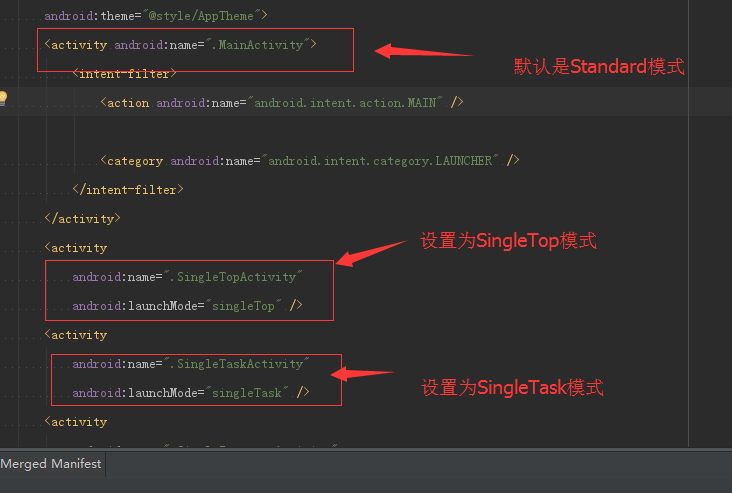 Android啟動模式總結
啟動模式:LaunchMode在多個Activity跳轉的過程中扮演著重要的角色,它可以決定是否生成新的Activity實例,是否重用已存在的Activity實例,是否和
 android UI進階之android中隱藏的layout 抽屜的使用方法
最近在寫一個應用,想把設置頁面和應用頁面放在一起,這樣就能實現用戶可以實時看到自己的設置對UI的影響,從而更方便的設置用戶喜歡的界面。想了一段時間,發現用slidingD
 Cocos2d-x 3.2 Lua示例 ClickAndMoveTest(點擊移動測試)
Cocos2d-x 3.2 Lua示例 ClickAndMoveTest(點擊移動測試) 本篇博客介紹Cocos2d-x 3.2Lua示例中點擊移動的例子,在這個例子你可
 AndroidStudio Git的使用(主要是解決文件沖突)
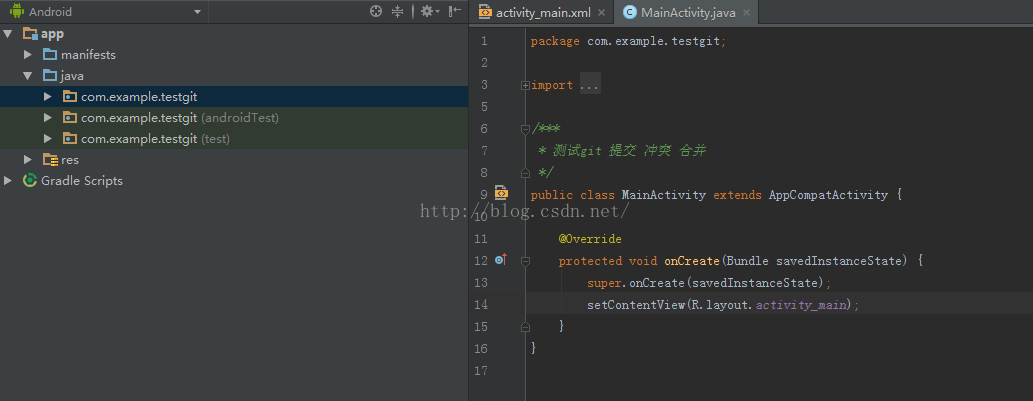
開始:1.使用github 來測試。首先准備一個GitHub賬號吧2.在androidStudio 裡面新建一個項目 這裡我取名TestGit 然後