編輯:關於Android編程
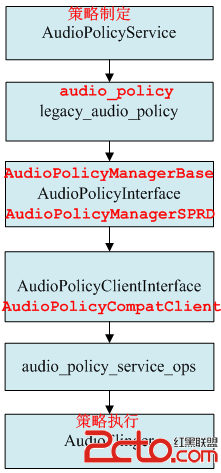
AudioPolicyService是策略的制定者,比如什麼時候打開音頻接口設備、某種Stream類型的音頻對應什麼設備等等。而AudioFlinger則是策略的執行者,例如具體如何與音頻設備通信,如何維護現有系統中的音頻設備,以及多個音頻流的混音如何處理等等都得由它來完成。AudioPolicyService根據用戶配置來指導AudioFlinger加載設備接口,起到路由功能。
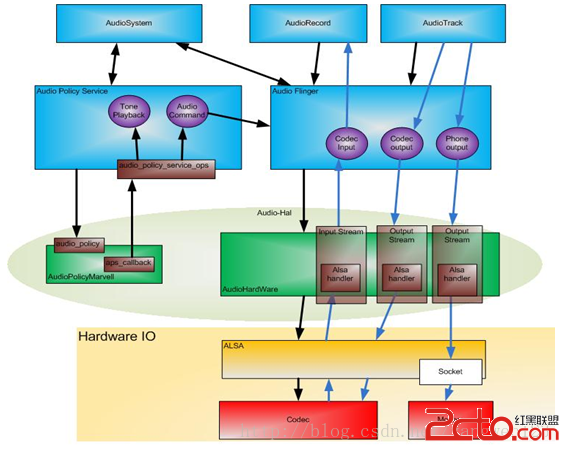
AudioPolicyService服務運行在mediaserver進程中,隨著mediaserver進程啟動而啟動。
frameworks\av\media\mediaserver\ Main_mediaserver.cpp
int main(int argc, char** argv)
{
    sp proc(ProcessState::self());
    sp sm = defaultServiceManager();
    ALOGI("ServiceManager: %p", sm.get());
    VolumeManager::instantiate(); // volumemanager have to be started before audioflinger
    AudioFlinger::instantiate();
    MediaPlayerService::instantiate();
    CameraService::instantiate();
    AudioPolicyService::instantiate();
    ProcessState::self()->startThreadPool();
    IPCThreadState::self()->joinThreadPool();
}
AudioPolicyService繼承了模板類BinderService,該類用於注冊native service。
frameworks\native\include\binder\ BinderService.h
templateclass BinderService { public: static status_t publish(bool allowIsolated = false) { sp sm(defaultServiceManager()); return sm->addService(String16(SERVICE::getServiceName()), new SERVICE(), allowIsolated); } static void instantiate() { publish(); } };
BinderService是一個模板類,該類的publish函數就是完成向ServiceManager注冊服務。
static const char *getServiceName() { return "media.audio_policy"; }
AudioPolicyService注冊名為media.audio_policy的服務。
AudioPolicyService::AudioPolicyService()
    : BnAudioPolicyService() , mpAudioPolicyDev(NULL) , mpAudioPolicy(NULL)
{
    char value[PROPERTY_VALUE_MAX];
    const struct hw_module_t *module;
    int forced_val;
    int rc;
    Mutex::Autolock _l(mLock);
    // start tone playback thread
    mTonePlaybackThread = new AudioCommandThread(String8("ApmTone"), this);
    // start audio commands thread
    mAudioCommandThread = new AudioCommandThread(String8("ApmAudio"), this);
    // start output activity command thread
    mOutputCommandThread = new AudioCommandThread(String8("ApmOutput"), this);
    /* instantiate the audio policy manager */
	/* 加載audio_policy.default.so庫得到audio_policy_module模塊 */
    rc = hw_get_module(AUDIO_POLICY_HARDWARE_MODULE_ID, &module);
    if (rc)
        return;
	/* 通過audio_policy_module模塊打開audio_policy_device設備 */
    rc = audio_policy_dev_open(module, &mpAudioPolicyDev);
    ALOGE_IF(rc, "couldn't open audio policy device (%s)", strerror(-rc));
    if (rc)
        return;
	//通過audio_policy_device設備創建audio_policy
    rc = mpAudioPolicyDev->create_audio_policy(mpAudioPolicyDev, &aps_ops, this,
                                               &mpAudioPolicy);
    ALOGE_IF(rc, "couldn't create audio policy (%s)", strerror(-rc));
    if (rc)
        return;
    rc = mpAudioPolicy->init_check(mpAudioPolicy);
    ALOGE_IF(rc, "couldn't init_check the audio policy (%s)", strerror(-rc));
    if (rc)
        return;
    /* SPRD: maybe set this property better, but here just change the default value @{ */
    property_get("ro.camera.sound.forced", value, "1");
    forced_val = strtol(value, NULL, 0);
    ALOGV("setForceUse() !forced_val=%d ",!forced_val);
    mpAudioPolicy->set_can_mute_enforced_audible(mpAudioPolicy, !forced_val);
    ALOGI("Loaded audio policy from %s (%s)", module->name, module->id);
    // 讀取audio_effects.conf文件
    if (access(AUDIO_EFFECT_VENDOR_CONFIG_FILE, R_OK) == 0) {
        loadPreProcessorConfig(AUDIO_EFFECT_VENDOR_CONFIG_FILE);
    } else if (access(AUDIO_EFFECT_DEFAULT_CONFIG_FILE, R_OK) == 0) {
        loadPreProcessorConfig(AUDIO_EFFECT_DEFAULT_CONFIG_FILE);
    }
}
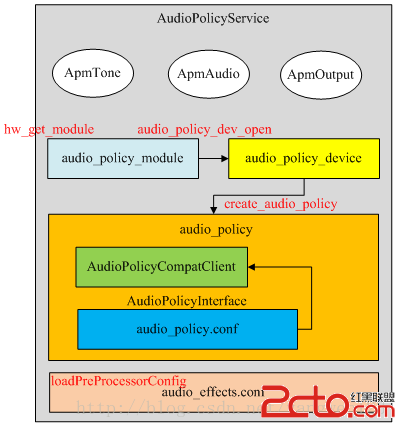
在AudioPolicyService對象構造過程中,分別創建了ApmTone、ApmAudio、ApmOutput三個AudioCommandThread線程:
1、 ApmTone用於播放tone音;
2、 ApmAudio用於執行audio命令;
3、ApmOutput用於執行輸出命令;
在第一次強引用AudioCommandThread線程對象時,AudioCommandThread的onFirstRef函數被回調,在此啟動線程
void AudioPolicyService::AudioCommandThread::onFirstRef()
{
    run(mName.string(), ANDROID_PRIORITY_AUDIO);
}
這裡采用異步方式來執行audio command,當需要執行上表中的命令時,首先將命令投遞到AudioCommandThread的mAudioCommands命令向量表中,然後通過mWaitWorkCV.signal()喚醒AudioCommandThread線程,被喚醒的AudioCommandThread線程執行完command後,又通過mWaitWorkCV.waitRelative(mLock, waitTime)睡眠等待命令到來。
audio_policy硬件抽象層動態庫位於/system/lib/hw/目錄下,命名為:audio_policy.$(TARGET_BOARD_PLATFORM).so。audiopolicy的硬件抽象層定義在hardware\libhardware_legacy\audio\audio_policy_hal.cpp中,AUDIO_POLICY_HARDWARE_MODULE_ID硬件抽象模塊定義如下:
hardware\libhardware_legacy\audio\ audio_policy_hal.cpp【audio_policy.scx15.so】
struct legacy_ap_module HAL_MODULE_INFO_SYM = {
    module: {
        common: {
            tag: HARDWARE_MODULE_TAG,
            version_major: 1,
            version_minor: 0,
            id: AUDIO_POLICY_HARDWARE_MODULE_ID,
            name: "LEGACY Audio Policy HAL",
            author: "The Android Open Source Project",
            methods: &legacy_ap_module_methods,
            dso : NULL,
            reserved : {0},
        },
    },
};
legacy_ap_module繼承於audio_policy_module。
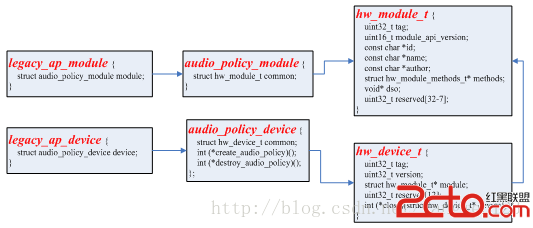
關於hw_get_module函數加載硬件抽象層模塊的過程請參考Android硬件抽象Hardware庫加載過程源碼分析。
hardware\libhardware\include\hardware\ audio_policy.h
static inline int audio_policy_dev_open(const hw_module_t* module,
                                    struct audio_policy_device** device)
{
    return module->methods->open(module, AUDIO_POLICY_INTERFACE,
                                 (hw_device_t**)device);
}
通過legacy_ap_module模塊的open方法來打開一個legacy_ap_device設備。
hardware\libhardware_legacy\audio\ audio_policy_hal.cpp
static int legacy_ap_dev_open(const hw_module_t* module, const char* name,
                                    hw_device_t** device)
{
    struct legacy_ap_device *dev;
    if (strcmp(name, AUDIO_POLICY_INTERFACE) != 0)
        return -EINVAL;
    dev = (struct legacy_ap_device *)calloc(1, sizeof(*dev));
    if (!dev)
        return -ENOMEM;
    dev->device.common.tag = HARDWARE_DEVICE_TAG;
    dev->device.common.version = 0;
    dev->device.common.module = const_cast(module);
    dev->device.common.close = legacy_ap_dev_close;
    dev->device.create_audio_policy = create_legacy_ap;
    dev->device.destroy_audio_policy = destroy_legacy_ap;
    *device = &dev->device.common;
    return 0;
}
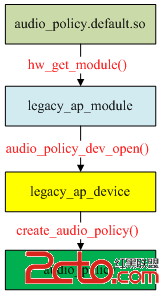
打開得到一個legacy_ap_device設備,通過該抽象設備可以創建一個audio_policy對象。
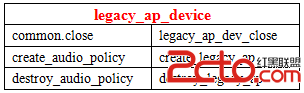
在打開legacy_ap_device設備時,該設備的create_audio_policy成員初始化為create_legacy_ap函數指針,我們通過legacy_ap_device設備可以創建一個legacy_audio_policy對象。
rc = mpAudioPolicyDev->create_audio_policy(mpAudioPolicyDev, &aps_ops, this,
                                               &mpAudioPolicy);
這裡通過audio_policy_device設備創建audio策略對象
hardware\libhardware_legacy\audio\ audio_policy_hal.cpp
static int create_legacy_ap(const struct audio_policy_device *device,
                            struct audio_policy_service_ops *aps_ops,
                            void *service,
                            struct audio_policy **ap)
{
    struct legacy_audio_policy *lap;
    int ret;
    if (!service || !aps_ops)
        return -EINVAL;
    lap = (struct legacy_audio_policy *)calloc(1, sizeof(*lap));
    if (!lap)
        return -ENOMEM;
lap->policy.set_device_connection_state = ap_set_device_connection_state;
…
    lap->policy.dump = ap_dump;
    lap->policy.is_offload_supported = ap_is_offload_supported;
    lap->service = service;
    lap->aps_ops = aps_ops;
    lap->service_client = new AudioPolicyCompatClient(aps_ops, service);
    if (!lap->service_client) {
        ret = -ENOMEM;
        goto err_new_compat_client;
    }
    lap->apm = createAudioPolicyManager(lap->service_client);
    if (!lap->apm) {
        ret = -ENOMEM;
        goto err_create_apm;
    }
    *ap = &lap->policy;
    return 0;
err_create_apm:
    delete lap->service_client;
err_new_compat_client:
    free(lap);
    *ap = NULL;
    return ret;
}
audio_policy實現在audio_policy_hal.cpp中,audio_policy_service_ops實現在AudioPolicyService.cpp中。create_audio_policy()函數就是創建並初始化一個legacy_audio_policy對象。
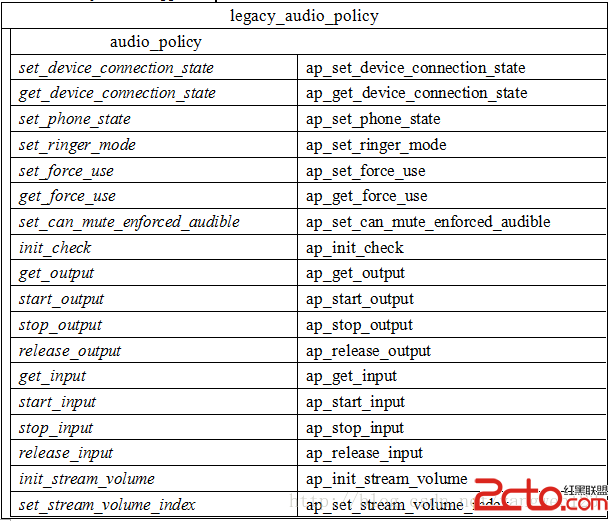
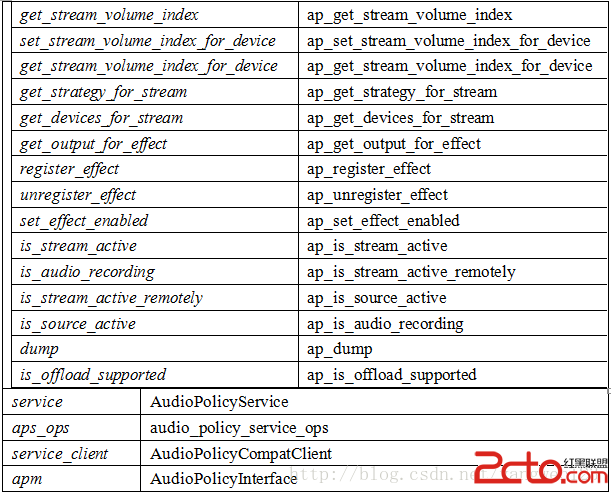
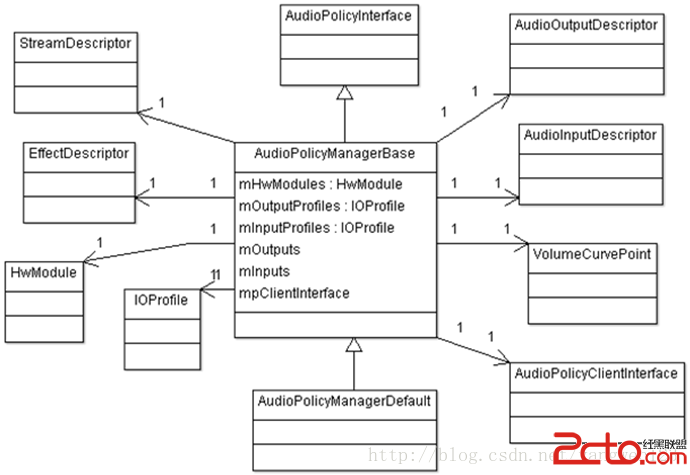
audio_policy與AudioPolicyService、AudioPolicyCompatClient之間的關系如下:
hardware\libhardware_legacy\audio\ AudioPolicyCompatClient.h
AudioPolicyCompatClient(struct audio_policy_service_ops *serviceOps,void *service) :
		mServiceOps(serviceOps) , mService(service) {}
AudioPolicyCompatClient是對audio_policy_service_ops的封裝類,對外提供audio_policy_service_ops數據結構中定義的接口。
extern "C" AudioPolicyInterface* createAudioPolicyManager(AudioPolicyClientInterface *clientInterface)
{
    ALOGI("SPRD policy manager created.");
    return new AudioPolicyManagerSPRD(clientInterface);
}
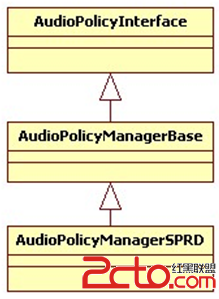
使用AudioPolicyClientInterface對象來構造AudioPolicyManagerSPRD對象,AudioPolicyManagerSPRD繼承於AudioPolicyManagerBase,而AudioPolicyManagerBase又繼承於AudioPolicyInterface。
hardware\libhardware_legacy\audio\ AudioPolicyManagerBase.cpp
AudioPolicyManagerBase::AudioPolicyManagerBase(AudioPolicyClientInterface *clientInterface)
    :
#ifdef AUDIO_POLICY_TEST
    Thread(false),
#endif //AUDIO_POLICY_TEST
    //變量初始化
    mPrimaryOutput((audio_io_handle_t)0),
    mAvailableOutputDevices(AUDIO_DEVICE_NONE),
    mPhoneState(AudioSystem::MODE_NORMAL),
    mLimitRingtoneVolume(false), mLastVoiceVolume(-1.0f),
    mTotalEffectsCpuLoad(0), mTotalEffectsMemory(0),
    mA2dpSuspended(false), mHasA2dp(false), mHasUsb(false), mHasRemoteSubmix(false),
    mSpeakerDrcEnabled(false), mFmOffGoing(false)
{
	//引用AudioPolicyCompatClient對象,這樣音頻管理器AudioPolicyManager就可以使用audio_policy_service_ops中的接口
    mpClientInterface = clientInterface;
    for (int i = 0; i < AudioSystem::NUM_FORCE_USE; i++) {
        mForceUse[i] = AudioSystem::FORCE_NONE;
    }
    mA2dpDeviceAddress = String8("");
    mScoDeviceAddress = String8("");
    mUsbCardAndDevice = String8("");
    /**
     * 優先加載/vendor/etc/audio_policy.conf配置文件,如果該配置文件不存在,則
     * 加載/system/etc/audio_policy.conf配置文件,如果該文件還是不存在,則通過
     * 函數defaultAudioPolicyConfig()來設置默認音頻接口
     */
    if (loadAudioPolicyConfig(AUDIO_POLICY_VENDOR_CONFIG_FILE) != NO_ERROR) {
        if (loadAudioPolicyConfig(AUDIO_POLICY_CONFIG_FILE) != NO_ERROR) {
            ALOGE("could not load audio policy configuration file, setting defaults");
            defaultAudioPolicyConfig();
        }
    }
    //設置各種音頻流對應的音量調節點,must be done after reading the policy
    initializeVolumeCurves();
    // open all output streams needed to access attached devices
    for (size_t i = 0; i < mHwModules.size(); i++) {
    	//通過名稱打開對應的音頻接口硬件抽象庫
        mHwModules[i]->mHandle = mpClientInterface->loadHwModule(mHwModules[i]->mName);
        if (mHwModules[i]->mHandle == 0) {
            ALOGW("could not open HW module %s", mHwModules[i]->mName);
            continue;
        }
        // open all output streams needed to access attached devices
        // except for direct output streams that are only opened when they are actually
        // required by an app.
        for (size_t j = 0; j < mHwModules[i]->mOutputProfiles.size(); j++)
        {
            const IOProfile *outProfile = mHwModules[i]->mOutputProfiles[j];
            //打開mAttachedOutputDevices對應的輸出
            if ((outProfile->mSupportedDevices & mAttachedOutputDevices) &&
                    ((outProfile->mFlags & AUDIO_OUTPUT_FLAG_DIRECT) == 0)) {
            	//將輸出IOProfile封裝為AudioOutputDescriptor對象
                AudioOutputDescriptor *outputDesc = new AudioOutputDescriptor(outProfile);
                //設置當前音頻接口的默認輸出設備
                outputDesc->mDevice = (audio_devices_t)(mDefaultOutputDevice & outProfile->mSupportedDevices);
                //打開輸出,在AudioFlinger中創建PlaybackThread線程,並返回該線程的id
                audio_io_handle_t output = mpClientInterface->openOutput(
                                                outProfile->mModule->mHandle,
                                                &outputDesc->mDevice,
                                                &outputDesc->mSamplingRate,
                                                &outputDesc->mFormat,
                                                &outputDesc->mChannelMask,
                                                &outputDesc->mLatency,
                                                outputDesc->mFlags);
                if (output == 0) {
                    delete outputDesc;
                } else {
                	//設置可以使用的輸出設備為mAttachedOutputDevices
                    mAvailableOutputDevices =(audio_devices_t)(mAvailableOutputDevices | (outProfile->mSupportedDevices & mAttachedOutputDevices));
                    if (mPrimaryOutput == 0 && outProfile->mFlags & AUDIO_OUTPUT_FLAG_PRIMARY) {
                        mPrimaryOutput = output;
                    }
                    //將輸出描述符對象AudioOutputDescriptor及創建的PlaybackThread線程id以鍵值對形式保存
                    addOutput(output, outputDesc);
                    //設置默認輸出設備
                    setOutputDevice(output,(audio_devices_t)(mDefaultOutputDevice & outProfile->mSupportedDevices),true);
                }
            }
        }
    }
    ALOGE_IF((mAttachedOutputDevices & ~mAvailableOutputDevices),
             "Not output found for attached devices %08x",
             (mAttachedOutputDevices & ~mAvailableOutputDevices));
    ALOGE_IF((mPrimaryOutput == 0), "Failed to open primary output");
    updateDevicesAndOutputs();

    //  add for bug158794 start
    char bootvalue[PROPERTY_VALUE_MAX];
    // prop sys.boot_completed will set 1 when system ready (ActivityManagerService.java)...
    property_get("sys.boot_completed", bootvalue, "");
    if (strncmp("1", bootvalue, 1) != 0) {
        startReadingThread();
    }
    // add for bug158794 end

#ifdef AUDIO_POLICY_TEST
    ...
#endif //AUDIO_POLICY_TEST
}
AudioPolicyManagerBase對象構造過程中主要完成以下幾個步驟:
1、 loadAudioPolicyConfig(AUDIO_POLICY_CONFIG_FILE)加載audio_policy.conf配置文件;
2、 initializeVolumeCurves()初始化各種音頻流對應的音量調節點;
3、 加載audio policy硬件抽象庫:mpClientInterface->loadHwModule(mHwModules[i]->mName)
4、 打開attached_output_devices輸出:
mpClientInterface->openOutput();
5、 保存輸出設備描述符對象:addOutput(output, outputDesc);
Android為每種音頻接口定義了對應的硬件抽象層,且編譯為單獨的so庫。

每種音頻接口定義了不同的輸入輸出,一個接口可以具有多個輸入或者輸出,每個輸入輸出有可以支持不同的音頻設備。通過讀取audio_policy.conf文件可以獲取系統支持的音頻接口參數。
audio_policy.conf文件定義了兩種音頻配置信息:
1、 當前系統支持的音頻輸入輸出設備及默認輸入輸出設備;

這些信息時通過global_configuration配置項來設置,在global_configuration中定義了三種音頻設備信息:
attached_output_devices:已連接的輸出設備;
default_output_device:默認輸出設備;
attached_input_devices:已連接的輸入設備;
1、 系統支持的音頻接口信息;
audio_policy.conf定義了系統支持的所有音頻接口參數信息,比如primary、a2dp、usb等,對於primary定義如下:
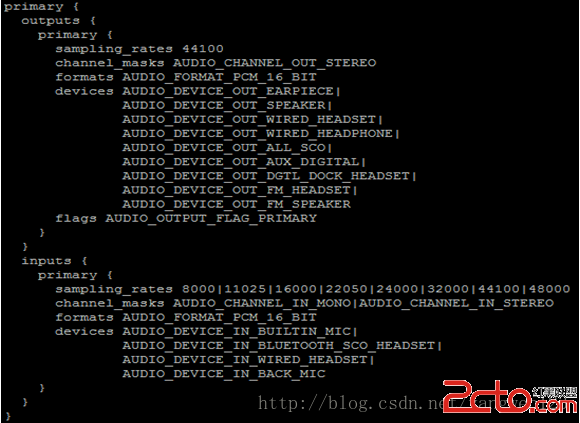
a2dp定義:
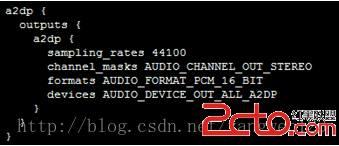
usb定義:
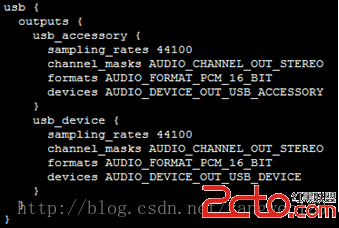
每種音頻接口包含輸入輸出,每種輸入輸出又包含多種輸入輸出配置,每種輸入輸出配置又支持多種音頻設備。AudioPolicyManagerBase首先加載/vendor/etc/audio_policy.conf,如果該文件不存在,則加/system/etc/audio_policy.conf。
status_t AudioPolicyManagerBase::loadAudioPolicyConfig(const char *path)
{
    cnode *root;
    char *data;
    data = (char *)load_file(path, NULL);
    if (data == NULL) {
        return -ENODEV;
    }
    root = config_node("", "");
    //讀取配置文件
    config_load(root, data);
    //解析global_configuration
    loadGlobalConfig(root);
    //解析audio_hw_modules
    loadHwModules(root);
    config_free(root);
    free(root);
    free(data);
    ALOGI("loadAudioPolicyConfig() loaded %s\n", path);
    return NO_ERROR;
}
通過loadGlobalConfig(root)函數來讀取這些全局配置信息。
void AudioPolicyManagerBase::loadGlobalConfig(cnode *root)
{
    cnode *node = config_find(root, GLOBAL_CONFIG_TAG);
    if (node == NULL) {
        return;
    }
    node = node->first_child;
    while (node) {
    	//attached_output_devices AUDIO_DEVICE_OUT_EARPIECE
        if (strcmp(ATTACHED_OUTPUT_DEVICES_TAG, node->name) == 0) {
            mAttachedOutputDevices = parseDeviceNames((char *)node->value);
            ALOGW_IF(mAttachedOutputDevices == AUDIO_DEVICE_NONE,
                    "loadGlobalConfig() no attached output devices");
            ALOGV("loadGlobalConfig()mAttachedOutputDevices%04x", mAttachedOutputDevices);
        //default_output_device AUDIO_DEVICE_OUT_SPEAKER
        } else if (strcmp(DEFAULT_OUTPUT_DEVICE_TAG, node->name) == 0) {
            mDefaultOutputDevice= (audio_devices_t)stringToEnum(sDeviceNameToEnumTable,ARRAY_SIZE(sDeviceNameToEnumTable),(char *)node->value);
            ALOGW_IF(mDefaultOutputDevice == AUDIO_DEVICE_NONE,
                    "loadGlobalConfig() default device not specified");
            ALOGV("loadGlobalConfig() mDefaultOutputDevice %04x", mDefaultOutputDevice);
        //attached_input_devices AUDIO_DEVICE_IN_BUILTIN_MIC
        } else if (strcmp(ATTACHED_INPUT_DEVICES_TAG, node->name) == 0) {
            mAvailableInputDevices = parseDeviceNames((char *)node->value) & ~AUDIO_DEVICE_BIT_IN;
            ALOGV("loadGlobalConfig() mAvailableInputDevices %04x", mAvailableInputDevices);
        //speaker_drc_enabled
        } else if (strcmp(SPEAKER_DRC_ENABLED_TAG, node->name) == 0) {
            mSpeakerDrcEnabled = stringToBool((char *)node->value);
            ALOGV("loadGlobalConfig() mSpeakerDrcEnabled = %d", mSpeakerDrcEnabled);
        }
        node = node->next;
    }
}
audio_policy.conf同時定義了多個audio 接口,每一個audio 接口包含若干output和input,而每個output和input又同時支持多種輸入輸出模式,每種輸入輸出模式又支持若干種設備。
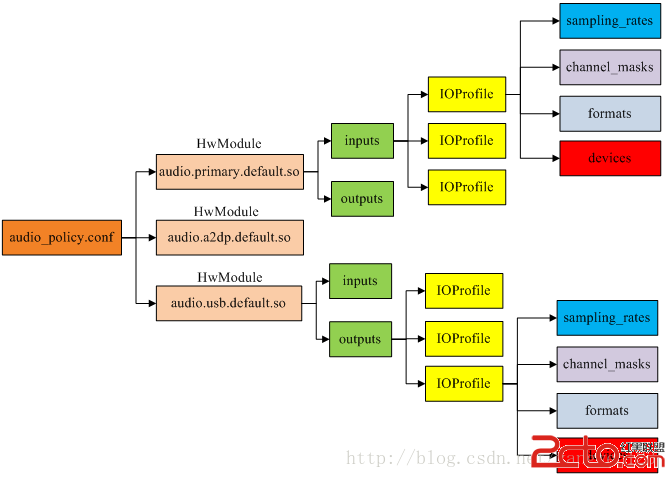
通過loadHwModules ()函數來加載系統配置的所有audio 接口:
void AudioPolicyManagerBase::loadHwModules(cnode *root)
{
	//audio_hw_modules
    cnode *node = config_find(root, AUDIO_HW_MODULE_TAG);
    if (node == NULL) {
        return;
    }
    node = node->first_child;
    while (node) {
        ALOGV("loadHwModules() loading module %s", node->name);
        //加載音頻接口
        loadHwModule(node);
        node = node->next;
    }
}
由於audio_policy.conf可以定義多個音頻接口,因此該函數循環調用loadHwModule()來解析每個音頻接口參數信息。Android定義HwModule類來描述每一個audio 接口參數,定義IOProfile類來描述輸入輸出模式配置。
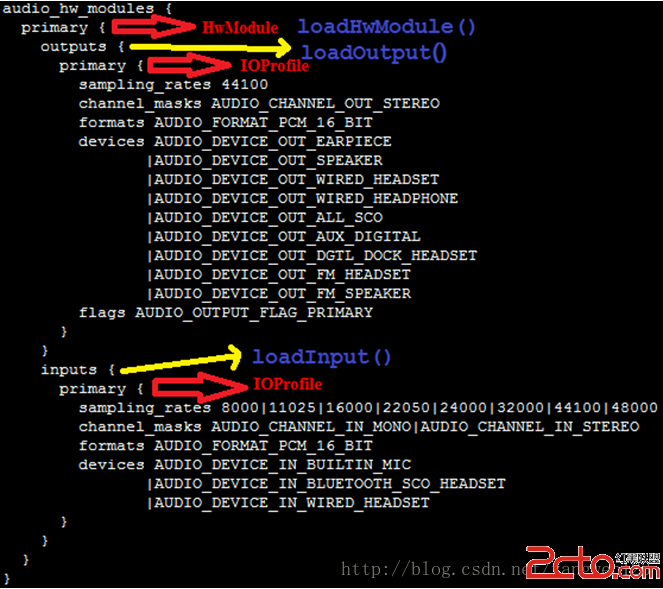
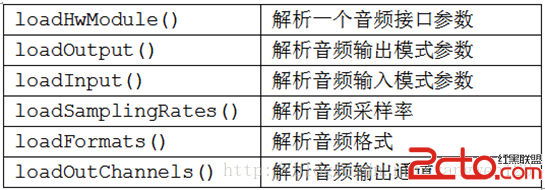
到此就將audio_policy.conf文件中音頻接口配置信息解析到了AudioPolicyManagerBase的成員變量mHwModules、mAttachedOutputDevices、mDefaultOutputDevice、mAvailableInputDevices中。
音量調節點設置在Android4.1與Android4.4中的實現完全不同,在Android4.1中是通過VolumeManager服務來管理,通過devicevolume.xml文件來配置,但Android4.4取消了VolumeManager服務,將音量控制放到AudioPolicyManagerBase中。在AudioPolicyManagerBase中定義了音量調節對應的音頻流描述符數組:
StreamDescriptor mStreams[AudioSystem::NUM_STREAM_TYPES];
initializeVolumeCurves()函數就是初始化該數組元素:
void AudioPolicyManagerBase::initializeVolumeCurves()
{
    for (int i = 0; i < AUDIO_STREAM_CNT; i++) {
        for (int j = 0; j < DEVICE_CATEGORY_CNT; j++) {
            mStreams[i].mVolumeCurve[j] =
                    sVolumeProfiles[i][j];
        }
    }

    // Check availability of DRC on speaker path: if available, override some of the speaker curves
    if (mSpeakerDrcEnabled) {
mStreams[AUDIO_STREAM_SYSTEM].mVolumeCurve[DEVICE_CATEGORY_SPEAKER] =
                sDefaultSystemVolumeCurveDrc;
mStreams[AUDIO_STREAM_RING].mVolumeCurve[DEVICE_CATEGORY_SPEAKER] =
                sSpeakerSonificationVolumeCurveDrc;
mStreams[AUDIO_STREAM_ALARM].mVolumeCurve[DEVICE_CATEGORY_SPEAKER] =
                sSpeakerSonificationVolumeCurveDrc;
mStreams[AUDIO_STREAM_NOTIFICATION].mVolumeCurve[DEVICE_CATEGORY_SPEAKER] =sSpeakerSonificationVolumeCurveDrc;
    }
}
sVolumeProfiles數組定義了不同音頻設備下不同音頻流對應的音量調節檔位,定義如下:
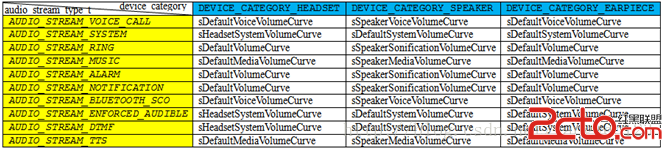
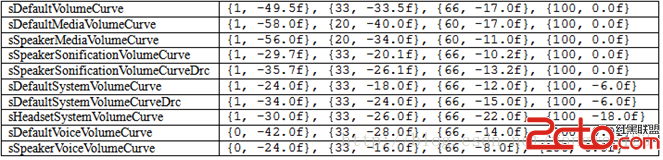
數組元素為音量調節檔位,每種模式下的音量調節都包含4個檔位,定義如下:
AudioPolicyManager通過讀取audio_policy.conf配置文件,可以知道系統當前支持那些音頻接口以及attached的輸入輸出設備、默認輸出設備。接下來就需要加載這些音頻接口的硬件抽象庫。

這三中音頻接口硬件抽象定義如下:
/vendor/sprd/open-source/libs/audio/audio_hw.c 【audio.primary.scx15.so】
struct audio_module HAL_MODULE_INFO_SYM = {
    .common = {
        .tag = HARDWARE_MODULE_TAG,
        .module_api_version = AUDIO_MODULE_API_VERSION_0_1,
        .hal_api_version = HARDWARE_HAL_API_VERSION,
        .id = AUDIO_HARDWARE_MODULE_ID,
        .name = "Spreadtrum Audio HW HAL",
        .author = "The Android Open Source Project",
        .methods = &hal_module_methods,
    },
};
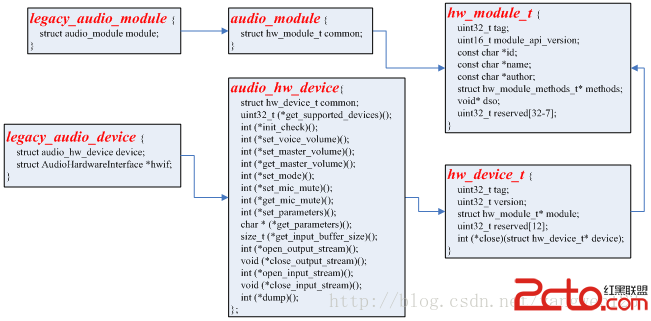
external/bluetooth/bluedroid/audio_a2dp_hw/audio_a2dp_hw.c【audio.a2dp.default.so】
struct audio_module HAL_MODULE_INFO_SYM = {
    .common = {
        .tag = HARDWARE_MODULE_TAG,
        .version_major = 1,
        .version_minor = 0,
        .id = AUDIO_HARDWARE_MODULE_ID,
        .name = "A2DP Audio HW HAL",
        .author = "The Android Open Source Project",
        .methods = &hal_module_methods,
    },
};
hardware/libhardware/modules/usbaudio/audio_hw.c【audio. usb.default.so】
struct audio_module HAL_MODULE_INFO_SYM = {
    .common = {
        .tag = HARDWARE_MODULE_TAG,
        .module_api_version = AUDIO_MODULE_API_VERSION_0_1,
        .hal_api_version = HARDWARE_HAL_API_VERSION,
        .id = AUDIO_HARDWARE_MODULE_ID,
        .name = "USB audio HW HAL",
        .author = "The Android Open Source Project",
        .methods = &hal_module_methods,
    },
};
AudioPolicyClientInterface提供了加載音頻接口硬件抽象庫的接口函數,通過前面的介紹,我們知道,AudioPolicyCompatClient通過代理audio_policy_service_ops實現AudioPolicyClientInterface接口。
hardware\libhardware_legacy\audio\ AudioPolicyCompatClient.cpp
audio_module_handle_t AudioPolicyCompatClient::loadHwModule(const char *moduleName)
{
    return mServiceOps->load_hw_module(mService, moduleName);
}
AudioPolicyCompatClient將音頻模塊加載工作交給audio_policy_service_ops
frameworks\av\services\audioflinger\ AudioPolicyService.cpp
static audio_module_handle_t aps_load_hw_module(void *service,const char *name)
{
    sp af = AudioSystem::get_audio_flinger();
    if (af == 0) {
        ALOGW("%s: could not get AudioFlinger", __func__);
        return 0;
    }
    return af->loadHwModule(name);
}
AudioPolicyService又將其轉交給AudioFlinger
frameworks\av\services\audioflinger\ AudioFlinger.cpp
audio_module_handle_t AudioFlinger::loadHwModule(const char *name)
{
    if (!settingsAllowed()) {
        return 0;
    }
    Mutex::Autolock _l(mLock);
    return loadHwModule_l(name);
}

audio_module_handle_t AudioFlinger::loadHwModule_l(const char *name)
{
    for (size_t i = 0; i < mAudioHwDevs.size(); i++) {
        if (strncmp(mAudioHwDevs.valueAt(i)->moduleName(), name, strlen(name)) == 0) {
            ALOGW("loadHwModule() module %s already loaded", name);
            return mAudioHwDevs.keyAt(i);
        }
    }
audio_hw_device_t *dev;
//加載音頻接口對應的so庫,得到對應的音頻接口設備audio_hw_device_t
    int rc = load_audio_interface(name, &dev);
    if (rc) {
        ALOGI("loadHwModule() error %d loading module %s ", rc, name);
        return 0;
    }
    mHardwareStatus = AUDIO_HW_INIT;
    rc = dev->init_check(dev);
    mHardwareStatus = AUDIO_HW_IDLE;
    if (rc) {
        ALOGI("loadHwModule() init check error %d for module %s ", rc, name);
        return 0;
    }
    if ((mMasterVolumeSupportLvl != MVS_NONE) &&
        (NULL != dev->set_master_volume)) {
        AutoMutex lock(mHardwareLock);
        mHardwareStatus = AUDIO_HW_SET_MASTER_VOLUME;
        dev->set_master_volume(dev, mMasterVolume);
        mHardwareStatus = AUDIO_HW_IDLE;
    }
    audio_module_handle_t handle = nextUniqueId();
    mAudioHwDevs.add(handle, new AudioHwDevice(name, dev));
    ALOGI("loadHwModule() Loaded %s audio interface from %s (%s) handle %d",
          name, dev->common.module->name, dev->common.module->id, handle);
    return handle;
}
函數首先加載系統定義的音頻接口對應的so庫,並打開該音頻接口的抽象硬件設備audio_hw_device_t,為每個音頻接口設備生成獨一無二的ID號,同時將打開的音頻接口設備封裝為AudioHwDevice對象,將系統中所有的音頻接口設備保存到AudioFlinger的成員變量mAudioHwDevs中。
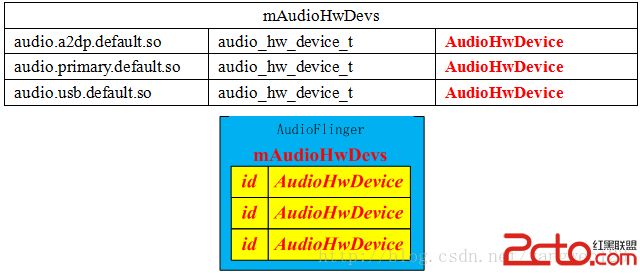
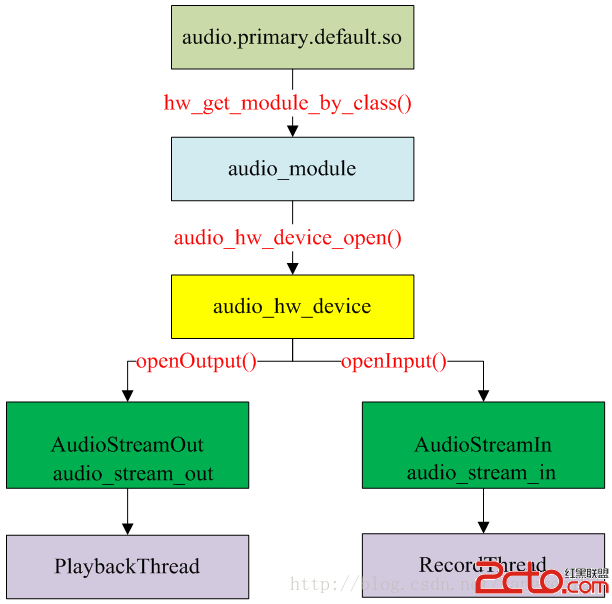
函數load_audio_interface根據音頻接口名稱來打開抽象的音頻接口設備audio_hw_device_t。
static int load_audio_interface(const char *if_name, audio_hw_device_t **dev)
{
    const hw_module_t *mod;
int rc;
//根據名字加載audio_module模塊
    rc = hw_get_module_by_class(AUDIO_HARDWARE_MODULE_ID, if_name, &mod);
    ALOGE_IF(rc, "%s couldn't load audio hw module %s.%s (%s)", __func__,
                 AUDIO_HARDWARE_MODULE_ID, if_name, strerror(-rc));
    if (rc) {
        goto out;
}
//打開audio_device設備
    rc = audio_hw_device_open(mod, dev);
    ALOGE_IF(rc, "%s couldn't open audio hw device in %s.%s (%s)", __func__,
                 AUDIO_HARDWARE_MODULE_ID, if_name, strerror(-rc));
    if (rc) {
        goto out;
    }
    if ((*dev)->common.version != AUDIO_DEVICE_API_VERSION_CURRENT) {
        ALOGE("%s wrong audio hw device version %04x", __func__, (*dev)->common.version);
        rc = BAD_VALUE;
        goto out;
    }
    return 0;
out:
    *dev = NULL;
    return rc;
}
hardware\libhardware\include\hardware\ Audio.h
static inline int audio_hw_device_open(const struct hw_module_t* module,
                                       struct audio_hw_device** device)
{
    return module->methods->open(module, AUDIO_HARDWARE_INTERFACE,
                                 (struct hw_device_t**)device);
}
hardware\libhardware_legacy\audio\ audio_hw_hal.cpp
static int legacy_adev_open(const hw_module_t* module, const char* name,
                            hw_device_t** device)
{
    struct legacy_audio_device *ladev;
    int ret;
    if (strcmp(name, AUDIO_HARDWARE_INTERFACE) != 0)
        return -EINVAL;
    ladev = (struct legacy_audio_device *)calloc(1, sizeof(*ladev));
    if (!ladev)
        return -ENOMEM;
    ladev->device.common.tag = HARDWARE_DEVICE_TAG;
    ladev->device.common.version = AUDIO_DEVICE_API_VERSION_1_0;
    ladev->device.common.module = const_cast(module);
    ladev->device.common.close = legacy_adev_close;
    ladev->device.get_supported_devices = adev_get_supported_devices;
…
ladev->device.dump = adev_dump;
    ladev->hwif = createAudioHardware();
    if (!ladev->hwif) {
        ret = -EIO;
        goto err_create_audio_hw;
    }
    *device = &ladev->device.common;
    return 0;
err_create_audio_hw:
    free(ladev);
    return ret;
}
打開音頻接口設備過程其實就是構造並初始化legacy_audio_device對象過程,legacy_audio_device數據結構關系如下:
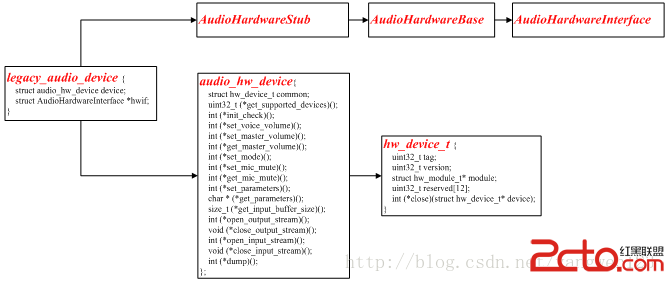
legacy_adev_open函數就是創建並初始化一個legacy_audio_device對象:
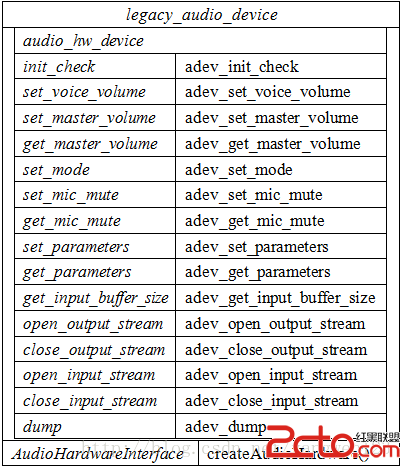
到此就加載完系統定義的所有音頻接口,並生成相應的數據對象,如下圖所示:
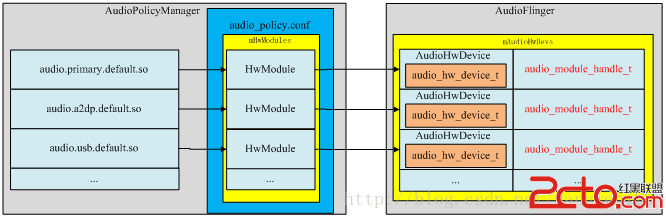
AudioPolicyService加載完所有音頻接口後,就知道了系統支持的所有音頻接口參數,可以為音頻輸出提供決策。
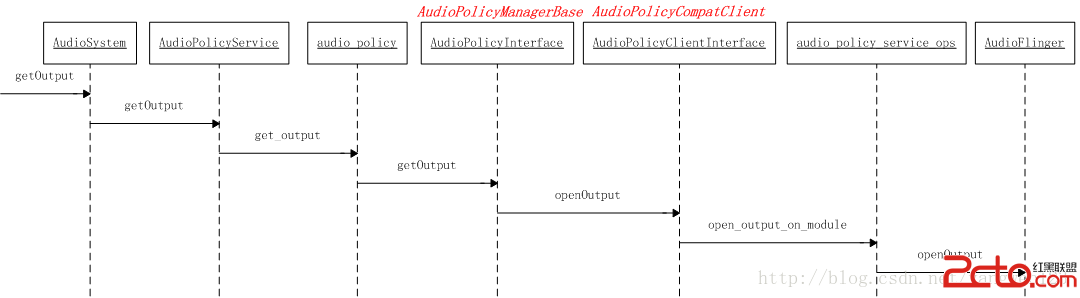
為了能正常播放音頻數據,需要創建抽象的音頻輸出接口對象,打開音頻輸出過程如下:
audio_io_handle_t AudioPolicyCompatClient::openOutput(audio_module_handle_t module,
                                              audio_devices_t *pDevices,
                                              uint32_t *pSamplingRate,
                                              audio_format_t *pFormat,
                                              audio_channel_mask_t *pChannelMask,
                                              uint32_t *pLatencyMs,
                                              audio_output_flags_t flags,
                                              const audio_offload_info_t *offloadInfo)
{
    return mServiceOps->open_output_on_module(mService,module, pDevices, pSamplingRate,
                                              pFormat, pChannelMask, pLatencyMs,
                                              flags, offloadInfo);
}
static audio_io_handle_t aps_open_output_on_module(void *service,
                                          audio_module_handle_t module,
                                          audio_devices_t *pDevices,
                                          uint32_t *pSamplingRate,
                                          audio_format_t *pFormat,
                                          audio_channel_mask_t *pChannelMask,
                                          uint32_t *pLatencyMs,
                                          audio_output_flags_t flags,
                                          const audio_offload_info_t *offloadInfo)
{
    sp af = AudioSystem::get_audio_flinger();
    if (af == 0) {
        ALOGW("%s: could not get AudioFlinger", __func__);
        return 0;
    }
    return af->openOutput(module, pDevices, pSamplingRate, pFormat, pChannelMask,
                          pLatencyMs, flags, offloadInfo);
}
audio_io_handle_t AudioFlinger::openOutput(audio_module_handle_t module,
                                           audio_devices_t *pDevices,
                                           uint32_t *pSamplingRate,
                                           audio_format_t *pFormat,
                                           audio_channel_mask_t *pChannelMask,
                                           uint32_t *pLatencyMs,
                                           audio_output_flags_t flags,
                                           const audio_offload_info_t *offloadInfo)
{
    PlaybackThread *thread = NULL;
    struct audio_config config;
    config.sample_rate = (pSamplingRate != NULL) ? *pSamplingRate : 0;
    config.channel_mask = (pChannelMask != NULL) ? *pChannelMask : 0;
    config.format = (pFormat != NULL) ? *pFormat : AUDIO_FORMAT_DEFAULT;
    if (offloadInfo) {
        config.offload_info = *offloadInfo;
    }
	//創建一個音頻輸出流對象audio_stream_out_t
    audio_stream_out_t *outStream = NULL;
    AudioHwDevice *outHwDev;
    ALOGV("openOutput(), module %d Device %x, SamplingRate %d, Format %#08x, Channels %x, flags %x",
              module,
              (pDevices != NULL) ? *pDevices : 0,
              config.sample_rate,
              config.format,
              config.channel_mask,
              flags);
    ALOGV("openOutput(), offloadInfo %p version 0x%04x",
          offloadInfo, offloadInfo == NULL ? -1 : offloadInfo->version );
    if (pDevices == NULL || *pDevices == 0) {
        return 0;
    }
    Mutex::Autolock _l(mLock);
	//從音頻接口列表mAudioHwDevs中查找出對應的音頻接口,如果找不到,則重新加載音頻接口動態庫
    outHwDev = findSuitableHwDev_l(module, *pDevices);
    if (outHwDev == NULL)
        return 0;
	//取出module對應的audio_hw_device_t設備
    audio_hw_device_t *hwDevHal = outHwDev->hwDevice();
	//為音頻輸出流生成一個獨一無二的id號
    audio_io_handle_t id = nextUniqueId();
    mHardwareStatus = AUDIO_HW_OUTPUT_OPEN;
	//打開音頻輸出流
    status_t status = hwDevHal->open_output_stream(hwDevHal,
                                          id,
                                          *pDevices,
                                          (audio_output_flags_t)flags,
                                          &config,
                                          &outStream);
    mHardwareStatus = AUDIO_HW_IDLE;
    ALOGV("openOutput() openOutputStream returned output %p, SamplingRate %d, Format %#08x, "
            "Channels %x, status %d",
            outStream,
            config.sample_rate,
            config.format,
            config.channel_mask,
            status);
    if (status == NO_ERROR && outStream != NULL) {
		//使用AudioStreamOut來封裝音頻輸出流audio_stream_out_t
        AudioStreamOut *output = new AudioStreamOut(outHwDev, outStream, flags);
		//根據flag標志位,創建不同類型的線程
        if (flags & AUDIO_OUTPUT_FLAG_COMPRESS_OFFLOAD) {
            thread = new OffloadThread(this, output, id, *pDevices);
            ALOGV("openOutput() created offload output: ID %d thread %p", id, thread);
        } else if ((flags & AUDIO_OUTPUT_FLAG_DIRECT) ||
            (config.format != AUDIO_FORMAT_PCM_16_BIT) ||
            (config.channel_mask != AUDIO_CHANNEL_OUT_STEREO)) {
            thread = new DirectOutputThread(this, output, id, *pDevices);
            ALOGV("openOutput() created direct output: ID %d thread %p", id, thread);
        } else {
            thread = new MixerThread(this, output, id, *pDevices);
            ALOGV("openOutput() created mixer output: ID %d thread %p", id, thread);
        }
		//將創建的線程及id以鍵值對的形式保存在mPlaybackThreads中
        mPlaybackThreads.add(id, thread);
        if (pSamplingRate != NULL) {
            *pSamplingRate = config.sample_rate;
        }
        if (pFormat != NULL) {
            *pFormat = config.format;
        }
        if (pChannelMask != NULL) {
            *pChannelMask = config.channel_mask;
        }
        if (pLatencyMs != NULL) {
            *pLatencyMs = thread->latency();
        }
        // notify client processes of the new output creation
        thread->audioConfigChanged_l(AudioSystem::OUTPUT_OPENED);
        // the first primary output opened designates the primary hw device
        if ((mPrimaryHardwareDev == NULL) && (flags & AUDIO_OUTPUT_FLAG_PRIMARY)) {
            ALOGI("Using module %d has the primary audio interface", module);
            mPrimaryHardwareDev = outHwDev;
            AutoMutex lock(mHardwareLock);
            mHardwareStatus = AUDIO_HW_SET_MODE;
            hwDevHal->set_mode(hwDevHal, mMode);
            mHardwareStatus = AUDIO_HW_IDLE;
        }
        return id;
    }
    return 0;
}
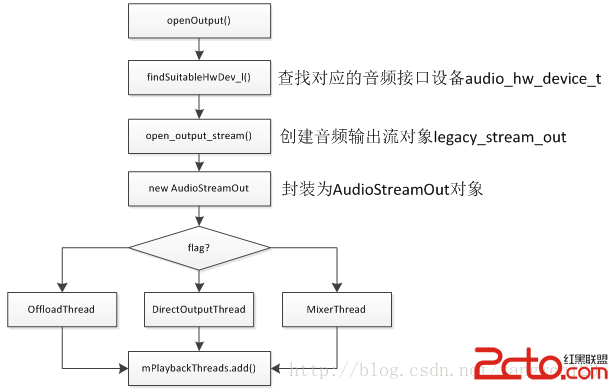
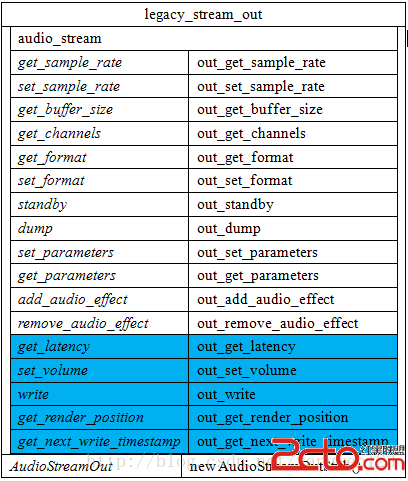
打開音頻輸出流過程其實就是創建AudioStreamOut對象及PlaybackThread線程過程。首先通過抽象的音頻接口設備audio_hw_device_t來創建輸出流對象legacy_stream_out。
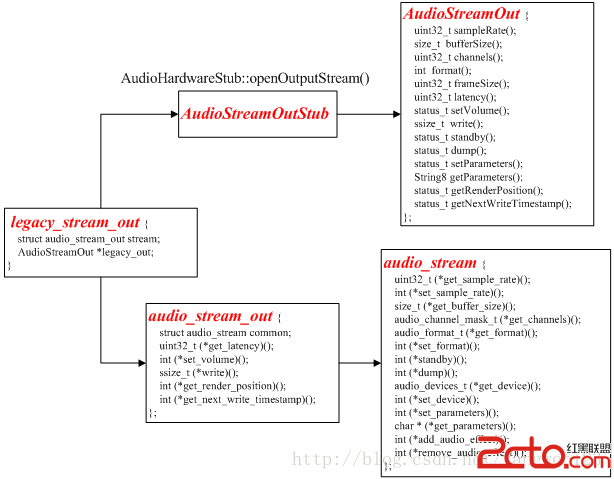
static int adev_open_output_stream(struct audio_hw_device *dev,
                                   audio_io_handle_t handle,
                                   audio_devices_t devices,
                                   audio_output_flags_t flags,
                                   struct audio_config *config,
                                   struct audio_stream_out **stream_out)
{
    struct legacy_audio_device *ladev = to_ladev(dev);
    status_t status;
    struct legacy_stream_out *out;
int ret;
//分配一個legacy_stream_out對象
    out = (struct legacy_stream_out *)calloc(1, sizeof(*out));
    if (!out)
        return -ENOMEM;
devices = convert_audio_device(devices, HAL_API_REV_2_0, HAL_API_REV_1_0);
//創建AudioStreamOut對象
    out->legacy_out = ladev->hwif->openOutputStream(devices, (int *) &config->format,
                                                    &config->channel_mask,
                                                    &config->sample_rate, &status);
    if (!out->legacy_out) {
        ret = status;
        goto err_open;
}
//初始化成員變量audio_stream
    out->stream.common.get_sample_rate = out_get_sample_rate;
    …
    *stream_out = &out->stream;
    return 0;
err_open:
    free(out);
    *stream_out = NULL;
    return ret;
}
由於legacy_audio_device的成員變量hwif的類型為AudioHardwareInterface,因此通過調用AudioHardwareInterface的接口openOutputStream()來創建AudioStreamOut對象。
AudioStreamOut* AudioHardwareStub::openOutputStream(
        uint32_t devices, int *format, uint32_t *channels, uint32_t *sampleRate, status_t *status)
{
    AudioStreamOutStub* out = new AudioStreamOutStub();
    status_t lStatus = out->set(format, channels, sampleRate);
    if (status) {
        *status = lStatus;
    }
    if (lStatus == NO_ERROR)
        return out;
    delete out;
    return 0;
}
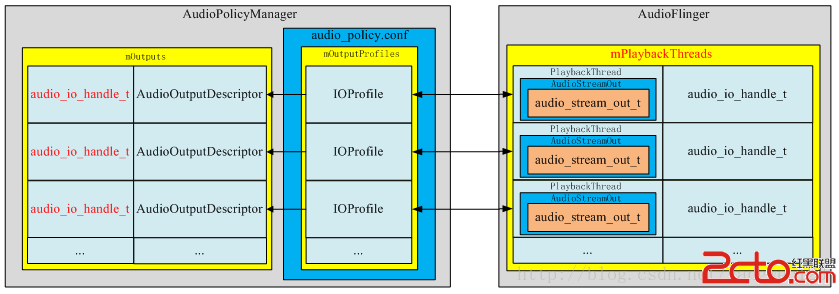
打開音頻輸出後,在AudioFlinger與AudioPolicyService中的表現形式如下:
audio_io_handle_t AudioPolicyCompatClient::openInput(audio_module_handle_t module,
                                             audio_devices_t *pDevices,
                                             uint32_t *pSamplingRate,
                                             audio_format_t *pFormat,
                                             audio_channel_mask_t *pChannelMask)
{
    return mServiceOps->open_input_on_module(mService, module, pDevices,pSamplingRate, pFormat, pChannelMask);
}
static audio_io_handle_t aps_open_input_on_module(void *service,
                                       audio_module_handle_t module,
                                       audio_devices_t *pDevices,
                                       uint32_t *pSamplingRate,
                                       audio_format_t *pFormat,
                                       audio_channel_mask_t *pChannelMask)
{
    sp af = AudioSystem::get_audio_flinger();
    if (af == 0) {
        ALOGW("%s: could not get AudioFlinger", __func__);
        return 0;
    }
    return af->openInput(module, pDevices, pSamplingRate, pFormat, pChannelMask);
}
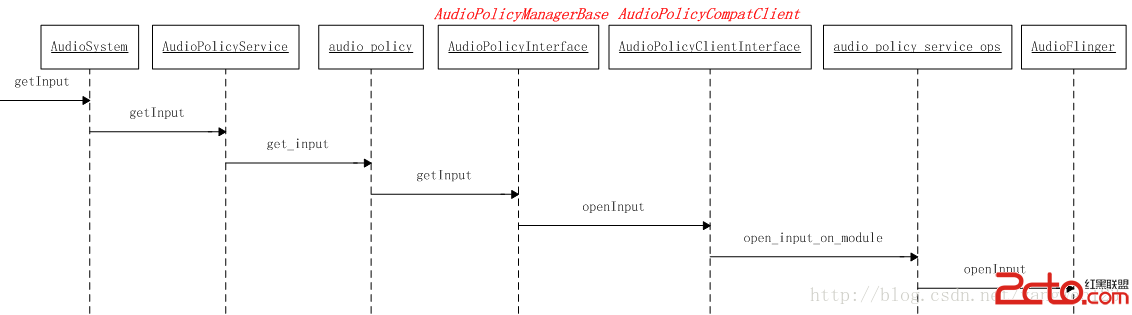
audio_io_handle_t AudioFlinger::openInput(audio_module_handle_t module,
                                          audio_devices_t *pDevices,
                                          uint32_t *pSamplingRate,
                                          audio_format_t *pFormat,
                                          audio_channel_mask_t *pChannelMask)
{
    status_t status;
    RecordThread *thread = NULL;
    struct audio_config config;
    config.sample_rate = (pSamplingRate != NULL) ? *pSamplingRate : 0;
    config.channel_mask = (pChannelMask != NULL) ? *pChannelMask : 0;
    config.format = (pFormat != NULL) ? *pFormat : AUDIO_FORMAT_DEFAULT;

    uint32_t reqSamplingRate = config.sample_rate;
    audio_format_t reqFormat = config.format;
    audio_channel_mask_t reqChannels = config.channel_mask;
    audio_stream_in_t *inStream = NULL;
    AudioHwDevice *inHwDev;
    if (pDevices == NULL || *pDevices == 0) {
        return 0;
    }
    Mutex::Autolock _l(mLock);
    inHwDev = findSuitableHwDev_l(module, *pDevices);
    if (inHwDev == NULL)
        return 0;
    audio_hw_device_t *inHwHal = inHwDev->hwDevice();
    audio_io_handle_t id = nextUniqueId();
    status = inHwHal->open_input_stream(inHwHal, id, *pDevices, &config,&inStream);
    ALOGV("openInput() openInputStream returned input %p, SamplingRate %d, Format %d, Channels %x, "
            "status %d",
            inStream,
            config.sample_rate,
            config.format,
            config.channel_mask,
            status);

    // If the input could not be opened with the requested parameters and we can handle the
    // conversion internally, try to open again with the proposed parameters. The AudioFlinger can
    // resample the input and do mono to stereo or stereo to mono conversions on 16 bit PCM inputs.
    if (status == BAD_VALUE &&reqFormat == config.format && config.format == AUDIO_FORMAT_PCM_16_BIT && (config.sample_rate <= 2 * reqSamplingRate) &&
        (popcount(config.channel_mask) <= FCC_2) && (popcount(reqChannels) <= FCC_2)) {
        ALOGV("openInput() reopening with proposed sampling rate and channel mask");
        inStream = NULL;
        status = inHwHal->open_input_stream(inHwHal, id, *pDevices, &config, &inStream);
    }

    if (status == NO_ERROR && inStream != NULL) {

#ifdef TEE_SINK
        // Try to re-use most recently used Pipe to archive a copy of input for dumpsys,
        // or (re-)create if current Pipe is idle and does not match the new format
      ...
#endif
        AudioStreamIn *input = new AudioStreamIn(inHwDev, inStream);
        // Start record thread
        // RecordThread requires both input and output device indication to forward to audio
        // pre processing modules
        thread = new RecordThread(this,
                                  input,
                                  reqSamplingRate,
                                  reqChannels,
                                  id,
                                  primaryOutputDevice_l(),
                                  *pDevices
#ifdef TEE_SINK
                                  , teeSink
#endif
                                  );
        mRecordThreads.add(id, thread);
        ALOGV("openInput() created record thread: ID %d thread %p", id, thread);
        if (pSamplingRate != NULL) {
            *pSamplingRate = reqSamplingRate;
        }
        if (pFormat != NULL) {
            *pFormat = config.format;
        }
        if (pChannelMask != NULL) {
            *pChannelMask = reqChannels;
        }
        // notify client processes of the new input creation
        thread->audioConfigChanged_l(AudioSystem::INPUT_OPENED);
        return id;
    }
    return 0;
}
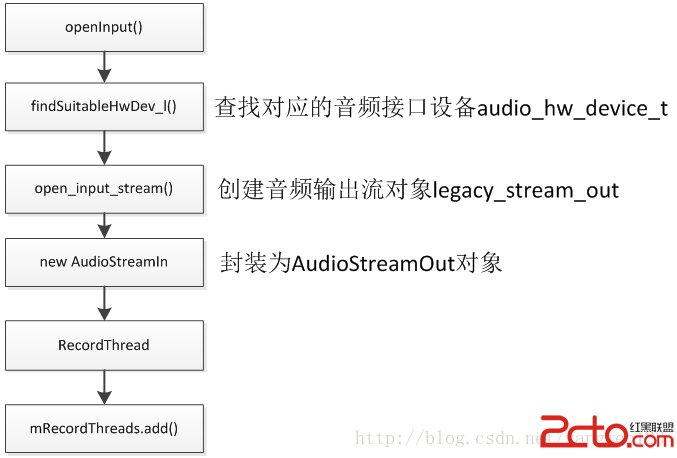
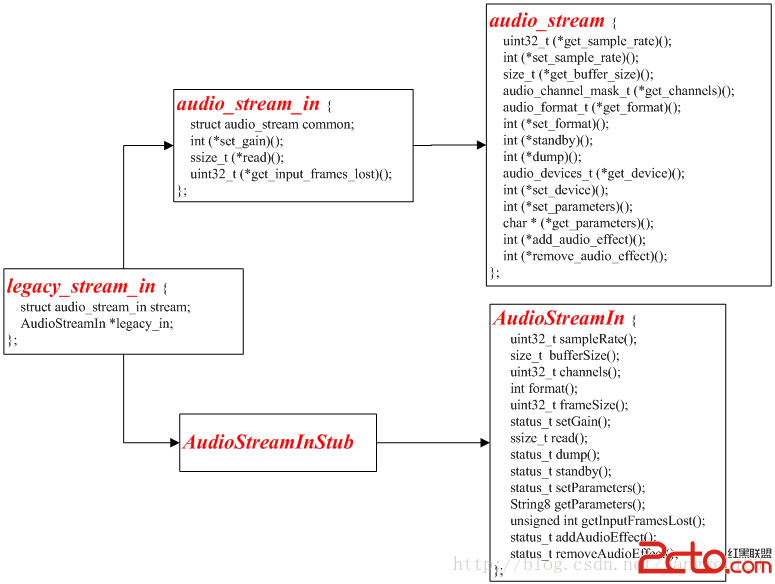
打開音頻輸入流過程其實就是創建AudioStreamIn對象及RecordThread線程過程。首先通過抽象的音頻接口設備audio_hw_device_t來創建輸出流對象legacy_stream_in。
static int adev_open_input_stream(struct audio_hw_device *dev,
                                  audio_io_handle_t handle,
                                  audio_devices_t devices,
                                  struct audio_config *config,
                                  struct audio_stream_in **stream_in)
{
    struct legacy_audio_device *ladev = to_ladev(dev);
    status_t status;
    struct legacy_stream_in *in;
    int ret;
    in = (struct legacy_stream_in *)calloc(1, sizeof(*in));
    if (!in)
        return -ENOMEM;
    devices = convert_audio_device(devices, HAL_API_REV_2_0, HAL_API_REV_1_0);
    in->legacy_in = ladev->hwif->openInputStream(devices, (int *) &config->format,
                                       &config->channel_mask,
                                       &config->sample_rate,
                                       &status, (AudioSystem::audio_in_acoustics)0);
    if (!in->legacy_in) {
        ret = status;
        goto err_open;
    }
    in->stream.common.get_sample_rate = in_get_sample_rate;
	…
    *stream_in = &in->stream;
    return 0;
err_open:
    free(in);
    *stream_in = NULL;
    return ret;
}
AudioStreamIn* AudioHardwareStub::openInputStream(
        uint32_t devices, int *format, uint32_t *channels, uint32_t *sampleRate,
        status_t *status, AudioSystem::audio_in_acoustics acoustics)
{
    // check for valid input source
    if (!AudioSystem::isInputDevice((AudioSystem::audio_devices)devices)) {
        return 0;
    }
    AudioStreamInStub* in = new AudioStreamInStub();
    status_t lStatus = in->set(format, channels, sampleRate, acoustics);
    if (status) {
        *status = lStatus;
    }
    if (lStatus == NO_ERROR)
        return in;
    delete in;
    return 0;
}
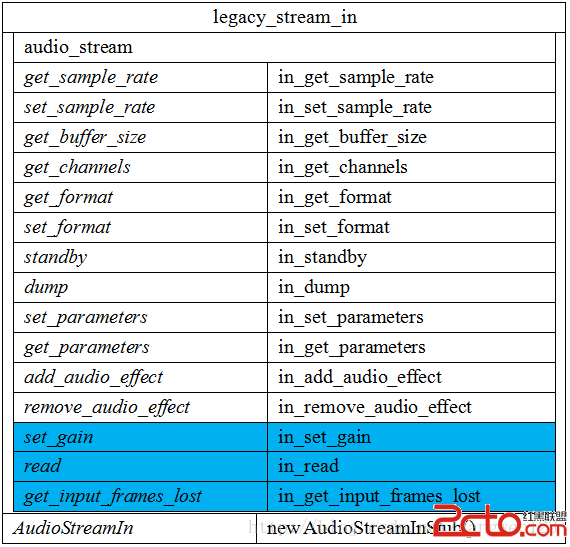
打開音頻輸入創建了以下legacy_stream_in對象:
打開音頻輸入後,在AudioFlinger與AudioPolicyService中的表現形式如下:
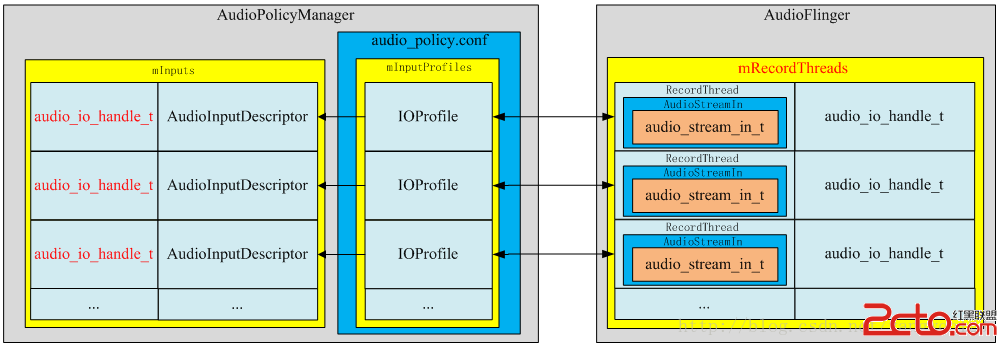
當AudioPolicyManagerBase構造時,它會根據用戶提供的audio_policy.conf來分析系統中有哪些audio接口(primary,a2dp以及usb),然後通過AudioFlinger::loadHwModule加載各audio接口對應的庫文件,並依次打開其中的output(openOutput)和input(openInput):
->打開音頻輸出時創建一個audio_stream_out通道,並創建AudioStreamOut對象以及新建PlaybackThread播放線程。
-> 打開音頻輸入時創建一個audio_stream_in通道,並創建AudioStreamIn對象以及創建RecordThread錄音線程。
 Android導出jar包後的資源使用問題
我們經常遇到一個需求,就是給別人使用我們工程的時候,為了能夠屏蔽代碼,把代碼封裝成jar包提供給第三方使用,但是這樣我們的資源文件怎麼給對方用呢? 網上有很多方法,有用C
 Android Binder驅動的工作機制之要旨
最近,看了不少Android內核分析的書籍、文章及Android源程序。感覺自己對Android Binder的工作機制算是有了個徹底的理解。 但是,自己是花了
 手機鎖屏密碼隨時間而改變
現在的移動支付越來越便捷,為了防止被他人隨意使用,很多人都開始使用鎖屏功能。但是傳統的鎖屏功能都是使用的單一密碼,這樣被他人破解的可能性又大大的增加。那麼有
 android顯示TextView文字的倒影效果實現代碼
今天記錄一下TextView的倒影效果,顯示一串文字,然後在文字的下方顯示出它的倒影,先上效果圖:最重要的就是View中getDrawingCache()方法,該方法可以