編輯:關於Android編程
先上圖
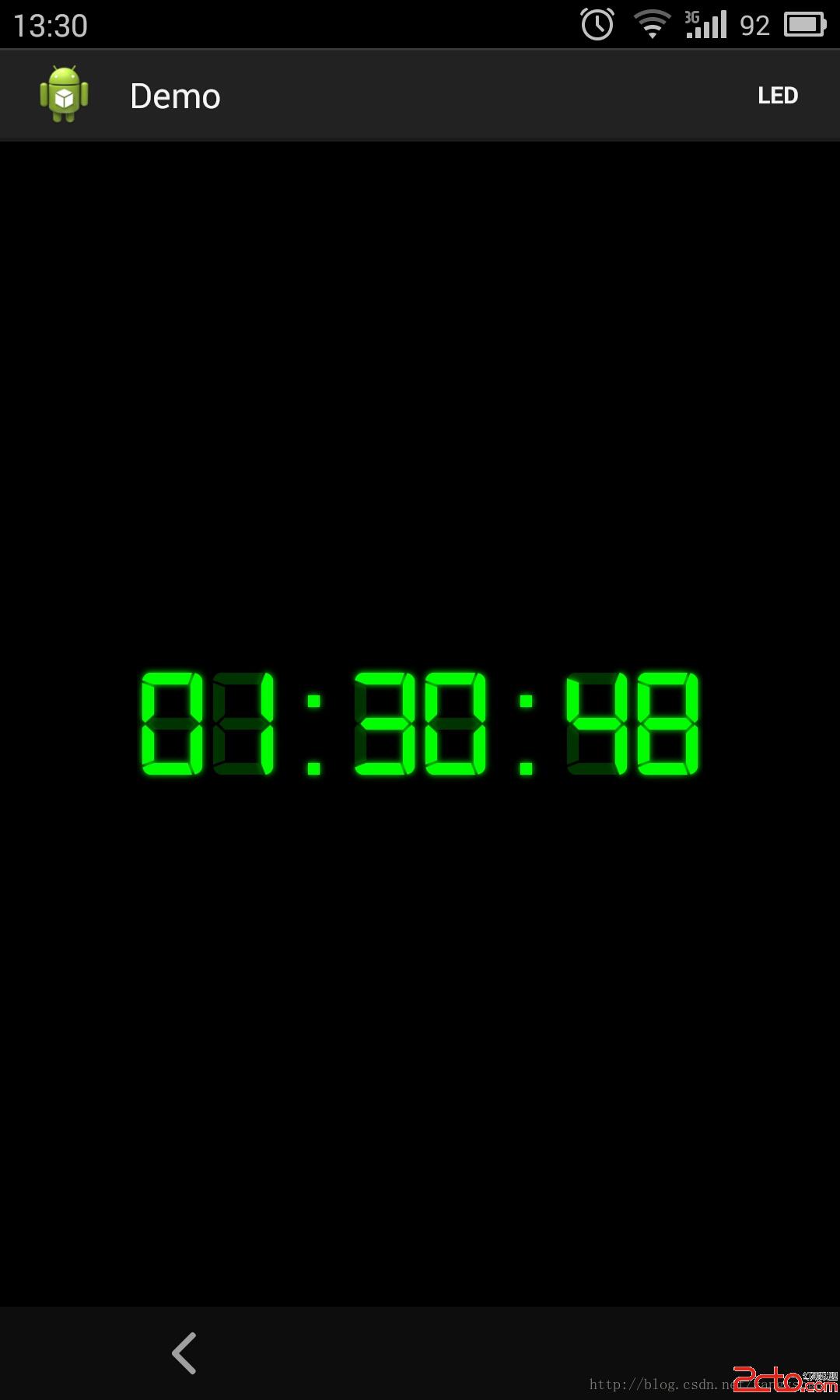
LEDView效果如圖所示。
之前看到一篇博客使用兩個TextView實現了該效果,於是我想用自定義控件的方式實現一個LEDView,使用時即可直接使用該控件。
采用組合控件的方式,將兩個TextView疊放在一起,再使用digital-7.ttf字體來顯示數據,從而達到LED的效果。代碼如下:
LEDView.class
package ione.zy.demo;

import java.io.File;
import java.util.Calendar;
import java.util.Date;
import java.util.TimeZone;

import android.annotation.SuppressLint;
import android.content.Context;
import android.content.res.AssetManager;
import android.graphics.Typeface;
import android.os.Handler;
import android.util.AttributeSet;
import android.view.LayoutInflater;
import android.view.View;
import android.widget.LinearLayout;
import android.widget.TextView;

public class LEDView extends LinearLayout {

	private TextView timeView;
	private TextView bgView;
	private static final String FONT_DIGITAL_7 = fonts + File.separator
			+ digital-7.ttf;

	private static final String DATE_FORMAT = %02d:%02d:%02d;
	private static final int REFRESH_DELAY = 500;

	private final Handler mHandler = new Handler();
	private final Runnable mTimeRefresher = new Runnable() {

		@Override
		public void run() {
			Calendar calendar = Calendar.getInstance(TimeZone
					.getTimeZone(GMT+8));
			final Date d = new Date();
			calendar.setTime(d);

			timeView.setText(String.format(DATE_FORMAT,
					calendar.get(Calendar.HOUR), calendar.get(Calendar.MINUTE),
					calendar.get(Calendar.SECOND)));
			mHandler.postDelayed(this, REFRESH_DELAY);
		}
	};

	@SuppressLint(NewApi)
	public LEDView(Context context, AttributeSet attrs, int defStyle) {
		super(context, attrs, defStyle);
		init(context);
	}

	public LEDView(Context context, AttributeSet attrs) {
		super(context, attrs);
		init(context);
	}

	public LEDView(Context context) {
		super(context);
		init(context);
	}

	private void init(Context context) {
		LayoutInflater layoutInflater = LayoutInflater.from(context);

		View view = layoutInflater.inflate(R.layout.ledview, this);
		timeView = (TextView) view.findViewById(R.id.ledview_clock_time);
		bgView = (TextView) view.findViewById(R.id.ledview_clock_bg);
		AssetManager assets = context.getAssets();
		final Typeface font = Typeface.createFromAsset(assets, FONT_DIGITAL_7);
		timeView.setTypeface(font);// 設置字體
		bgView.setTypeface(font);// 設置字體

	}

	public void start() {
		mHandler.post(mTimeRefresher);
	}

	public void stop() {
		mHandler.removeCallbacks(mTimeRefresher);
	}
}
控件使用Demo
package ione.zy.demo;

import android.os.Build;
import android.os.Bundle;
import android.view.Menu;
import android.annotation.SuppressLint;
import android.annotation.TargetApi;
import android.app.ActionBar;
import android.app.Activity;

@TargetApi(Build.VERSION_CODES.HONEYCOMB)
public class LEDActivity extends Activity {

	private LEDView ledView;

	@SuppressLint(NewApi)
	@Override
	protected void onCreate(Bundle savedInstanceState) {
		super.onCreate(savedInstanceState);
		setContentView(R.layout.activity_led);
		ledView = (LEDView) findViewById(R.id.ledview);

		  ActionBar actionBar = getActionBar();
		  actionBar.setDisplayHomeAsUpEnabled(true);
	}

	@Override
	protected void onResume() {
		super.onResume();
		ledView.start();
	}

	@Override
	protected void onStop() {
		super.onStop();
		ledView.stop();
	}

	@Override
	public boolean onCreateOptionsMenu(Menu menu) {
		getMenuInflater().inflate(R.menu.activity_led, menu);
		return true;
	}

}
 Android數據存儲之SQLite使用
SQLite是一款開源的、嵌入式關系型數據庫,第一個版本Alpha發布於2000年。SQLite在便攜性、易用性、緊湊性、高效性和可靠性方面有著突出的表現。在Androi
 Android提高之SQLite分頁讀取實現方法
一般來說,Android自身就包含了常用於嵌入式系統的SQLite,這樣就免去了開發者自己移植安裝的功夫。SQLite 支持多數SQL92標准,很多常用的SQL命令都能在
 Android5.0L退出APP橫豎屏切換導致的觸摸屏輸入(Touch Event)無效(凍屏)問題分析(Key Event仍然有效)
一、問題現象1、多次進出需要強制橫屏的app,比如Real FootBall2015,在退出app的時候會有概率出現退出卡頓,然後TP無法輸入的問題。2、出問題時Powe
 Android中HttpURLConnection使用詳解
認識Http協議 Android中發送http網絡請求是很常見的,要有GET請求和POST請求。一個完整的http請求需要經歷兩個過程:客戶端發送請求到服務器,然後服務