編輯:關於Android編程
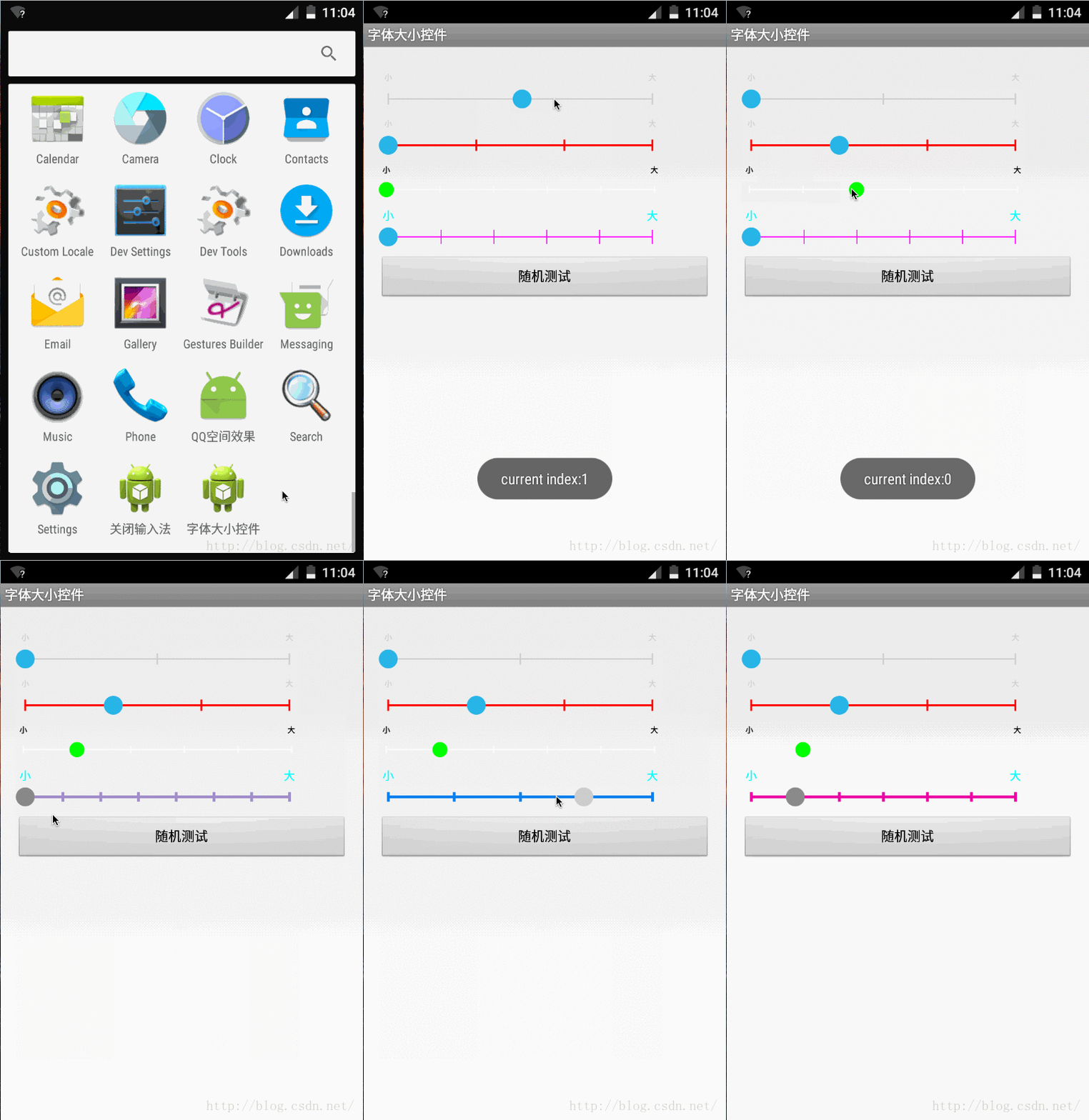
了解iOS的同學應該知道在iOS中有個UISliderBar控件,在iPhone手機中的設置文字大小中使用了該控件。近來產品提的需求中有一個是更改APP中部分字體大小,雖然技術難度不大但工作量還是有的,思路是利用LayoutInflater.Factory實現的。UI是參考iOS的UISliderBar設計的,而Android系統並沒有提供直接符合要求的控件,於是動手寫了個類似UISliderBar的控件,我給它起名為FontSliderBar,運行效果如下所示:
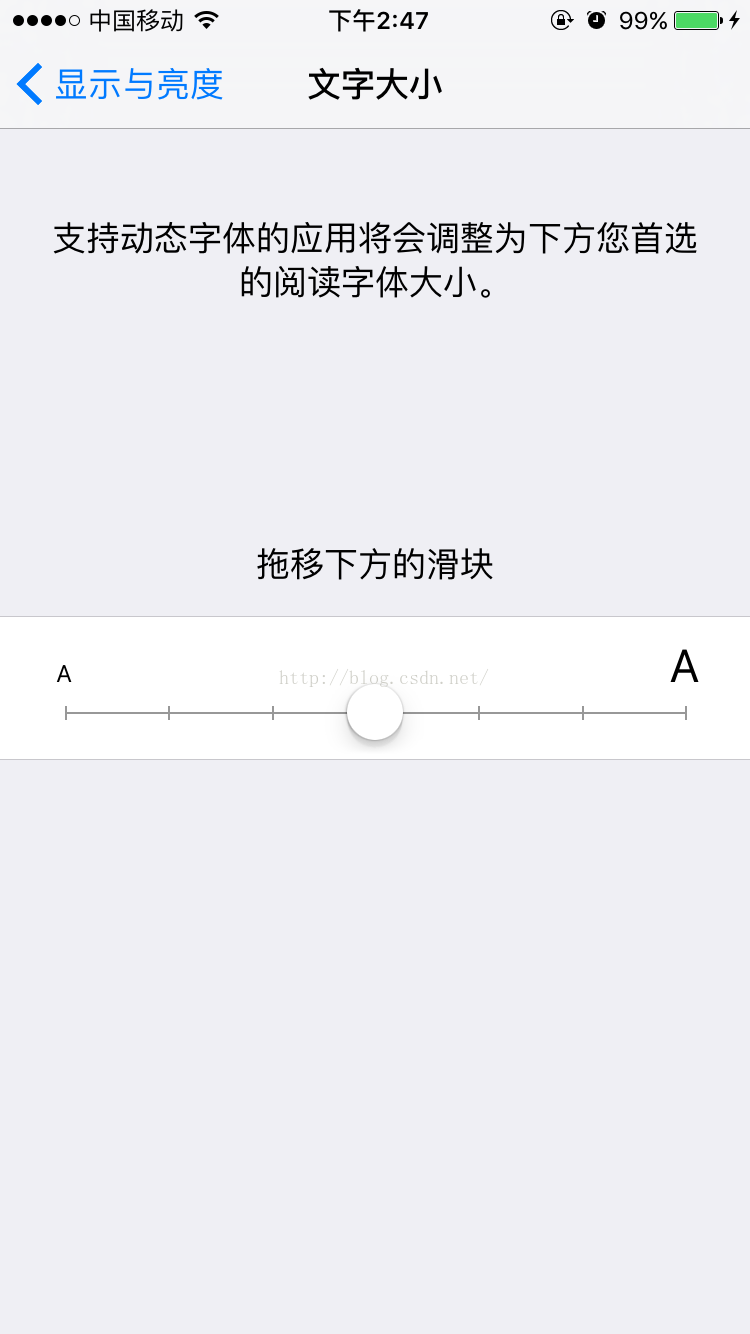
好了,開始講解如果實現該效果吧,開始實現該功能之前我們先分析一下iOS的UISliderBar的運行效果,根據iOS的截圖圖左一可以知道該控件有刻度條 ,在刻度條的上方還有一個可拖動的圓球
 ,因此FontSliderBar可以做一下拆分,把畫表刻度尺的功能單獨提取出來用Bar來表示,拖動的圓球用Thumb來表示,拆分圖如下所示: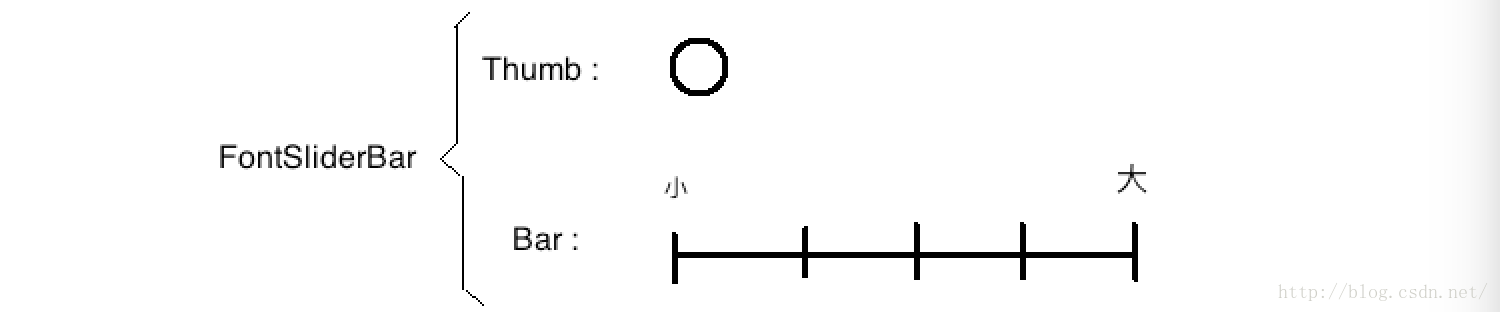
根據拆分圖我們來分析一下Thumb和Bar應該具有什麼屬性和功能吧。
Thumb功能分析
public class Thumb {

	private static final float MINIMUM_TARGET_RADIUS = 50;

	private final float mTouchZone;
	private boolean mIsPressed;

	private final float mY;
	private float mX;

	private Paint mPaintNormal;
	private Paint mPaintPressed;

	private float mRadius;
	private int mColorNormal;
	private int mColorPressed;

	public Thumb(float x, float y, int colorNormal, int colorPressed, float radius) {

		mRadius = radius;
		mColorNormal = colorNormal;
		mColorPressed = colorPressed;

		mPaintNormal = new Paint();
		mPaintNormal.setColor(mColorNormal);
		mPaintNormal.setAntiAlias(true);

		mPaintPressed = new Paint();
		mPaintPressed.setColor(mColorPressed);
		mPaintPressed.setAntiAlias(true);

		mTouchZone = (int) Math.max(MINIMUM_TARGET_RADIUS, radius);

		mX = x;
		mY = y;
	}

	public void setX(float x) {
		mX = x;
	}

	public float getX() {
		return mX;
	}

	public boolean isPressed() {
		return mIsPressed;
	}

	public void press() {
		mIsPressed = true;
	}

	public void release() {
		mIsPressed = false;
	}

	public boolean isInTargetZone(float x, float y) {
		if (Math.abs(x - mX) <= mTouchZone && Math.abs(y - mY) <= mTouchZone) {
			return true;
		}
		return false;
	}

	public void draw(Canvas canvas) {
		if (mIsPressed) {
			canvas.drawCircle(mX, mY, mRadius, mPaintPressed);
		} else {
			canvas.drawCircle(mX, mY, mRadius, mPaintNormal);
		}
	}

	public void destroyResources() {
		if(null != mPaintNormal) {
			mPaintNormal = null;
		}
		if(null != mPaintPressed) {
			mPaintPressed = null;
		}
	}
}
Thumb的代碼很簡單,需要說明的是在Thumb中新加了一個mTouchDelegate屬性,該屬性模擬了Android系統中的TouchDelegate特性(有不熟悉View中的TouchDelegate原理的請自行查閱源碼,這個不在做詳述了),使用場景就是當圓的半徑太小的時候可能手指點擊不住,這樣會影響用戶體驗,所以就設置了mTouchDelete屬性,它表示手指觸摸的最小范圍。Bar功能分析
public class Bar {

	private Paint mBarPaint;
	private Paint mTextPaint;

	private final float mLeftX;
	private final float mRightX;
	private final float mY;
	private final float mPadding;

	private int mSegments;
	private float mTickDistance;
	private final float mTickHeight;
	private final float mTickStartY;
	private final float mTickEndY;

	public Bar(float x, float y, float width, int tickCount, float tickHeight,
			float barWidth, int barColor,int textColor, int textSize, int padding) {

		mLeftX = x;
		mRightX = x + width;
		mY = y;
		mPadding = padding;

		mSegments = tickCount - 1;
		mTickDistance = width / mSegments;
		mTickHeight = tickHeight;
		mTickStartY = mY - mTickHeight / 2f;
		mTickEndY = mY + mTickHeight / 2f;

		mBarPaint = new Paint();
		mBarPaint.setColor(barColor);
		mBarPaint.setStrokeWidth(barWidth);
		mBarPaint.setAntiAlias(true);

		mTextPaint = new Paint();
		mTextPaint.setColor(textColor);
		mTextPaint.setTextSize(textSize);
		mTextPaint.setAntiAlias(true);
	}

	public void draw(Canvas canvas) {
		drawLine(canvas);
		drawTicks(canvas);
	}

	public float getLeftX() {
		return mLeftX;
	}

	public float getRightX() {
		return mRightX;
	}

	public float getNearestTickCoordinate(Thumb thumb) {
		final int nearestTickIndex = getNearestTickIndex(thumb);
		final float nearestTickCoordinate = mLeftX + (nearestTickIndex * mTickDistance);
		return nearestTickCoordinate;
	}

	public int getNearestTickIndex(Thumb thumb) {
		return getNearestTickIndex(thumb.getX());
	}

	public int getNearestTickIndex(float x) {
		return (int) ((x - mLeftX + mTickDistance / 2f) / mTickDistance);
	}

	private void drawLine(Canvas canvas) {
		canvas.drawLine(mLeftX, mY, mRightX, mY, mBarPaint);
	}

	private void drawTicks(Canvas canvas) {
		for (int i = 0; i <= mSegments; i++) {
			final float x = i * mTickDistance + mLeftX;
			canvas.drawLine(x, mTickStartY, x, mTickEndY, mBarPaint);
			String text = 0 == i ? "小" : mSegments == i ? "大" : "";
			if(!TextUtils.isEmpty(text)) {
				canvas.drawText(text, x - getTextWidth(text) / 2, mTickStartY - mPadding, mTextPaint);
			}
		}
	}

	float getTextWidth(String text) {
		return mTextPaint.measureText(text);
	}

	public void destroyResources() {
		if(null != mBarPaint) {
			mBarPaint = null;
		}
		if(null != mTextPaint) {
			mTextPaint = null;
		}
	}
}
Bar的方法也不是太復雜,相信童靴們也都看的懂,其中方法getNearestTickCoordinate()方法表示的是找到距離thumb最近刻度的X坐標,getNearestTickIndex()表示的是找到距離thumb最近的刻度的下標。
分析過Bar和Thumb後,開始實現我們的FontSliderBar,首先FontSliderBar繼承View並實現構造方法,其次要重寫View的onMeasure()方法來確定FontSliderBar的尺寸大小,需要注意的是如果在使用FontSliderBar的時候設置其寬和高都為warp_content的話就會出問題,所以要對寬和高做最小值限定,寬的最小值比較好理解,高的確定如下圖所示: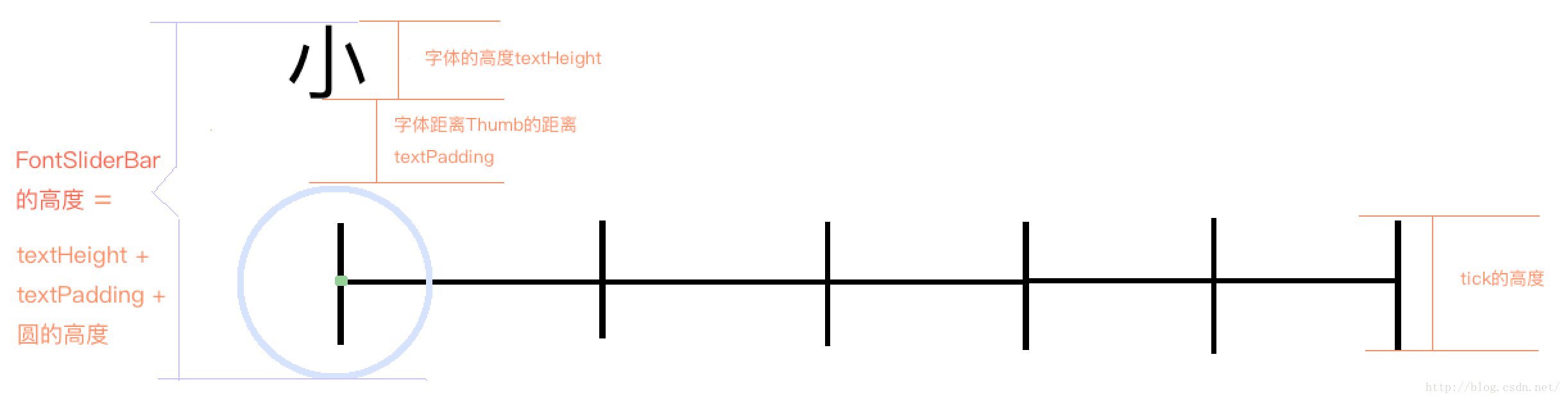
根據上圖我們可以很清楚的計算出FontSliderBar的最小高度,寬度可以直接給定一個最小值,接下來就是定義我們的FontSliderBar了,代碼如下所示:
public class FontSliderBar extends View {

	private static final String TAG = "SliderBar";

	private static final int DEFAULT_TICK_COUNT = 3;
	private static final float DEFAULT_TICK_HEIGHT = 24;

	private static final float DEFAULT_BAR_WIDTH = 3;
	private static final int DEFAULT_BAR_COLOR = Color.LTGRAY;

	private static final int DEFAULT_TEXT_SIZE = 16;
	private static final int DEFAULT_TEXT_COLOR = Color.LTGRAY;
	private static final int DEFAULT_TEXT_PADDING = 20;

	private static final float DEFAULT_THUMB_RADIUS = 20;
	private static final int DEFAULT_THUMB_COLOR_NORMAL = 0xff33b5e5;
	private static final int DEFAULT_THUMB_COLOR_PRESSED = 0xff33b5e5;

	private int mTickCount = DEFAULT_TICK_COUNT;
	private float mTickHeight = DEFAULT_TICK_HEIGHT;

	private float mBarWidth = DEFAULT_BAR_WIDTH;
	private int mBarColor = DEFAULT_BAR_COLOR;

	private float mThumbRadius = DEFAULT_THUMB_RADIUS;
	private int mThumbColorNormal = DEFAULT_THUMB_COLOR_NORMAL;
	private int mThumbColorPressed = DEFAULT_THUMB_COLOR_PRESSED;

	private int mTextSize = DEFAULT_TEXT_SIZE;
	private int mTextColor = DEFAULT_TEXT_COLOR;
	private int mTextPadding = DEFAULT_TEXT_PADDING;

	private int mDefaultWidth = 500;

	private int mCurrentIndex = 0;
	private boolean mAnimation = true;

	private Thumb mThumb;
	private Bar mBar;

	private ValueAnimator mAnimator;
	private FontSliderBar.OnSliderBarChangeListener mListener;

	public FontSliderBar(Context context) {
		super(context);
	}

	public FontSliderBar(Context context, AttributeSet attrs) {
		super(context, attrs);
	}

	public FontSliderBar(Context context, AttributeSet attrs, int defStyle) {
		super(context, attrs, defStyle);
	}

	@Override
	protected void onMeasure(int widthMeasureSpec, int heightMeasureSpec) {
		super.onMeasure(widthMeasureSpec, heightMeasureSpec);
		int width;
		int height;

		final int measureWidthMode = MeasureSpec.getMode(widthMeasureSpec);
		final int measureHeightMode = MeasureSpec.getMode(heightMeasureSpec);
		final int measureWidth = MeasureSpec.getSize(widthMeasureSpec);
		final int measureHeight = MeasureSpec.getSize(heightMeasureSpec);

		if (measureWidthMode == MeasureSpec.AT_MOST) {
			width = measureWidth;
		} else if (measureWidthMode == MeasureSpec.EXACTLY) {
			width = measureWidth;
		} else {
			width = mDefaultWidth;
		}

		if (measureHeightMode == MeasureSpec.AT_MOST) {
			height = Math.min(getMinHeight(), measureHeight);
		} else if (measureHeightMode == MeasureSpec.EXACTLY) {
			height = measureHeight;
		} else {
			height = getMinHeight();
		}
		setMeasuredDimension(width, height);
	}

	private int getMinHeight() {
		final float f = getFontHeight();
		return (int) (f + mTextPadding + mThumbRadius * 2);
	}

	@Override
	protected void onSizeChanged(int w, int h, int oldw, int oldh) {
		super.onSizeChanged(w, h, oldw, oldh);
		createBar();
		createThumbs();
	}

	@Override
	protected void onDraw(Canvas canvas) {
		super.onDraw(canvas);
		mBar.draw(canvas);
		mThumb.draw(canvas);
	}

	@Override
	protected void onVisibilityChanged(View changedView, int visibility) {
		super.onVisibilityChanged(changedView, visibility);
		if (VISIBLE != visibility) {
			stopAnimation();
		}
	}

	@Override
	protected void onDetachedFromWindow() {
		destroyResources();
		super.onDetachedFromWindow();
	}

	@Override
	public boolean onTouchEvent(MotionEvent event) {
		if (!isEnabled() || isAnimationRunning()) {
			return false;
		}
		switch (event.getAction()) {
		case MotionEvent.ACTION_DOWN:
			return onActionDown(event.getX(), event.getY());
		case MotionEvent.ACTION_MOVE:
			this.getParent().requestDisallowInterceptTouchEvent(true);
			return onActionMove(event.getX());
		case MotionEvent.ACTION_UP:
		case MotionEvent.ACTION_CANCEL:
			this.getParent().requestDisallowInterceptTouchEvent(false);
			return onActionUp(event.getX(), event.getY());
		default:
			return true;
		}
	}

	public FontSliderBar setOnSliderBarChangeListener(FontSliderBar.OnSliderBarChangeListener listener) {
		mListener = listener;
		return FontSliderBar.this;
	}

	public FontSliderBar setTickCount(int tickCount) {
		if (isValidTickCount(tickCount)) {
			mTickCount = tickCount;
		} else {
			Log.e(TAG, "tickCount less than 2; invalid tickCount.");
			throw new IllegalArgumentException("tickCount less than 2; invalid tickCount.");
		}
		return FontSliderBar.this;
	}

	public FontSliderBar setTickHeight(float tickHeight) {
		mTickHeight = tickHeight;
		return FontSliderBar.this;
	}

	public FontSliderBar setBarWeight(float barWeight) {
		mBarWidth = barWeight;
		return FontSliderBar.this;
	}

	public FontSliderBar setBarColor(int barColor) {
		mBarColor = barColor;
		return FontSliderBar.this;
	}

	public FontSliderBar setTextSize(int textSize) {
		mTextSize = textSize;
		return FontSliderBar.this;
	}

	public FontSliderBar setTextColor(int textColor) {
		mTextColor = textColor;
		return FontSliderBar.this;
	}

	public FontSliderBar setTextPadding(int textPadding) {
		mTextPadding = textPadding;
		return FontSliderBar.this;
	}

	public FontSliderBar setThumbRadius(float thumbRadius) {
		mThumbRadius = thumbRadius;
		return FontSliderBar.this;
	}

	public FontSliderBar setThumbColorNormal(int thumbColorNormal) {
		mThumbColorNormal = thumbColorNormal;
		return FontSliderBar.this;
	}

	public FontSliderBar setThumbColorPressed(int thumbColorPressed) {
		mThumbColorPressed = thumbColorPressed;
		return FontSliderBar.this;
	}

	public FontSliderBar setThumbIndex(int currentIndex) {
		if (indexOutOfRange(currentIndex)) {
			throw new IllegalArgumentException(
					"A thumb index is out of bounds. Check that it is between 0 and mTickCount - 1");
		} else {
			if (mCurrentIndex != currentIndex) {
				mCurrentIndex = currentIndex;
				if (mListener != null) {
					mListener.onIndexChanged(this, mCurrentIndex);
				}
			}
		}
		return FontSliderBar.this;
	}

	public FontSliderBar withAnimation(boolean animation) {
		mAnimation = animation;
		return FontSliderBar.this;
	}

	public void applay() {
		createThumbs();
		createBar();
		requestLayout();
		invalidate();
	}

	public int getCurrentIndex() {
		return mCurrentIndex;
	}

	private void createBar() {
		mBar = new Bar(getXCoordinate(), getYCoordinate(), getBarLength(), mTickCount, mTickHeight, mBarWidth,
				mBarColor, mTextColor, mTextSize, mTextPadding, mThumbRadius);
	}

	private void createThumbs() {
		mThumb = new Thumb(getXCoordinate(), getYCoordinate(), mThumbColorNormal, mThumbColorPressed, mThumbRadius);
	}

	private float getXCoordinate() {
		return mThumbRadius;
	}

	private float getYCoordinate() {
		return getHeight() - mThumbRadius;
	}

	private float getFontHeight() {
		Paint paint = new Paint();
		paint.setTextSize(mTextSize);
		paint.measureText("大");
		FontMetrics fontMetrics = paint.getFontMetrics();
		float f = fontMetrics.descent - fontMetrics.ascent;
		return f;
	}

	private float getBarLength() {
		return getWidth() - 2 * getXCoordinate();
	}

	private boolean indexOutOfRange(int thumbIndex) {
		return (thumbIndex < 0 || thumbIndex >= mTickCount);
	}

	private boolean isValidTickCount(int tickCount) {
		return tickCount > 1;
	}

	private boolean onActionDown(float x, float y) {
		if (!mThumb.isPressed() && mThumb.isInTargetZone(x, y)) {
			pressThumb(mThumb);
		}
		return true;
	}

	private boolean onActionMove(float x) {
		if (mThumb.isPressed()) {
			moveThumb(mThumb, x);
		}
		return true;
	}

	private boolean onActionUp(float x, float y) {
		if (mThumb.isPressed()) {
			releaseThumb(mThumb);
		}
		return true;
	}

	private void pressThumb(Thumb thumb) {
		thumb.press();
		invalidate();
	}

	private void releaseThumb(final Thumb thumb) {
		final int tempIndex = mBar.getNearestTickIndex(thumb);
		if (tempIndex != mCurrentIndex) {
			mCurrentIndex = tempIndex;
			if (null != mListener) {
				mListener.onIndexChanged(this, mCurrentIndex);
			}
		}

		float start = thumb.getX();
		float end = mBar.getNearestTickCoordinate(thumb);
		if (mAnimation) {
			startAnimation(thumb, start, end);
		} else {
			thumb.setX(end);
			invalidate();
		}
		thumb.release();
	}

	private void startAnimation(final Thumb thumb, float start, float end) {
		stopAnimation();
		mAnimator = ValueAnimator.ofFloat(start, end);
		mAnimator.setDuration(80);
		mAnimator.addUpdateListener(new AnimatorUpdateListener() {
			@Override
			public void onAnimationUpdate(ValueAnimator animation) {
				final float x = (Float) animation.getAnimatedValue();
				thumb.setX(x);
				invalidate();
			}
		});
		mAnimator.start();
	}

	private boolean isAnimationRunning() {
		if (null != mAnimator && mAnimator.isRunning()) {
			return true;
		}
		return false;
	}

	private void destroyResources() {
		stopAnimation();
		if (null != mBar) {
			mBar.destroyResources();
			mBar = null;
		}
		if (null != mThumb) {
			mThumb.destroyResources();
			mThumb = null;
		}
	}

	private void stopAnimation() {
		if (null != mAnimator) {
			mAnimator.cancel();
			mAnimator = null;
		}
	}

	private void moveThumb(Thumb thumb, float x) {
		if (x < mBar.getLeftX() || x > mBar.getRightX()) {
			// Do nothing.
		} else {
			thumb.setX(x);
			invalidate();
		}
	}

	public static interface OnSliderBarChangeListener {
		public void onIndexChanged(FontSliderBar rangeBar, int index);
	}
}
FontSliderBar中定義了默認值和對外踢動了一系列修改屬性的方法,FontSliderBar中分別重寫了onMeasure()、onSizeChanged()、onDraw()、onTouchEvent()等方法。onMeasure()方法確定FontSliderBar的尺寸,onSizeChanged()方法創建Bar和Thumb對象,onTouchEvent()方法根據手指的點擊來判斷是否可以進行thumb的拖動。在最後定義了OnSliderBarChangeListener接口,方便在Thumb下標改變的時候做回調操作。FontSliderBar的使用也很簡單,設置屬性的時候可以直接鏈式調用,如下所示:
FontSliderBar sliderBar = (FontSliderBar) findViewById(R.id.sliderbar);
sliderBar.setTickCount(6).setTickHeight(30).setBarColor(Color.MAGENTA)
	.setTextColor(Color.CYAN).setTextPadding(20).setTextSize(20)
	.setThumbRadius(20).setThumbColorNormal(Color.CYAN).setThumbColorPressed(Color.GREEN)
	.withAnimation(false).applay();
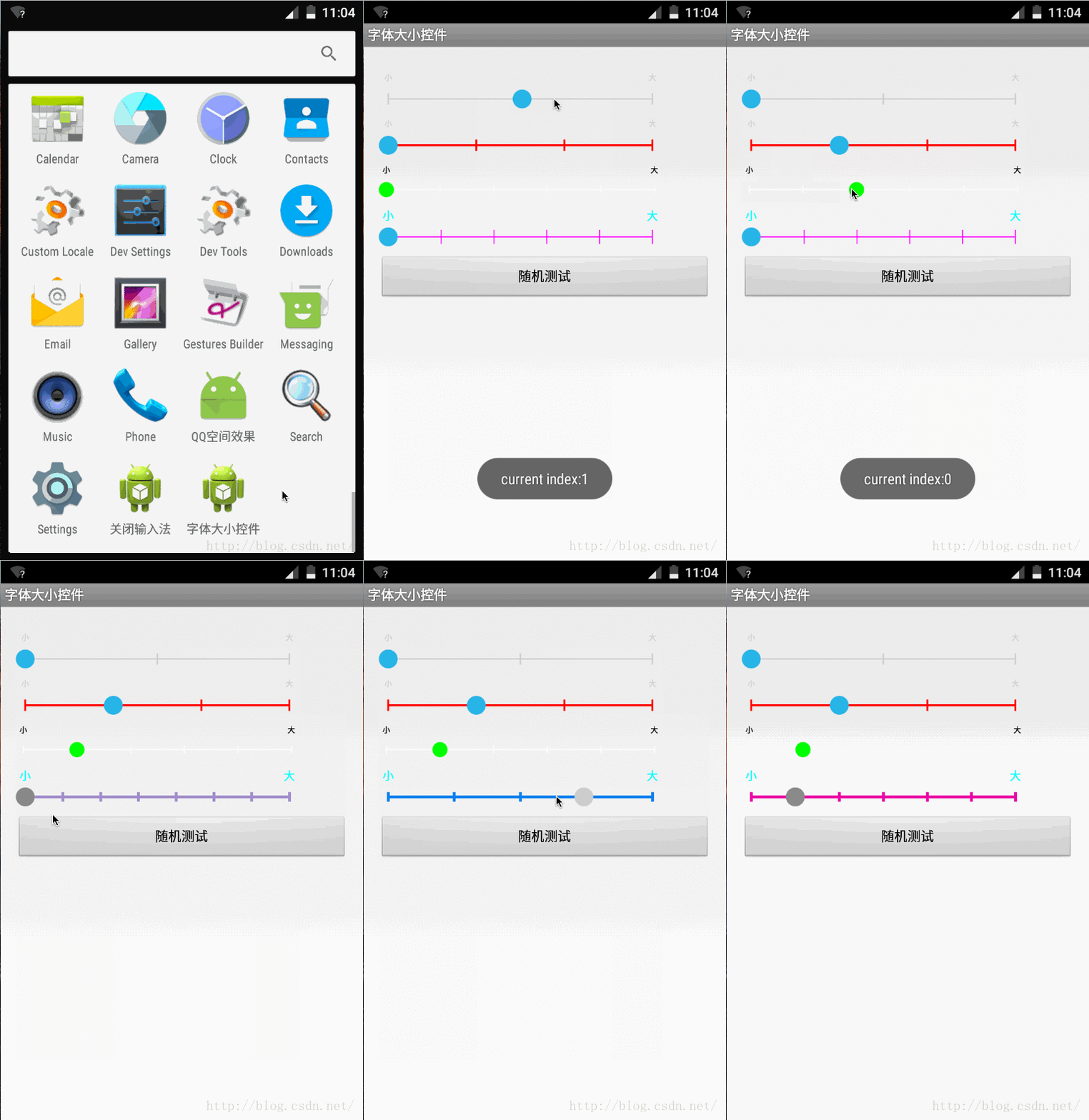
現在看一下運行效果吧,截圖如下所示:
好了,有關FontSliderBar的講解告一段落了,感謝收看(*^__^*) ……
 Android自定義動態布局 — 多圖片上傳
Android自定義動態布局 — 多圖片上傳 本文介紹Android中動態布局添加圖片,多圖片上傳。 項目中效果圖: 技術點
 Android 動畫解析(二) 補間動畫(Tween Animation)
上篇文章簡單描述了有關如何實現逐幀動畫(Frame Animation),如何還未了解逐幀動畫(Frame Animation)。今天這篇文章就來描述補間動畫(Tween
 Android--線程詳解
什麼是線程?線程或者線程執行本質上就是一串命令(也是程序代碼),然後我們把它發送給操作系統執行。一般來說,我們的CPU在任何時候一個核只能處理一個線程。多核處理器(目前大
 Android Paint之ColorFilter詳解
在之前講到Android Paint的使用詳解的時候,其中setColorFilter(ColorFilter filter)方法沒有講,今天就來簡單的分析一下,在And