編輯:關於Android編程
package com.example.utils;

import java.io.ByteArrayOutputStream;
import java.io.InputStream;

public class StreamTool {
	public static byte[] readInputStream(InputStream inStream) throws Exception {
		ByteArrayOutputStream outStream = new ByteArrayOutputStream();// 輸出流,寫到內存
		byte[] buffer = new byte[1024];// 1K緩沖區容量
		int len = 0;
		while ((len = inStream.read(buffer)) != -1) {
			outStream.write(buffer, 0, len);// 從數組buffer中讀取從0到len的數據
		}
		inStream.close();
		return outStream.toByteArray();
	}
}
package com.example.web;

import java.net.HttpURLConnection;
import java.net.URL;
import java.util.Map;

public class HttpRequest {
	public static void sendGetRequest(String path, Map params)
			throws Throwable {
		StringBuilder str = new StringBuilder();
		str.append('?');
		for (Map.Entry entry : params.entrySet()) {
			str.append(entry.getKey()).append('=').append(entry.getValue())
					.append('&');
		}
		str.deleteCharAt(str.length() - 1);
		URL url = new URL(path);
		HttpURLConnection conn = (HttpURLConnection) url.openConnection();
		conn.setRequestMethod("GET");
		conn.setConnectTimeout(5 * 1000);

	}
}
package com.example.web;

import java.util.HashMap;
import java.util.Map;

import android.app.Activity;
import android.os.Bundle;
import android.util.Log;
import android.view.View;
import android.widget.Button;
import android.widget.EditText;
import android.widget.Toast;

import com.example.image.R;
import com.example.web.HttpRequest;

public class MainActivity extends Activity {

	private static final String TAG = "UploaddataToWen";
	private EditText titleText;
	private EditText timelengthText;

	@Override
	protected void onCreate(Bundle savedInstanceState) {
		super.onCreate(savedInstanceState);
		setContentView(R.layout.activity_image);
		Button button = (Button) this.findViewById(R.id.button);
		titleText = (EditText) this.findViewById(R.id.title);
		timelengthText = (EditText) this.findViewById(R.id.timelength);
		button.setOnClickListener(new View.OnClickListener() {

			@Override
			public void onClick(View v) {
				String title = titleText.getText().toString();
				String timelength = timelengthText.getText().toString();
				Map params = new HashMap();
				params.put("method", "save");
				params.put("title", title);
				params.put("timelength", timelength);
				try {
					HttpRequest.sendGetRequest(
							"http://192.168.1.101:8080/web/admin.do", params);
					Toast.makeText(MainActivity.this, "save success",
							Toast.LENGTH_LONG).show();
				} catch (Throwable e) {
					Toast.makeText(MainActivity.this, "save fail",
							Toast.LENGTH_LONG).show();
					Log.e(TAG, e.toString());
				}
			}
		});
	}
}
//
//
/*
package org.android.net;
import java.io.ByteArrayOutputStream;
import java.io.InputStream;
import java.net.HttpURLConnection;
import java.net.URL;
public class HtmlRequest {
public static void main(String[] args) throws Throwable {
URL url = new URL("http://www.baidu.con");
HttpURLConnection conn = (HttpURLConnection) url.openConnection();
conn.setRequestMethod("GET");
conn.setConnectTimeout(5 * 1000);
InputStream inStream = conn.getInputStream();// 通過輸入流獲取html數據
byte[] data = readInputStream(inStream);// 得到的html的二進制數據
String html= new String(data);
System.out.print(html);
}
public static byte[] readInputStream(InputStream inStream) throws Exception {
ByteArrayOutputStream outStream = new ByteArrayOutputStream();// 輸出流,寫到內存
byte[] buffer = new byte[1024];// 1K緩沖區容量
int len = 0;
while ((len = inStream.read(buffer)) != -1) {
outStream.write(buffer, 0, len);// 從數組buffer中讀取從0到len的數據
}
inStream.close();
return outStream.toByteArray();
}
}
package org.android.net;
import java.io.ByteArrayOutputStream;
import java.io.File;
import java.io.FileOutputStream;
import java.io.InputStream;
import java.net.HttpURLConnection;
import java.net.URL;
public class ImageRequest {
public static void main(String[] args) throws Throwable {
URL url = new URL("http://imageaddress");
HttpURLConnection conn = (HttpURLConnection) url.openConnection();
conn.setRequestMethod("GET");
conn.setConnectTimeout(5 * 1000);
InputStream inStream = conn.getInputStream();// 通過輸入流獲取圖片數據
byte[] data = readInputStream(inStream);// 得到的圖片的二進制數據
File imageFile = new File("temp.jpg");
FileOutputStream outStream = new FileOutputStream(imageFile);// 把圖片寫入到硬盤
outStream.write(data);
outStream.close();
}
public static byte[] readInputStream(InputStream inStream) throws Exception {
ByteArrayOutputStream outStream = new ByteArrayOutputStream();// 輸出流,寫到內存
byte[] buffer = new byte[1024];// 1K緩沖區容量
int len = 0;
while ((len = inStream.read(buffer)) != -1) {
outStream.write(buffer, 0, len);// 從數組buffer中讀取從0到len的數據
}
inStream.close();
return outStream.toByteArray();
}
}
*/ 如何讓 Galaxy S7 同時支持雙 SIM 卡和存儲卡
Galaxy S7 俨然已經成為目前最受關注的智能手機之一,許多人還將其稱作是目前最佳的智能手機。三星在這部手機身上帶回了對於 microSD 卡的支持,但
 Android學習路線(十)如何將Action Bar疊放在你的布局上
為了第六篇的完整性,這裡先貼出原文,下次再來翻譯;:p 原文地址:http://developer.android.com/training/basics/acti
 Android應用APP自動更新功能的代碼實現
由於Android項目開源所致,市面上出現了N多安卓軟件市場。為了讓我們開發的軟件有更多的用戶使用,我們需要向N多市場發布,軟件升級後,我們也必須到安卓市場上進行更新,給
 Android應用Preference相關及源碼淺析(Preference組件家族篇)
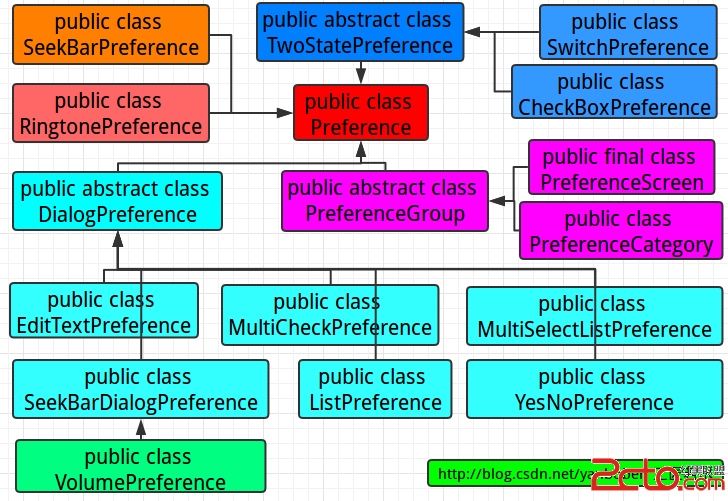
1 前言前一篇(點我閱讀前一篇《Android應用Preference相關及源碼淺析(SharePreferences篇)》)我們討論分析使用了Android的Share