編輯:關於Android編程
一、基本知識點
1、Activity之間傳遞數據
1)傳遞基本類型或String
intent.putExtra("username", username);
getIntent();
intent.getStringExtra("username");
2)以bundle的形式傳
Bundle bundle = new Bundle();
bundle.putString("username", username);
bundle.putString("password", password);
intent.putExtras(bundle);
Bundle bundle = intent.getExtras();
String username = bundle.getString("username");
String password = bundle.getString("password");
3)傳遞自定義類型
1))implements Parcelable
2))重寫以下兩個方法
public int describeContents() {
// TODO Auto-generated method stub
return 0;
}
//把數據寫入到Parcel對象
public void writeToParcel(Parcel dest, int flags) {
// TODO Auto-generated method stub
dest.writeInt(id);
dest.writeString(name);
dest.writeInt(age);
}
3))拷貝以下方法(把Person換成你的實際類型)
public static final Parcelable.Creator
= new Parcelable.Creator
//從Parcel對象裡面讀取數據
public Person createFromParcel(Parcel in) {
return new Person(in);
}
public Person[] newArray(int size) {
return new Person[size];
}
};
public Person(Parcel in) {
// TODO Auto-generated constructor stub
id = in.readInt();
name = in.readString();
age = in.readInt();
}
Person person = new Person(100, "張信哲", 40);
intent.putExtra("person", person);
Person person = intent.getParcelableExtra("person");
二、代碼
1、MainActivity
package com.example.parsedata;

import android.os.Bundle;
import android.app.Activity;
import android.content.Intent;
import android.view.Menu;
import android.view.View;
import android.widget.EditText;

public class MainActivity extends Activity {

	private EditText et_username;
	private EditText et_password;

	@Override
	protected void onCreate(Bundle savedInstanceState) {
		super.onCreate(savedInstanceState);
		setContentView(R.layout.main);

		et_username = (EditText) findViewById(R.id.et_username);
		et_password = (EditText) findViewById(R.id.et_password);
	}

	public void enter(View view) {

		String username = et_username.getText().toString();
		String password = et_password.getText().toString();

		Intent intent = new Intent(this, MainActivity2.class);
		intent.putExtra("username", username);
		intent.putExtra("password", password);


		Bundle bundle = new Bundle();
		bundle.putString("zhangzetian", "huangjundong");
		intent.putExtras(bundle);

		Person person = new Person(2, "hjd is a handsomeboy..", 21);
		intent.putExtra("person", person);


		startActivity(intent);

	}

	@Override
	public boolean onCreateOptionsMenu(Menu menu) {
		// Inflate the menu; this adds items to the action bar if it is present.
		getMenuInflater().inflate(R.menu.main, menu);
		return true;
	}

}
2、MainActivity2
package com.example.parsedata;

import android.app.Activity;
import android.content.Intent;
import android.os.Bundle;
import android.view.View;
import android.widget.EditText;
import android.widget.TextView;

public class MainActivity2 extends Activity {

	private TextView tv_info;


	@Override
	protected void onCreate(Bundle savedInstanceState) {
		super.onCreate(savedInstanceState);
		setContentView(R.layout.main2);

		tv_info = (TextView) findViewById(R.id.tv_info);

		Intent intent = getIntent();
		String username = intent.getStringExtra("username");
		String password = intent.getStringExtra("password");

		Bundle bundle = intent.getExtras();

		Person p = intent.getParcelableExtra("person");

		tv_info.setText("username: " + username + ",password: " + password + "zhangzetian's husband is : " + bundle.getString("zhangzetian") + " person: " + p.toString());


	}

}
三、源碼下載:
http://download.csdn.net/detail/caihongshijie6/7792903
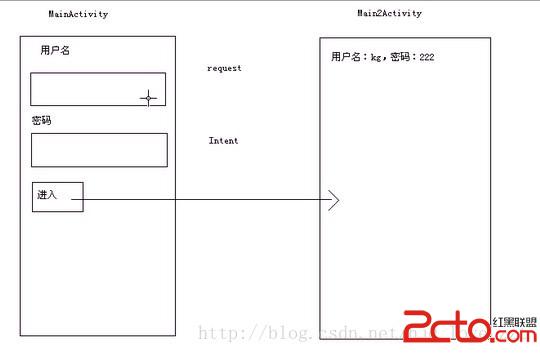
四、效果圖
 android接入微信分享(朋友、朋友圈)、QQ分享(好友、空間)
1、申請注冊你的appid2、下載sdkQQ: http://wiki.open.qq.com/wiki/mobile/SDK%E4%B8%8B%E8%BD%BD微信:h
 Android開發學習之WallPaper設置壁紙詳細介紹與實例
今天和大家分享的是關於在Android中設置壁紙的方法,在Android中設置壁紙的方法有三種,分別是:1、使用WallpaperManager的setResource(
 android 日常迭代與維護總結二
android 迭代開發中陸續遇到各種問題,我們要善於總結,歸類。現在記錄一下這幾個月遇到的問題匯總。1、android fragment中onActivityResul
 Android TabLayout實現京東詳情效果
Google在2015的IO大會上,給我們帶來了更加詳細的Material Design設計規范,同時,也給我們帶來了全新的Android Design Support