編輯:關於Android編程
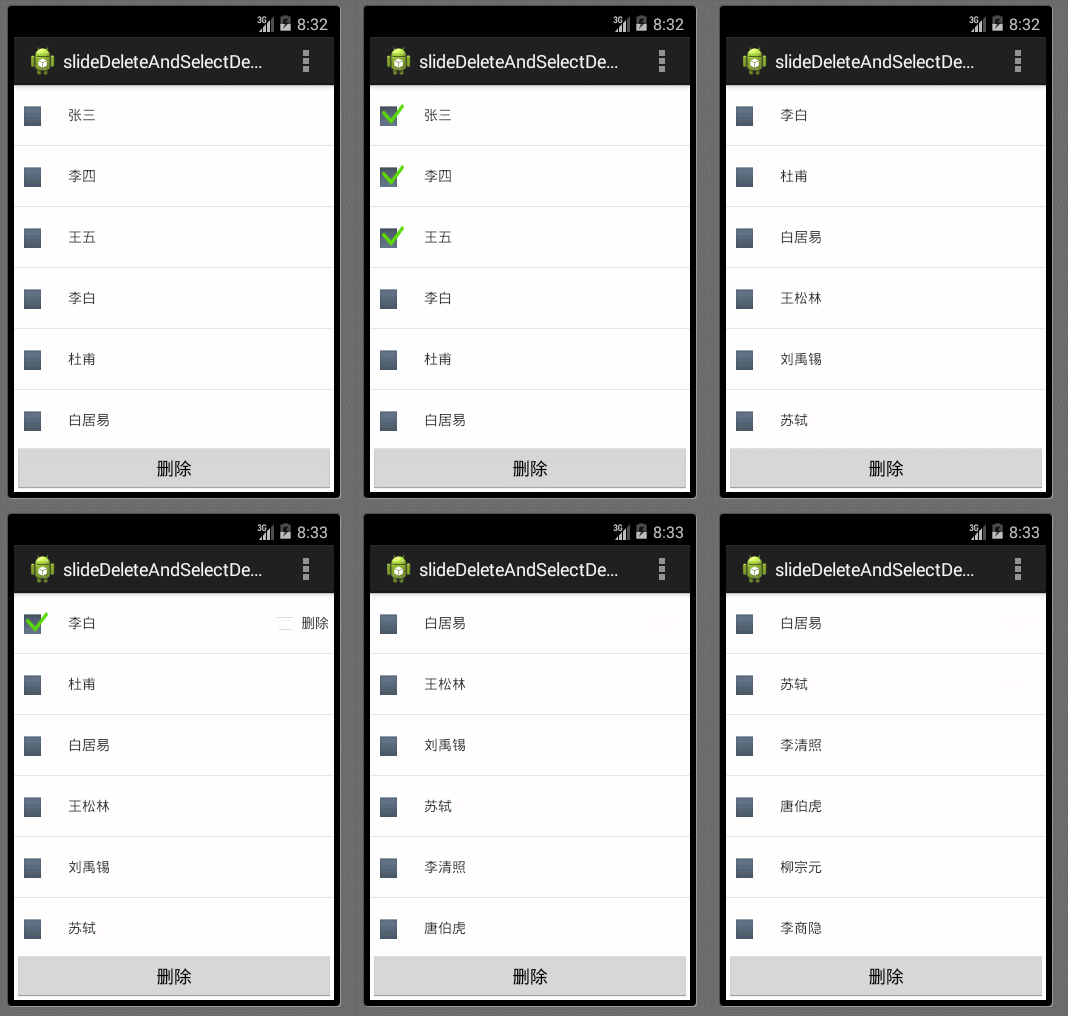
在項目開發過程中,常常需要對用戶列表的信息進行刪除的操作。Android中常用的刪除操作方式有兩種 ,一種就是類似微信的滑動出現刪除按鈕方式,還有一種是通過CheckBox進行選擇,然後通過按鈕進行刪除的方式。本來的實例集成上述的兩種操作方式來實現用戶列表刪除的效果。
設計思路:在適配器類MyAdapter一個滑動刪除按鈕顯示或隱藏的Map,一個用於CheckBox是否選中的Map和一個與MainAcitivyt進行數據交互的接口ContentsDeleteListener,同時該接口包含兩個方法,contentsDeleteSelect(int position, boolean isChecked)方法用於將選中或取消內容從選中List中加入或刪除,contentDelete(int position)用於刪除List中指定位置的列項。滑動的效果主要是通過當滑動的距離大於40時,顯示滑動刪除按鈕,再執行刪除操作時,將其他所有設置不可見,並設置CheckBox為不選中狀態。
一.代碼實現效果
二.代碼實餡喎?/kf/yidong/wp/" target="_blank" class="keylink">WPC9wPgo8cD4xLiDW973nw+ayvL7WIGFjdGl2aXR5X21haW4ueG1sPC9wPgo8cD48L3A+CjxwcmUgY2xhc3M9"brush:java;">
2.用戶項布局 activity_main_list_view.xml
該布局包含一個選擇的CheckBox,顯示內容的TextView 和一個能滑動實現刪除的TextView
3.滑動效果anim_right_left.xml
package com.example.slideandselectdeletedemo;

import java.util.HashMap;
import java.util.List;
import java.util.Map;
import android.annotation.SuppressLint;
import android.content.Context;
import android.view.LayoutInflater;
import android.view.MotionEvent;
import android.view.View;
import android.view.View.OnClickListener;
import android.view.View.OnTouchListener;
import android.view.animation.Animation;
import android.view.animation.AnimationUtils;
import android.view.ViewGroup;
import android.widget.BaseAdapter;
import android.widget.CheckBox;
import android.widget.CompoundButton;
import android.widget.CompoundButton.OnCheckedChangeListener;
import android.widget.RelativeLayout;
import android.widget.TextView;
import com.example.slidedeleteandselectdemo.R;

@SuppressLint("UseSparseArrays")
public class MyAdapter extends BaseAdapter {

	private LayoutInflater mInflater;
	private List mContentsList;
	private Context mContext;
	private ContentsDeleteListener mContentsDeleteListener;
	//設置滑動刪除按鈕是否顯示
	private Map visibleDeleteTv;
	//CheckBox選擇和未選擇
	private Map selectCb;
	//滑動後的X坐標點
	private int mLastX = 0;
//	private int mLastY = 0;

	public MyAdapter(Context mContext, List mContentsList,
			ContentsDeleteListener mContentsDeleteListener) {
		this.mContext = mContext;
		this.mContentsList = mContentsList;
		this.mContentsDeleteListener = mContentsDeleteListener;
		this.mInflater = (LayoutInflater) mContext
				.getSystemService(Context.LAYOUT_INFLATER_SERVICE);

		visibleDeleteTv = new HashMap();
		selectCb = new HashMap();

		// 更新界面時,記錄為 未選中和滑動刪除按鈕不可見
		for (int i = 0; i < mContentsList.size(); i++) {
			visibleDeleteTv.put(i, View.GONE);
			selectCb.put(i, false);
		}
	}

	public void updateView(List mContentsList) {
		this.mContentsList = mContentsList;
		this.notifyDataSetChanged();
	}

	@Override
	public int getCount() {
		return mContentsList.size();
	}

	@Override
	public Object getItem(int position) {
		return mContentsList.get(position);
	}

	@Override
	public long getItemId(int position) {
		return position;
	}

	@Override
	public View getView(final int position, View convertView, ViewGroup parent) {
		final HolderView holderView;
		if (convertView == null) {
			holderView = new HolderView();
			convertView = mInflater.inflate(R.layout.activity_main_list_view,
					null);
			holderView.listSelectCb = (CheckBox) convertView
					.findViewById(R.id.my_select_cb);
			holderView.listContentTv = (TextView) convertView
					.findViewById(R.id.my_content_tv);
			holderView.listDeleteTv = (TextView) convertView
					.findViewById(R.id.my_delete_tv);
			holderView.listRl = (RelativeLayout) convertView
					.findViewById(R.id.my_rl);

			convertView.setTag(holderView);
		} else {
			holderView = (HolderView) convertView.getTag();
			if (holderView.listSelectCb.isChecked()) {
				holderView.listSelectCb.setChecked(false);
			}

		}
		// 顯示內容
		holderView.listContentTv.setText(mContentsList.get(position));

		if (visibleDeleteTv != null) {
			holderView.listDeleteTv
					.setVisibility(visibleDeleteTv.get(position));
		}
		if (selectCb != null) {
			holderView.listSelectCb.setChecked(selectCb.get(position));
			mContentsDeleteListener.contentsDeleteSelect(position,
					selectCb.get(position));
		}

		// 處理選擇事件
		holderView.listRl.setOnClickListener(new OnClickListener() {
			@Override
			public void onClick(View v) {
				if (visibleDeleteTv.containsValue(View.VISIBLE)) {//可見時,再次單擊設置不可見,未選中
					for (int i = 0; i < getCount(); i++) {
						visibleDeleteTv.put(i, View.GONE);
						selectCb.put(i, false);
						mContentsDeleteListener.contentsDeleteSelect(i, false);
					}
					notifyDataSetChanged();
				} else {
					boolean isChecked = holderView.listSelectCb.isChecked() ? false
							: true;
					holderView.listSelectCb.setChecked(isChecked);

					mContentsDeleteListener.contentsDeleteSelect(position, isChecked);
				}
			}
		});

		holderView.listSelectCb
				.setOnCheckedChangeListener(new OnCheckedChangeListener() {
					@Override
					public void onCheckedChanged(CompoundButton buttonView,
							boolean isChecked) {
						mContentsDeleteListener.contentsDeleteSelect(position,
								isChecked);
					}
				});

		holderView.listSelectCb.setOnClickListener(new OnClickListener() {

			@Override
			public void onClick(View v) {
				if (visibleDeleteTv.containsValue(View.VISIBLE)) {
					for (int i = 0; i < getCount(); i++) {
						visibleDeleteTv.put(i, View.GONE);
						selectCb.put(i, false);
						mContentsDeleteListener.contentsDeleteSelect(i,
						 false);
					}
					notifyDataSetChanged();
				}
			}
		});

		convertView.setOnTouchListener(new OnTouchListener() {

			@Override
			public boolean onTouch(View v, MotionEvent event) {
				final Animation alpha = AnimationUtils.loadAnimation(mContext,
						R.anim.anim_right_left);
				int x = (int) event.getX();
//				int y = (int) event.getY();
				// Log.d(TAG, "x=" + x + "  y=" + y);
				// press down
				if (event.getAction() == MotionEvent.ACTION_DOWN) {
					alpha.cancel();
				} else if (event.getAction() == MotionEvent.ACTION_MOVE) {
					alpha.cancel();
					int deltaX = mLastX - x;
//					int deltaY = mLastY - y;
					// Log.d(TAG, "deltaX=" + deltaX + ",deltaY=" + deltaY);
					if (deltaX > 40) {//當滑動距離大於40時,顯示該位置的刪除按鍵
						for (int i = 0; i < getCount(); i++) {
							visibleDeleteTv.put(i, View.GONE);
							selectCb.put(i, false);
							mContentsDeleteListener.contentsDeleteSelect(i, false);
							if (i == position) {
								visibleDeleteTv.put(position, View.VISIBLE);
								selectCb.put(i, true);
								mContentsDeleteListener.contentsDeleteSelect(i, true);
								if (visibleDeleteTv.get(position) == View.VISIBLE) {
									holderView.listDeleteTv
											.startAnimation(alpha);
								}
							}
						}
						notifyDataSetChanged();
					}
					return true;
				} else {// other
					alpha.cancel();

				}
				mLastX = x;
//				mLastY = y;
				return false;
			}
		});
		holderView.listDeleteTv.setOnClickListener(new OnClickListener() {

			@Override
			public void onClick(View v) {
				// Log.d(TAG, "onClick:position=" + position);
				mContentsList.remove(position);
				mContentsDeleteListener.contentDelete(position);
				for (int i = 0; i < mContentsList.size(); i++) {
					visibleDeleteTv.put(i, View.GONE);
					selectCb.put(i, false);
					mContentsDeleteListener.contentsDeleteSelect(i, false);
				}
				notifyDataSetChanged();
			}
		});
		return convertView;
	}

	public class HolderView {
		public TextView listContentTv, listDeleteTv;
		public CheckBox listSelectCb;
		public RelativeLayout listRl;
	}

	public void setContentsDeleteListener(
			ContentsDeleteListener mContentsDeleteListener) {
		this.mContentsDeleteListener = mContentsDeleteListener;
	}

	/**
	 * 用於刪除內容的接口
	 *
	 * @author liangming.deng
	 *
	 */
	public interface ContentsDeleteListener {
		/**
		 * 根據isChecked 選擇和取消選擇的指定位置
		 * @param position
		 * @param isChecked
		 */
		public void contentsDeleteSelect(int position, boolean isChecked);
		/**
		 * 刪除指定位置內容
		 * @param position
		 */
		public void contentDelete(int position);
	}

	public void setVisibleDeleteTv(Map visibleDeleteTv) {
		this.visibleDeleteTv = visibleDeleteTv;
	}

	public void setSelectCb(Map selectCb) {
		this.selectCb = selectCb;
	}
}
package com.example.slideandselectdeletedemo;

import java.util.ArrayList;
import java.util.Collections;
import java.util.List;

import android.app.Activity;
import android.os.Bundle;
import android.view.Menu;
import android.view.MenuItem;
import android.view.View;
import android.view.View.OnClickListener;
import android.widget.Button;
import android.widget.ListView;

import com.example.slideandselectdeletedemo.MyAdapter.ContentsDeleteListener;
import com.example.slidedeleteandselectdemo.R;

public class MainActivity extends Activity implements ContentsDeleteListener,OnClickListener{
	private  ListView myLv;
	private Button myDeleteBtn;
	private MyAdapter myAdapter;
	private String[] myContentsArray;
	private List myContentsList = new ArrayList();
	private List mySelectedList = new ArrayList();
	@Override
	protected void onCreate(Bundle savedInstanceState) {
		super.onCreate(savedInstanceState);
		setContentView(R.layout.activity_main);

		findById();

		myContentsArray = this.getResources().getStringArray(R.array.my_contents);
		if(myContentsArray != null){
			Collections.addAll(myContentsList, myContentsArray);
		}

		myAdapter = new MyAdapter(this,myContentsList,this);
		myLv.setAdapter(myAdapter);
	}

	private void findById(){
		myLv = (ListView) this.findViewById(R.id.my_lv);
		myDeleteBtn = (Button) this.findViewById(R.id.my_delete_btn);

		myDeleteBtn.setOnClickListener(this);
	}

	@Override
	public void onResume(){
		super.onResume();
	}
	@Override
	public boolean onCreateOptionsMenu(Menu menu) {

		// Inflate the menu; this adds items to the action bar if it is present.
		getMenuInflater().inflate(R.menu.main, menu);
		return true;
	}

	@Override
	public boolean onOptionsItemSelected(MenuItem item) {
		// Handle action bar item clicks here. The action bar will
		// automatically handle clicks on the Home/Up button, so long
		// as you specify a parent activity in AndroidManifest.xml.
		int id = item.getItemId();
		if (id == R.id.action_settings) {
			return true;
		}
		return super.onOptionsItemSelected(item);
	}

	/*
	 * 根據isChecked,給選擇的List中添加或刪除數據
	 * (non-Javadoc)
	 * @see com.example.slideandselectdeletedemo.MyAdapter.ContentsDeleteListener#contentsDeleteSelect(int, boolean)
	 */
	@Override
	public void contentsDeleteSelect(int position,boolean isChecked) {
		if(isChecked){
			mySelectedList.add(myContentsList.get(position));
		}else{
			mySelectedList.remove(myContentsList.get(position));
		}
	}

	/*
	 * 刪除指定位置的數據
	 * (non-Javadoc)
	 * @see com.example.slideandselectdeletedemo.MyAdapter.ContentsDeleteListener#contentDelete(int)
	 */
	@Override
	public void contentDelete(int position) {
		// TODO Auto-generated method stub
		myContentsList.remove(position);
	}


	@Override
	public void onClick(View v) {
		// TODO Auto-generated method stub
		switch(v.getId()){
		case R.id.my_delete_btn:
			myContentsList.removeAll(mySelectedList);
			myAdapter.updateView(myContentsList);
			break;
		}
	}

}
上述主要部分給出了注釋。
源碼地址:http://download.csdn.net/detail/a123demi/7751141
 android中GridView實現點擊查看更多功能示例
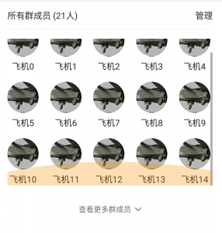
首先來看一下效果圖; 先說一下我的需求:查看群成員,如果超過15人則全部顯示,如果大於15人則先加載15人,其余的不顯示,點擊查看更多則加載全部。再來說一下我
 從java到C解析Binder機制
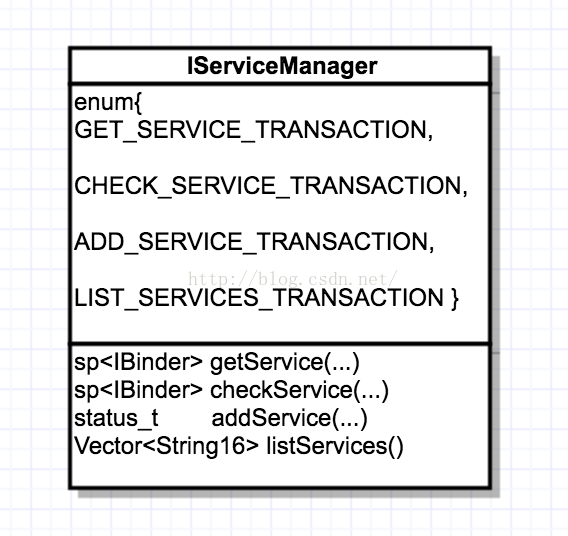
Binder機制是一種C/S結構,主要包括三部分,分別為Client、Server、ServiceManager。ServiceManager是谷歌設計的,它是一段簡潔的
 Android仿微信朋友圈實現滾動條下拉反彈效果
微信朋友圈上面的圖片封面,QQ空間說說上面的圖片封面都有下拉反彈的效果,這些都是使用滾動條實現的。下拉,當松開時候,反彈至原來的位置。下拉時候能看到背景圖片。那麼這裡簡單
 Android開發技巧之Camera拍照功能
本篇是我對開發項目的拍照功能過程中,對Camera拍照使用的總結。由於camera2是在api level 21(5.0.1)才引入的,而Camera到6.0仍可使用,所