編輯:關於Android編程
作為Android開發人員,Handler這個類應該是再熟悉不過了,因為幾乎任何App的開發,都會使用到Handler這個類,有些同學可能就要說了,我完全可以使用AsyncTask代替它,這個確實是可以的,但是其實AsyncTask也是通過Handler實現的,具體的大家可以去看看源碼就行了,Handler的主要功能就是實現子線程和主線程的通信,例如在子線程中執行一些耗時操作,操作完成之後通知主線程跟新UI(因為Android是不允許在子線程中跟新UI的)。
下面就使用一個簡單的例子開始這篇文章吧
public class MainActivity extends Activity
{
  public static final int MSG_DOWNLOAD_FINISH=0X001;
  //創建一個Handler的匿名內部類
  private Handler handler=new Handler()
  {

    @Override
    public void handleMessage(Message msg)
    {
      switch(msg.what)
      {
        case MSG_DOWNLOAD_FINISH:
          Log.v("yzy", "handler所在的線程id是-->"+Thread.currentThread().getName());
          break;
      }
    }

  };

  @Override
  protected void onCreate(Bundle savedInstanceState)
  {
    super.onCreate(savedInstanceState);
    setContentView(R.layout.activity_main);
  }

  //啟動一個下載線程
  public void download(View view)
  {
    new Thread()
    {
      public void run() {
        try
        {
          Log.v("yzy", "下載子線程的Name是--->"+Thread.currentThread().getName());
          //在子線程運行,模擬一個下載任務
          Thread.sleep(2000);
          //下載完成後,發送下載完成消息
          handler.sendEmptyMessage(MSG_DOWNLOAD_FINISH);
        } catch (InterruptedException e)
        {
          e.printStackTrace();
        }
      };
    }.start();
} 上面例子就是模擬了一個下載任務,當下載完成後,通過Handler對象發送一個消息,最後被handlerMessage方法接收並處理,通過運行結果可以發現,download方法是在子線程中完成的,而handlerMessage是在UI線程中被調用的。到了這裡一個簡單的Handler使用案例就結束了,如果你已經明白了上面的代碼,那麼說明你已經明白了Handler的最基本使用。
下面再來一個簡單的例子:
public void postRun(View view)
  {
    new Thread(){
      public void run() {
        try
        {
          Log.v("yzy", " 下載子線程的Name是--->"+Thread.currentThread().getName());
          Thread.sleep(2000);
          handler.post(new Runnable()
          {

            @Override
            public void run()
            {
              Log.v("yzy", "handler post run -->"+Thread.currentThread().getName());
            }
          });
        } catch (InterruptedException e)
        {
          e.printStackTrace();
        }

      };

    }.start();

}在Handler中除了可以發送Message對象還可以發送Runnable對象,從運行結果來看發送的Runnable也是在main線程中執行的
那麼是不是通過handler發出的Message和Runnable都是在UI線程中執行的呢,這個可不一定,現在我在onCreate方法中創建一個handler2
HandlerThread thread=new HandlerThread("yzy");
    thread.start();

    handler2=new Handler(thread.getLooper())
    {
      public void handleMessage(Message msg) {
        switch(msg.what)
        {
          case MSG_DOWNLOAD_FINISH:
            Log.v("yzy", "handler所在的線程Name是-->"+Thread.currentThread().getName());
            break;
        }

      };
};//無參構造函數
public Handler() {
//檢查Handler是否是static的,如果不是的,那麼有可能導致內存洩露,具體可以百度
if (FIND_POTENTIAL_LEAKS) {
final Class klass = getClass();
if ((klass.isAnonymousClass() || klass.isMemberClass() || klass.isLocalClass()) &&
(klass.getModifiers() & Modifier.STATIC) == 0) {
Log.w(TAG, "The following Handler class should be static or leaks might occur: " +
klass.getCanonicalName());
}
}
//很重要的一個屬性,暫時就將Looper理解成一個消息隊列的管理者吧,用來從消息隊列中取消息的,稍後會分析這個類
mLooper = Looper.myLooper();
if (mLooper == null) {
//這個異常非常常見哦,Handler一定要在有Looper的線程上執行,這個也就是為什麼我在HandlerThread中初始化Handler
//而沒有在Thread裡面初始化,如果在Thread裡面初始化需要先調用Looper.prepare方法
throw new RuntimeException(
"Can't create handler inside thread that has not called Looper.prepare()");
}
//將mLooper裡面的消息隊列復制到自身的mQueue,這也就意味著Handler和Looper是公用一個消息隊列
mQueue = mLooper.mQueue;
//回調函數默認是Null
mCallback = null;
}
//這個和上面一樣的,只不過傳入了一個回調函數
public Handler(Callback callback) {
if (FIND_POTENTIAL_LEAKS) {
final Class klass = getClass();
if ((klass.isAnonymousClass() || klass.isMemberClass() || klass.isLocalClass()) &&
(klass.getModifiers() & Modifier.STATIC) == 0) {
Log.w(TAG, "The following Handler class should be static or leaks might occur: " +
klass.getCanonicalName());
}
}
mLooper = Looper.myLooper();
if (mLooper == null) {
throw new RuntimeException(
"Can't create handler inside thread that has not called Looper.prepare()");
}
mQueue = mLooper.mQueue;
mCallback = callback;
}
/**
* 傳入一個Looper,並和Looper公用一個消息隊列
*/
public Handler(Looper looper) {
mLooper = looper;
mQueue = looper.mQueue;
mCallback = null;
}
/**
* 和上面一個差不多,就不在贅述
*/
public Handler(Looper looper, Callback callback) {
mLooper = looper;
mQueue = looper.mQueue;
mCallback = callback;
}* class LooperThread extends Thread {
* public Handler mHandler;
*
* public void run() {
* Looper.prepare();
*
* mHandler = new Handler() {
* public void handleMessage(Message msg) {
* // process incoming messages here
* }
* };
*
* Looper.loop();
* }
* //Looper的構造函數,主要是對消息隊列等屬性初始化
private Looper() {
mQueue = new MessageQueue();
mRun = true;
//記錄所在線程
mThread = Thread.currentThread();
}
//在上面的例子中,看到當在一個沒有Looper的線程中創建Handler,就需要執行這個函數,
//這個函數主要是new 一個Looper,燃火放入ThreadLocal中保存,做到一個線程就創建一次。第二次調用這個方法會拋出異常的
public static final void prepare() {
if (sThreadLocal.get() != null) {
throw new RuntimeException("Only one Looper may be created per thread");
}
sThreadLocal.set(new Looper());
}
//prepare是創建並保存,這個方法就是取出Looper
public static final Looper myLooper() {
return (Looper)sThreadLocal.get();
}
//這個方法是給系統調用的,UI線程通過調用這個線程,從而保證UI線程裡有一個Looper
//需要注意:如果一個線程是UI線程,那麼myLooper和getMainLooper是同一個Looper,通過這個代碼很好理解
public static final void prepareMainLooper() {
prepare();
setMainLooper(myLooper());
if (Process.supportsProcesses()) {
myLooper().mQueue.mQuitAllowed = false;
}
}
//獲得UI線程的Looper,通常我想Hanlder的handleMessage在UI線程執行時通常會new Handler(getMainLooper());
public synchronized static final Looper getMainLooper() {
return mMainLooper;
}
/**
* 上面的例子是執行了這個方法的,這個方法是一個死循環,一直從消息隊列中讀取消息,並分發出去
*/
public static final void loop() {
//得到本線程的Looper
Looper me = myLooper();
//拿到消息隊列
MessageQueue queue = me.mQueue;
while (true) {
//從消息隊列中拿一個消息
Message msg = queue.next(); // might block
//取到了一個消息
if (msg != null) {
//這個一般不等於Null,通常就是發出這個Message的Handler
if (msg.target == null) {
// No target is a magic identifier for the quit message.
return;
}
if (me.mLogging!= null) me.mLogging.println(
">>>>> Dispatching to " + msg.target + " "
+ msg.callback + ": " + msg.what
);
//調用Handler的dispatchMessage方法
msg.target.dispatchMessage(msg);
if (me.mLogging!= null) me.mLogging.println(
"<<<<< Finished to " + msg.target + " "
+ msg.callback);
//將消息放入消息池
msg.recycle();
}
}
}
//返回Looper的消息隊列
public static final MessageQueue myQueue() {
return myLooper().mQueue;
}//在Handler中發送一個消息到消息隊列,類似的方法很多,我只選了這一個
public boolean sendMessageAtTime(Message msg, long uptimeMillis)
{
boolean sent = false;
MessageQueue queue = mQueue;
if (queue != null) {
//將target設置成了Handler
msg.target = this;
sent = queue.enqueueMessage(msg, uptimeMillis);
}
else {
RuntimeException e = new RuntimeException(
this + " sendMessageAtTime() called with no mQueue");
Log.w("Looper", e.getMessage(), e);
}
return sent;
}
//這個方法是在loop方法中被調用的
public void dispatchMessage(Message msg) {
//首先檢查msg中callback(是一個Runnable對象)是否為Null,如果不為null,則直接調用callback中的run方法
if (msg.callback != null) {
handleCallback(msg);
} else {
//檢查Handler中的callback是否為空,如果不為空,則直接調用callback中的handleMessage,如果返回TRUE,則直接返回不在調用Handler中的handleMessage
if (mCallback != null) {
if (mCallback.handleMessage(msg)) {
return;
}
}
//最後調用Handler中的handlerMessage
handleMessage(msg);
}
} public final boolean post(Runnable r)
{
return sendMessageDelayed(getPostMessage(r), 0);
}
private final Message getPostMessage(Runnable r) {
Message m = Message.obtain();
m.callback = r;
return m;
}
public final boolean sendMessageDelayed(Message msg, long delayMillis)
{
if (delayMillis < 0) {
delayMillis = 0;
}
return sendMessageAtTime(msg, SystemClock.uptimeMillis() + delayMillis);
}//讓Runnable在UI線程執行
public final void runOnUiThread(Runnable action) {
//如果當前線程不是UI線程,那麼通過Handler轉發到UI線程
if (Thread.currentThread() != mUiThread) {
mHandler.post(action);
} else {
action.run();
}
}public boolean post(Runnable action) {
Handler handler;
if (mAttachInfo != null) {
handler = mAttachInfo.mHandler;
} else {
// Assume that post will succeed later
ViewRoot.getRunQueue().post(action);
return true;
}
return handler.post(action);
} android虛擬鍵盤彈出遮擋登陸按鈕問題的解決方法
Android虛擬鍵盤的彈起會遮擋住部分ui,雖然通過在清單文件中設置,可以隨著虛擬鍵盤的彈出,布局往上推,但是面對登陸界面時,並沒有太大的作用,這樣就會導致用戶體驗不好
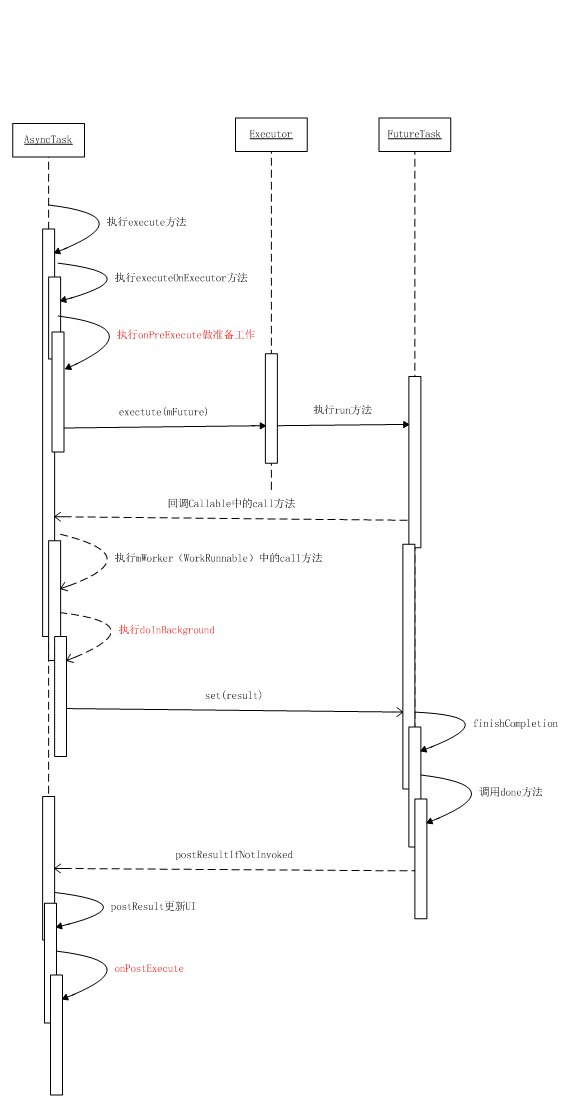 深入分析AsyncTask
1. 什麼是AsyncTaskAsyncTask 即 asynchronous task,異步任務。AsyncTask實際上是圍繞Thread和Handler設計的一個輔
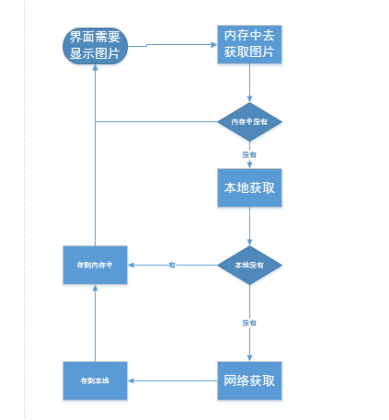 屬性動畫與圖片三級緩存
屬性動畫動畫: UI漸變, 變量值的變化 ObjectAnimator : ofInt(“backgroundColor”,start,end);
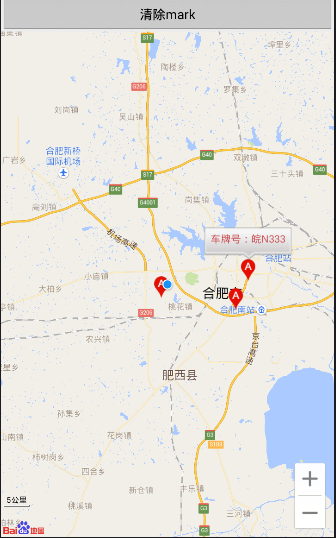 百度地圖簡單的使用
最近寫了百度地圖的Demo,所以總結下遇到的問題;1.使用百度地圖,先看下官方的例子。要再清單文件中配置KEY,如果用到定位要注冊serviece:android:nam