編輯:關於Android編程
Android中截圖很好實現,從開發文檔中,可以看到View有一個接口getDrawingCache(),這個接口可以獲取View在調用這個接口時的位圖圖像Bitmap。
截圖是抓取View在某一個時刻的圖像,包含了addView到這個View的所有子View的圖像,比如在截取Activity時,圖像是不會包含浮現在activity上方的對話框的
下面的代碼是截取圖像並且經過http post接口上傳到服務器的例子,截圖並上傳的核心代碼如下:
Screenshot.java
package com.example.scrmdemo;

import java.io.BufferedReader;
import java.io.ByteArrayOutputStream;
import java.io.File;
import java.io.FileNotFoundException;
import java.io.FileOutputStream;
import java.io.IOException;
import java.io.InputStreamReader;
import java.io.OutputStream;
import java.net.HttpURLConnection;
import java.net.URL;

import android.app.Activity;
import android.graphics.Bitmap;
import android.graphics.Rect;
import android.graphics.drawable.BitmapDrawable;
import android.graphics.drawable.Drawable;
import android.view.View;

public class Screenshot {

	public static Bitmap takeScreenshotForView(View view) {
		view.setDrawingCacheEnabled(true);
		view.buildDrawingCache();
		Bitmap tempBit = view.getDrawingCache();
		Rect frame = new Rect();
		view.getWindowVisibleDisplayFrame(frame);
		int width = view.getWidth();
		int height = view.getHeight();
		Bitmap bitmap = Bitmap.createBitmap(tempBit, 0, 0, width, height);
		view.destroyDrawingCache();
		return bitmap;
	}

	public static Bitmap takeScreenshotForActivity(Activity activity) {
		View view = activity.getWindow().getDecorView();
		view.setDrawingCacheEnabled(true);
		view.buildDrawingCache();
		Bitmap tempBit = view.getDrawingCache();
		Rect frame = new Rect();
		view.getWindowVisibleDisplayFrame(frame);
		int statusBarHeight = frame.top;
		int width = view.getWidth();
		int height = view.getHeight();
		Bitmap bitmap = Bitmap.createBitmap(tempBit, 0, statusBarHeight, width,
				height - statusBarHeight);
		view.destroyDrawingCache();
		return bitmap;
	}

	public static Drawable BitmapToDrawable(Bitmap bitmap) {
		@SuppressWarnings("deprecation")
		BitmapDrawable bd = new BitmapDrawable(bitmap);
		Drawable drawable = (Drawable) bd;
		return drawable;
	}

	public static boolean savePic(Bitmap bitmap, String fileName) {
		try {
			File file = new File(fileName);
			if (!file.getParentFile().exists()) {
				file.getParentFile().mkdirs();
			}
			FileOutputStream fos = null;
			fos = new FileOutputStream(file);
			bitmap.compress(Bitmap.CompressFormat.JPEG, 100, fos);
			fos.flush();
			fos.close();
			return true;
		} catch (FileNotFoundException e) {
			e.printStackTrace();
			return false;
		} catch (IOException e) {
			e.printStackTrace();
			return false;
		}
	}

	public static byte[] getBytes(Bitmap bitmap) {
		ByteArrayOutputStream out = new ByteArrayOutputStream();
		bitmap.compress(Bitmap.CompressFormat.JPEG, 100, out);
		try {
			out.flush();
			out.close();
		} catch (IOException e) {
			e.printStackTrace();
		}
		return out.toByteArray();
	}

	interface ISharePicCallBack {
		public final static int SHARE_OK = 1;
		public final static int SHARE_NOTOK = 2;

		public void shareResult(int resultCode, String output);
	}

	public static void share(final String urlStr, final Bitmap bitmap,
			final ISharePicCallBack callBack) {
		new Thread() {
			public void run() {
				try {
					URL url = new URL(urlStr);
					HttpURLConnection httpConn = (HttpURLConnection) url
							.openConnection();
					httpConn.setDoOutput(true);
					httpConn.setDoInput(true);
					httpConn.setUseCaches(false);
					httpConn.setRequestMethod("POST");
					byte[] requestStringBytes = getBytes(bitmap);
					httpConn.setRequestProperty("Content-length", ""
							+ requestStringBytes.length);
					httpConn.setRequestProperty("Content-Type",
							"application/octet-stream");
					httpConn.setRequestProperty("Connection", "Keep-Alive");
					httpConn.setRequestProperty("Charset", "UTF-8");
					OutputStream outputStream = httpConn.getOutputStream();
					outputStream.write(requestStringBytes);
					outputStream.flush();
					outputStream.close();
					if (HttpURLConnection.HTTP_OK == httpConn.getResponseCode()) {
						StringBuffer sb = new StringBuffer();
						String readLine;
						BufferedReader responseReader;
						responseReader = new BufferedReader(
								new InputStreamReader(
										httpConn.getInputStream(), "UTF-8"));
						while ((readLine = responseReader.readLine()) != null) {
							sb.append(readLine).append("\n");
						}
						responseReader.close();
						callBack.shareResult(ISharePicCallBack.SHARE_OK,
								sb.toString());
					} else {
						callBack.shareResult(ISharePicCallBack.SHARE_NOTOK, ""
								+ httpConn.getResponseCode());
					}
				} catch (IOException e) {
					callBack.shareResult(ISharePicCallBack.SHARE_NOTOK, "");
					e.printStackTrace();
				}
			};
		}.start();
	}
}
 Android使用ListView批量刪除item的方法
本文實例講述了Android使用ListView批量刪除item的方法。分享給大家供大家參考,具體如下:利用CheckBox選中一個或多個item,最後批量刪除它們。程序
 淺談Android Activity與Service的交互方式
實現更新下載進度的功能1. 通過廣播交互Server端將目前的下載進度,通過廣播的方式發送出來,Client端注冊此廣播的監聽器,當獲取到該廣播後,將廣播中當前的下載進度
 Android自定義ViewGroup之子控件的自動換行和添加刪除
概述:常用的布局類型並不能滿足所有需求,這時就會用到ViewGroup。ViewGroup作為一個放置View的容器,並且我們在寫布局xml的時候,會告訴容器(凡是以la
 Android 5.x Theme 與 ToolBar 實戰
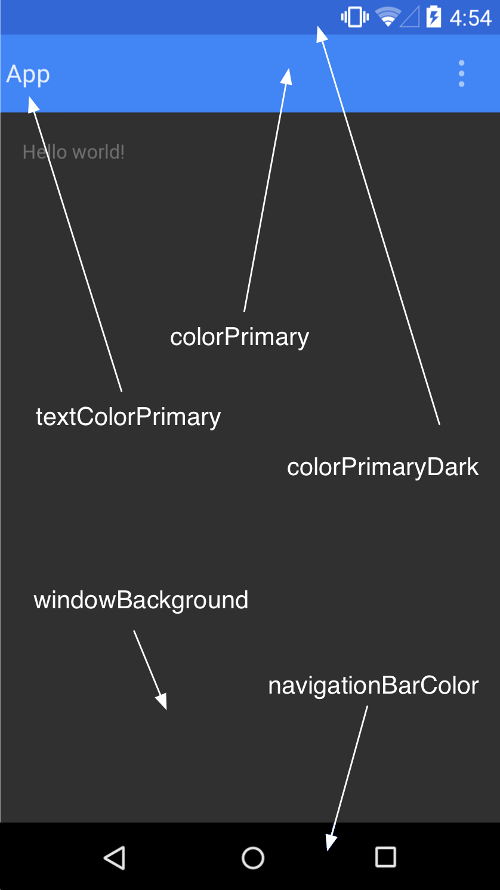
1、概述隨著Material Design的逐漸的普及,業內也有很多具有分享精神的伙伴翻譯了material design specification,中文翻譯地址:Ma