編輯:關於Android編程
應用如果需要復雜的手勢匹配,這時候可以使用GestureDetector來實現。
實現步驟:
1、實現OnGestureListener類,也可繼承SimpleOnGestureListener類然後復寫相應函數;
2、創建一個GestureDetector類對象,然後new一個第1步中自定義的監聽類對象作為參數穿進去;
3、在接收到MotionEvent事件時,調用OnGestureListener.onTouchEvent(onTouchEvent)函數。
對手勢匹配做的一些自定義處理在手勢監聽類中實現。
下面對以上三步做一些簡單分析:先看GestureDetector構造函數
    public GestureDetector(Context context, OnGestureListener listener, Handler handler) {
        if (handler != null) {
            mHandler = new GestureHandler(handler);
        } else {
            mHandler = new GestureHandler();
        }
        mListener = listener;
        if (listener instanceof OnDoubleTapListener) {
            setOnDoubleTapListener((OnDoubleTapListener) listener);
        }
        init(context);
    }
從構造函數看出new一個GestureDetector對象需要一個OnGestureListener對象,該對象保存在mListener中,如果手勢監聽是繼承SimpleOnGestureListener類,那麼還會調用setOnDoubleTapListener()。init函數做一些初始化函數,先不看。
接著看第3步OnGestureListener.onTouchEvent(onTouchEvent)函數處理。此函數稍微有點長,分段閱讀
    public boolean onTouchEvent(MotionEvent ev) {
        if (mInputEventConsistencyVerifier != null) {
            mInputEventConsistencyVerifier.onTouchEvent(ev, 0);
        }

        final int action = ev.getAction();

        if (mVelocityTracker == null) {
            mVelocityTracker = VelocityTracker.obtain();
        }
        mVelocityTracker.addMovement(ev);

        final boolean pointerUp =
                (action & MotionEvent.ACTION_MASK) == MotionEvent.ACTION_POINTER_UP;
        final int skipIndex = pointerUp ? ev.getActionIndex() : -1;

        // Determine focal point
        float sumX = 0, sumY = 0;
        final int count = ev.getPointerCount();
        for (int i = 0; i < count; i++) {
            if (skipIndex == i) continue;
            sumX += ev.getX(i);
            sumY += ev.getY(i);
        }
        final int div = pointerUp ? count - 1 : count;
        final float focusX = sumX / div;
        final float focusY = sumY / div;

        boolean handled = false;
InputEventConsistencyVerifier是調試用的,mVelocityTracker是一個速度追蹤類對象,緊接著的這段代碼邏輯是求一個MotionEvent的中心點,這邊調試時發現getPointerCount只有一個點而已,不管是點擊或滑動。接著往下看 switch (action & MotionEvent.ACTION_MASK) {
case MotionEvent.ACTION_POINTER_DOWN:
mDownFocusX = mLastFocusX = focusX;
mDownFocusY = mLastFocusY = focusY;
// Cancel long press and taps
cancelTaps();
break;
case MotionEvent.ACTION_POINTER_UP:
mDownFocusX = mLastFocusX = focusX;
mDownFocusY = mLastFocusY = focusY;
// Check the dot product of current velocities.
// If the pointer that left was opposing another velocity vector, clear.
mVelocityTracker.computeCurrentVelocity(1000, mMaximumFlingVelocity);
final int upIndex = ev.getActionIndex();
final int id1 = ev.getPointerId(upIndex);
final float x1 = mVelocityTracker.getXVelocity(id1);
final float y1 = mVelocityTracker.getYVelocity(id1);
for (int i = 0; i < count; i++) {
if (i == upIndex) continue;
final int id2 = ev.getPointerId(i);
final float x = x1 * mVelocityTracker.getXVelocity(id2);
final float y = y1 * mVelocityTracker.getYVelocity(id2);
final float dot = x + y;
if (dot < 0) {
mVelocityTracker.clear();
break;
}
}
break;
case MotionEvent.ACTION_DOWN:
if (mDoubleTapListener != null) {
boolean hadTapMessage = mHandler.hasMessages(TAP);
if (hadTapMessage) mHandler.removeMessages(TAP);
if ((mCurrentDownEvent != null) && (mPreviousUpEvent != null) && hadTapMessage &&
isConsideredDoubleTap(mCurrentDownEvent, mPreviousUpEvent, ev)) {
// This is a second tap
mIsDoubleTapping = true;
// Give a callback with the first tap of the double-tap
handled |= mDoubleTapListener.onDoubleTap(mCurrentDownEvent);
// Give a callback with down event of the double-tap
handled |= mDoubleTapListener.onDoubleTapEvent(ev);
} else {
// This is a first tap
mHandler.sendEmptyMessageDelayed(TAP, DOUBLE_TAP_TIMEOUT);
}
}
mDownFocusX = mLastFocusX = focusX;
mDownFocusY = mLastFocusY = focusY;
if (mCurrentDownEvent != null) {
mCurrentDownEvent.recycle();
}
mCurrentDownEvent = MotionEvent.obtain(ev);
mAlwaysInTapRegion = true;
mAlwaysInBiggerTapRegion = true;
mStillDown = true;
mInLongPress = false;
mDeferConfirmSingleTap = false;
if (mIsLongpressEnabled) {
mHandler.removeMessages(LONG_PRESS);
mHandler.sendEmptyMessageAtTime(LONG_PRESS, mCurrentDownEvent.getDownTime()
+ TAP_TIMEOUT + LONGPRESS_TIMEOUT);
}
mHandler.sendEmptyMessageAtTime(SHOW_PRESS, mCurrentDownEvent.getDownTime() + TAP_TIMEOUT);
handled |= mListener.onDown(ev);
break;
對於ACTION_DOWN事件,調用mListener.onDown(ev);處理,mListener是指向第1步中定義的手勢監聽類對象。對於MotionEvent.ACTION_MOVE事件,調用mListener.onScroll(mCurrentDownEvent, ev, scrollX, scrollY);函數,mCurrentDownEvent是當前滑動手勢中的按下點,ev是當前觸摸點,scrollX、scrollY是當前觸摸點跟上一個觸摸點的x/y軸偏移量。對於ACTION_UP事件,調用mListener.onSingleTapUp(ev)或者mListener.onFling(mCurrentDownEvent, ev, velocityX, velocityY);函數。
未完待續。
 Android自定義控件實戰——仿淘寶商品浏覽界面
用手機淘寶浏覽商品詳情時,商品圖片是放在後面的,在第一個ScrollView滾動到最底下時會有提示,繼續拖動才能浏覽圖片。仿照這個效果寫一個出來並不難,只要
 自定義繪制android EditText的背景,定義EditText文字的顯示樣式
EditText可以通過layer-list來繪制背景: //用白色來填充裡面
 Android簡易音樂播放器實現代碼
本文實例為大家分享了Android音樂播放器的具體代碼,供大家參考,具體內容如下1.播放項目內的音樂package com.thm.g150820_android26_p
 Android TransitionDrawable ImageView過度效果使用實例
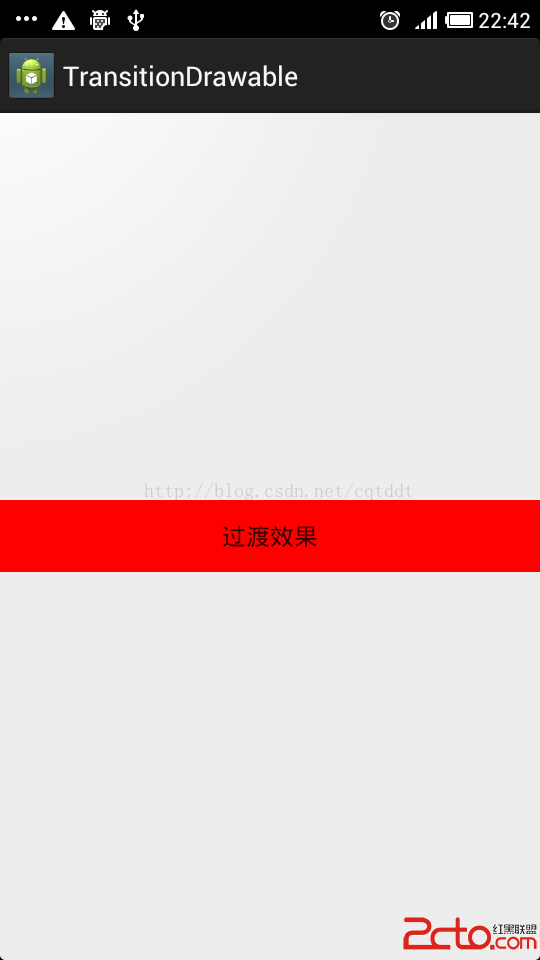
實現兩張圖片漸隱漸現的過渡效果Transition Drawable實現兩張圖片之間動態過度效果的方式。 運行如下所示:第一張為初始界面,第二張為過度中界面