編輯:關於Android編程
主要原理是:
在應用啟動的時候,去取服務器上版本號 ,與當前應用的對比如果有更新則下載
下面這個是獲取當前應用的版本信息
private void getCurVersion() {
        try {
            PackageInfo pInfo = context.getPackageManager().getPackageInfo(
                    context.getPackageName(), 0);
            curVersion = pInfo.versionName;
            curVersionCode = pInfo.versionCode;
        } catch (NameNotFoundException e) {
            Log.e("update", e.getMessage());
            curVersion = "1.0.1";
            curVersionCode = 1;
        }

}服務器端格式如下 version_1.0.2
HttpURLConnection 獲取輸入流,再用
BufferedReader 緩沖流,readline成String,再比較
private boolean check_update(){
		String getstring = null;
		String version=null;
		getCurVersion();
		try {

			URL myurl=new URL(app_check);

			HttpURLConnection urlconnection=(HttpURLConnection) myurl.openConnection();
			urlconnection.setReadTimeout(50000);
			urlconnection.setConnectTimeout(50000);
			urlconnection.connect();
			InputStream in=urlconnection.getInputStream();

			   BufferedReader buffread;
			   buffread=new BufferedReader(new InputStreamReader(in,"utf-8"));
			   String line;
				line=buffread.readLine();
				while(line!=null){
					getstring+=line;
					line=buffread.readLine();

				}
				int index=getstring.indexOf("version_");
				//2.0.1
				version=getstring.substring(index+8, index+13);
				in.close();
				Log.e("version",version);
		} catch (MalformedURLException e) {
			// TODO Auto-generated catch block
			e.printStackTrace();
		} catch (IOException e) {
			// TODO Auto-generated catch block
			e.printStackTrace();
		}
	    if(version!=null){
		if(version.compareTo(curVersion)>0)
			return true;
		else
			return false;
	    }
	    else
	    	return false;
}private void showdownDialog(){
AlertDialog.Builder dialog = new AlertDialog.Builder(context);
dialog.setTitle("軟件版本更新");
dialog.setMessage("有最新的app更新");
dialog.setNegativeButton("以後再說", new OnClickListener(){
@Override
public void onClick(DialogInterface arg0, int arg1) {
// TODO Auto-generated method stub
arg0.dismiss();
}
});
dialog.setPositiveButton("確定", new OnClickListener(){
@Override
public void onClick(DialogInterface dialog, int which) {
// TODO Auto-generated method stub
//確定裡面調用下載線程,同時顯示下載的那個進度對話框
dialog.dismiss();
cancel=true;
downapk();
showDownapk();
}
});
dialog.show();
}private void setInstall(){
File apkfile = new File(apk_path);
if (!apkfile.exists()) {
return;
}
Intent i = new Intent(Intent.ACTION_VIEW);
i.setDataAndType(Uri.parse("file://" + apkfile.toString()), "application/vnd.android.package-archive");
context.startActivity(i);
}
 如何在IIS添加MIME擴展類型
在iis7中默認的MIME類型並不包含所有的後綴名文件,像現在比較熱門的apk,ipa文件都是需要手動添加的。那如何在IIS添加MIME類型?步驟如下:1、打開iis7,
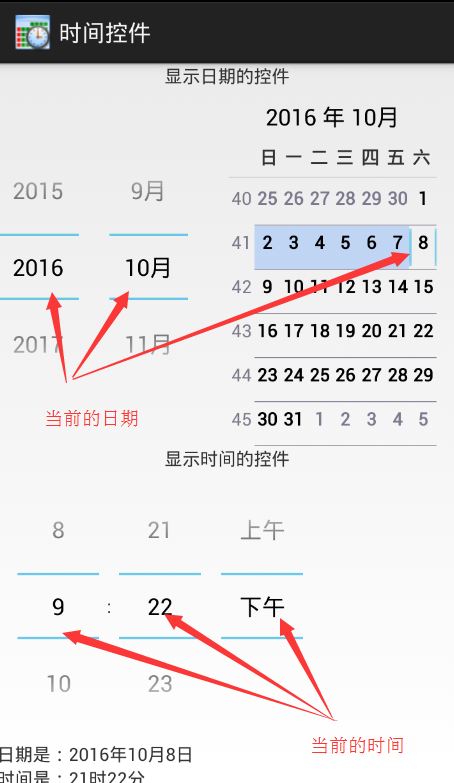 Android顯示時間和日期的控件的使用總結
相關類的認識Picker(DatePicker、TimerPicker、NumberPicker)其中DatePicker和TimerPicker都有窗口的形式顯示日期和
 [Android] 獲取WebView的頁面標題(Title)-----WebChromeClient.onReceivedTitle()方法的重寫
應用開發中需要獲取WebView當前頁面的標題,可能通過對WebChromeClient.onReceivedTitle()方法的重寫來實現 效果圖如下: 代碼如下:
 Android-支付寶快捷支付
支付寶的快捷支付Android版業務流程比較麻煩,出現的意外情況比較多.在此,簡單說下開發流程以及出現錯誤的解決方案; 1.注冊支付業務.這裡不在贅述.建立數據安全傳輸所