編輯:關於Android編程
這篇文章主要講解注解實現findViewById的功能,首先我們來熟悉一下在java中怎麼定義一個注解和解析一個注解
注解的概念是在jdk5.0中提出來的,在java.lang的包中已經定義了三個注解:Override,Deprecated,SuppressWarnings注解的定義和接口的接口非常像,在interface的前面多了一個@
public @interface TestPerson
{

}
public @interface TestPerson
{
  //name既是這個注解的屬性,也是注解的方法,調用name()返回值就是name
  String name() default gavin;
}
//用來標注某個類是用來干嘛的
public @interface ClassFunction
{
  String value() default ;
}

//用來標注類中的方法是被誰測試的
public @interface TestPerson
{
  //name是屬性而不是方法,gavin是它的默認值,在定義的時候可以不用給定默認值
  String name() default gavin;
}
@Target(ElementType.METHOD)
@Retention(RetentionPolicy.SOURCE)
public @interface Override {
}

@Documented
@Retention(RetentionPolicy.RUNTIME)
@Target(value={CONSTRUCTOR, FIELD, LOCAL_VARIABLE, METHOD, PACKAGE, PARAMETER, TYPE})
public @interface Deprecated {
}
那麼我們就完善我們自己的注解吧
@Target(ElementType.METHOD)//作用於方法
@Retention(RetentionPolicy.RUNTIME)//在運行時有效(即運行時保留)
public @interface TestPerson
{
  //name是屬性而不是方法,gavin是它的默認值,在定義的時候可以不用給定默認值
  String name() default gavin;
}

@Target(ElementType.TYPE)//作用於類上
@Retention(RetentionPolicy.RUNTIME)//在運行時有效(即運行時保留)
public @interface ClassFunction
{
  String value() default ;
}
@ClassFunction(用於描述一個人的基本信息)
public class Person
{
  private static final String TAG = Person;

  @TestPerson(name=jj)
  public void setName()
  {

  }
}
/**
 * com.annotation.TestPerson
 * @author yuanzeyao

 * create at 2014年5月21日 下午1:30:14
 */
@Target(ElementType.METHOD)
@Retention(RetentionPolicy.RUNTIME)
public @interface TestPerson {

  String name();
}
public class Person {
  private static final String TAG = Person;
  @TestPerson(name=gavin)
  public void getName()
  {

  }
}
public class Main {
  private static final String TAG = Main;
  public static void main(String[] args)
  {
     Person person=new Person();
	 //獲得Person對應的Class
     Class clazz=Person.class;
     try {
	  //找到getName方法
      Method method=clazz.getMethod(getName,null);
	  //判斷是否被TestPerson標注
      if(method.isAnnotationPresent(TestPerson.class))
      {
		//調用getName方法
        method.invoke(person, null);
		//得到TestPerson注解的實例
        TestPerson test=method.getAnnotation(TestPerson.class);
		//獲得其name屬性
        String name=test.name();
        System.out.println(this method is test by-->+name);
      }
    } catch (SecurityException e) {
    } catch (NoSuchMethodException e) {
    } catch (IllegalArgumentException e) {
    } catch (IllegalAccessException e) {
    } catch (InvocationTargetException e) {
    }
  }
}
@Target(ElementType.FIELD)
@Retention(RetentionPolicy.RUNTIME)
public @interface InjectView
{
  //id就是控件id,在某一個控件上使用注解標注其id
  int id() default -1;
}
public class MainActivity extends Activity
{
  public static final String TAG=MainActivity;
  //標注TextView的id
  @InjectView(id=R.id.tv_img)
  private TextView mText;

  @Override
  protected void onCreate(Bundle savedInstanceState) {
    super.onCreate(savedInstanceState);
    setContentView(R.layout.activity_main);
    try {
      autoInjectAllField(this);
    } catch (IllegalAccessException e) {
    } catch (IllegalArgumentException e) {
    }

    if(mText!=null)
      mText.setText(Hello Gavin);
  }

  public void autoInjectAllField(Activity activity) throws IllegalAccessException, IllegalArgumentException
  {
	//得到Activity對應的Class
    Class clazz=this.getClass();
	//得到該Activity的所有字段
    Field []fields=clazz.getDeclaredFields();
    Log.v(TAG, fields size-->+fields.length);
    for(Field field :fields)
    {
	  //判斷字段是否標注InjectView
      if(field.isAnnotationPresent(InjectView.class))
      {
        Log.v(TAG, is injectView);
		//如果標注了,就獲得它的id
        InjectView inject=field.getAnnotation(InjectView.class);
        int id=inject.id();
        Log.v(TAG, id--->+id);
        if(id>0)
        {
		  //反射訪問私有成員,必須加上這句
          field.setAccessible(true);
		  //然後對這個屬性復制
          field.set(activity, activity.findViewById(id));
        }
      }
    }
  }


}
 Android模仿微信語音聊天功能
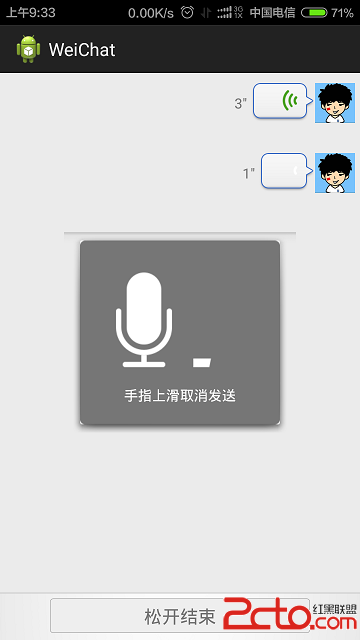
項目效果如下:項目目錄結構如下:代碼如下:AudioManager.javapackage com.xuliugen.weichat;import java.io.Fil
 通過源碼,手把手帶你學屬性動畫(一) - 相關類總覽
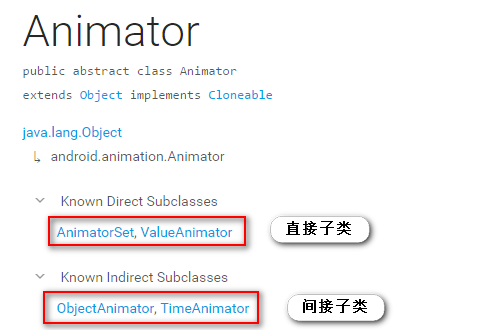
在 Android 3.0(API level 11) 之後,Google 為 Android添加了屬性動畫(Property Animation),該動畫系統是一個強大
 Android實現360手機助手底部的動畫菜單
首先來看下我們實現的效果和360效果的對比:360手機助手效果演示本庫實現的效果(Icon來自360手機助手,侵刪)xml布局文件注:為了美觀,講每個Button的高度以
 Android圖片緩存處理
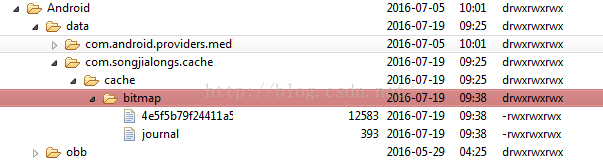
LruCache以鍵-值對的形式存儲(內部定義了一個LinkedHashMap)數據,通過new LruCache(int size)實例化,參數使指定分配給LruCac