編輯:關於Android編程
原文出自:方傑|http://fangjie.sinaapp.com/?p=184 轉載請注明出處
最終效果演示:http://fangjie.sinaapp.com/?page_id=54
該項目代碼已經放到github:https://github.com/JayFang1993/SinaWeibo
一.首先是ListView的adapter。
因為微博列表的Item不是規則的,比如說有些微博有轉發子微博,有些沒有,有些有圖片,有些沒有圖片,所以說很不固定。這裡就采用BaseAdapter,要自己為微博Item設計一個WeiboAdapter.java
package com.fangjie.weibo.ui;

import java.util.Date;
import java.util.List;
import com.fangjie.weibo.R;
import com.fangjie.weibo.bean.Weibo;
import android.content.Context;
import android.graphics.Bitmap;
import android.support.v4.util.LruCache;
import android.text.Html;
import android.view.View;
import android.view.ViewGroup;
import android.widget.BaseAdapter;
import android.widget.ImageView;
import android.widget.LinearLayout;
import android.widget.TextView;

public class WeiboAdapter extends BaseAdapter {

	private Context context;
	private List weibos;

	public WeiboAdapter(Context context,List weibos) {
        System.out.println(weibos.get(1).content);
		this.context=context;
		this.weibos=weibos;
	}

	public int getCount() {
		return weibos.size();
	}

	public Object getItem(int position) {
		return null;
	}

	public long getItemId(int position) {
		return 0;
	}

	public View getView(int position, View convertView, ViewGroup parent) {
		 //position代表位置

        //通過View關聯自定義Item布局,進行填充

		 if(convertView == null)
         {
			 convertView = View.inflate(context, R.layout.wb_item, null);
         }

        System.out.println(position);
        final Weibo weibo =weibos.get(position);

        //獲取要顯示的組件,注意findViewById的調用對象是上面填充了Item的布局的對象View
        TextView tv_name = (TextView)convertView.findViewById(R.id.txt_wb_item_uname);
        TextView tv_content = (TextView)convertView.findViewById(R.id.txt_wb_item_content);
        TextView tv_time =(TextView)convertView.findViewById(R.id.txt_wb_item_time);
        TextView tv_from =(TextView)convertView.findViewById(R.id.txt_wb_item_from);
        TextView tv_comment =(TextView)convertView.findViewById(R.id.txt_wb_item_comment);
        TextView tv_repost =(TextView)convertView.findViewById(R.id.txt_wb_item_redirect);

        LinearLayout zlayout=(LinearLayout)convertView.findViewById(R.id.lyt_wb_item_sublayout);
        TextView tv_zcontent=(TextView)convertView.findViewById(R.id.txt_wb_item_subcontent);

        final ImageView iv_userhead=(ImageView)convertView.findViewById(R.id.img_wb_item_head);
        ImageView iv_isv=(ImageView)convertView.findViewById(R.id.img_wb_item_V);
        ImageView iv_content_pic=(ImageView)convertView.findViewById(R.id.img_wb_item_content_pic);
        ImageView iv_zcontent_pic=(ImageView)convertView.findViewById(R.id.img_wb_item_content_subpic);

        //組件添加內容
        tv_content.setText(weibo.getContent());
        tv_name.setText(weibo.getUser().getName());
        tv_from.setText("來自:"+Html.fromHtml(weibo.getFrom()));
        tv_repost.setText(weibo.getReposts_count()+"");
        tv_comment.setText(weibo.getComments_count()+"");
        tv_time.setText(dealTime(weibo.getTime()));

        loadBitmap(weibo.getUser().getProfile_image_url(), iv_userhead,80,80);

        if(!weibo.getBmiddle_pic().equals(""))
        {
            loadBitmap(weibo.getBmiddle_pic(), iv_content_pic,0,0);
            iv_content_pic.setVisibility(View.VISIBLE);
        }
        else
        {
            iv_content_pic.setVisibility(View.GONE);
        }

        if(weibo.getUser().isIsv())
        	iv_isv.setVisibility(View.VISIBLE);
        else
        	iv_isv.setVisibility(View.GONE);

        if(weibo.getWeibo()!=null)
        {
        	zlayout.setVisibility(View.VISIBLE);
        	tv_zcontent.setText("@"+weibo.getWeibo().getUser().getName()+":"+weibo.getWeibo().getContent());
            if(!weibo.getWeibo().getBmiddle_pic().equals(""))
            {
                loadBitmap(weibo.getWeibo().getBmiddle_pic(), iv_zcontent_pic,0,0);
                iv_zcontent_pic.setVisibility(View.VISIBLE);
            }
        }
        else
        	zlayout.setVisibility(View.GONE);

        return convertView;
	}

	public void addItem(Weibo weibo)
	{
		weibos.add(weibo);
	}
}
微博Item的布局文件 wb_item.xml
WeiboAdapter的作用就是將List
二.ListView的細節——底部加載更多
首先需要為這個東西寫一個布局文件 load_more.xml,布局很簡單,就是一個button。
然後在HomeActivity.java中為ListView增加一個底部視圖,ListView.addFooterView(View view);
		//設置列表底部視圖-加載更多
		View loadMoreView = getLayoutInflater().inflate(R.layout.load_more, null);
		loadMoreButton= (Button) loadMoreView.findViewById(R.id.loadMoreButton);
        weibolist.addFooterView(loadMoreView);
三.ListView的刷新按鈕
在點擊主界面的刷新按鈕時,會出現progressbar,這些都不是很難。首先寫好一個progress的布局,在刷新任務開始之前然progressbar顯示,任務結束後就View.gone就OK啦,詳細請看源代碼HomeActivity.
四.注意:我在寫ListView的時候,在模擬器測試完全OK,但是在真機上調試時,ListView與上面的TitleBar和TabHost交界處會有陰影。加上這句就可以了。
ListView.setFadingEdgeLength(0);
可能講的不是很直觀,最後附上HomeActivity.java的全部代碼,這個就是Home界面的代碼
package com.fangjie.weibo.ui;

import java.util.HashMap;
import java.util.List;
import java.util.Map;
import com.fangjie.weibo.R;
import com.fangjie.weibo.bean.Task;
import com.fangjie.weibo.bean.Weibo;
import com.fangjie.weibo.logic.MainService;
import com.fangjie.weibo.util.SharePreferencesUtil;
import android.app.Activity;
import android.os.Bundle;
import android.view.View;
import android.view.View.OnClickListener;
import android.widget.Button;
import android.widget.LinearLayout;
import android.widget.ListView;
import android.widget.TextView;
import android.widget.Toast;

public class HomeActivity extends Activity implements IWeiboAcitivity {
	private ListView weibolist;
	private List weibos;
	private WeiboAdapter adapter;

	private TextView tv_title;
	private Button btn_refresh;
	private Button btn_update;

	private LinearLayout progress;

	private Button loadMoreButton;

	protected void onCreate(Bundle savedInstanceState) {

		super.onCreate(savedInstanceState);
		setContentView(R.layout.home);
		init();
	}

	public void init() {
		weibolist=(ListView)findViewById(R.id.lv_weibos);
		tv_title=(TextView)findViewById(R.id.txt_wb_title);
		btn_refresh=(Button)findViewById(R.id.btn_refresh);
		btn_update=(Button)findViewById(R.id.btn_writer);
		progress=(LinearLayout)findViewById(R.id.layout_progress);

		//設置列表底部視圖-加載更多
		View loadMoreView = getLayoutInflater().inflate(R.layout.load_more, null);
		loadMoreButton= (Button) loadMoreView.findViewById(R.id.loadMoreButton);
        weibolist.addFooterView(loadMoreView);

        weibolist.setFadingEdgeLength(0);

		final String token=SharePreferencesUtil.getLoginUser(HomeActivity.this).getToken();
		tv_title.setText(SharePreferencesUtil.getLoginUser(HomeActivity.this).getUserName());

		Map params=new HashMap();
		params.put("token", token);
		Task task=new Task(Task.GET_WEIBOS, params);
		progress.setVisibility(View.VISIBLE);
		MainService.newTask(task);
		MainService.addActivty(HomeActivity.this);

		loadMoreButton.setOnClickListener(new OnClickListener() {
			public void onClick(View v) {
				Map params=new HashMap();
				params.put("token", token);
				params.put("max_id", weibos.get(weibos.size()-1).getWid());
				loadMoreButton.setText("正在加載,請稍候...");
				Task task=new Task(Task.LOADMORE, params);
				MainService.newTask(task);
				MainService.addActivty(HomeActivity.this);
			}
		});

		btn_refresh.setOnClickListener(new OnClickListener() {
			public void onClick(View v) {
				Map params=new HashMap();
				params.put("token", token);
				progress.setVisibility(View.VISIBLE);
				Task task=new Task(Task.GET_WEIBOS, params);
				MainService.newTask(task);
				MainService.addActivty(HomeActivity.this);
			}
		});

		btn_update.setOnClickListener(new OnClickListener() {
			public void onClick(View v) {
				Toast.makeText(HomeActivity.this, "親,程序猿還沒寫好呢...", Toast.LENGTH_LONG).show();
			}
		});
	}

	@SuppressWarnings("unchecked")
	public void refresh(int taskID, Object... objects) {
		switch (taskID)
		{
			case Task.GET_WEIBOS:
				weibos=(List)objects[0];
				adapter=new WeiboAdapter(HomeActivity.this,weibos);
				weibolist.setAdapter(adapter);
				break;
			case Task.LOADMORE:
				weibos=(List)objects[0];
				for(int i=1;i


可能大家在HomeActivity中只看到新開一些任務,但是這些任務具體做什麼操縱不清楚,大家可以看看前面的博文,因為有一個 邏輯處理的MainService處理類。針對Task.GET_WEIBOS和Task.LOADMORE,其中的代碼又增加了。這裡也附上MainService.java關於這兩個任務的部分代碼。
			//刷新微博
			case Task.GET_WEIBOS:
			{
				String token=(String)task.getParams().get("token");
				WeiboUtil weiboutil=new WeiboUtil();
				List weibos=weiboutil.getWeiboList(token,0);
				msg.obj=weibos;
				break;
			}
			//加載更多
			case Task.LOADMORE:
			{
				String token=(String)task.getParams().get("token");
				long max_id=(Long) task.getParams().get("max_id");
				WeiboUtil weiboutil=new WeiboUtil();
				List weibos=weiboutil.getWeiboList(token,max_id);
				msg.obj=weibos;
				break;
			}


 歡迎各位關注我的個人站點:http://fangjie.sinaapp.com/
 微信小程序 bnner滾動實例詳解
微信小程序 bnner滾動首先是輪播圖,autoplay 自動播放,interval 輪播的時間,duration 切換速度,可以根據自己需求去添加。Delete:是刪除
 Android 實現閃屏頁和右上角的倒計時跳轉實例代碼
以前編程的時候,遇到倒計時的功能時,經常自己去寫,但其實Android已經幫封裝好了一個倒計時類CountDownTimer,其實是將後台線程的創建和Handler隊列封
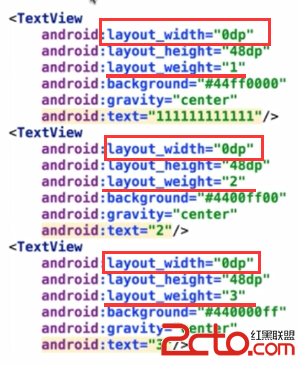 Android面試中的一個常見問題:Layout_weight的用法
今天在公司第一次去當了回面試官,挺帶勁的啦,發現那位面試的小伙做的卷子裡有道關於layout_weight的問題,感覺答得不是很好,遂想寫個博客(其實是想要記錄下這有意思
 AndrowListView實現(自定義游戲列表)android中不推薦的方法,要考慮向下兼容,用了推薦的新方法,可能不兼容舊版本系統的手機
activity類 package com.kane.listview; import java.util.ArrayList; import java.util.D