編輯:關於Android編程
如果每下載一張圖片,就得重寫一次Http協議,多線程的啟動和handler的信息傳遞就顯得太麻煩了,我們直接來封裝一個工具類,便於我們以後在開發時隨時可以調用。
(1)在清單文件添加權限
package com.example.g05_handler;

import java.io.IOException;

import org.apache.http.HttpResponse;
import org.apache.http.client.ClientProtocolException;
import org.apache.http.client.HttpClient;
import org.apache.http.client.methods.HttpGet;
import org.apache.http.impl.client.DefaultHttpClient;
import org.apache.http.util.EntityUtils;

import android.annotation.SuppressLint;
import android.app.ProgressDialog;
import android.content.Context;
import android.os.Handler;
import android.os.Message;
import android.util.Log;

public class DownLoad {

	private ProgressDialog dialog;

	public DownLoad(Context context) {
		// TODO Auto-generated constructor stub
		dialog = new ProgressDialog(context);
		dialog.setTitle("提示");
		dialog.setMessage("玩命加載中");

	}

	@SuppressLint("HandlerLeak")
	public void Down(final String path, final DownLoadCallback callback) {
		final Handler handler = new Handler() {
			@Override
			public void handleMessage(Message msg) {
				// TODO Auto-generated method stub
				super.handleMessage(msg);
				byte[] result = (byte[]) msg.obj;

				callback.download(result);

				if (msg.what == 1) {
					dialog.dismiss();
				}
			}
		};
		class MyThread implements Runnable {
			@Override
			public void run() {
				// TODO Auto-generated method stub
				HttpClient client = new DefaultHttpClient();
				HttpGet httpGet = new HttpGet(path);
				try {
					HttpResponse httpResponse = client.execute(httpGet);
					Log.i("TAG", "------>"
							+ httpResponse.getStatusLine().getStatusCode());
					if (httpResponse.getStatusLine().getStatusCode() == 200) {
						byte[] result = EntityUtils.toByteArray(httpResponse
								.getEntity());
						Message message = Message.obtain();
						message.obj = result;
						message.what = 1;
						handler.sendMessage(message);
					}
				} catch (ClientProtocolException e) {
					// TODO Auto-generated catch block
					e.printStackTrace();
				} catch (IOException e) {
					// TODO Auto-generated catch block
					e.printStackTrace();
				} finally {
					if (client != null) {
						client.getConnectionManager().shutdown();
					}
				}
			};
		}
		new Thread(new MyThread()).start();
		dialog.show();
	}

	public interface DownLoadCallback {
		public void download(byte[] data);
	}
}package com.example.g05_handler;
import com.example.g05_handler.DownLoad.DownLoadCallback;
import android.os.Bundle;
import android.app.Activity;
import android.graphics.Bitmap;
import android.graphics.BitmapFactory;
import android.view.Menu;
import android.view.View;
import android.widget.Button;
import android.widget.ImageView;
public class MainActivity extends Activity {
private Button button;
private ImageView imageView;
private final String path="http://avatar.csdn.net/D/7/5/1_u013900875.jpg";
@Override
protected void onCreate(Bundle savedInstanceState) {
super.onCreate(savedInstanceState);
setContentView(R.layout.activity_main);
button=(Button)this.findViewById(R.id.button1);
imageView=(ImageView)this.findViewById(R.id.imageView1);
button.setOnClickListener(new View.OnClickListener() {
@Override
public void onClick(View v) {
// TODO Auto-generated method stub
DownLoad downLoad=new DownLoad(MainActivity.this);
downLoad.Down(path, new DownLoadCallback() {
@Override
public void download(byte[] data) {
// TODO Auto-generated method stub
Bitmap bitmap=BitmapFactory.decodeByteArray(data, 0, data.length);
imageView.setImageBitmap(bitmap);
}
});
}
});
}
@Override
public boolean onCreateOptionsMenu(Menu menu) {
// Inflate the menu; this adds items to the action bar if it is present.
getMenuInflater().inflate(R.menu.main, menu);
return true;
}
} Android開發系列(十九):為SimpleAdapter設置樣式
Adapter的作用:數據在adapter中做了處理之後,顯示在視圖上 一般的對於ArrayAdapter來說,只需要把一個數組和一個樣式傳遞給ArrayAdapter之
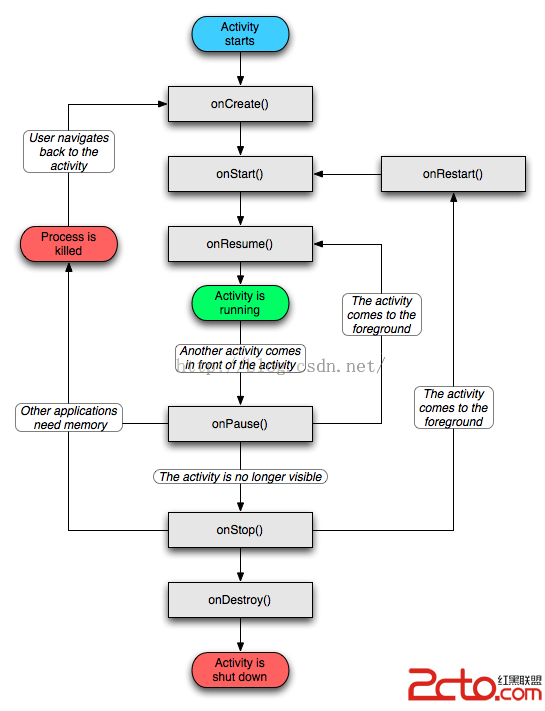 Android的生命周期
Activity的生命周期圖2 Android生命周期中涉及到的幾個過程 1.啟動Activity:系統會先調用onCreate方法,然後調用onStart方法,最後
 酷狗ktv怎麼用自己的伴奏 酷狗ktv怎麼設置不用系統的伴奏
酷狗ktv怎麼用自己的伴奏?一、 音樂分類,找KTV伴 酷狗音樂的軟件設計者為愛唱歌用戶考慮周到,在“酷狗音樂2008軟件”的右
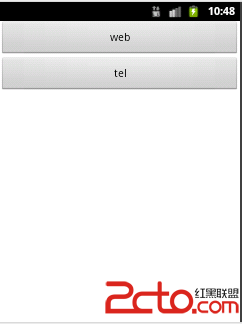 第十四章,通過Intent打開其他軟件(Android)
activity_main.xml MainActivity.java package com.example.demo0623;impo