編輯:關於Android編程
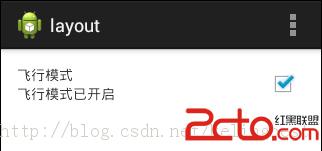
需求:模擬android系統應用設置中飛行模式的開啟與關閉,並記住設置的狀態
布局文件:fragment_main.xml
資源文件strings.xml
MainActivity.javalayout Settings 飛行模式 關閉網絡連接 飛行模式已開啟 飛行模式已關閉
public class MainActivity extends Activity {
	private TextView tv_content;
	private CheckBox cb;
	private RelativeLayout rl;
	private SharedPreferences sp;

	@Override
	protected void onCreate(Bundle savedInstanceState) {
		super.onCreate(savedInstanceState);
		setContentView(R.layout.fragment_main);

		sp = getSharedPreferences("config", MODE_PRIVATE);//將需要記錄的數據保存在config.xml文件中
		// sp =  getPreferences(MODE_PRIVATE); 自動以當前activity.java文件的類名 作為.xml文件的名稱
		boolean flymode = sp.getBoolean("flymode", false);

		tv_content = (TextView) findViewById(R.id.tv_content);
		cb=(CheckBox) findViewById(R.id.cb);
		rl = (RelativeLayout) findViewById(R.id.rl);

		if (flymode) {
			tv_content.setText(R.string.ari_open);
			cb.setChecked(true);
		} else {
			tv_content.setText(R.string.ari_close);
			cb.setChecked(false);
		}
		rl.setOnClickListener(new OnClickListener() {
			public void onClick(View v) {
				if (cb.isChecked()) {
					cb.setChecked(false);
					tv_content.setText(R.string.ari_close);
					Editor editor = sp.edit();
					editor.putBoolean("flymode", false);
					editor.commit();
				} else {
					cb.setChecked(true);
					tv_content.setText(R.string.ari_open);
					Editor editor = sp.edit();
					editor.putBoolean("flymode", true);
					editor.commit();
				}
			}
		});

/*		cb.setOnCheckedChangeListener(new OnCheckedChangeListener() {

			@Override
			public void onCheckedChanged(CompoundButton buttonView, boolean isChecked) {
				if(isChecked){
					tv_content.setText(R.string.ari_open);
					Editor editor = sp.edit();
					editor.putBoolean("flymode", false);
					editor.commit();
				}else{
					tv_content.setText(R.string.ari_close);
					Editor editor = sp.edit();
					editor.putBoolean("flymode", true);
					editor.commit();
				}

			}
		});*/
	}
  }
界面效果如圖:
 Android 自定義ViewGroup之實現FlowLayout-標簽流容器
本篇文章講的是Android 自定義ViewGroup之實現標簽流式布局-FlowLayout,開發中我們會經常需要實現類似於熱門標簽等自動換行的流式布局的功能,網上也有
 Android5.x新特性之 Toolbar和Theme的使用
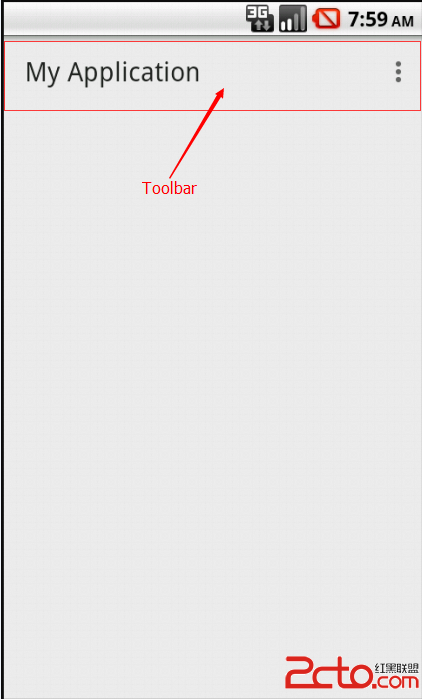
Android5.0以後谷歌大力推崇Material Design設計,有意統一之前Android style風格亂象的情況。上一篇博客我們學習了Androi
 Android中進程間通信(IPC)方式總結
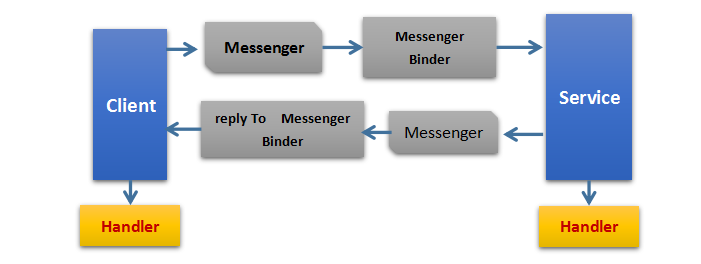
IPC為進程間通信或跨進程通信,是指兩個進程進行進程間通信的過程。在PC和移動設備上一個進程指的是一個程序或者一個應用,所以我們可以將進程間通信簡單理解為不同應用之間的通
 Android實現圖片疊加效果的兩種方法
本文實例講述了Android實現圖片疊加效果的兩種方法。分享給大家供大家參考,具體如下:效果圖:第一種:第二種:第一種是通過canvas畫出來的效果:public voi