編輯:關於Android編程
Service想要與Activity進行數據交互,首先Activity先得綁定Service.bound service是service 的實現,它允許其他應用程序綁定到它並與之交互。要提供bound service,我們必須實現onBind()回調方法。這個方法返回一個內部對象定義的編程接口,Activity可以使用與Service進行交互。那麼具體該如何實現呢,首先我們還是一樣先創建一個MyService繼承Service。然後如何設置:呢。(1)在你的Service,創建一個Binder實例,返回當前的Service實例以及一個Activity可以調用公共方法。(2)返回這個實例的Binder在onBind()回調方法。(3)在Activity裡創建ServiceConnection,在onServiceConnected()回調方法接受Binder,並得到服務器的實例。講的比較啰嗦哦,我們還是看代碼來細細品味吧。
Service的代碼
package com.example.f22_service02;

import java.util.Random;

import android.app.Service;
import android.content.Intent;
import android.os.Binder;
import android.os.IBinder;
import android.os.Parcel;
import android.os.RemoteException;
import android.util.Log;

public class HelloService extends Service {
    private MyBinder binder=new MyBinder();

	public class MyBinder extends Binder{
		public HelloService getService(){
			return HelloService.this;
			//返回Service實例,使主程序能調用該方法

		}
		@Override
		protected boolean onTransact(int code, Parcel data, Parcel reply,
				int flags) throws RemoteException {
			// TODO Auto-generated method stub
			Log.i("TAG", "------>"+data.readInt());
			Log.i("TAG", "------>"+data.readString());
			reply.writeInt(2);
			reply.writeString("Rose");
			return super.onTransact(code, data, reply, flags);
		}

	}
	@Override
	public IBinder onBind(Intent intent) {
		// TODO Auto-generated method stub
		return binder; //回掉方法
	}
	public int getRandom(){
		return new Random().nextInt(100);

	}


	@Override
	public void onCreate() {
		// TODO Auto-generated method stub
		Log.i("TAG", "------>Create");
		super.onCreate();

	}
	@Override
	public boolean onUnbind(Intent intent) {
		// TODO Auto-generated method stub
		Log.i("TAG", "------>Unbind");
		return super.onUnbind(intent);
	}

}
package com.example.f22_service02;

import com.example.f22_service02.HelloService.MyBinder;

import android.os.Bundle;
import android.os.IBinder;
import android.os.Parcel;
import android.os.RemoteException;
import android.annotation.SuppressLint;
import android.app.Activity;
import android.content.ComponentName;
import android.content.Context;
import android.content.Intent;
import android.content.ServiceConnection;
import android.util.Log;
import android.view.View;
import android.view.View.OnClickListener;
import android.widget.Button;

@SuppressLint("Recycle")
public class MainActivity extends Activity implements OnClickListener {
	private Button button, button2, button3;
	private MyBinder binder;
	private HelloService helloService;

	@Override
	protected void onCreate(Bundle savedInstanceState) {
		super.onCreate(savedInstanceState);
		setContentView(R.layout.activity_main);
		button = (Button) this.findViewById(R.id.button1);
		button2 = (Button) this.findViewById(R.id.button2);
		button3 = (Button) this.findViewById(R.id.button3);
		button.setOnClickListener(this);
		button2.setOnClickListener(this);
		button3.setOnClickListener(this);
	}


	private ServiceConnection connection = new ServiceConnection() {

		@Override
		public void onServiceDisconnected(ComponentName name) {
			// TODO Auto-generated method stub

			Log.i("ACTIVITY", "---------〉失去綁定");

		}

		@Override
		public void onServiceConnected(ComponentName name, IBinder service) {
			// TODO Auto-generated method stub
			binder = (MyBinder) service; // 綁定Service,並獲得Service實例,接下來就可以調用Service中的方法了
			helloService = binder.getService();

			Log.i("ACTIVITY", "---------〉綁定成功");
		}
	};
	@SuppressLint("Recycle")
	@Override
	public void onClick(View v) {
		// TODO Auto-generated method stub
		switch (v.getId()) {
		case R.id.button1:
            //綁定Service
			Intent intent=new Intent(MainActivity.this,HelloService.class);
			bindService(intent, connection, Context.BIND_AUTO_CREATE);//第三個參數是一個標志顯示選項綁定

			break;

		case R.id.button2:
			//實現Activity與Service的數據交互
			//Parcel是一個容器,能包含消息(數據和對象引用),可以通過一個IBinde發送
            Parcel data=Parcel.obtain();
            data.writeInt(helloService.getRandom());
            data.writeString("jack");
            Parcel reply=Parcel.obtain();
        	try {
				binder.transact(IBinder.LAST_CALL_TRANSACTION, data, reply, 0);
			} catch (RemoteException e) {
				// TODO Auto-generated catch block
				e.printStackTrace();
			}
        	Log.i("ACTIVITY", "----Service回傳的值---->"+reply.readInt());
        	Log.i("ACTIVITY", "----Service回傳的值---->"+reply.readString());
			break;
		case R.id.button3:
			  //解除綁定
             unbindService(connection);
			break;
		}
	}

}
 Android Service綁定過程完整分析
通常我們使用Service都要和它通信,當想要與Service通信的時候,那麼Service要處於綁定狀態的。然後客戶端可以拿到一個Binder與服務端進行通信,這個過程
 Android常用逆向工具總結(未完待續)
寫在前面的話突然覺得我好無聊,寫這個有種浪費生命的感覺有沒有,不過項目結束的時候這個還是要寫的,以後寫還不如現在趁現在,趁著現在鏈接就在身邊直接寫了。1.apktool的
 Adapter類型控件之Adapter(數據適配器)
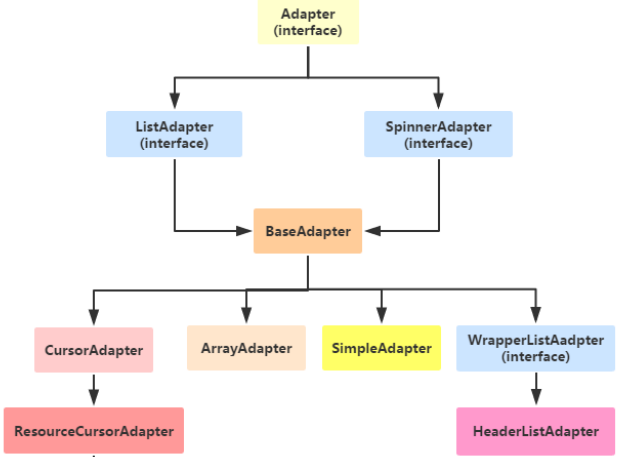
(一)概述Adapter是作為連接數據跟View之間橋梁的,你可以創建一個View來使用Adapter來對數據直接進行填充;(二)Adapter(適配器)的使用先來看看他
 Android源碼中的外觀模式
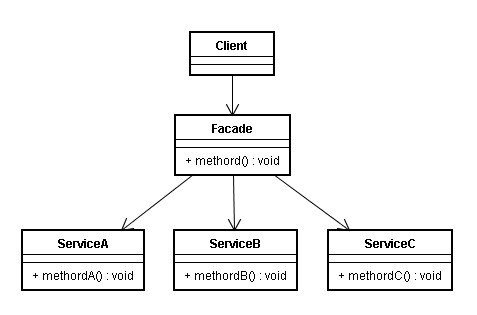
定義外觀模式(Facade Pattern):外部與一個子系統的通信必須通過一個統一的外觀對象進行,為子系統中的一組接口提供一個一致的界面,外觀模式定義了一個高層接口,這