編輯:關於Android編程
/**
 * 檢查網絡是否可用
 *
 * @param context
 * @return
 */
public static boolean detect(Context context) {
    ConnectivityManager manager = (ConnectivityManager) context
            .getApplicationContext().getSystemService(
                    Context.CONNECTIVITY_SERVICE);
    if (manager == null) {
        return false;
    }
    NetworkInfo networkinfo = manager.getActiveNetworkInfo();

    if (networkinfo == null || !networkinfo.isAvailable()) {
        return false;
    }
    return true;
}
b. 檢查WIFI是否連接
/**
 * 檢查當前WIFI是否連接,兩層意思——是否連接,連接是不是WIFI
 * @param context
 * @return true表示當前網絡處於連接狀態,且是WIFI,否則返回false
 */
public static boolean isWifiConnected(Context context) {
    ConnectivityManager cm = (ConnectivityManager) context
    .getSystemService(Context.CONNECTIVITY_SERVICE);
    NetworkInfo info = cm.getActiveNetworkInfo();
    if (info != null && info.isConnected()
    && ConnectivityManager.TYPE_WIFI == info.getType()) {
        return true;
    }
    return false;
}
c. 檢查GPRS是否連接
/**
 * 檢查當前GPRS是否連接,兩層意思——是否連接,連接是不是GPRS
 * @param context
 * @return true表示當前網絡處於連接狀態,且是GPRS,否則返回false
 */
public static boolean isGprsConnected(Context context) {
    ConnectivityManager cm = (ConnectivityManager) context
    .getSystemService(Context.CONNECTIVITY_SERVICE);
    NetworkInfo info = cm.getActiveNetworkInfo();
    if (info != null && info.isConnected()
    && ConnectivityManager.TYPE_MOBILE == info.getType()) {
        return true;
    }
    return false;
}
d. 檢查當前是否連接
/**
 * 檢查當前是否連接
 * @param context
 * @return true表示當前網絡處於連接狀態,否則返回false
 */
public static boolean isConnected(Context context) {
    ConnectivityManager cm = (ConnectivityManager) context
    .getSystemService(Context.CONNECTIVITY_SERVICE);
    NetworkInfo info = cm.getActiveNetworkInfo();
    if (info != null && info.isConnected()) {
        return true;
    }
    return false;
}
二、Bitmap 工具類相關記錄
package com.example.syc_util;

import java.io.BufferedOutputStream;
import java.io.ByteArrayOutputStream;
import java.io.File;
import java.io.FileOutputStream;
import java.io.IOException;
import java.io.InputStream;
import java.io.OutputStream;
import android.content.Context;
import android.graphics.Bitmap;
import android.graphics.Canvas;
import android.graphics.Matrix;
import android.graphics.Paint;
import android.graphics.PorterDuffXfermode;
import android.graphics.Rect;
import android.graphics.RectF;
import android.graphics.Bitmap.CompressFormat;
import android.graphics.Bitmap.Config;
import android.graphics.BitmapFactory;
import android.graphics.BitmapFactory.Options;
import android.graphics.PorterDuff.Mode;
import android.os.Environment;
import android.util.Log;
import android.widget.Toast;

public class BitmapTools {

	/**
	 * 根據輸入流獲取位圖對象
	 *
	 * @param is
	 * @return
	 */
	public static Bitmap getBitmap(InputStream is) {
		return BitmapFactory.decodeStream(is);
	}

	/**
	 * 根據輸入流和 縮小比例 獲取位圖對象
	 *
	 * @param is
	 * @param scale
	 * @return
	 */
	public static Bitmap getBitmap(InputStream is, int scale) {
		Bitmap bitmap = null;
		Options opts = new Options();
		opts.inSampleSize = scale;
		bitmap = BitmapFactory.decodeStream(is, null, opts);
		return bitmap;
	}

	/**
	 * 根據指定的寬高 保持縱橫比 縮小讀取指定圖片
	 *
	 * @param bytes
	 * @param width
	 * @param height
	 * @return
	 */
	public static Bitmap getBitmap(byte[] bytes, int width, int height) {
		Bitmap bitmap = null;
		Options opts = new Options();
		opts.inJustDecodeBounds = true;
		bitmap = BitmapFactory.decodeByteArray(bytes, 0, bytes.length, opts);
		opts.inJustDecodeBounds = false;
		int scaleX = opts.outWidth / width;
		int scaleY = opts.outHeight / height;
		int scale = scaleX > scaleY ? scaleX : scaleY;
		opts.inSampleSize = scale;
		Log.i(info, scale :  + scale);
		bitmap = BitmapFactory.decodeByteArray(bytes, 0, bytes.length, opts);
		return bitmap;
	}

	/**
	 * 根據指定的寬高 等比例 縮小讀取指定路徑的圖片
	 *
	 * @param fileName
	 *            文件名
	 * @param width
	 *            寬
	 * @param height
	 *            高
	 * @return
	 */
	public static Bitmap getBitmap(String fileName, int width, int height) {
		// 絕對路徑
		String abPath =fileName;
		BitmapFactory.Options options = new BitmapFactory.Options();
		options.inJustDecodeBounds = true;
		// 通過這個bitmap獲取圖片的寬和高
		Bitmap bitmap = BitmapFactory.decodeFile(abPath, options);
		// if (bitmap == null)
		// {
		// System.out.println(bitmap為空);
		// }
		float realWidth = options.outWidth;
		float realHeight = options.outHeight;
		if (realHeight == 0 || realWidth == 0) {
			return null;
		}
		// System.out.println(真實圖片高度: + realHeight + 寬度: + realWidth);
		// 計算縮放比
		int scaleX = options.outWidth / width;
		int scaleY = options.outHeight / height;
		int scale = scaleX > scaleY ? scaleX : scaleY;
		options.inSampleSize = scale;
		// }
		// else if(flag==1){
		// options.outWidth=width;
		// options.outHeight=height;
		// }
		options.inJustDecodeBounds = false;
		// 注意這次要把options.inJustDecodeBounds 設為 false,這次圖片是要讀取出來的。
		bitmap = BitmapFactory.decodeFile(abPath, options);
		int w = bitmap.getWidth();
		int h = bitmap.getHeight();
		System.out.println(縮略圖高度: + h + 寬度: + w);
		return bitmap;
	}
	/**
	 * 根據指定的寬高 縮小讀取指定路徑的圖片
	 *
	 * @param fileName
	 *            文件名
	 * @param width
	 *            寬
	 * @param height
	 *            高
	 * @return
	 */
	public static Bitmap getBitmapDeng(String fileName, int width, int height) {
		// 絕對路徑
		String abPath =  fileName;
		BitmapFactory.Options options = new BitmapFactory.Options();
		options.inJustDecodeBounds = true;
		// 通過這個bitmap獲取圖片的寬和高
		Bitmap bitmap = BitmapFactory.decodeFile(abPath, options);
		// if (bitmap == null)
		// {
		// System.out.println(bitmap為空);
		// }
		float realWidth = options.outWidth;
		float realHeight = options.outHeight;
		if (realHeight == 0 || realWidth == 0) {
			return null;
		}
		// System.out.println(真實圖片高度: + realHeight + 寬度: + realWidth);
		// 計算縮放比
		float scaleX = width/realWidth ;
		float scaleY =  height/realHeight ;
		int scale = (int) (scaleX > scaleY ? scaleX : scaleY);
		options.inSampleSize = scale;
		Matrix matrix = new Matrix();
		// float scaleWidth = ((float) w / width);
		// float scaleHeight = ((float) h / height);
		matrix.postScale(scaleX, scaleY);
		// }
		// else if(flag==1){
		// options.outWidth=width;
		// options.outHeight=height;
		// }
		options.inJustDecodeBounds = false;
		// 注意這次要把options.inJustDecodeBounds 設為 false,這次圖片是要讀取出來的。
		bitmap = BitmapFactory.decodeFile(abPath, options);
		bitmap=Bitmap.createBitmap(bitmap, 0, 0, width, height,
				matrix, true);
//		int w = bitmap.getWidth();
//		int h = bitmap.getHeight();
//		System.out.println(縮略圖高度: + h + 寬度: + w);
		return bitmap;
	}


	/**
	 * 根據指定的高度比例,拉伸讀取指定圖片
	 *
	 * @param bytes
	 * @param width
	 * @param height
	 * @return
	 */
	public static Bitmap getBitmap(byte[] bytes, int height) {
		Bitmap bitmap = null;
		Options opts = new Options();
		opts.inJustDecodeBounds = true;
		bitmap = BitmapFactory.decodeByteArray(bytes, 0, bytes.length, opts);
		opts.inJustDecodeBounds = false;
		// int scaleX = opts.outWidth / width;
		// int scaleY = opts.outHeight / height;
		// int scale = scaleX > scaleY ? scaleX : scaleY;
		opts.outHeight = opts.outHeight * height;

		// Log.i(info, scale :  + scale);
		bitmap = BitmapFactory.decodeByteArray(bytes, 0, bytes.length, opts);
		return bitmap;
	}

	public static byte[] Bitmap2Bytes(Bitmap bm) {
		ByteArrayOutputStream baos = new ByteArrayOutputStream();
		bm.compress(Bitmap.CompressFormat.PNG, 100, baos);
		return baos.toByteArray();
	}

	/**
	 * 根據路徑 從文件中讀取位圖對象
	 *
	 * @param path
	 * @return
	 */
	public static Bitmap getbiBitmap(String path) {
		Bitmap bitmap = null;
		bitmap = BitmapFactory.decodeFile(path);
		return bitmap;
	}

	/**
	 * 保存位圖對象到指定位置
	 *
	 * @param path
	 * @param bitmap
	 * @throws IOException
	 */
	public static void saveBitmap(String path, Bitmap bitmap)
			throws IOException {
		if (path != null && bitmap != null) {
			File file = new File(path);
			if (!file.exists()) {
				file.getParentFile().mkdirs();
				file.createNewFile();
			}

			OutputStream stream = new FileOutputStream(file);
			String name = file.getName();
			String end = name.substring(name.lastIndexOf(.) + 1);
			if (png.equals(end)) {
				bitmap.compress(CompressFormat.PNG, 100, stream);
			} else {
				bitmap.compress(CompressFormat.JPEG, 100, stream);
			}
		}
	}

	/**
	 * @param 將圖片內容解析成字節數組
	 * @param inStream
	 * @return byte[]
	 * @throws Exception
	 */
	public static byte[] readStream(InputStream inStream) throws Exception {
		byte[] buffer = new byte[1024];
		int len = -1;
		ByteArrayOutputStream outStream = new ByteArrayOutputStream();
		while ((len = inStream.read(buffer)) != -1) {
			outStream.write(buffer, 0, len);
		}
		byte[] data = outStream.toByteArray();
		outStream.close();
		inStream.close();
		return data;

	}

	/**
	 * @param 將字節數組轉換為ImageView可調用的Bitmap對象
	 * @param bytes
	 * @param opts
	 * @return Bitmap
	 */
	public static Bitmap getPicFromBytes(byte[] bytes,
			BitmapFactory.Options opts) {
		if (bytes != null)
			if (opts != null)
				return BitmapFactory.decodeByteArray(bytes, 0, bytes.length,
						opts);
			else
				return BitmapFactory.decodeByteArray(bytes, 0, bytes.length);
		return null;
	}

	/**
	 * @param 圖片縮放
	 * @param bitmap
	 *            對象
	 * @param w
	 *            要縮放的寬度
	 * @param h
	 *            要縮放的高度
	 * @return newBmp 新 Bitmap對象
	 */
	public static Bitmap zoomBitmap(Bitmap bitmap, int w, int h) {
		int width = bitmap.getWidth();
		int height = bitmap.getHeight();
		Matrix matrix = new Matrix();
		float scaleWidth = ((float) w / width);
		float scaleHeight = ((float) h / height);
		matrix.postScale(scaleWidth, scaleHeight);
		Bitmap newBmp = Bitmap.createBitmap(bitmap, 0, 0, width, height,
				matrix, true);
		return newBmp;
	}

	/**
	 * @param 等比圖片縮放
	 * @param bitmap
	 *            對象
	 * @param w
	 *            要縮放的寬度
	 * @param h
	 *            要縮放的高度
	 * @return newBmp 新 Bitmap對象
	 */
	public static Bitmap zoomBitmapDeng(Bitmap bitmap, int w, int h) {
		int width = bitmap.getWidth();
		int height = bitmap.getHeight();
		Matrix matrix = new Matrix();
		float scaleWidth = ((float) w / width);
		float scaleHeight = ((float) h / height);
		float scale = scaleWidth > scaleHeight ? scaleWidth : scaleHeight;
		matrix.postScale(scale, scale);
		Bitmap newBmp = Bitmap.createBitmap(bitmap, 0, 0, width, height,
				matrix, true);
		bitmap.recycle();
		return newBmp;
	}

	/**
	 * @param 等比圖片縮放
	 * @param bitmap
	 *            對象
	 * @param scale
	 *            等比縮放的比例
	 * @return newBmp 新 Bitmap對象
	 */
	public static Bitmap zoomBitmap(Bitmap bitmap, float scale) {
		int width = bitmap.getWidth();
		int height = bitmap.getHeight();
		Matrix matrix = new Matrix();
		// float scaleWidth = ((float) w / width);
		// float scaleHeight = ((float) h / height);
		matrix.postScale(scale, scale);
		Bitmap newBmp = Bitmap.createBitmap(bitmap, 0, 0, width, height,
				matrix, true);
		return newBmp;
	}

	/**
	 * // * 把Bitmap轉Byte // * @Author HEH // * @EditTime 2010-07-19 上午11:45:56
	 * //
	 */
	// public static byte[] Bitmap2Bytes(Bitmap bm){
	// ByteArrayOutputStream baos = new ByteArrayOutputStream();
	// bm.compress(Bitmap.CompressFormat.PNG, 100, baos);
	// return baos.toByteArray();
	// }
	/**
	 * 把字節數組保存為一個文件
	 *
	 * @Author HEH
	 * @EditTime 2010-07-19 上午11:45:56
	 */
	public static File getFileFromBytes(byte[] b, String outputFile) {
		BufferedOutputStream stream = null;
		File file = null;
		try {
			file = new File(outputFile);
			FileOutputStream fstream = new FileOutputStream(file);
			stream = new BufferedOutputStream(fstream);
			stream.write(b);
		} catch (Exception e) {
			e.printStackTrace();
		} finally {
			if (stream != null) {
				try {
					stream.close();
				} catch (IOException e1) {
					e1.printStackTrace();
				}
			}
		}
		return file;
	}
	/**
	 * 獲取圓角位圖的方法
	 *
	 * @param bitmap
	 *            需要轉化成圓角的位圖
	 * @param pixels
	 *            圓角的度數,數值越大,圓角越大
	 * @return 處理後的圓角位圖
	 */
	public static Bitmap toRoundCorner(Bitmap bitmap, int pixels) {
		Bitmap output = Bitmap.createBitmap(bitmap.getWidth(),
				bitmap.getHeight(), Config.ARGB_8888);
		Canvas canvas = new Canvas(output);
//		final int color = 0x00FFFFFF;
		final Paint paint = new Paint();
		final Rect rect = new Rect(0, 0, bitmap.getWidth(), bitmap.getHeight());
		final RectF rectF = new RectF(rect);
		final float roundPx = pixels;
		paint.setAntiAlias(true);
		canvas.drawARGB(0, 0, 0, 0);
//		paint.setColor(color);
		canvas.drawRoundRect(rectF, roundPx, roundPx, paint);
		paint.setXfermode(new PorterDuffXfermode(Mode.SRC_IN));
		canvas.drawBitmap(bitmap, rect, rect, paint);
		return output;
	}
	/**
	 * 得到圖片路徑
	 *
	 * @param fileItem
	 * @return 圖片路徑
	 */
	public static String getPicture(int fileItem, Context context) {
		String status = Environment.getExternalStorageState();
		if (!status.equals(Environment.MEDIA_MOUNTED)) {// 判斷是否有SD卡
			Toast.makeText(context, 請插入SD卡, Toast.LENGTH_LONG).show();
			return null;
		}
//		String date = MyDate.getMyNowDate(yyyy_MM_dd_);
//
//		BMapApiDemoApp app=(BMapApiDemoApp) context.getApplicationContext();
//		// 文件名
//		String fileName = date + fileItem+_+app.getName() + .png;
//		File f = new File(YinShiToadyAct.PHOTO_DIR, fileName);
		//boolean exist = f.exists();
//		if (!exist) {
//			return null;
//		}
		// Log.i(exist, exist+);
		//return fileName;
		return null;
	}

}
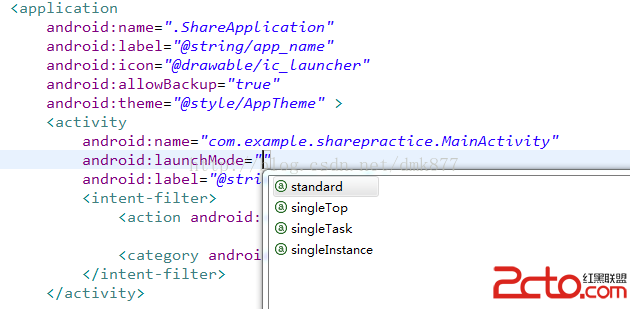 Android開發之Activity的啟動模式
今天花了整個下午+晚上的的時間學習了Activity的啟動模式,本來以為這個知識點很簡單,但是在學習的過程中發現,Activity的啟動模式並沒有
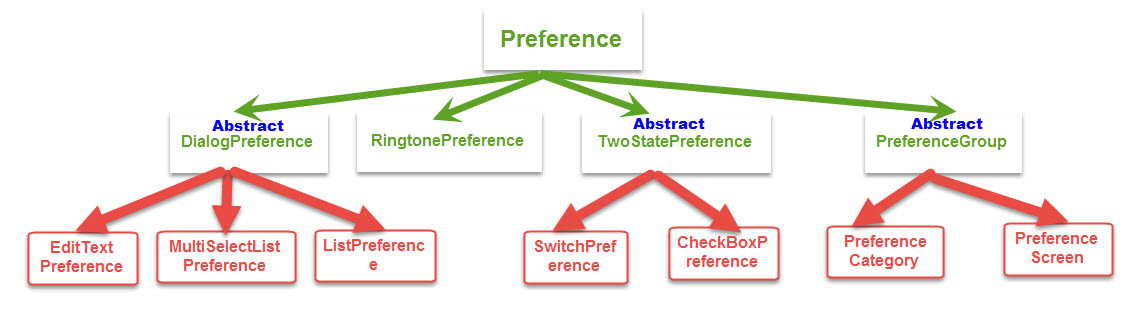 Android進階——Preference詳解之Preference系的基本應用(三)
引言前面一篇文章介紹了二級Preference的使用和特點,接下來進入系統給我提供的底級Preference的使用CheckBox選擇項CheckBoxPreferenc
 生活管家app
這篇文章給大家帶來的是一款android的生活管家app實現。主要實現功能及其要求:1、個人收入支出的管理。主要完成收入管理、支出管理、類別管理、收入查詢、支出查詢、統計
 android使用AIDL實現跨進程通訊(IPC)
前言:在還沒有做任何一件事情之前,千萬不要覺得這件事情很難,因為還沒有開始做內心就已經對這件事情產生了恐懼,這將會阻止你的進步,也許當你動手開始做了這件事後發現其實並不是