編輯:關於Android編程
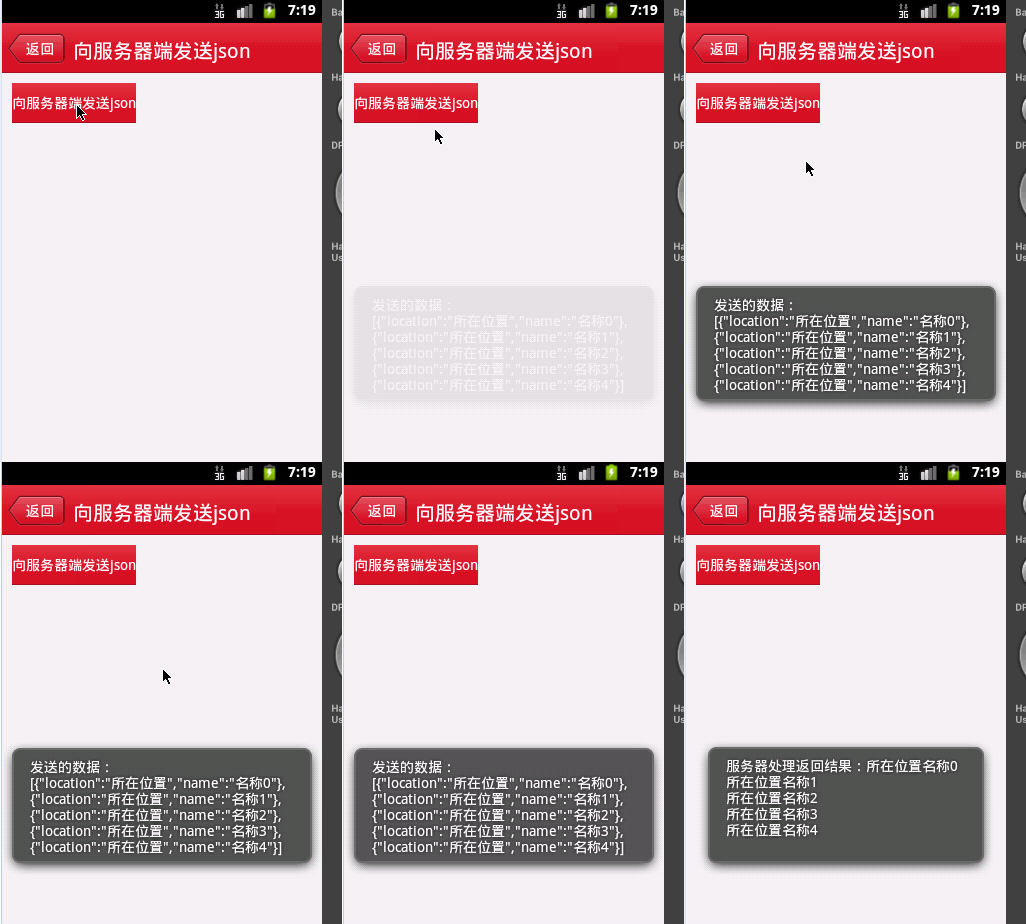
android 向服務器端發送json數據,本文講解的知識點比較基礎,如果你是大神,請直接關閉該網頁,免得浪費你寶貴時間。
1.向服務器端發送json數據
關鍵代碼:
   public void sendJsonToServer() {
		HttpClient httpClient = new DefaultHttpClient();
		try {

			HttpPost httpPost = new HttpPost(constant.url);
			HttpParams httpParams = new BasicHttpParams();
			List nameValuePair = new ArrayList();
			Gson gson = new Gson();
			String str = gson.toJson(initData());
			nameValuePair.add(new BasicNameValuePair("jsonString", URLEncoder
					.encode(str, "utf-8")));
			httpPost.setEntity(new UrlEncodedFormEntity(nameValuePair));
			httpPost.setParams(httpParams);
			Toast.makeText(Main.this, "發送的數據:\n" + str.toString(),
					Toast.LENGTH_SHORT).show();
			httpClient.execute(httpPost);
			HttpResponse response = httpClient.execute(httpPost);
			StatusLine statusLine = response.getStatusLine();
			if (statusLine != null && statusLine.getStatusCode() == 200) {
				HttpEntity entity = response.getEntity();
				if (entity != null) {
					Toast.makeText(
							Main.this,
							"服務器處理返回結果:" + readInputStream(entity.getContent()),
							Toast.LENGTH_SHORT).show();
				} else {
					Toast.makeText(Main.this, "沒有返回相關數據", Toast.LENGTH_SHORT)
							.show();
				}
			} else {
				Toast.makeText(Main.this, "發送失敗,可能服務器忙,請稍後再試",
						Toast.LENGTH_SHORT).show();
			}
		} catch (Exception e) {
			throw new RuntimeException(e);
		}
	}

	private static String readInputStream(InputStream is) throws IOException {
		if (is == null)
			return null;
		ByteArrayOutputStream bout = new ByteArrayOutputStream();
		int len = 0;
		byte[] buf = new byte[1024];
		while ((len = is.read(buf)) != -1) {
			bout.write(buf, 0, len);
		}
		is.close();
		return URLDecoder.decode(new String(bout.toByteArray()), "utf-8");
	}
/*
 * 填充數據源
 */
	public List initData() {
		List persons = new ArrayList();
		for (int i = 0; i < 5; i++) {
			Product p = new Product();
			p.setLocation("所在位置");
			p.setName("名稱" + i);
			persons.add(p);
		}
		return persons;
	}
4.服務器端采用VS建立一個網站,新建一個頁面androidtest.aspx
源碼:
protected void Page_Load(object sender, EventArgs e)
    {
        if (Request["jsonString"] != null)
        {
            string json = Request["jsonString"].ToString().Trim();
            json = HttpUtility.UrlDecode(json);
            try
            {
                string str = json.Substring(0, json.Length - 1);//去掉最後一個]
                str = str.Substring(1);//去掉第一個[
                string[] sArray = Regex.Split(str, "},");
                JavaScriptSerializer jss = new JavaScriptSerializer();
                for (int i = 0; i < sArray.Length; i++)
                {
                    if (i < sArray.Length - 1)
                    {
                        sArray[i] += "}";
                    }
                    ProductBillList list = jss.Deserialize(sArray[i]);
                    Response.Write(list.location + list.name + "\n");
                }
            }
            catch
            {
                Response.Write("出現異常");
            }
        }
        else
        {
            Response.Write("接收數據失敗");
        }
    }
    public class ProductBill
    {
        public List ProductBillLists { get; set; }
    }

    public class ProductBillList
    {
        public String name { get; set; }
        public String location { get; set; }
    }
 【安卓自定義控件系列】安卓自定義控件之組合控件
在安卓開發中,谷歌已經為我們提供了許多原生控件,基本上能夠滿足我們日常的開發需求,但是某些項目中原生控件可能達不到產品所要求的各式各樣的酷炫效果或功能效果,這個時候我們只
 Activity的四種啟動模式與內存洩漏
初看這個博文名,我都蒙蔽了,Activity的啟動模式居然能扯到內存問題,還有內存洩漏問題,WTF!!!不要方,小司機我帶你理解和稍微深入的探討一下Activity的四種
 Android源碼分析(二):View的事件分發機制探析
Android應用開發時,自定義控件時少不了和View的觸摸點擊事件打交道。針對View的事件分發原理,也看過網上的一些博客,但是看歸看,看了之後時間一長就又忘記了,因此
 微信怎麼定時設置消息勿打擾
有些時候我們只想要好好的休息可是在某些時刻我們登錄的微信老是響個不停,尤其是一些群聊,一直刷刷刷,自己又沒時間去看,下面小編就為大家分享一下怎麼設置微信消息