編輯:關於Android編程
Android開發常用工具方法(CommonTools)
在發開Android應用過程中,我們往往添加一個Utils包放置一些幫助方法類(這也是很好的Android開發習慣),這樣大大方便了開發時的調取操作、也使得軟件維護、更新更為便捷,以下就是我常用的幾個util類:有關於網絡的、文件操作的等等!
public class CommonTools {


	/**
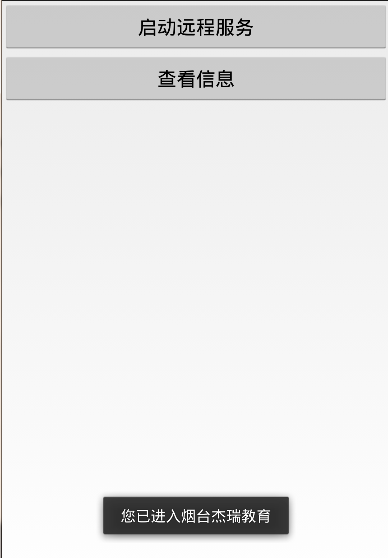
	 * 短暫顯示Toast消息
	 *
	 * @param context
	 * @param message
	 */
	public static void showShortToast(Context context, String message) {
		LayoutInflater inflater = (LayoutInflater) context
				.getSystemService(Context.LAYOUT_INFLATER_SERVICE);
		View view = inflater.inflate(R.layout.custom_toast, null);
		TextView text = (TextView) view.findViewById(R.id.toast_message);
		text.setText(message);
		Toast toast = new Toast(context);
		toast.setDuration(Toast.LENGTH_SHORT);
		toast.setGravity(Gravity.BOTTOM, 0, 300);
		toast.setView(view);
		toast.show();
	}

	/**
	 * 根據手機分辨率從dp轉成px
	 *
	 * @param context
	 * @param dpValue
	 * @return
	 */
	public static int dip2px(Context context, float dpValue) {
		final float scale = context.getResources().getDisplayMetrics().density;
		return (int) (dpValue * scale + 0.5f);
	}

	/**
	 * 根據手機的分辨率從 px(像素) 的單位 轉成為 dp
	 */
	public static int px2dip(Context context, float pxValue) {
		final float scale = context.getResources().getDisplayMetrics().density;
		return (int) (pxValue / scale + 0.5f) - 15;
	}

	/**
	 * 獲取手機狀態欄高度
	 *
	 * @param context
	 * @return
	 */
	public static int getStatusBarHeight(Context context) {
		Class c = null;
		Object obj = null;
		java.lang.reflect.Field field = null;
		int x = 0;
		int statusBarHeight = 0;
		try {
			c = Class.forName("com.android.internal.R$dimen");
			obj = c.newInstance();
			field = c.getField("status_bar_height");
			x = Integer.parseInt(field.get(obj).toString());
			statusBarHeight = context.getResources().getDimensionPixelSize(x);
			return statusBarHeight;
		} catch (Exception e) {
			e.printStackTrace();
		}
		return statusBarHeight;
	}


	/**
	 * 判斷手機號碼*/
	public static boolean isMobileNO(String mobiles){

		Pattern pattern = Pattern.compile("^((13[0-9])|(15[^4,\\D])|(18[0,5-9]))\\d{8}$");
		Matcher matcher = pattern.matcher(mobiles);

		return matcher.matches();

	}


}
關於網絡判斷的類NetworkUtils
public class NetworkUtils {

	/**
	 * 網絡是否可用
	 *
	 * @param activity
	 * @return
	 */
	public static boolean isNetworkAvailable(Context context) {
		ConnectivityManager connectivity = (ConnectivityManager) context
				.getSystemService(Context.CONNECTIVITY_SERVICE);
		if (connectivity == null) {
		} else {
			NetworkInfo[] info = connectivity.getAllNetworkInfo();
			if (info != null) {
				for (int i = 0; i < info.length; i++) {
					if (info[i].getState() == NetworkInfo.State.CONNECTED) {
						return true;
					}
				}
			}
		}
		return false;
	}

	/**
	 * 網絡連接提示
	 *
	 * @param context
	 * @return
	 */
	public static void networkStateTips(Context context) {
		if (!isNetworkAvailable(context)) {
			CommonTools.showShortToast(context, "網絡故障,請先檢查網絡連接");
		}
	}

	/**
	 * Gps是否打開
	 *
	 * @param context
	 * @return
	 */
	public static boolean isGpsEnabled(Context context) {
		LocationManager locationManager = ((LocationManager) context
				.getSystemService(Context.LOCATION_SERVICE));
		List accessibleProviders = locationManager.getProviders(true);
		return accessibleProviders != null && accessibleProviders.size() > 0;
	}

	/**
	 * wifi是否打開
	 */
	public static boolean isWifiEnabled(Context context) {
		ConnectivityManager mgrConn = (ConnectivityManager) context
				.getSystemService(Context.CONNECTIVITY_SERVICE);
		TelephonyManager mgrTel = (TelephonyManager) context
				.getSystemService(Context.TELEPHONY_SERVICE);
		return ((mgrConn.getActiveNetworkInfo() != null && mgrConn
				.getActiveNetworkInfo().getState() == NetworkInfo.State.CONNECTED) || mgrTel
				.getNetworkType() == TelephonyManager.NETWORK_TYPE_UMTS);
	}

	/**
	 * 判斷當前網絡是否是wifi網絡
	 * if(activeNetInfo.getType()==ConnectivityManager.TYPE_MOBILE) { //判斷3G網
	 *
	 * @param context
	 * @return boolean
	 */
	public static boolean isWifi(Context context) {
		ConnectivityManager connectivityManager = (ConnectivityManager) context
				.getSystemService(Context.CONNECTIVITY_SERVICE);
		NetworkInfo activeNetInfo = connectivityManager.getActiveNetworkInfo();
		if (activeNetInfo != null
				&& activeNetInfo.getType() == ConnectivityManager.TYPE_WIFI) {
			return true;
		}
		return false;
	}

	/**
	 * 判斷當前網絡是否是3G網絡
	 *
	 * @param context
	 * @return boolean
	 */
	public static boolean is3G(Context context) {
		ConnectivityManager connectivityManager = (ConnectivityManager) context
				.getSystemService(Context.CONNECTIVITY_SERVICE);
		NetworkInfo activeNetInfo = connectivityManager.getActiveNetworkInfo();
		if (activeNetInfo != null
				&& activeNetInfo.getType() == ConnectivityManager.TYPE_MOBILE) {
			return true;
		}
		return false;
	}
}
文件操作類FileUtils
public class FileUtils {
    private final static String t = "FileUtils";

    // Used to validate and display valid form names.
    public static final String VALID_FILENAME = "[ _\\-A-Za-z0-9]*.x[ht]*ml";

    // Storage paths
    public static final String FORMS_PATH = Environment.getExternalStorageDirectory() + "/odk/forms/";
    public static final String INSTANCES_PATH = Environment.getExternalStorageDirectory() + "/odk/instances/";
    public static final String CACHE_PATH = Environment.getExternalStorageDirectory() + "/odk/.cache/";
    public static final String TMPFILE_PATH = CACHE_PATH + "tmp.jpg";


    public static ArrayList getValidFormsAsArrayList(String path) {
        ArrayList formPaths = new ArrayList();
        File dir = new File(path);

        if (!storageReady()) {
            return null;
        }
        if (!dir.exists()) {
            if (!createFolder(path)) {
                return null;
            }
        }
        File[] dirs = dir.listFiles();
        for (int i = 0; i < dirs.length; i++) {
          // skip all the directories
          if (dirs[i].isDirectory())
            continue;

            String formName = dirs[i].getName();

          formPaths.add(dirs[i].getAbsolutePath());
        }
        return formPaths;
    }

    public static ArrayList getFoldersAsArrayList(String path) {
        ArrayList mFolderList = new ArrayList();
        File root = new File(path);

        if (!storageReady()) {
            return null;
        }
        if (!root.exists()) {
            if (!createFolder(path)) {
                return null;
            }
        }
        if (root.isDirectory()) {
            File[] children = root.listFiles();
            for (File child : children) {
                boolean directory = child.isDirectory();
                if (directory) {
                    mFolderList.add(child.getAbsolutePath());
                }
            }
        }
        return mFolderList;
    }


    public static boolean deleteFolder(String path) {
        // not recursive
        if (path != null && storageReady()) {
            File dir = new File(path);
            if (dir.exists() && dir.isDirectory()) {
                File[] files = dir.listFiles();
                for (File file : files) {
                    if (!file.delete()) {
                        Log.i(t, "Failed to delete " + file);
                    }
                }
            }
            return dir.delete();
        } else {
            return false;
        }
    }


    public static boolean createFolder(String path) {
        if (storageReady()) {
            boolean made = true;
            File dir = new File(path);
            if (!dir.exists()) {
                made = dir.mkdirs();
            }
            return made;
        } else {
            return false;
        }
    }


    public static boolean deleteFile(String path) {
        if (storageReady()) {
            File f = new File(path);
            return f.delete();
        } else {
            return false;
        }
    }


    public static byte[] getFileAsBytes(File file) {
        byte[] bytes = null;
        InputStream is = null;
        try {
            is = new FileInputStream(file);

            // Get the size of the file
            long length = file.length();
            if (length > Integer.MAX_VALUE) {
                Log.e(t, "File " + file.getName() + "is too large");
                return null;
            }

            // Create the byte array to hold the data
            bytes = new byte[(int) length];

            // Read in the bytes
            int offset = 0;
            int read = 0;
            try {
                while (offset < bytes.length && read >= 0) {
                    read = is.read(bytes, offset, bytes.length - offset);
                    offset += read;
                }
            } catch (IOException e) {
                Log.e(t, "Cannot read " + file.getName());
                e.printStackTrace();
                return null;
            }

            // Ensure all the bytes have been read in
            if (offset < bytes.length) {
                try {
                    throw new IOException("Could not completely read file " + file.getName());
                } catch (IOException e) {
                    e.printStackTrace();
                    return null;
                }
            }

            return bytes;

        } catch (FileNotFoundException e) {
            Log.e(t, "Cannot find " + file.getName());
            e.printStackTrace();
            return null;

        } finally {
            // Close the input stream
            try {
                is.close();
            } catch (IOException e) {
                Log.e(t, "Cannot close input stream for " + file.getName());
                e.printStackTrace();
                return null;
            }
        }
    }


    public static boolean storageReady() {
        String cardstatus = Environment.getExternalStorageState();
        if (cardstatus.equals(Environment.MEDIA_REMOVED)
                || cardstatus.equals(Environment.MEDIA_UNMOUNTABLE)
                || cardstatus.equals(Environment.MEDIA_UNMOUNTED)
                || cardstatus.equals(Environment.MEDIA_MOUNTED_READ_ONLY)) {
            return false;
        } else {
            return true;
        }
    }


    public static String getMd5Hash(File file) {
        try {
            // CTS (6/15/2010) : stream file through digest instead of handing it the byte[]
            MessageDigest md = MessageDigest.getInstance("MD5");
            int chunkSize = 256;

            byte[] chunk = new byte[chunkSize];

            // Get the size of the file
            long lLength = file.length();

            if (lLength > Integer.MAX_VALUE) {
                Log.e(t, "File " + file.getName() + "is too large");
                return null;
            }

            int length = (int) lLength;

            InputStream is = null;
            is = new FileInputStream(file);

            int l = 0;
            for (l = 0; l + chunkSize < length; l += chunkSize) {
                is.read(chunk, 0, chunkSize);
                md.update(chunk, 0, chunkSize);
            }

            int remaining = length - l;
            if (remaining > 0) {
                is.read(chunk, 0, remaining);
                md.update(chunk, 0, remaining);
            }
            byte[] messageDigest = md.digest();

            BigInteger number = new BigInteger(1, messageDigest);
            String md5 = number.toString(16);
            while (md5.length() < 32)
                md5 = "0" + md5;
            is.close();
            return md5;

        } catch (NoSuchAlgorithmException e) {
            Log.e("MD5", e.getMessage());
            return null;

        } catch (FileNotFoundException e) {
            Log.e("No Cache File", e.getMessage());
            return null;
        } catch (IOException e) {
            Log.e("Problem reading from file", e.getMessage());
            return null;
        }


    }

}
Written in the last:在這篇博客中我會慢慢總結我經常用到的util類,謝謝!
2014.2.16
 Android群英傳筆記——第八章:Activity與Activity調用棧分析
開篇,我們陳述一下Activity,Activity是整個應用用戶交互的核心組件,了解Activity的工作模式,生命周期和管理方式,是了解Android的基礎,本節主
 ImageView的屬性android:scaleType作用
在網上查了好多資料,大致都雷同,大家都是互相抄襲的,看著很費勁,不好理解,自己總結一下,留著需要看的話來查找。代碼中的例子如下 <ImageView
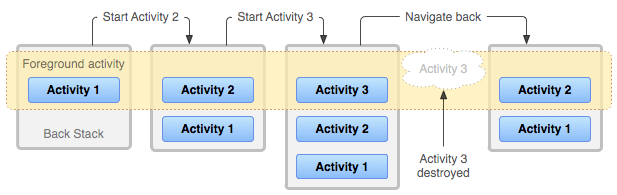 android任務和返回棧
原文來自官方文檔:https://developer.android.com/guide/components/tasks-and-back-stack.html 應用
 一個不是那麼優美的圓形進度條續(基本還原原應用裡面的效果)
之前幫別人寫了一個不是那麼優美的圓形進度條,效果圖大家也看過了。但是後某人不滿意,說原應用是倒計時時間最後5s,才開始顯示數字的,同時轉完一圈需要的時間只能是30s左右。