編輯:關於Android編程
折騰了好幾天的 HTTP 終於搞定了,經測試正常,不過是初步用例測試用的,因為後面還要修改先把當前版本保存在博客裡吧。
其中POST因為涉及多段上傳需要導入兩個包文件,我用的是最新的 httpmine4.3 發現網上很多 MultipartEntity 相關的文章都是早起版本的,以前的一些方法雖然還可用,但新版本中已經不建議使用了,所以全部使用新的方式 MultipartEntityBuilder 來處理了。
httpmime-4.3.2.jar
httpcore-4.3.1.jar
如果是 android studio 這裡可能會遇到一個問題:Android Duplicate files copied in APK
經測試 POST 對中文處理也是正常的,沒有發現亂碼
下面是完整代碼:
ZHttpRequest.java
package com.ai9475.util;

import org.apache.http.HttpEntity;
import org.apache.http.HttpResponse;
import org.apache.http.HttpStatus;
import org.apache.http.client.HttpClient;
import org.apache.http.client.methods.HttpGet;
import org.apache.http.client.methods.HttpPost;
import org.apache.http.client.methods.HttpRequestBase;
import org.apache.http.entity.ContentType;
import org.apache.http.entity.mime.HttpMultipartMode;
import org.apache.http.entity.mime.MultipartEntityBuilder;
import org.apache.http.impl.client.DefaultHttpClient;
import org.apache.http.params.BasicHttpParams;
import org.apache.http.params.HttpConnectionParams;
import org.apache.http.params.HttpParams;
import org.apache.http.protocol.HTTP;

import java.io.ByteArrayOutputStream;
import java.io.File;
import java.io.IOException;
import java.io.InputStream;
import java.io.UnsupportedEncodingException;
import java.nio.charset.Charset;
import java.util.Iterator;
import java.util.Map;
import java.util.Set;

/**
 * Created by ZHOUZ on 14-2-3.
 */
public class ZHttpRequest
{
    protected String url = ;

    protected Map headers = null;

    protected int connectionTimeout = 5000;

    protected int soTimeout = 10000;

    protected int statusCode = 200;

    protected String charset = HTTP.UTF_8;

    protected HttpGet httpGet;

    protected HttpPost httpPost;

    protected HttpParams httpParameters;

    protected HttpResponse httpResponse;

    protected HttpClient httpClient;

    protected String inputContent;

    /**
     * 設置當前請求的鏈接
     *
     * @param url
     * @return
     */
    public ZHttpRequest setUrl(String url)
    {
        this.url = url;
        return this;
    }

    /**
     * 設置請求的 header 信息
     *
     * @param headers
     * @return
     */
    public ZHttpRequest setHeaders(Map headers)
    {
        this.headers = headers;
        return this;
    }

    /**
     * 設置連接超時時間
     *
     * @param timeout 單位(毫秒),默認 5000
     * @return
     */
    public ZHttpRequest setConnectionTimeout(int timeout)
    {
        this.connectionTimeout = timeout;
        return this;
    }

    /**
     * 設置 socket 讀取超時時間
     *
     * @param timeout 單位(毫秒),默認 10000
     * @return
     */
    public ZHttpRequest setSoTimeout(int timeout)
    {
        this.soTimeout = timeout;
        return this;
    }

    /**
     * 設置獲取內容的編碼格式
     *
     * @param charset 默認為 UTF-8
     * @return
     */
    public ZHttpRequest setCharset(String charset)
    {
        this.charset = charset;
        return this;
    }

    /**
     * 獲取 HTTP 請求響應信息
     *
     * @return
     */
    public HttpResponse getHttpResponse()
    {
        return this.httpResponse;
    }

    /**
     * 獲取 HTTP 客戶端連接管理器
     *
     * @return
     */
    public HttpClient getHttpClient()
    {
        return this.httpClient;
    }

    /**
     * 獲取請求的狀態碼
     *
     * @return
     */
    public int getStatusCode()
    {
        return this.statusCode;
    }

    /**
     * 通過 GET 方式請求數據
     *
     * @param url
     * @return
     * @throws IOException
     */
    public String get(String url) throws IOException
    {
        // 設置當前請求的鏈接
        this.setUrl(url);
        // 實例化 GET 連接
        this.httpGet = new HttpGet(this.url);
        // 自定義配置 header 信息
        this.addHeaders(this.httpGet);
        // 初始化客戶端請求
        this.initHttpClient();
        // 發送 HTTP 請求
        this.httpResponse = this.httpClient.execute(this.httpGet);
        // 讀取遠程數據
        this.getInputStream();
        // 遠程請求狀態碼是否正常
        if (this.statusCode != HttpStatus.SC_OK) {
            return null;
        }
        // 返回全部讀取到的字符串
        return this.inputContent;
    }

    public String post(String url, Map datas, Map files) throws IOException
    {
        this.setUrl(url);
        // 實例化 GET 連接
        this.httpPost = new HttpPost(this.url);
        // 自定義配置 header 信息
        this.addHeaders(this.httpPost);
        // 初始化客戶端請求
        this.initHttpClient();
        Iterator iterator = datas.entrySet().iterator();
        MultipartEntityBuilder multipartEntityBuilder = MultipartEntityBuilder.create();
        multipartEntityBuilder.setMode(HttpMultipartMode.BROWSER_COMPATIBLE);
        multipartEntityBuilder.setCharset(Charset.forName(this.charset));
        // 發送的數據
        while (iterator.hasNext()) {
            Map.Entry entry = (Map.Entry) iterator.next();
            multipartEntityBuilder.addTextBody(entry.getKey(), entry.getValue(), ContentType.create(text/plain, Charset.forName(this.charset)));
        }
        // 發送的文件
        if (files != null) {
            iterator = files.entrySet().iterator();
            while (iterator.hasNext()) {
                Map.Entry entry = (Map.Entry) iterator.next();
                String path = entry.getValue();
                if (.equals(path) || path == null) continue;
                File file = new File(entry.getValue());
                multipartEntityBuilder.addBinaryBody(entry.getKey(), file);
            }
        }
        // 生成 HTTP 實體
        HttpEntity httpEntity = multipartEntityBuilder.build();
        // 設置 POST 請求的實體部分
        this.httpPost.setEntity(httpEntity);
        // 發送 HTTP 請求
        this.httpResponse = this.httpClient.execute(this.httpPost);
        // 讀取遠程數據
        this.getInputStream();
        // 遠程請求狀態碼是否正常
        if (this.statusCode != HttpStatus.SC_OK) {
            return null;
        }
        // 返回全部讀取到的字符串
        return this.inputContent.toString();
    }

    /**
     * 為 HTTP 請求添加 header 信息
     *
     * @param request
     */
    protected void addHeaders(HttpRequestBase request)
    {
        if (this.headers != null) {
            Set keys = this.headers.entrySet();
            Iterator iterator = keys.iterator();
            Map.Entry entry;
            while (iterator.hasNext()) {
                entry = (Map.Entry) iterator.next();
                request.addHeader(entry.getKey().toString(), entry.getValue().toString());
            }
        }
    }

    /**
     * 配置請求參數
     */
    protected void setParams()
    {
        this.httpParameters = new BasicHttpParams();
        this.httpParameters.setParameter(charset, this.charset);
        // 設置 連接請求超時時間
        HttpConnectionParams.setConnectionTimeout(this.httpParameters, this.connectionTimeout);
        // 設置 socket 讀取超時時間
        HttpConnectionParams.setSoTimeout(this.httpParameters, this.soTimeout);
    }

    /**
     * 初始化配置客戶端請求
     */
    protected void initHttpClient()
    {
        // 配置 HTTP 請求參數
        this.setParams();
        // 開啟一個客戶端 HTTP 請求
        this.httpClient = new DefaultHttpClient(this.httpParameters);
    }

    /**
     * 讀取遠程數據
     *
     * @throws IOException
     */
    protected void getInputStream() throws IOException
    {
        // 接收遠程輸入流
        InputStream inStream = this.httpResponse.getEntity().getContent();
        // 分段讀取輸入流數據
        ByteArrayOutputStream baos = new ByteArrayOutputStream();
        byte[] buf = new byte[1024];
        int len = -1;
        while ((len = inStream.read(buf)) != -1) {
            baos.write(buf, 0, len);
        }
        // 將數據轉換為字符串保存
        this.inputContent = new String(baos.toByteArray());
        // 數據接收完畢退出
        inStream.close();
        // 獲取請求返回的狀態碼
        this.statusCode = this.httpResponse.getStatusLine().getStatusCode();
    }

    /**
     * 關閉連接管理器釋放資源
     */
    protected void shutdownHttpClient()
    {
        if (this.httpClient != null && this.httpClient.getConnectionManager() != null) {
            this.httpClient.getConnectionManager().shutdown();
        }
    }
}
MainActivity.java
這個我就只寫事件部分了
    public void doClick(View view)
    {
        ZHttpRequest request = new ZHttpRequest();
        String url = ;
        TextView textView = (TextView) findViewById(R.id.showContent);
        String content = 空內容;
        try {
            if (view.getId() == R.id.doGet) {
                url = http://www.baidu.com;
                content = GET數據: + request.get(url);
            } else {
                url = http://192.168.1.6/test.php;
                HashMap datas = new HashMap();
                datas.put(p1, abc);
                datas.put(p2, 中文);
                datas.put(p3, abc中文cba);
                datas.put(pic, this.picPath);
                HashMap files = new HashMap();
                files.put(file, this.picPath);
                content = POST數據: + request.post(url, datas, files);
            }

        } catch (IOException e) {
            content = IO異常: + e.getMessage();
        } catch (Exception e) {
            content = 異常: + e.getMessage();
        }
        textView.setText(content);
    }
activity_main.xml
 Android基於IIS的APK下載(四)數據下載
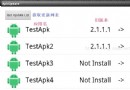
在《Android基於IIS的APK下載(三)用JSON傳輸更新數據》一文中已經從服務器中拿到了更新數據,並且呈現到了UI中,結合前面的文章及效果圖(參見下圖),可以看到
 Android開發學習之使用百度語音識別SDK實現語音識別(中)
今天我們來繼續學習百度語音識別SDK的相關內容,今天我們以百度語音識別SDK提供的API接口為前提,來實現自己的語音識別交互界面。在正式開始今天的文章之前,我們首先來了解
 我的Android進階之旅------)Android自定義View實現帶數字的進度條(NumberProgressBar)
第一步、效果展示圖1、藍色的進度條圖2、紅色的進度條圖3、多條顏色不同的進度條圖4、多條顏色不同的進度條 版權聲明:本文為【歐陽鵬】原創文章,歡迎轉載,轉載請注明出處!
 Android6.0 運行時權限簡單理解
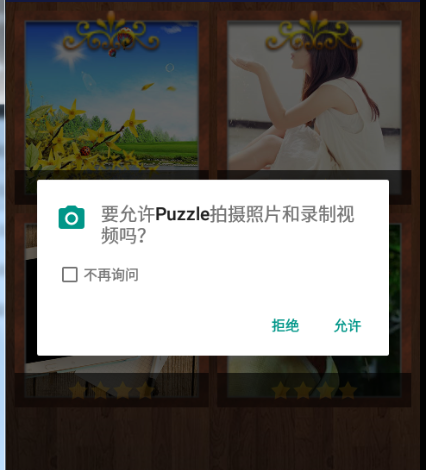
6.0 運行時權限處理在6.0以前 權限都是在安裝時授權的,如果用戶不授權就無法安裝;Android從6.0(API 23)開始 使用運行時權限,而不是像以前那樣安裝時授