編輯:關於Android編程
<LinearLayout xmlns:android="http://schemas.android.com/apk/res/android"
    xmlns:tools="http://schemas.android.com/tools"
    android:layout_width="match_parent"
    android:layout_height="match_parent"
    android:orientation="vertical">

    <TextView
        android:layout_width="wrap_content"
        android:layout_height="wrap_content"
        android:text="@string/hello_world"
        tools:context=".MainActivity" />
   <LinearLayout
       android:layout_width="wrap_content"
       android:layout_height="wrap_content"
       android:orientation="horizontal">
       <EditText
           android:id="@+id/name"
           android:layout_width="200dp"
           android:layout_height="wrap_content"/>
    <Button
        android:id="@+id/search"

        android:layout_width="wrap_content"
        android:layout_height="wrap_content"
        android:text="@string/search"/>
    </LinearLayout>
    <TextView android:id="@+id/result"
        android:layout_width="fill_parent"
        android:layout_height="wrap_content"/>

</LinearLayout>
建一個工具類SOAPUtil:
public class SOAPUtil {
    public static Object doTransport(final String wsdUrl, final String webMethod) {
        String nameSpace = "http://tempuri.org/";//一般都是默認的
        SoapObject soapObject = new SoapObject(nameSpace, webMethod);
        // soapObject.addProperty(propertyInfo)
        System.out.println();
        SoapSerializationEnvelope soapSerializationEnvelope = new SoapSerializationEnvelope(
                SoapEnvelope.VER11);
        soapSerializationEnvelope.bodyIn = soapObject;
        soapSerializationEnvelope.dotNet = true;
        soapSerializationEnvelope.setOutputSoapObject(soapObject);
        HttpTransportSE httpTransportSE = new HttpTransportSE(wsdUrl);
        String SOAP_ACTION = "http://tempuri.org/" + webMethod;
        //輸出soapAction
        System.out.println(SOAP_ACTION);
        try {
            httpTransportSE.call(SOAP_ACTION, soapSerializationEnvelope);
            System.out.println("調用結束");
            //輸出響應
            System.out.println(soapSerializationEnvelope.getResponse());
            if (soapSerializationEnvelope.getResponse() != null) {
                SoapObject result = (SoapObject) soapSerializationEnvelope
                        .getResponse();
                //輸出結果
                for (int i = 0; i < result.getPropertyCount(); i++) {
                    System.out.println("result [" + i + "] = "+ result.getProperty(i).toString());
                }

                return result;
            }
        } catch (IOException e) {
            System.out.println("IOException");
            e.printStackTrace();
        } catch (XmlPullParserException e) {
            e.printStackTrace();
        }
        return null;


    }


}
主要實現方法:
public class MainActivity extends Activity {
    private Button searchs;
    private TextView results;

    @Override
    public void onCreate(Bundle savedInstanceState) {
        super.onCreate(savedInstanceState);
        setContentView(R.layout.activity_main);
        searchs=(Button) findViewById(R.id.search);
        results=(TextView) findViewById(R.id.result);
        searchs.setOnClickListener(new View.OnClickListener() {

            @Override
            public void onClick(View v) {
                //服務器地址
                String wsdUrl="http://192.168.1.195:88/service1.asmx";
                //方法名
                String method="SelectAll";
                Object result=SOAPUtil.doTransport(wsdUrl, method);
                results.setText(result.toString());

            }
        });
    }

    @Override
    public boolean onCreateOptionsMenu(Menu menu) {
        getMenuInflater().inflate(R.menu.activity_main, menu);
        return true;
    }
}
以上這些是我們在客戶端這邊的必要步驟,除此之外還需要服務器給出接口(接口名即activity裡的方法名)。這裡我沒有寫接口,接口其實很簡單各種編程語言都可以,主要就是sql操作語句,寫完部署到服務器即可。 demo我放在資源裡,有興趣可以參考下。由於服務器是公司的只有內部網可以用,但這個項目絕對可行。
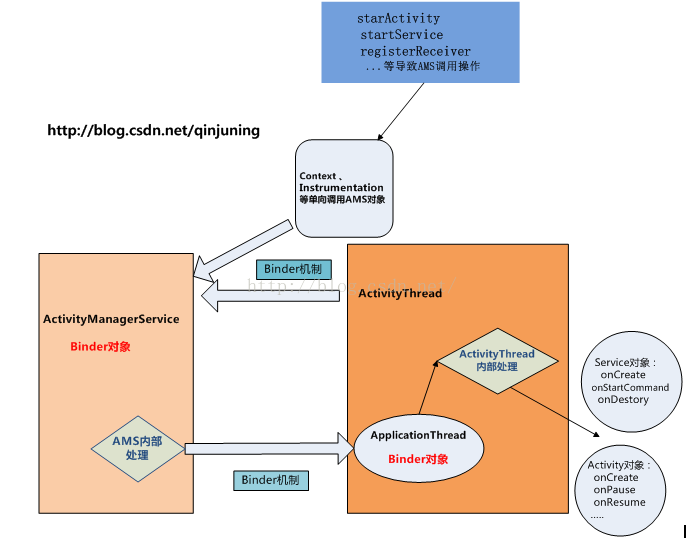 Android插件化開發之AMS與應用程序(客戶端ActivityThread、Instrumentation、Activity)通信模型分析
今天主要分析下ActivityManagerService(服務端) 與應用程序(客戶端)之間的通信模型,在介紹這個通信模型的基礎上,再簡單介紹實現這個模型所需要數據類型
 跟我學Android之五
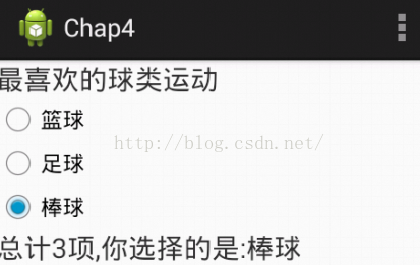
本章目標 掌握單選按鈕的用法 掌握復選框的用法 掌握開關按鈕的用法 掌握圖像視圖的用法。 掌握自動完成文本框的用法。單選控件——RadioButt
 一起學android之如何設置TextView中不同字段的字體顏色
在這裡先看看效果圖: OK,有時候,在我們的項目中會要求TextView中文本有一部分的字體顏色不一樣,這時我們應該使用 SpannableStrin
 Android 使用NineOldAndroids實現絢麗的ListView左右滑動刪除Item效果
今天還是給大家帶來自定義控件的編寫,自定義一個ListView的左右滑動刪除Item的效果,這個效果之前已經實現過了,有興趣的可以看下Android 使用S
 Android源碼淺析(三)——Android AOSP 5.1.1源碼的同步sync和編譯make,搭建Samba服務器進行更便捷的燒錄刷機
最近比較忙,而且又要維護自己的博客,視頻和公眾號,也就沒仔細的梳理源碼