編輯:關於Android編程
package cc.testservice3;

import android.os.Bundle;
import android.app.Activity;
import android.content.Intent;
import android.view.View;
import android.view.View.OnClickListener;
import android.widget.Button;
/**
 * Demo描述:
 * IntentService的使用
 *
 * Demo詳情:
 * 在此處使用Service和IntentService模擬耗時任務.
 * 那麼Service會出現ANR錯誤,IntentService則不會
 *
 * 原因說明:
 * 1 Service不是專門啟動的一條單獨進程,Service與它所在的應用位於同一進程中
 * 2 Service也不是一條新的線程,所以不能在Service裡面處理耗時的任務
 *
 * IntentService繼承自Service但是會在onHandleIntent()中開啟新的線程
 * 來處理任務,所以不會造成ANR
 */
public class MainActivity extends Activity {
	 private Button mStartServiceButton;
	 private Button mStartIntentServiceButton;
	@Override
	protected void onCreate(Bundle savedInstanceState) {
		super.onCreate(savedInstanceState);
		setContentView(R.layout.main);
		init();
	}

	private void init(){
	    //利用Service操作耗時任務
		mStartServiceButton=(Button) findViewById(R.id.startServiceButton);
		mStartServiceButton.setOnClickListener(new OnClickListener() {
			@Override
			public void onClick(View arg0) {
				Intent intent=new Intent(MainActivity.this, ServiceSubclass.class);
				startService(intent);
			}
		});

		//利用IntentService操作耗時任務
		mStartIntentServiceButton=(Button) findViewById(R.id.startIntentServiceButton);
		mStartIntentServiceButton.setOnClickListener(new OnClickListener() {
			@Override
			public void onClick(View arg0) {
				Intent intent=new Intent(MainActivity.this, IntentServiceSubclass.class);
				startService(intent);
			}
		});


	}
}
package cc.testservice3;

import android.app.Service;
import android.content.Intent;
import android.os.IBinder;

public class ServiceSubclass extends Service {

	@Override
	public IBinder onBind(Intent arg0) {
		return null;
	}

	public void onCreate() {
		System.out.println("---> Service onCreate()");
	}

	@Override
	public void onStart(Intent intent, int startId) {
		super.onStart(intent, startId);
		System.out.println("---> Service onStart()");
	}

	@Override
	public int onStartCommand(Intent intent, int flags, int startId) {
		System.out.println("---> Service onStartCommand()");
		//模擬耗時的操作
		try {
			Thread.sleep(30*1000);
		} catch (Exception e) {
			e.printStackTrace();
		}
		return super.onStartCommand(intent, flags, startId);
	}

	@Override
	public void onDestroy() {
		super.onDestroy();
		System.out.println("---> Service onDestroy()");
	}


}
package cc.testservice3;

import android.app.IntentService;
import android.content.Intent;
/**
 * 注意事項:
 * 在繼承自IntentService時Eclipse會提示生成一個帶String參數的
 * 構造方法.我們按照該提示生成構造方法後,運行時會報錯:
 * java.lang.InstantiationException
 *
 * 解決辦法:
 * 刪除該提示生成的構造方法,寫一個空參數的構造方法.
 * 但在該空參數構造方法裡執行super("");
 *
 */
public class IntentServiceSubclass extends IntentService {

	public IntentServiceSubclass() {
		super("");
	}

	@Override
	protected void onHandleIntent(Intent intent) {
		//模擬耗時的操作
		try {
			Thread.sleep(30*1000);
		} catch (Exception e) {
			e.printStackTrace();
		}

	}

}
<LinearLayout xmlns:android="http://schemas.android.com/apk/res/android"
    xmlns:tools="http://schemas.android.com/tools"
    android:layout_width="match_parent"
    android:layout_height="match_parent"
    android:orientation="vertical"
    android:gravity="center_horizontal"
   >

    <Button
        android:id="@+id/startServiceButton"
        android:layout_width="200dip"
        android:layout_height="150dip"
        android:text="啟動Service"
     />

      <Button
        android:id="@+id/startIntentServiceButton"
        android:layout_width="200dip"
        android:layout_height="150dip"
        android:text="啟動IntentService"
      />

</LinearLayout>
 PhoneGap || Cordova 安裝以及導入AndroidStudio 遇到的問題
需要用到的資源再網上可以下載到Java SDK,node.js,apache-ant,ADT(google提供的android開發工具,其實主要是需要android SD
 Android Demo之旅 Activity、Service、BroadCast實現計數統計
時間匆匆,轉眼就是大半個月過去了,學習android的道理上艱苦而漫長呀!!自己寫了很多的小demo,總結總結,也在博客裡面留點足跡吧! 源代碼下載:htt
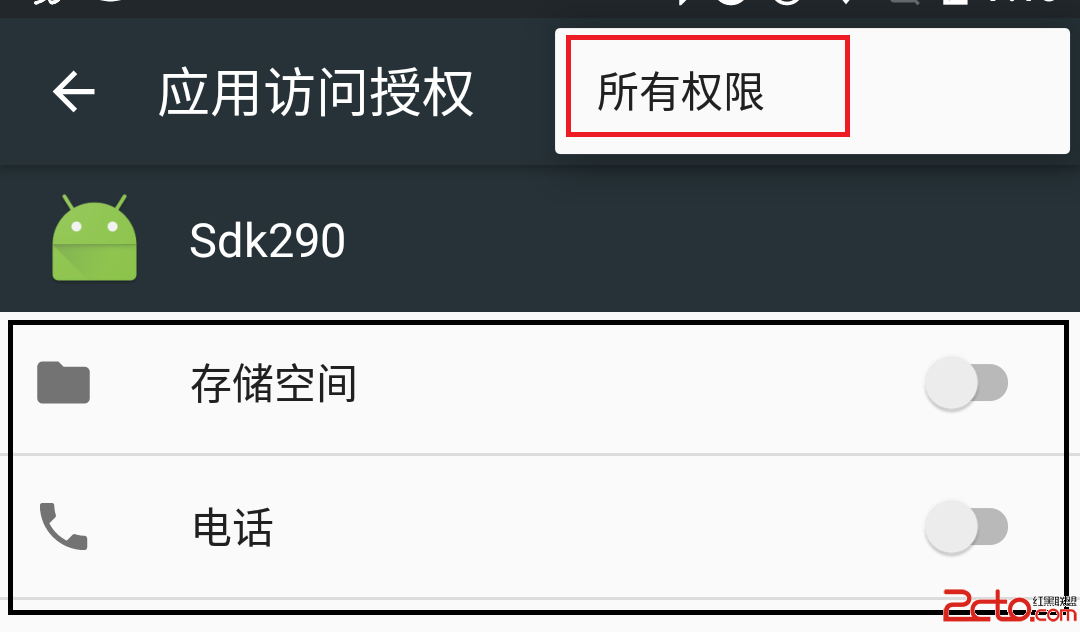 Android6.0權限管理
Android 6.0 Marshmallow首次加入了運行時權限管理,這對用戶來說,可以更好的了解、控 制 app 涉及到的權限。然而對開發者來說卻是一件比較蛋疼的事情
 Android AIDL開發
Introduction 在Android中, 每個應用程序都運行在自己的進程中,擁有獨立的內存空間。但是有些時候我們的應用程序需要跟其它的應用程序進行通信,這個時候該