編輯:關於Android編程
1. 源起
很多分頁加載的組件都是繼承自ScrollView,分頁要檢查是否滾動到底部,下拉刷新需要檢測是否滾動到頂部。
2. 代碼
<SPAN style="FONT-FAMILY: Microsoft YaHei; FONT-SIZE: 18px"><RelativeLayout xmlns:android="http://schemas.android.com/apk/res/android"
    xmlns:tools="http://schemas.android.com/tools"
    android:layout_width="match_parent"
    android:layout_height="match_parent"
    tools:context=".MainActivity" >

    <ScrollView
        android:id="@+id/scroll_view"
        android:layout_width="match_parent"
        android:layout_height="match_parent"
        android:scrollbars="vertical" >

        <LinearLayout
            android:layout_width="match_parent"
            android:layout_height="wrap_content"
            android:background="@android:color/darker_gray"
            android:orientation="vertical" >

            <TextView
                android:layout_width="wrap_content"
                android:layout_height="2000dip"
                android:text="text" />
        </LinearLayout>
    </ScrollView>

</RelativeLayout></SPAN>

<RelativeLayout xmlns:android="http://schemas.android.com/apk/res/android"
    xmlns:tools="http://schemas.android.com/tools"
    android:layout_width="match_parent"
    android:layout_height="match_parent"
    tools:context=".MainActivity" >

    <ScrollView
        android:id="@+id/scroll_view"
        android:layout_width="match_parent"
        android:layout_height="match_parent"
        android:scrollbars="vertical" >

        <LinearLayout
            android:layout_width="match_parent"
            android:layout_height="wrap_content"
            android:background="@android:color/darker_gray"
            android:orientation="vertical" >

            <TextView
                android:layout_width="wrap_content"
                android:layout_height="2000dip"
                android:text="text" />
        </LinearLayout>
    </ScrollView>

</RelativeLayout>[java] view plaincopyprint?
<SPAN style="FONT-FAMILY: Microsoft YaHei; FONT-SIZE: 18px">public class MainActivity extends Activity {

    @Override
    protected void onCreate(Bundle savedInstanceState) {
    super.onCreate(savedInstanceState);
    setContentView(R.layout.activity_main);
    final ScrollView view = (ScrollView) findViewById(R.id.scroll_view);
    view.setOnTouchListener(new OnTouchListener() {
        @Override
        public boolean onTouch(View v, MotionEvent event) {
            switch (event.getAction()) {
            case MotionEvent.ACTION_DOWN:
                break;
            case MotionEvent.ACTION_MOVE:
                if (v.getScrollY() <= 0) {
                    Log.d("scroll view", "top");
                } else if (view.getChildAt(0).getMeasuredHeight() <= v.getHeight() + v.getScrollY()) {
                    Log.d("scroll view", "bottom");
                    Log.d("scroll view", "view.getMeasuredHeight() = " + view.getMeasuredHeight()
                        + ", v.getHeight() = " + v.getHeight()
                        + ", v.getScrollY() = " + v.getScrollY()
                        + ", view.getChildAt(0).getMeasuredHeight() = " + view.getChildAt(0).getMeasuredHeight());
                }
                break;
            default:
                break;
            }
            return false;
    } });
    }
}</SPAN>

public class MainActivity extends Activity {

    @Override
    protected void onCreate(Bundle savedInstanceState) {
    super.onCreate(savedInstanceState);
    setContentView(R.layout.activity_main);
    final ScrollView view = (ScrollView) findViewById(R.id.scroll_view);
    view.setOnTouchListener(new OnTouchListener() {
        @Override
        public boolean onTouch(View v, MotionEvent event) {
            switch (event.getAction()) {
            case MotionEvent.ACTION_DOWN:
                break;
            case MotionEvent.ACTION_MOVE:
                if (v.getScrollY() <= 0) {
                    Log.d("scroll view", "top");
                } else if (view.getChildAt(0).getMeasuredHeight() <= v.getHeight() + v.getScrollY()) {
                    Log.d("scroll view", "bottom");
                    Log.d("scroll view", "view.getMeasuredHeight() = " + view.getMeasuredHeight()
                        + ", v.getHeight() = " + v.getHeight()
                        + ", v.getScrollY() = " + v.getScrollY()
                        + ", view.getChildAt(0).getMeasuredHeight() = " + view.getChildAt(0).getMeasuredHeight());
                }
                break;
            default:
                break;
            }
            return false;
 } });
    }
}
3. 說明
檢測滾動的時機有很多,這裡是在ScrollView外面檢測,使用onTouch的MotionEvent.ACTION_MOVE。如果是繼承ScrollView,可以在其他回調的時候檢測。
v.getScrollY()表示scrollview的上面滾出去的長度。v.getHeight()表示scrollview本身看上去的高度。view.getChildAt(0).getMeasuredHeight()是內容的高度。這裡不能用view.getMeasureHeight()。
view.getMeasuredHeight() = 1038
v.getHeight() = 1038
v.getScrollY() = 2962
view.getChildAt(0).getMeasuredHeight() = 4000
 微信號怎麼改 微信號怎麼改第二次
想必現在有很多朋友都曾經遇到過這樣的困惑。小編也嘗試過修改幾個微信號都沒能成功;結果有一個是兩年前注冊的微信號,並且當時是已經填寫了自己的微信號(不是默認號
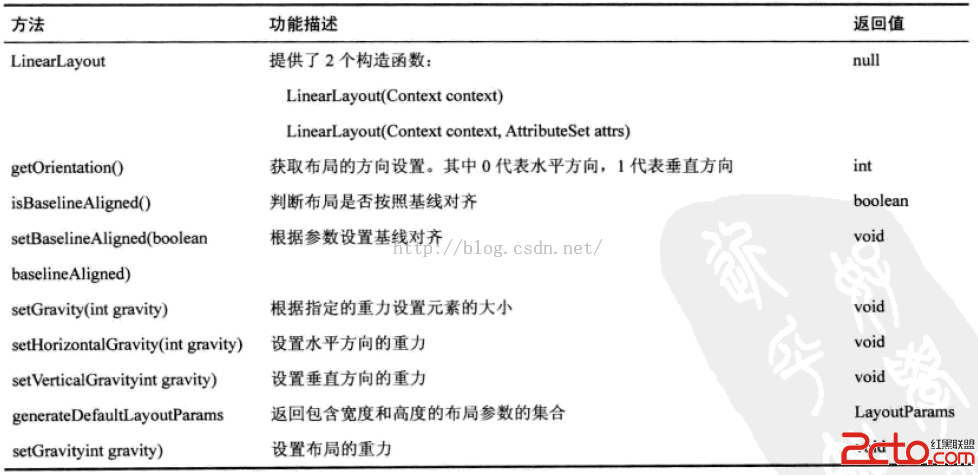 閱讀《Android 從入門到精通》(29)——LinearLayout 等四類方法
LinearLayout 類方法RelativeLayout 類方法TableLayout 類方法AbsoluteLayout 類方法
 安卓(android)仿電商app商品詳情頁按鈕浮動效果
1、效果圖如下:這效果用戶體驗還是很酷炫,今天我們就來講解如何實現這個效果。2、分析為了方便理解,作圖分析如圖所示,整個頁面分為四個部分: &nbs
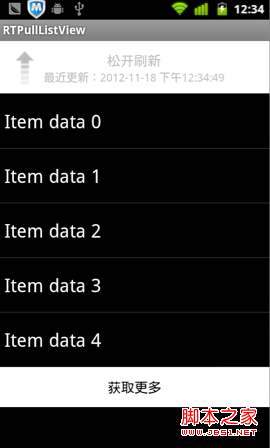 Android下拉刷新ListView——RTPullListView(demo)
下拉刷新在越來越多的App中使用,已經形成一種默認的用戶習慣,遇到列表顯示的內容時,用戶已經開始習慣性的拉拉。在交互習慣上已經形成定性。之前在我的文章《IOS學習筆記34