編輯:關於Android編程
注:在Edittext和Textview中,不要加下面2個屬性中的任何一種。否則,當行數大於1行以後會發生表情、圖片對不齊的情況
android:lineSpacingExtra=""
android:lineSpacingMultiplier=""
效果圖:
輸入:

展示效果:

注:為了舉例,把“我”當成關鍵字,“你”當成要凸顯出來的字。比如搜索“你”,在結果中,把“你”字變紅
把下面的代碼,都復制到自己項目下,改改包名什麼的,就可以直接用了
代碼:
1、布局文件
activity_main_12:
emoji_gridview:
restul_layout:
工具等:
Expressions:
package com.chen.customviewdemo.view;


import com.chen.customviewdemo.R;

import java.util.ArrayList;
import java.util.List;

/**
 * 處理表情
 */
public class Expressions {

    public static List emojiIdList = new ArrayList();
    public static List emojiNameList = new ArrayList();

    public static final int[] emojID = new int[]{R.mipmap.emoji_0, R.mipmap.emoji_1, R.mipmap.emoji_2,
            R.mipmap.emoji_3, R.mipmap.emoji_4, R.mipmap.emoji_5, R.mipmap.emoji_6, R.mipmap.emoji_7,
            R.mipmap.emoji_8, R.mipmap.emoji_9, R.mipmap.emoji_10, R.mipmap.emoji_11, R.mipmap.emoji_12,
            R.mipmap.emoji_13, R.mipmap.emoji_14, R.mipmap.emoji_15, R.mipmap.emoji_16, R.mipmap.emoji_17,
            R.mipmap.emoji_18, R.mipmap.emoji_19, R.mipmap.emoji_20, R.mipmap.emoji_21, R.mipmap.emoji_22,
            R.mipmap.emoji_23, R.mipmap.emoji_24, R.mipmap.emoji_25, R.mipmap.emoji_26, R.mipmap.emoji_27,
            R.mipmap.emoji_28, R.mipmap.emoji_29, R.mipmap.emoji_30, R.mipmap.emoji_31, R.mipmap.emoji_32,
            R.mipmap.emoji_33, R.mipmap.emoji_34, R.mipmap.emoji_35, R.mipmap.emoji_36, R.mipmap.emoji_37,
            R.mipmap.emoji_38, R.mipmap.emoji_39, R.mipmap.emoji_40, R.mipmap.emoji_41, R.mipmap.emoji_42,
            R.mipmap.emoji_43, R.mipmap.emoji_44, R.mipmap.emoji_45, R.mipmap.emoji_46, R.mipmap.emoji_47,
            R.mipmap.emoji_48, R.mipmap.emoji_49, R.mipmap.emoji_50, R.mipmap.emoji_51, R.mipmap.emoji_52,
            R.mipmap.emoji_53, R.mipmap.emoji_54, R.mipmap.emoji_55, R.mipmap.emoji_56, R.mipmap.emoji_57,
            R.mipmap.emoji_58, R.mipmap.emoji_59, R.mipmap.emoji_60, R.mipmap.emoji_61, R.mipmap.emoji_62,
            R.mipmap.emoji_63, R.mipmap.emoji_64, R.mipmap.emoji_65, R.mipmap.emoji_66,
            R.mipmap.emoji_67, R.mipmap.emoji_68, R.mipmap.emoji_69, R.mipmap.emoji_70, R.mipmap.emoji_71,
            R.mipmap.emoji_72, R.mipmap.emoji_73, R.mipmap.emoji_74, R.mipmap.emoji_75, R.mipmap.emoji_76,
            R.mipmap.emoji_77, R.mipmap.emoji_78, R.mipmap.emoji_79, R.mipmap.emoji_80, R.mipmap.emoji_81,
            R.mipmap.emoji_82, R.mipmap.emoji_83, R.mipmap.emoji_84, R.mipmap.emoji_85, R.mipmap.emoji_86,
            R.mipmap.emoji_87, R.mipmap.emoji_88, R.mipmap.emoji_89, R.mipmap.emoji_90, R.mipmap.emoji_91,
            R.mipmap.emoji_92, R.mipmap.emoji_93, R.mipmap.emoji_94, R.mipmap.emoji_95, R.mipmap.emoji_96,
            R.mipmap.emoji_97, R.mipmap.emoji_98, R.mipmap.emoji_99, R.mipmap.emoji_100, R.mipmap.emoji_101,
            R.mipmap.emoji_102, R.mipmap.emoji_103, R.mipmap.emoji_104};

    public static final String[] emojName = new String[]{"[/微笑]", "[/撇嘴]", "[/色]", "[/發呆]",
            "[/得意]", "[/流淚]", "[/害羞]", "[/閉嘴]", "[/睡]", "[/大哭]", "[/尴尬]", "[/發怒]",
            "[/調皮]", "[/呲牙]", "[/驚訝]", "[/難過]", "[/酷]", "[/冷汗]", "[/抓狂]", "[/吐]",
            "[/偷笑]", "[/可愛]", "[/白眼]", "[/傲慢]", "[/饑餓]", "[/困]", "[/驚恐]", "[/流汗]",
            "[/憨笑]", "[/大兵]", "[/奮斗]", "[/咒罵]", "[/疑問]", "[/噓...]", "[/暈]", "[/折磨]",
            "[/衰]", "[/骷髅]", "[/敲打]", "[/再見]", "[/擦汗]", "[/摳鼻]", "[/鼓掌]", "[/糗大了]",
            "[/壞笑]", "[/左哼哼]", "[/右哼哼]", "[/哈欠]", "[/鄙視]", "[/委屈]", "[/快哭了]", "[/陰險]",
            "[/親親]", "[/嚇]", "[/可憐]", "[/菜刀]", "[/西瓜]", "[/啤酒]", "[/籃球]", "[/乒乓]", "[/咖啡]",
            "[/飯]", "[/豬頭]", "[/玫瑰]", "[/凋謝]", "[/示愛]", "[/愛心]", "[/心碎]", "[/蛋糕]", "[/閃電]",
            "[/炸彈]", "[/刀]", "[/足球]", "[/瓢蟲]", "[/便便]", "[/月亮]", "[/太陽]", "[/禮物]", "[/擁抱]",
            "[/強]", "[/弱]", "[/握手]", "[/勝利]", "[/抱拳]", "[/勾引]", "[/拳頭]", "[/差勁]", "[/愛你]",
            "[/NO]", "[/OK]", "[/愛情]", "[/飛吻]", "[/跳跳]", "[/發抖]", "[/怄火]", "[/轉圈]", "[/磕頭]",
            "[/回頭]", "[/跳繩]", "[/揮手]", "[/激動]", "[/街舞]", "[/獻吻]", "[/左太極]", "[/右太極]"};

    static {
        emojiIdList.add(emojID);
        emojiNameList.add(emojName);
    }

    /**
     * 由表情名稱獲得表情圖片id
     *
     * @param name
     * @return
     */
    public static int getIdAsName(String name) throws NullPointerException {
        for (int i = 0; i < emojName.length; i++) {
            if (emojName[i].equals(name)) {
                return emojID[i];
            }
        }
        return 0;
    }

}
EmotionBean
package com.chen.customviewdemo.bean;

/**
 * 表情bean
 */
public class EmotionBean {

    private int Id; // 表情對應的Id
    private String Name; // 表情對應的名字

    public int getId() {
        return Id;
    }

    public void setId(int id) {
        Id = id;
    }

    public String getName() {
        return Name;
    }

    public void setName(String name) {
        Name = name;
    }

}
KeyBean
package com.chen.customviewdemo.bean;

/**
 * 關鍵字bean。
 * 包含顯式內容和隱式內容。
 * 如:在界面上顯示“百度”,點擊了它,就去一個界面打開百度的網頁。要打開網頁,肯定需要Url。這就需要,在點擊的時候,把Url傳遞過去。
 * 這個時候,這個Url,就是隱式內容了。不必讓用戶看到,只是在觸發後,隱含的做一定操作就行
 */
public class KeyBean {

    public KeyBean(String content, String hide_content) {
        this.content = content;
        this.hide_content = hide_content;
    }

    /**
     * 內容
     */
    public String content;

    /**
     * 隱藏的內容,點擊內容後,要傳遞的值或者要做的事
     */
    public String hide_content;

    public String getContent() {
        return content;
    }

    public void setContent(String content) {
        this.content = content;
    }

    public String getHide_content() {
        return hide_content;
    }

    public void setHide_content(String hide_content) {
        this.hide_content = hide_content;
    }


}
ExpressionUtil
package com.chen.customviewdemo.utils;

import android.content.Context;
import android.graphics.drawable.Drawable;
import android.text.Spannable;
import android.text.SpannableString;
import android.text.style.ImageSpan;

import com.chen.customviewdemo.view.Expressions;

import java.util.regex.Matcher;
import java.util.regex.Pattern;

public class ExpressionUtil {

    public static SpannableString getSpannableString(String str, Context context, int size) {
        SpannableString spannableString = new SpannableString(str);
        String string = "\\[(.+?)\\]";
        Pattern patten = Pattern.compile(string, Pattern.CASE_INSENSITIVE);
        try {
            dealSpannableString(context, spannableString, patten, 0, size);
        } catch (Exception e) {
        }
        return spannableString;
    }

    private static void dealSpannableString(Context context, SpannableString spannableString, Pattern patten, int start, int emojiSize) {
        Matcher matcher = patten.matcher(spannableString);
        while (matcher.find()) {
            String key = matcher.group();
            if (matcher.start() < start) {
                continue;
            }
            int id = Expressions.getIdAsName(key);
            if (id != 0) {
                Drawable drawable = context.getResources().getDrawable(id);
                drawable.setBounds(0, 0, Utils.sp2px(context, emojiSize), Utils.sp2px(context, emojiSize));
                ImageSpan imgSpan = new ImageSpan(drawable);
                int end = matcher.start() + key.length();
                spannableString.setSpan(imgSpan, matcher.start(), end, Spannable.SPAN_EXCLUSIVE_EXCLUSIVE);
                if (end < spannableString.length()) {                        //如果整個字符串還未驗證完,則繼續。。
                    dealSpannableString(context, spannableString, patten, end, emojiSize);
                }
                break;
            }
        }
    }
}
Utils
package com.chen.customviewdemo.utils;

import android.app.Activity;
import android.content.Context;
import android.text.TextUtils;
import android.util.DisplayMetrics;

/**
 * 工具類
 */
public class Utils {

    /**
     * 檢查字符串是否是空
     *
     * @param str
     * @return true:字符串為空
     */
    public static boolean checkStringIsEmpty(String str) {

        if (TextUtils.isEmpty(str) || "null".equals(str)) {
            return true;
        } else {
            return false;
        }
    }

    /**
     * 將sp值轉換為px值
     */
    public static int sp2px(Context context, float spValue) {
        final float fontScale = context.getResources().getDisplayMetrics().scaledDensity;
        return (int) (spValue * fontScale + 0.5f);
    }

}
CHEN
package com.chen.customviewdemo.utils;

/**
 * 用於保存全局變量值
 */
public class CHEN {

    /**
     * 要被傳遞的文字
     */
    public static String Str = "";

    /**
     * 要變紅的字。一般用於搜索,如:把搜索的字變為紅色用於突出顯示
     */
    public static String toRedWord = "";

    /**
     * 網址要被替換成的文字
     */
    public static String REPLACEMENT_STRING = "*點擊鏈接";

    /**
     * 匹配網址的正則表達式。以http://為例
     */
    public static String urlRegex = "(http://[a-zA-Z0-9\\.\\-]+\\.([a-zA-Z]{2,4})(:\\d+)?(/[a-zA-Z0-9\\.\\-~!@#$%^&*+?:_/=<>,]*)?)|(www.[a-zA-Z0-9\\.\\-]+\\.([a-zA-Z]{2,4})(:\\d+)?(/[a-zA-Z0-9\\.\\-~!@#$%^&*+?:_/=<>,]*)?)|([a-zA-Z0-9\\.\\-]+\\.([a-zA-Z]{2,4})(:\\d+)?(/[a-zA-Z0-9\\.\\-~!@#$%^&*+?:_/=<>,]*)?)";

    /**
     * 匹配網址的正則表達式。有http://、https://、ftp://這3中開頭的
     */
    //    public static String urlRegex = "((http[s]{0,1}|ftp)://[a-zA-Z0-9\\.\\-]+\\.([a-zA-Z]{2,4})(:\\d+)?(/[a-zA-Z0-9\\.\\-~!@#$%^&*+?:_/=<>,]*)?)|(www.[a-zA-Z0-9\\.\\-]+\\.([a-zA-Z]{2,4})(:\\d+)?(/[a-zA-Z0-9\\.\\-~!@#$%^&*+?:_/=<>,]*)?)|([a-zA-Z0-9\\.\\-]+\\.([a-zA-Z]{2,4})(:\\d+)?(/[a-zA-Z0-9\\.\\-~!@#$%^&*+?:_/=<>,]*)?)";


}
EmotionGridViewAdapter
package com.chen.customviewdemo.adapter;

import android.app.Activity;
import android.content.Context;
import android.util.DisplayMetrics;
import android.view.View;
import android.view.ViewGroup;
import android.widget.AbsListView.LayoutParams;
import android.widget.BaseAdapter;
import android.widget.ImageView;
import android.widget.ImageView.ScaleType;

import com.chen.customviewdemo.R;
import com.chen.customviewdemo.bean.EmotionBean;
import com.chen.customviewdemo.view.Expressions;

import java.util.ArrayList;
import java.util.List;

/**
 * 每一個表情頁的adapter
 */
public class EmotionGridViewAdapter extends BaseAdapter {

    private List list;
    private Context context;
    private String tag;

    public EmotionGridViewAdapter(Context context, int page) {
        this.context = context;
        this.list = new ArrayList();
        setData1(page);
    }

    private void setData1(int page) {
        switch (page) {
            case 0:
            case 1:
            case 2:
            case 3:
            case 4:
                int len = 20;  // 每頁顯示20個表情,一個刪除鍵
                for (int i = 0 + (len * page); i < len + (len * page); i++) {
                    EmotionBean bean = new EmotionBean();
                    bean.setId(Expressions.emojID[i]);
                    bean.setName(Expressions.emojName[i]);
                    list.add(bean);
                }
                EmotionBean bean = new EmotionBean();
                bean.setId(R.mipmap.emoji_del);
                list.add(bean);
                break;
            case 5:
                // 最後一頁,顯示5個表情和一個刪除鍵
                for (int i = 100; i < 105; i++) {
                    EmotionBean bean1 = new EmotionBean();
                    bean1.setId(Expressions.emojID[i]);
                    bean1.setName(Expressions.emojName[i]);
                    list.add(bean1);
                }
                EmotionBean bean1 = new EmotionBean();
                bean1.setId(R.mipmap.emoji_del);
                list.add(bean1);
                break;
        }
    }


    public void setData(List list) {
        this.list = list;
    }

    @Override
    public int getCount() {
        return list.size();
    }

    @Override
    public Object getItem(int position) {
        return list.get(position);
    }

    @Override
    public long getItemId(int position) {
        return position;
    }

    @Override
    public View getView(int position, View convertView, ViewGroup parent) {
        final EmotionBean bean = list.get(position);
        int itemWidth = getWindowPX();
        int padding = itemWidth / 6;
        ImageView iv = new ImageView(context);
        LayoutParams params = new LayoutParams(itemWidth, itemWidth);
        iv.setLayoutParams(params);
        iv.setScaleType(ScaleType.FIT_CENTER);
        iv.setPadding(padding, 0, padding, 0);
        iv.setImageResource(bean.getId());
        return iv;
    }


    private int getWindowPX() {
        Activity activity;
        if (context instanceof Activity) {
            activity = (Activity) context;
            DisplayMetrics dm = new DisplayMetrics();
            activity.getWindowManager().getDefaultDisplay().getMetrics(dm);
            int width = dm.widthPixels;
            return width / 8;
        } else {
            return 200;
        }
    }


}
ShowEmojiViewPagerAdapter
package com.chen.customviewdemo.adapter;

import android.support.v4.view.PagerAdapter;
import android.view.View;
import android.view.ViewGroup;
import android.widget.GridView;

import java.util.List;

/**
 * 展示表情的viewpager的adapter
 */
public class ShowEmojiViewPagerAdapter extends PagerAdapter {

    private List mGridlist;

    public ShowEmojiViewPagerAdapter(List mList) {
        super();
        this.mGridlist = mList;
    }

    @Override
    public int getCount() {
        return mGridlist.size();
    }

    @Override
    public boolean isViewFromObject(View arg0, Object arg1) {
        return arg0==arg1;
    }

    @Override
    public void destroyItem(View container, int position, Object object) {
        ((ViewGroup)container).removeView(mGridlist.get(position));
    }


    @Override
    public Object instantiateItem(View container, int position) {

        ((ViewGroup)container).addView(mGridlist.get(position));

        return mGridlist.get(position);
    }


}
MyTextView
package com.chen.customviewdemo.view;

import android.content.Context;
import android.graphics.drawable.Drawable;
import android.text.SpannableString;
import android.text.Spanned;
import android.text.TextPaint;
import android.text.TextUtils;
import android.text.method.LinkMovementMethod;
import android.text.style.ClickableSpan;
import android.text.style.ImageSpan;
import android.util.AttributeSet;
import android.view.View;
import android.widget.TextView;
import android.widget.Toast;

import com.chen.customviewdemo.R;
import com.chen.customviewdemo.bean.KeyBean;
import com.chen.customviewdemo.utils.CHEN;
import com.chen.customviewdemo.utils.ExpressionUtil;
import com.chen.customviewdemo.utils.Utils;

import java.util.ArrayList;
import java.util.regex.Matcher;
import java.util.regex.Pattern;

/**
 * 自定義textview,用於處理url、表情、文字等
 */
public class MyTextView extends TextView {
    private Context context = null;

    public MyTextView(Context context, AttributeSet attr) {
        super(context, attr);
        this.context = context;
    }


    public MyTextView(Context context) {
        super(context);
        this.context = context;
    }

    /**
     * TextView顯示有顏色的字,並添加點擊事件,適用於一段文字中有多個內容要處理
     */
    public void handleText(String str, final ArrayList keyBeanList, int size) {
        String content = str;

        //處理匹配的url
        Pattern p = Pattern.compile(CHEN.urlRegex);
        Matcher m = p.matcher(content);
        ArrayList urlList = new ArrayList();
        while (m.find()) {
            String urlStr = m.group();
            if (urlStr.contains("http://")) {
                //如果末尾有英文逗號或者中文逗號等,就去掉
                while (urlStr.endsWith(",") || urlStr.endsWith(",") || urlStr.endsWith(".") || urlStr.endsWith("。") || urlStr.endsWith(";") || urlStr.endsWith(";") || urlStr.endsWith("!") || urlStr.endsWith("!") || urlStr.endsWith("?") || urlStr.endsWith("?")) {
                    urlStr = urlStr.substring(0, urlStr.length() - 1);
                }
                urlList.add(urlStr);
                content = content.replace(urlStr, CHEN.REPLACEMENT_STRING);
            }
        }

        final SpannableString spannableString = ExpressionUtil.getSpannableString(content, context, size);
        content = spannableString.toString();

        //處理鏈接
        if (urlList.size() > 0) {

            int urlStartNew = 0;
            int urlStartOld = 0;

            String urlTemp = content;

            for (int i = 0; i < urlList.size(); i++) {

                final String regexUrl = urlList.get(i);

                spannableString.setSpan(new ClickableSpan() {

                                            @Override
                                            public void updateDrawState(TextPaint ds) {
                                                // TODO Auto-generated method stub
                                                super.updateDrawState(ds);
                                                ds.setColor(context.getResources().getColor(R.color.linkcolor));
                                                ds.setUnderlineText(false);
                                            }

                                            @Override
                                            public void onClick(View widget) {
                                                Toast.makeText(context, regexUrl, Toast.LENGTH_SHORT).show();
                                            }

                                        }, urlStartOld + urlTemp.indexOf(CHEN.REPLACEMENT_STRING), urlStartOld + urlTemp.indexOf(CHEN.REPLACEMENT_STRING) + CHEN.REPLACEMENT_STRING.length(),
                        Spanned.SPAN_EXCLUSIVE_EXCLUSIVE);
                try {
                    //“點擊鏈接”前面的回形針圖片。大小可自己調整
                    Drawable drawable = context.getResources().getDrawable(R.mipmap.web_link);
                    drawable.setBounds(0, 0, Utils.sp2px(context, size), Utils.sp2px(context, size));
                    ImageSpan imgSpan = new ImageSpan(drawable);
                    spannableString.setSpan(imgSpan, urlStartOld + urlTemp.indexOf(CHEN.REPLACEMENT_STRING), urlStartOld + urlTemp.indexOf(CHEN.REPLACEMENT_STRING) + 1, Spanned.SPAN_EXCLUSIVE_EXCLUSIVE);

                } catch (Exception e) {
                    //異常以後,就不加小圖片了
                }

                setText(spannableString);
                setMovementMethod(LinkMovementMethod.getInstance());

                urlStartNew = urlTemp.indexOf(CHEN.REPLACEMENT_STRING) + CHEN.REPLACEMENT_STRING.length();
                urlStartOld += urlStartNew;
                urlTemp = urlTemp.substring(urlStartNew);
            }
        }

        //處理文本中的關鍵字
        if (keyBeanList != null && keyBeanList.size() > 0) {
            for (int i = 0; i < keyBeanList.size(); i++) {
                final String data = keyBeanList.get(i).getContent();
                final String hide_content = keyBeanList.get(i).getHide_content();
                String temp = content;
                int startNew = 0;
                int startOld = 0;
                if (temp.contains(data)) {
                    while (temp.contains(data)) {
                        spannableString.setSpan(new ClickableSpan() {
                                                    @Override
                                                    public void updateDrawState(TextPaint ds) {
                                                        // TODO Auto-generated method stub
                                                        super.updateDrawState(ds);
                                                        ds.setColor(context.getResources().getColor(R.color.linkcolor));
                                                        ds.setUnderlineText(false);
                                                    }

                                                    @Override
                                                    public void onClick(View widget) {
                                                        Toast.makeText(context, hide_content, Toast.LENGTH_SHORT).show();
                                                    }

                                                }, startOld + temp.indexOf(data), startOld + temp.indexOf(data) + data.length(),
                                Spanned.SPAN_EXCLUSIVE_EXCLUSIVE);
                        setText(spannableString);
                        setMovementMethod(LinkMovementMethod.getInstance());
                        startNew = temp.indexOf(data) + data.length();
                        startOld += startNew;
                        temp = temp.substring(startNew);
                    }
                } else {
                    setText(spannableString);
                }
            }

        } else {
            setText(spannableString);
        }

        //處理要變紅的字
        if (!TextUtils.isEmpty(CHEN.toRedWord)) {
            //只要把關鍵字變紅就行了,不需要加點擊事件。如果需要,可以自己加
            String temp = content;
            int startNew = 0;
            int startOld = 0;
            while (temp.contains(CHEN.toRedWord)) {
                spannableString.setSpan(new ClickableSpan() {

                                            @Override
                                            public void updateDrawState(TextPaint ds) {
                                                // TODO Auto-generated method stub
                                                super.updateDrawState(ds);
                                                ds.setColor(0xffff0000);
                                                ds.setUnderlineText(false);
                                            }

                                            @Override
                                            public void onClick(View widget) {
                                            }

                                        }, startOld + temp.indexOf(CHEN.toRedWord), startOld + temp.indexOf(CHEN.toRedWord) + CHEN.toRedWord.length(),
                        Spanned.SPAN_EXCLUSIVE_EXCLUSIVE);
                setText(spannableString);
                setMovementMethod(LinkMovementMethod.getInstance());
                startNew = temp.indexOf(CHEN.toRedWord) + CHEN.toRedWord.length();
                startOld += startNew;
                temp = temp.substring(startNew);
            }
        } else {
            setText(spannableString);
        }
    }
}
Activity中使用
BaseActivity
package com.chen.customviewdemo;

import android.app.Activity;
import android.os.Bundle;
import android.view.Window;

/**
 * 基礎Activity
 */
public abstract class BaseActivity extends Activity {

    @Override
    protected void onCreate(Bundle savedInstanceState) {
        super.onCreate(savedInstanceState);
        //不顯示title
        requestWindowFeature(Window.FEATURE_NO_TITLE);
        initview();
    }

    abstract void initview();

}
MainActivity_12
package com.chen.customviewdemo;

import android.app.Instrumentation;
import android.content.Context;
import android.content.Intent;
import android.support.v4.view.ViewPager;
import android.text.Editable;
import android.text.SpannableString;
import android.text.TextUtils;
import android.text.TextWatcher;
import android.view.KeyEvent;
import android.view.LayoutInflater;
import android.view.View;
import android.view.inputmethod.InputMethodManager;
import android.widget.AdapterView;
import android.widget.EditText;
import android.widget.GridView;
import android.widget.ImageView;
import android.widget.TextView;

import com.chen.customviewdemo.adapter.EmotionGridViewAdapter;
import com.chen.customviewdemo.adapter.ShowEmojiViewPagerAdapter;
import com.chen.customviewdemo.utils.CHEN;
import com.chen.customviewdemo.utils.ExpressionUtil;
import com.chen.customviewdemo.view.Expressions;

import java.util.ArrayList;
import java.util.List;
import java.util.regex.Matcher;
import java.util.regex.Pattern;

/**
 * 輸入文字和表情的界面
 */
public class MainActivity_12 extends BaseActivity implements View.OnClickListener {

    private Context mContext;
    // 表情
    private ImageView iv_expression;
    // 顯示表情的ViewPager
    private ViewPager show_emoji_viewPager;
    // 裝載表情的viewPager的Adapter
    private ShowEmojiViewPagerAdapter showEmojiViewPagerAdapter;

    /**
     * 裝載表情的viewPager的Adapter的每一頁,都是一個gridview,這些gridview,用集合管理起來
     */
    private List mGridList;

    /**
     * 文本輸入框
     */
    private EditText et_word_message;
    /**
     * 當前是否顯示表情鍵盤
     */
    private boolean isShowEmotion = false;
    private final String reg = "^[\u4e00-\u9fa5\u0020-\u007E\uFE30-\uFFA0。、……“”‘’《》——¥~]*$";
    private Pattern pattern = Pattern.compile(reg);
    /**
     * 顯示動態的剩余字數
     */
    private TextView tv_show_residue_num;
    /**
     * 動態內容剩余字數。以300為例
     */
    private int dynamicContentResidueNum = 300;

    /**
     * 展示輸入結果的按鈕
     */
    private TextView show_result_tv;

    /**
     * 動態輸入框的監聽
     */
    private TextWatcher watcher = new TextWatcher() {

        @Override
        public void beforeTextChanged(CharSequence s, int start, int count, int after) {

        }

        @Override
        public void onTextChanged(CharSequence s, int start, int before, int count) {

            String dynicContent = s.toString();
            int contentCount = dynicContent.length();

            if (TextUtils.isEmpty(dynicContent) || contentCount < 250) {
                tv_show_residue_num.setText("");
                dynamicContentResidueNum = 300;
            } else if (contentCount >= 250 && contentCount <= dynamicContentResidueNum) {
                int tempCount = dynamicContentResidueNum - contentCount;
                tv_show_residue_num.setText("還能輸入" + tempCount + "字");
            } else if (contentCount > dynamicContentResidueNum) {
                tv_show_residue_num.setText(dynamicContentResidueNum - contentCount + "");
            }
        }

        @Override
        public void afterTextChanged(Editable s) {

        }
    };


    @Override
    void initview() {
        setContentView(R.layout.activity_main_12);

        mContext = this;

        //默認。以此為例
        CHEN.toRedWord = "你";

        show_result_tv = (TextView) findViewById(R.id.show_result_tv);

        mGridList = new ArrayList();

        mGridList.clear();

        tv_show_residue_num = (TextView) findViewById(R.id.tv_show_residue_num);

        iv_expression = (ImageView) findViewById(R.id.iv_expression);
        iv_expression.setBackgroundResource(R.mipmap.biao_qing);
        show_emoji_viewPager = (ViewPager) findViewById(R.id.show_emoji_viewPager);

        initGridViews();

        // 填充 表情的ViewPager的adapter
        showEmojiViewPagerAdapter = new ShowEmojiViewPagerAdapter(mGridList);
        show_emoji_viewPager.setAdapter(showEmojiViewPagerAdapter);

        et_word_message = (EditText) findViewById(R.id.et_word_message);

        et_word_message.addTextChangedListener(watcher);

        iv_expression.setOnClickListener(this);
        show_result_tv.setOnClickListener(this);
        et_word_message.setOnClickListener(this);

    }

    /**
     * 初始化表情鍵盤的Grideview
     */
    private void initGridViews() {
        mGridList = new ArrayList();
        LayoutInflater inflater = LayoutInflater.from(mContext);
        mGridList.clear();
        for (int i = 0; i < 6; i++) {
            final int j = i;
            GridView gridView = (GridView) inflater.inflate(
                    R.layout.emoji_gridview, null);
            gridView.setAdapter(new EmotionGridViewAdapter(mContext, i));
            mGridList.add(gridView);
            gridView.setOnItemClickListener(new AdapterView.OnItemClickListener() {

                @Override
                public void onItemClick(AdapterView parent, View view,
                                        int position, long id) {
                    if (position == 20 || position == 40 || position == 60
                            || position == 80 || position == 100
                            || (j == 5 && position == 5)) {//處理刪除鍵
                        int selectionStart = et_word_message.getSelectionStart();
                        String text = et_word_message.getText().toString();

                        if (!TextUtils.isEmpty(text)) {
                            String body = et_word_message.getText().toString();
                            String tempStr = body.substring(0, selectionStart);
                            int i = tempStr.lastIndexOf("]");// 獲取最後一個表情的位置
                            if (i == tempStr.length() - 1) {// 說明光標剛好停在這個表情之後
                                int j = tempStr.lastIndexOf("[");// 將這兩個之間的字符刪掉
                                et_word_message.getEditableText().delete(j,
                                        selectionStart);
                            } else {
                                Matcher matcher = pattern.matcher(text);
                                if (!matcher.matches()) {
                                    new Thread(new Runnable() {

                                        @Override
                                        public void run() {
                                            Instrumentation instrumentation = new Instrumentation();
                                            instrumentation.sendKeyDownUpSync(KeyEvent.KEYCODE_DEL);
                                        }
                                    }) {
                                    }.start();
                                } else {
                                    et_word_message.getEditableText().delete(
                                            tempStr.length() - 1, selectionStart);
                                }
                            }
                        }
                    } else {
                        //表情會被轉換成字符串。防止最後輸入一個表情,超出字數顯示
                        if ((300 - et_word_message.getText().toString().trim().length()) < 5) {
                            return;
                        }
                        String emotionString = Expressions.emojName[position
                                + j * 20];
                        String text = et_word_message.getText() + emotionString;
                        SpannableString spannableString = ExpressionUtil
                                .getSpannableString(text, mContext, 23);
                        et_word_message.setText(spannableString);
                        Editable b = et_word_message.getText();
                        et_word_message.setSelection(b.length());
                    }
                }
            });
        }
        showEmojiViewPagerAdapter = new ShowEmojiViewPagerAdapter(mGridList);
        show_emoji_viewPager.setAdapter(showEmojiViewPagerAdapter);
    }

    @Override
    public void onClick(View v) {
        switch (v.getId()) {
            case R.id.iv_expression:
                // 點擊表情的按鈕,彈出表情
                if (isShowEmotion) {
                    iv_expression.setBackgroundResource(R.mipmap.biao_qing);
                    show_emoji_viewPager.setVisibility(View.GONE);
                    showKeyBoard();
                } else if (!isShowEmotion) {
                    iv_expression.setBackgroundResource(R.mipmap.keyboard);
                    show_emoji_viewPager.setVisibility(View.VISIBLE);
                    hideKeyBoard(v);
                }
                isShowEmotion = !isShowEmotion;
                break;
            case R.id.et_word_message:
                if (isShowEmotion) {
                    iv_expression.setBackgroundResource(R.mipmap.biao_qing);
                    show_emoji_viewPager.setVisibility(View.GONE);
                    forceShowKeyBoard(et_word_message);
                    isShowEmotion = !isShowEmotion;
                }
                break;
            case R.id.show_result_tv:
                //去展示結果的界面
                CHEN.Str = et_word_message.getText().toString().trim();
                startActivity(new Intent(this, ShowWordAndEmojiDataActivity.class));
                break;

            default:
                break;
        }
    }

    /**
     * 強制顯示軟鍵盤
     */
    public void forceShowKeyBoard(View v) {
        InputMethodManager imm = (InputMethodManager) getSystemService(Context.INPUT_METHOD_SERVICE);
        imm.showSoftInput(v, InputMethodManager.SHOW_FORCED);
    }

    /**
     * 隱藏軟鍵盤
     * @param v
     */
    public void hideKeyBoard(View v) {
        InputMethodManager imm = (InputMethodManager) getSystemService(Context.INPUT_METHOD_SERVICE);
        imm.hideSoftInputFromWindow(v.getWindowToken(), 0);
    }

    /**
     * 顯示軟鍵盤
     */
    public void showKeyBoard() {
        InputMethodManager inputManager = (InputMethodManager) getSystemService(Context.INPUT_METHOD_SERVICE);
        inputManager.toggleSoftInput(0, InputMethodManager.HIDE_NOT_ALWAYS);
    }
}
ShowWordAndEmojiDataActivity
package com.chen.customviewdemo;

import com.chen.customviewdemo.bean.KeyBean;
import com.chen.customviewdemo.utils.CHEN;
import com.chen.customviewdemo.view.MyTextView;

import java.util.ArrayList;

/**
 * 展示輸入結果的Activity
 */
public class ShowWordAndEmojiDataActivity extends BaseActivity {

    MyTextView result_tv;

    ArrayList keyBeanList;

    @Override
    void initview() {
        setContentView(R.layout.restul_layout);

        keyBeanList = new ArrayList();
        //還有關鍵字的話,可以繼續加
        keyBeanList.add(new KeyBean("我", "哈哈"));

        result_tv = (MyTextView) findViewById(R.id.result_tv);

        result_tv.handleText(CHEN.Str, keyBeanList, 23);
    }

    @Override
    protected void onDestroy() {
        super.onDestroy();
        CHEN.toRedWord = "";
    }
}
清單文件:
 編譯android源碼4---ubuntu下載Android源代碼
1.下載repo信息mkdir ~/binPATH=~/bin:$PATH //放到環境變量中cd ~/bingit clone git://aosp.tuna.tsin
 360手機q5怎麼插卡/裝卡?360q5手機SIM卡安裝教程
360手機q5配備雙攝像頭,主打高端安全。360手機Q5支持全網通與Volte高清語音通話。那麼,360手機Q5怎麼插卡或者裝卡呢?360q5手機支持什麼S
 Foxit Mobile PDF SDK for Android_渲染PDF文檔(2)
PS: 入門階段,加上是Android菜鳥,所以先閱讀他們的文檔作為學習,幸好他們的文檔寫得夠詳細,非常適合我這種小白菜鳥用戶。我主要是看他們的developer_gui
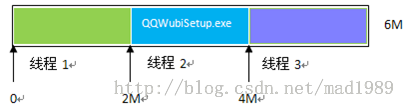 Android實現網絡多線程文件下載
實現原理(1)首先獲得下載文件的長度,然後設置本地文件的長度。(2)根據文件長度和線程數計算每條線程下載的數據長度和下載位置。如:文件的長度為6M,線程數為3,那麼,每條