編輯:關於Android編程
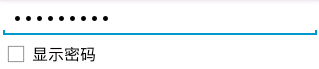
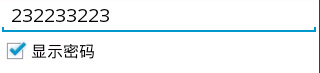
效果:
<?xml version="1.0" encoding="utf-8"?>
<LinearLayout xmlns:android="http://schemas.android.com/apk/res/android"
 android:layout_width="match_parent"
 android:layout_height="match_parent"
 android:orientation="vertical" >
 <EditText
  android:id="@+id/editText1"
  android:layout_width="match_parent"
  android:layout_height="wrap_content"
  android:ems="10"
  android:inputType="textPassword" >
  <requestFocus />
 </EditText>
 <CheckBox
  android:id="@+id/checkBox1"
  android:layout_width="wrap_content"
  android:layout_height="wrap_content"
  android:text="顯示密碼" />
</LinearLayout>
package com.example.test;
import android.app.Activity;
import android.os.Bundle;
import android.text.method.HideReturnsTransformationMethod;
import android.text.method.PasswordTransformationMethod;
import android.widget.CheckBox;
import android.widget.CompoundButton;
import android.widget.CompoundButton.OnCheckedChangeListener;
import android.widget.TextView;
public class MainActivity extends Activity {
private TextView editText1;
private CheckBox checkBox1;
 @Override
 protected void onCreate(Bundle savedInstanceState) {
  super.onCreate(savedInstanceState);
  setContentView(R.layout.test);
  editText1 =(TextView) findViewById(R.id.editText1);
  checkBox1=(CheckBox) findViewById(R.id.checkBox1);
  checkBox1.setOnCheckedChangeListener(new OnCheckedChangeListener() {
   @Override
   public void onCheckedChanged(CompoundButton buttonView, boolean isChecked) {
    // TODO Auto-generated method stub
    if(isChecked){
     //如果選中,顯示密碼
     editText1.setTransformationMethod(HideReturnsTransformationMethod.getInstance());
    }else{
     //否則隱藏密碼
     editText1.setTransformationMethod(PasswordTransformationMethod.getInstance());
    }
   }
  });
 }
}
關鍵是:
editText1.setTransformationMethod(HideReturnsTransformationMethod.getInstance());
editText1.setTransformationMethod(PasswordTransformationMethod.getInstance());
以上所述是小編給大家介紹的Android 密碼 顯示與隱藏功能實例,希望對大家有所幫助,如果大家有任何疑問請給我留言,小編會及時回復大家的。在此也非常感謝大家對本站網站的支持!
 Android微信簽名知識的總結
前言最近遇到一個項目的應用要上微信登錄,大家都知道微信登錄是需要開放平台上申請的,在微信開發平台創建移動應用後,需要填寫:需要填寫的內容問題這裡的應用簽名是keystor
 android ContentProvider實現資源共享實例
ContentProvider為存儲和讀取數據提供了統一的接口,使用ContentProvider,應用程序可以實現數據共享,android內置的許多數據都是使用Con
 Android 實現自定義圓形進度條的實例代碼
Android 自定義圓形進度條今天無意中發現一個圓形進度,想想自己實現一個,如下圖:基本思路是這樣的:1.首先繪制一個實心圓2.繪制一個白色實心的正方形,遮住實心圓3.
 android ListView中CheckBox錯位的解決
貌似已經很晚了,但是還是想記下筆記,想讓今天完滿。 在ListView中加了checkBox,可是發現點擊改變其選中狀態的時候,發現其位置錯亂。狀態改變的並