

編輯:Android 技術基礎
上一節我們已經對 Android 的網路編程有了初步認識,也理清了 HTTP 的基本概念。本節要深入探討的是 HTTP 的請求頭(Request Header)與響應頭(Response Header)。你可以把這一篇當作隨身查閱的參考手冊,遇到不確定的欄位時翻一翻即可。
先複習一下請求的結構:第一行是請求行,由「請求方式 + 資源名稱 + HTTP 協議版本號」組成;其後的每一行都是請求頭。要特別留意的是,請求頭只是客戶端提供給伺服器的一段資訊,至於要如何解讀與處理,最終決定權仍在伺服器手上。
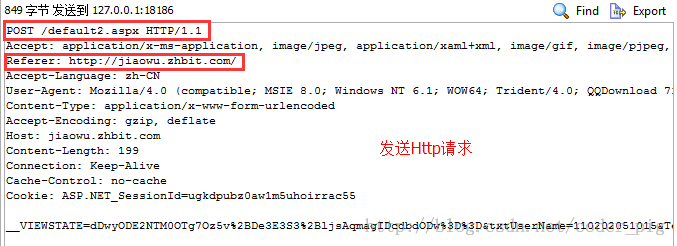
| Header | 說明 | 示例 |
|---|---|---|
| Accept | 指定客戶端能夠接收的內容類型 | Accept: text/plain, text/html |
| Accept-Charset | 瀏覽器可接受的字符編碼集 | Accept-Charset: iso-8859-5 |
| Accept-Encoding | 指定瀏覽器可支援的伺服器回傳內容壓縮編碼類型 | Accept-Encoding: compress, gzip |
| Accept-Language | 瀏覽器可接受的語言 | Accept-Language: en,zh |
| Accept-Ranges | 可請求網頁實體的一個或多個子範圍欄位 | Accept-Ranges: bytes |
| Authorization | HTTP 授權的授權憑證 | Authorization: Basic QWxhZGRpbjpvcGVuIHNlc2FtZQ== |
| Cache-Control | 指定請求與響應所遵循的緩存機制 | Cache-Control: no-cache |
| Connection | 表示是否需要持久連接(HTTP 1.1 預設進行持久連接) | Connection: close |
| Cookie | 請求時會把保存在該請求域名下的所有 cookie 一併傳送給伺服器 | Cookie: $Version=1; Skin=new; |
| Content-Length | 請求的內容長度 | Content-Length: 348 |
| Content-Type | 請求與實體對應的 MIME 資訊 | Content-Type: application/x-www-form-urlencoded |
| Date | 請求發送的日期與時間 | Date: Tue, 15 Nov 2010 08:12:31 GMT |
| Expect | 請求特定的伺服器行為 | Expect: 100-continue |
| From | 發出請求的用戶 Email | From: user@email.com |
| Host | 指定請求伺服器的域名與連接埠 | Host: www.zcmhi.com |
| If-Match | 只有請求內容與實體相匹配才有效 | If-Match: "737060cd8c284d8af7ad3082f209582d" |
| If-Modified-Since | 請求部分在指定時間之後被修改才成功,否則返回 304 | If-Modified-Since: Sat, 29 Oct 2010 19:43:31 GMT |
| If-None-Match | 內容未改變時返回 304,參數為伺服器先前發送的 Etag | If-None-Match: "737060cd8c284d8af7ad3082f209582d" |
| If-Range | 實體未改變時只傳送客戶端遺失的部分,否則傳送整個實體 | If-Range: "737060cd8c284d8af7ad3082f209582d" |
| If-Unmodified-Since | 實體在指定時間之後未被修改才請求成功 | If-Unmodified-Since: Sat, 29 Oct 2010 19:43:31 GMT |
| Max-Forwards | 限制資訊透過代理與閘道傳送的次數 | Max-Forwards: 10 |
| Pragma | 用來包含實作特定的指令 | Pragma: no-cache |
| Proxy-Authorization | 連接到代理的授權憑證 | Proxy-Authorization: Basic QWxhZGRpbjpvcGVuIHNlc2FtZQ== |
| Range | 只請求實體的一部分,指定範圍 | Range: bytes=500-999 |
| Referer | 前一頁面的地址,即當前請求的來路 | Referer: https://blog.csdn.net/coder_pig |
| TE | 客戶端願意接受的傳輸編碼,並通知伺服器接受尾加頭資訊 | TE: trailers,deflate;q=0.5 |
| Upgrade | 向伺服器指定某種傳輸協議以便轉換(若支援) | Upgrade: HTTP/2.0, SHTTP/1.3, IRC/6.9, RTA/x11 |
| User-Agent | 包含發出請求的用戶資訊 | User-Agent: Mozilla/5.0 (Linux; X11) |
| Via | 通知中間閘道或代理伺服器位址與通信協議 | Via: 1.0 fred, 1.1 nowhere.com (Apache/1.1) |
| Warning | 關於消息實體的警告資訊 | Warn: 199 Miscellaneous warning |
同樣先回顧響應的結構:第一行依序是「協議版本號、狀態碼、狀態描述」。以 302 為例,它代表當前位址沒有資源,但另一個地方有,於是透過 Location 欄位進行頁面重定向。

| Header | 說明 | 示例 |
|---|---|---|
| Accept-Ranges | 表明伺服器是否支援指定範圍請求及哪一類的分段請求 | Accept-Ranges: bytes |
| Age | 從原始伺服器到代理緩存形成的估算時間(以秒計,非負) | Age: 12 |
| Allow | 對某網路資源有效的請求行為,不允許則返回 405 | Allow: GET, HEAD |
| Cache-Control | 告訴所有緩存機制是否可以緩存及哪一類 | Cache-Control: no-cache |
| Content-Encoding | 伺服器支援的回傳內容壓縮編碼類型 | Content-Encoding: gzip |
| Content-Language | 響應體的語言 | Content-Language: en,zh |
| Content-Length | 響應體的長度 | Content-Length: 348 |
| Content-Location | 請求資源可替代的備用另一地址 | Content-Location: /index.htm |
| Content-MD5 | 返回資源的 MD5 校驗值 | Content-MD5: Q2hlY2sgSW50ZWdyaXR5IQ== |
| Content-Range | 在整個返回體中本部分的字節位置 | Content-Range: bytes 21010-47021/47022 |
| Content-Type | 返回內容的 MIME 類型 | Content-Type: text/html; charset=utf-8 |
| Date | 原始伺服器消息發出的時間 | Date: Tue, 15 Nov 2010 08:12:31 GMT |
| ETag | 請求變量的實體標籤當前值 | ETag: "737060cd8c284d8af7ad3082f209582d" |
| Expires | 響應過期的日期與時間 | Expires: Thu, 01 Dec 2010 16:00:00 GMT |
| Last-Modified | 請求資源的最後修改時間 | Last-Modified: Tue, 15 Nov 2010 12:45:26 GMT |
| Location | 用來重定向接收方到非請求 URL 的位置以完成請求或標識新資源 | Location: https://blog.csdn.net/coder_pig |
| Pragma | 包含實作特定的指令,可應用到響應鏈上的任何接收方 | Pragma: no-cache |
| Proxy-Authenticate | 指出認證方案及可應用到代理的該 URL 上的參數 | Proxy-Authenticate: Basic |
看了這麼多概念,不動手實作實在說不過去。下面我們寫幾段簡單的程式碼,驗證幾個常用響應頭的效果,加深理解。這裡的伺服器端用最簡單的 Servlet 來實現,不熟悉 Java Web 的朋友只要把程式碼拷一拷、在 web.xml 裡配置好、換上對應的類名即可:
 <servlet>
 <servlet-name>FirstServlet</servlet-name>
 <servlet-class>com.jay.server.FirstServlet</servlet-class>
 </servlet>
 <servlet-mapping>
 <servlet-name>FirstServlet</servlet-name>
 <url-pattern>/FirstServlet</url-pattern>
 </servlet-mapping>
實現代碼:
 package com.jay.http.test;
import java.io.IOException;
import javax.servlet.ServletException;
import javax.servlet.http.HttpServlet;
import javax.servlet.http.HttpServletRequest;
import javax.servlet.http.HttpServletResponse;
public class ServletOne extends HttpServlet {
 @Override
 protected void doGet(HttpServletRequest req, HttpServletResponse resp) throws ServletException, IOException {
 //告訴瀏覽器響應碼,以及重定向頁面
 resp.setStatus(302);
 resp.setHeader("Location", "https://www.baidu.com");
 }
 @Override
 protected void doPost(HttpServletRequest req, HttpServletResponse resp) throws ServletException, IOException {
 this.doGet(req, resp);
 }
}
運行結果:當我們訪問 https://localhost:8080/HttpTest/ServletOne 時,頁面會自動跳轉到百度。接著用 Firefox 的開發者工具,可以看到我們發出的 HTTP 內容:
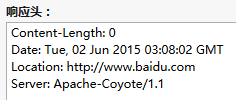
實現代碼:
 package com.jay.http.test;
import java.io.ByteArrayOutputStream;
import java.io.IOException;
import java.util.zip.GZIPOutputStream;
import javax.servlet.ServletException;
import javax.servlet.http.HttpServlet;
import javax.servlet.http.HttpServletRequest;
import javax.servlet.http.HttpServletResponse;
public class ServletTwo extends HttpServlet {
 @Override
 protected void doGet(HttpServletRequest req, HttpServletResponse resp) throws ServletException, IOException {
 String data = "Fresh air and sunshine can have an amazing effect on our feelings. " + "Sometimes when we are feeling down, all that we need to do is simply to go " + "outside and breathe. Movement and exercise is also a fantastic way to feel better. " + "Positive emotions can be generated by motion. So if we start to feel down," + " take some deep breathes, go outside, feel the fresh air, " + "let the sun hit our face, go for a hike, a walk, a bike ride, " + "a swim, a run, whatever. We will feel better if we do this.";
 System.out.println("原始數據長度:" + data.getBytes().length);
 // 對數據進行壓縮:
 ByteArrayOutputStream bout = new ByteArrayOutputStream();
 GZIPOutputStream gout = new GZIPOutputStream(bout);
 gout.write(data.getBytes());
 gout.close();
 // 得到壓縮後的數據
 byte gdata[] = bout.toByteArray();
 resp.setHeader("Content-Encoding", "gzip");
 resp.setHeader("Content-Length", gdata.length + "");
 resp.getOutputStream().write(gdata);
 }
 protected void doPost(HttpServletRequest req, HttpServletResponse resp) throws ServletException, IOException {
 doGet(req, resp);
 };
}
運行結果:控制台輸出如下:

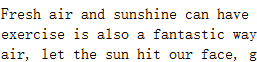
瀏覽器輸出:
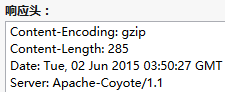
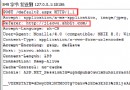
再看看我們的 HTTP 內容:
要提醒的是,gzip 這類壓縮對短字符串的效果並不明顯。小豬原本壓縮的是一首靜夜思的字符串,結果壓縮後的大小竟然比原始資料還要大,著實讓人哭笑不得。
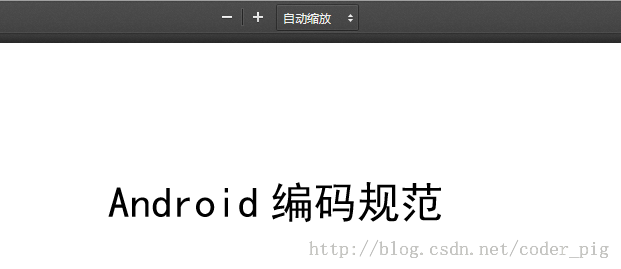
伺服器返回的內容可能是 text/html,也可能是 image/jpeg,又或者是一段 video/avi 影片。瀏覽器會依據這個數據類型,用不同的方式把資料呈現出來。這裡我們來做一個讀取 PDF 的示範。
實現代碼:
 package com.jay.http.test;
import java.io.IOException;
import java.io.InputStream;
import java.io.OutputStream;
import javax.servlet.ServletException;
import javax.servlet.http.HttpServlet;
import javax.servlet.http.HttpServletRequest;
import javax.servlet.http.HttpServletResponse;
public class ServletThree extends HttpServlet {
 @Override
 protected void doGet(HttpServletRequest req, HttpServletResponse resp) throws ServletException, IOException {
 resp.setHeader("content-type", "application/pdf");
 InputStream in = this.getServletContext().getResourceAsStream("/file/android編碼規範.pdf");
 byte buffer[] = new byte[1024];
 int len = 0;
 OutputStream out = resp.getOutputStream();
 while((len = in.read(buffer)) > 0) {
 out.write(buffer,0,len);
 }
 }
 protected void doPost(HttpServletRequest req, HttpServletResponse resp) throws ServletException ,IOException {
 doGet(req, resp);
 };
}
運行結果:在瀏覽器輸入 https://localhost:8080/HttpTest/ServletThree,果然可以讀到 PDF 了。提醒一下,這個 PDF 要記得放在 webroot 的 file 目錄下,否則會出現空指針。當然,你也可以試著播放一段音樂或影片,只要改一下 Content-Type 參數即可。
順帶附上一張 HTTP Content-Type 對照表:
我們常有這樣的需求:每隔幾秒刷新一次頁面,或者在載入某頁面幾秒後自動跳轉到另一個頁面。Refresh 就能滿足這個需求。
實現代碼:
 package com.jay.http.test;
import java.io.IOException;
import javax.servlet.ServletException;
import javax.servlet.http.HttpServlet;
import javax.servlet.http.HttpServletRequest;
import javax.servlet.http.HttpServletResponse;
public class ServletFour extends HttpServlet {
 public int second = 0;
 @Override
 protected void doGet(HttpServletRequest req, HttpServletResponse resp) throws ServletException, IOException {
 //1.瀏覽器每隔2秒定時刷新頁面
 // resp.setHeader("refresh", "2");
 // resp.getWriter().write(++second + "");
 // System.out.println("doGet方法被調用~");
 //2.進入頁面5s後,頁面跳到百度~
 resp.setHeader("refresh", "5;url='https://www.baidu.com'");
 resp.getWriter().write("HE HE DA~");
 }
 protected void doPost(HttpServletRequest req, HttpServletResponse resp) throws ServletException ,IOException {
 doGet(req, resp);
 };
}
運行結果:
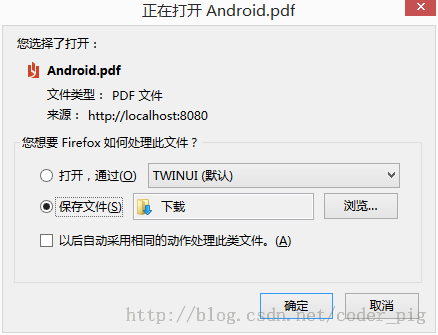
這個很簡單,只要把③中設置 Content-Type 的那一行去掉,改成下面這行即可:resp.setHeader("content-disposition", "attachment;filename=Android.pdf");
實現代碼:
 package com.jay.http.test;
import java.io.IOException;
import java.io.InputStream;
import java.io.OutputStream;
import javax.servlet.ServletException;
import javax.servlet.http.HttpServlet;
import javax.servlet.http.HttpServletRequest;
import javax.servlet.http.HttpServletResponse;
public class ServletFive extends HttpServlet {
 @Override
 protected void doGet(HttpServletRequest req, HttpServletResponse resp) throws ServletException, IOException {
 resp.setHeader("content-disposition", "attachment;filename=Android.pdf");
 InputStream in = this.getServletContext().getResourceAsStream("/file/android編碼規範.pdf");
 byte buffer[] = new byte[1024];
 int len = 0;
 OutputStream out = resp.getOutputStream();
 while((len = in.read(buffer)) > 0) {
 out.write(buffer,0,len);
 }
 }
 @Override
 protected void doPost(HttpServletRequest req, HttpServletResponse resp) throws ServletException, IOException {
 doGet(req, resp);
 }
}
運行結果:
本節系統梳理了 HTTP 的請求頭與響應頭,並透過幾個實作範例,示範如何用響應頭來調控瀏覽器的行為,相信經過這一節,大家對 HTTP 協議會有更扎實的認識。下一節我們將學習 Android 為我們提供的 HttpURLConnection 請求方式。本節就到這裡,感謝閱讀。
 第23章 Android OnFocusChangeListener 焦點事件:輸入框焦點切換實作
填表單時最常見的惱人狀況,是欄位裡留著提示文字(例如「手機號碼」),使用者得先手動全選刪除才能開始輸入。用焦點事件就能解決:一進欄位自動清空,離開時再驗證。本章在上一章的
 Paint API 之 PathEffect(路徑效果)詳解
本節引言: 本節繼續學習 Paint 的 API——PathEffect(路徑效果)。把畫筆的 style 設為 Stroke,我們就能繪製由線構成的圖形,但這些線偶爾會
 第84章:Service 之二——與 Activity 綁定的用法(從零開始學 Android)
Android 裡的 Service(服務)到底是什麼樣的存在?如果你熟悉 Windows 系統的服務,不妨把它們想成一回事;若不太了解也無妨,你只要把 Service
 HTTP請求頭與響應頭完全指南:概念對照與Servlet實戰
本節導讀 上一節我們已經對 Android 的網路編程有了初步認識,也理清了 HTTP 的基本概念。本節要深入探討的是 HTTP 的請求頭(Request Header)