

編輯:Android 開發教學
最近在練手做「憤怒的小鳥」,用 JBox2D 構建物理世界。這個開源庫本身不是本文重點,但真的很值得一謝——物理引擎這類東西自己從零實現的成本太高了。
寫下來的過程裡,有個問題反覆困擾我:屏幕上的鳥、豬、木塊、石頭,本質上都是「有一個物理剛體、有一張圖片、需要按坐標繪製」的對象。如果每個都從頭寫一遍 draw 方法,代碼會迅速膨脹成災。於是有了這篇——如何抽象公共類,讓多個對象復用同一套方法。
import org.jbox2d.dynamics.Body;
import org.liky.angrybird.util.Globals;
import org.liky.angrybird.util.ImageUtils;
import android.graphics.Canvas;
import android.graphics.Paint;
import android.graphics.Point;

public class Bird {

    private Body body;
    private float r;
    private int type;

    public Bird(int type) {
        switch (type) {
            case 1:
                r = Globals.PIECE_WIDTH / 2;
                break;
        }
        this.type = type;
    }

    public void draw(Canvas canvas, Paint paint, Point nowPosition) {
        canvas.save();
        canvas.rotate((float) (body.getAngle() * 180 / Math.PI),
                      body.getPosition().x * Globals.RATE + nowPosition.x,
                      body.getPosition().y * Globals.RATE + nowPosition.y);
        canvas.drawBitmap(ImageUtils.getBirdImg(type),
                          body.getPosition().x * Globals.RATE - r + nowPosition.x,
                          body.getPosition().y * Globals.RATE - r + nowPosition.y,
                          paint);

        if (Globals.birdCenterFlag) {
            // 保證正在飛行的鳥的坐標在屏幕正中
            nowPosition.x = (int) -(body.getPosition().x * Globals.RATE - Globals.SCREEN_WIDTH / 2);
            nowPosition.y = (int) -(body.getPosition().y * Globals.RATE - Globals.SCREEN_HEIGHT / 2);
            if (nowPosition.x > 0) {
                nowPosition.x = 0;
            }
            if (nowPosition.y > 0) {
                nowPosition.y = 0;
            }
            if (nowPosition.x < -Globals.SCREEN_WIDTH) {
                nowPosition.x = -Globals.SCREEN_WIDTH;
            }
            if (nowPosition.y < -Globals.SCREEN_HEIGHT) {
                nowPosition.y = -Globals.SCREEN_HEIGHT;
            }
        }
        canvas.restore();
    }

    public Body getBody() { return body; }

    public void setBody(Body body) {
        this.body = body;
        this.body.m_userData = this;
    }

    public int getType() { return type; }
    public void setType(int type) { this.type = type; }

    public float getR() { return r; }
    public void setR(float r) { this.r = r; }
}
仔細看會發現,draw 方法裡除了「用哪張圖片」之外,其餘邏輯完全是通用的:保存畫布狀態、按剛體角度旋轉、按物理坐標換算屏幕坐標、繪製位圖、恢復畫布。豬、木塊、石頭換成各自的圖片資源後,這段代碼一字不改就能跑。
同樣通用的還有 getBody/setBody 這對方法。尤其注意 this.body.m_userData = this 這一句——它把物理剛體與渲染對象互相關聯起來,後續在碰撞回調裡可以通過 body.getUserData() 直接取回對應的遊戲對象,判斷是誰撞了誰。這是 JBox2D 使用中的關鍵技巧。
自然的做法是抽出一個基類:
public abstract class GameObject {
    protected Body body;
    protected float r;
    protected int type;

    public void draw(Canvas canvas, Paint paint, Point nowPosition) {
        canvas.save();
        canvas.rotate((float) (body.getAngle() * 180 / Math.PI),
                      body.getPosition().x * Globals.RATE + nowPosition.x,
                      body.getPosition().y * Globals.RATE + nowPosition.y);
        canvas.drawBitmap(getBitmap(),
                          body.getPosition().x * Globals.RATE - r + nowPosition.x,
                          body.getPosition().y * Globals.RATE - r + nowPosition.y,
                          paint);
        canvas.restore();
    }

    /** 子類只需實現這一個方法,返回自己的圖片 */
    protected abstract Bitmap getBitmap();

    public Body getBody() { return body; }

    public void setBody(Body body) {
        this.body = body;
        this.body.m_userData = this;
    }
}
於是 Bird、Pig、Block、Stone 各自只需要繼承 GameObject 並實現 getBitmap(),幾行代碼搞定。新增一種障礙物時,也不必再拷貝一遍 draw。
為什麼用抽象類而不是接口。因為這裡有實質的公共實現(draw 方法體)需要復用,抽象類可以把共性代碼寫在基類裡;若只是定義能力契約而無共享實現,接口更合適。
「瞄準鏡頭」邏輯的處理。原代碼中那段 birdCenterFlag 判斷,其實並不屬於 Bird 自身的職責——它是遊戲鏡頭的行為,只是剛好被塞在了 draw 裡。更清晰的拆分方式是把 nowPosition 的計算上移到遊戲主循環或單獨的 Camera 類中,讓實體類只關心「怎麼把自己畫出來」。這也是後續重構的方向。
用 m_userData 建立雙向關聯。這個技巧值得記住:物理引擎只認識 Body,但你的業務邏輯認識的是 Bird、Pig。通過 userData 掛鉤,可以在碰撞監聽中無障礙地在兩個世界之間轉換。
返回欄目頁:https://www.bianceng.cn/OS/extra/
 Android GUI 系統之 SurfaceFlinger(5):BufferQueue 的內部原理
1.1 BufferQueue 詳解 上一小節我們已經見過 BufferQueue,它是 SurfaceTextureClient 實現本地視窗的關鍵。從邏輯上推斷,Bu
 Android 滑動效果入門:ViewFlipper 輪播
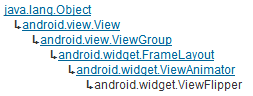
ViewFlipper 是 Android 提供的 View 容器,可實現頁面切換與自動播放。特性繼承自 ViewAnimator,可放入多個子 View,並設定翻轉間隔
 Android clipChildren 屬性:突破子 View 邊界
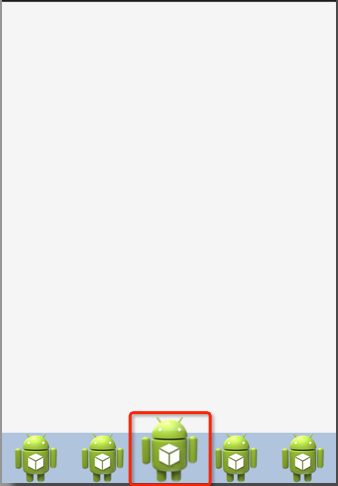
android:clipChildren 用來決定父容器是否裁剪子 View 的顯示範圍。預設值為 true,也就是子 View 無法超出父容器邊界;若設為 false,
 SpringAnimation 上手:用物理引擎做一支名副其實的彈簧動畫
Android 最近推出一個基於物理學的動畫支援庫,命名為 SpringAnimation(彈簧動畫),隨 Support Library 25.3.0 一起發布。Goo