

編輯:Android 開發教學
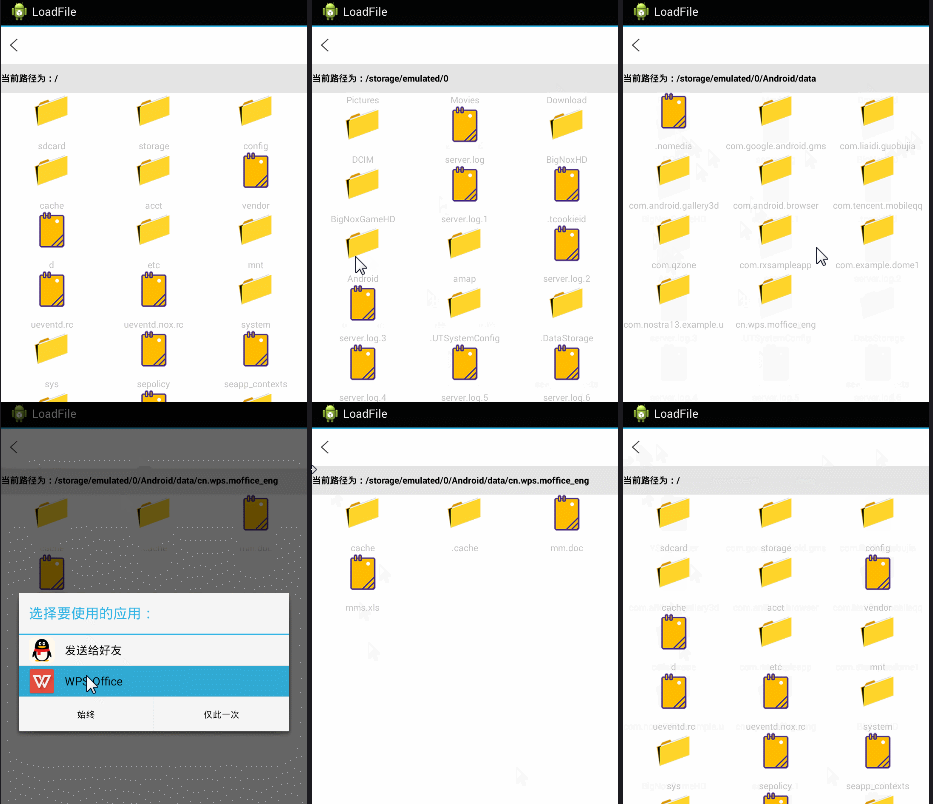
這個案例示範如何用 GridView 載入 SD 卡下的所有目錄與檔案,支援多層進入與返回、依檔案類型切換圖示,最後再依副檔名呼叫系統內對應的應用程式來開啟檔案。
public class GridViewFile extends Activity implements View.OnClickListener {

    private Context context;
    private TextView tv_title, textView;
    private GridView listView;
    private final String MUSIC_PATH = "/";

    private File currentParent;   // 當前所在目錄
    private File[] currentFiles;  // 當前目錄下的所有檔案

    @Override
    protected void onCreate(Bundle savedInstanceState) {
        super.onCreate(savedInstanceState);
        setContentView(R.layout.activity_main);
        context = this;
        initView();
    }

    public void initView() {
        findViewById(R.id.public_top_img_close).setOnClickListener(this);
        listView = (GridView) findViewById(R.id.gridview);
        textView = (TextView) findViewById(R.id.llss);
        onLoad();
    }

    public void onLoad() {
        ListSongsName();
    }

    private void ListSongsName() {
        File root = new File(MUSIC_PATH);
        if (root.exists()) {
            currentParent = root;
            currentFiles = root.listFiles();
            inflateListView(currentFiles);
        }

        listView.setOnItemClickListener(new AdapterView.OnItemClickListener() {
            @Override
            public void onItemClick(AdapterView<?> parent, View view, int position, long id) {
                if (currentFiles[position].isFile()) {
                    // 檔案:呼叫系統已安裝的應用開啟
                    onError(currentFiles[position].getPath() + "1");
                    Intent intent = OpenFile.openFile(currentFiles[position].getPath());
                    startActivity(intent);
                } else {
                    // 目錄:進入下一層
                    File[] tmp = currentFiles[position].listFiles();
                    if (tmp == null || tmp.length == 0) {
                        Toast.makeText(GridViewFile.this, "空文件夾!", Toast.LENGTH_SHORT).show();
                    } else {
                        currentParent = currentFiles[position];
                        currentFiles = tmp;
                        inflateListView(currentFiles);
                    }
                }
            }
        });
    }

    /** 依檔案是目錄或檔案,選用不同圖示後刷新列表 */
    private void inflateListView(File[] files) {
        if (files.length == 0) {
            Toast.makeText(GridViewFile.this, "sd卡不存在", Toast.LENGTH_SHORT).show();
        } else {
            List<Map<String, Object>> listItems = new ArrayList<Map<String, Object>>();
            for (int i = 0; i < files.length; i++) {
                Map<String, Object> listItem = new HashMap<String, Object>();
                Log.i("path", files[i].getPath());
                Log.i("path", files[i].getName());
                if (files[i].isDirectory()) {
                    listItem.put("icon", R.drawable.file_wenjianjia);
                } else {
                    listItem.put("icon", R.drawable.file_wenjian1);
                }
                listItem.put("fileName", files[i].getName());
                listItems.add(listItem);
            }

            SimpleAdapter simpleAdapter = new SimpleAdapter(this, listItems, R.layout.acheshi_item,
                    new String[] { "icon", "fileName" },
                    new int[] { R.id.imageView1, R.id.text_path });
            listView.setAdapter(simpleAdapter);

            try {
                textView.setText("當前路徑為:" + currentParent.getCanonicalPath());
            } catch (IOException e) {
                e.printStackTrace();
            }
        }
    }

    @Override
    public void onClick(View v) {
        onbey();
    }

    /** 返回上一層目錄;已在根目錄則詢問是否結束程式 */
    private void onbey() {
        try {
            if (!MUSIC_PATH.equals(currentParent.getCanonicalPath())) {
                currentParent = currentParent.getParentFile();
                currentFiles = currentParent.listFiles();
                inflateListView(currentFiles);
            } else {
                new AlertDialog.Builder(this)
                        .setIcon(R.drawable.ic_launcher)
                        .setTitle("提示")
                        .setMessage("確定要退出嗎?")
                        .setPositiveButton("確定", new DialogInterface.OnClickListener() {
                            @Override
                            public void onClick(DialogInterface dialog, int which) {
                                finish();
                            }
                        })
                        .setNegativeButton("取消", new DialogInterface.OnClickListener() {
                            @Override
                            public void onClick(DialogInterface dialog, int which) {
                            }
                        }).create().show();
            }
        } catch (Exception e) {
            e.printStackTrace();
        }
    }

    public void onError(Object error) {
        Toast.makeText(getApplicationContext(), error + "", Toast.LENGTH_LONG).show();
    }

    protected void onDestroy() {
        super.onDestroy();
    }
}
目錄瀏覽的邏輯靠兩個狀態變數支撐:currentParent 記住目前所在層級,currentFiles 記住該層的內容清單。點擊時判斷是檔案還是目錄,分別走「開啟」或「下潛」;返回時把 currentParent 退回上一層再重填列表即可。
/** 根據路徑調用系統對應的應用打開文件 */
public class OpenFile {

    public static Intent openFile(String filePath) {
        File file = new File(filePath);
        if (!file.exists()) return null;

        /* 取得副檔名 */
        String end = file.getName()
                .substring(file.getName().lastIndexOf(".") + 1, file.getName().length())
                .toLowerCase();

        /* 依副檔名決定 MIME 類型 */
        if (end.equals("m4a") || end.equals("mp3") || end.equals("mid")
                || end.equals("xmf") || end.equals("ogg") || end.equals("wav")) {
            return getAudioFileIntent(filePath);
        } else if (end.equals("3gp") || end.equals("mp4")) {
            return getAudioFileIntent(filePath);
        } else if (end.equals("jpg") || end.equals("gif") || end.equals("png")
                || end.equals("jpeg") || end.equals("bmp")) {
            return getImageFileIntent(filePath);
        } else if (end.equals("apk")) {
            return getApkFileIntent(filePath);
        } else if (end.equals("ppt")) {
            return getPptFileIntent(filePath);
        } else if (end.equals("xls")) {
            return getExcelFileIntent(filePath);
        } else if (end.equals("doc")) {
            return getWordFileIntent(filePath);
        } else if (end.equals("pdf")) {
            return getPdfFileIntent(filePath);
        } else if (end.equals("chm")) {
            return getChmFileIntent(filePath);
        } else if (end.equals("txt")) {
            return getTextFileIntent(filePath, false);
        } else {
            return getAllIntent(filePath);
        }
    }

    // 通用:讓系統自己挑應用
    public static Intent getAllIntent(String param) {
        Intent intent = new Intent();
        intent.addFlags(Intent.FLAG_ACTIVITY_NEW_TASK);
        intent.setAction(android.content.Intent.ACTION_VIEW);
        Uri uri = Uri.fromFile(new File(param));
        intent.setDataAndType(uri, "*/*");
        return intent;
    }

    public static Intent getApkFileIntent(String param) {
        Intent intent = new Intent();
        intent.addFlags(Intent.FLAG_ACTIVITY_NEW_TASK);
        intent.setAction(android.content.Intent.ACTION_VIEW);
        Uri uri = Uri.fromFile(new File(param));
        intent.setDataAndType(uri, "application/vnd.android.package-archive");
        return intent;
    }

    public static Intent getVideoFileIntent(String param) {
        Intent intent = new Intent("android.intent.action.VIEW");
        intent.addFlags(Intent.FLAG_ACTIVITY_CLEAR_TOP);
        intent.putExtra("oneshot", 0);
        intent.putExtra("configchange", 0);
        Uri uri = Uri.fromFile(new File(param));
        intent.setDataAndType(uri, "video/*");
        return intent;
    }

    public static Intent getAudioFileIntent(String param) {
        Intent intent = new Intent("android.intent.action.VIEW");
        intent.addFlags(Intent.FLAG_ACTIVITY_CLEAR_TOP);
        intent.putExtra("oneshot", 0);
        intent.putExtra("configchange", 0);
        Uri uri = Uri.fromFile(new File(param));
        intent.setDataAndType(uri, "audio/*");
        return intent;
    }

    public static Intent getHtmlFileIntent(String param) {
        Uri uri = Uri.parse(param).buildUpon()
                .encodedAuthority("com.android.htmlfileprovider")
                .scheme("content").encodedPath(param).build();
        Intent intent = new Intent("android.intent.action.VIEW");
        intent.setDataAndType(uri, "text/html");
        return intent;
    }

    public static Intent getImageFileIntent(String param) {
        Intent intent = new Intent("android.intent.action.VIEW");
        intent.addCategory("android.intent.category.DEFAULT");
        intent.addFlags(Intent.FLAG_ACTIVITY_NEW_TASK);
        Uri uri = Uri.fromFile(new File(param));
        intent.setDataAndType(uri, "image/*");
        return intent;
    }

    public static Intent getPptFileIntent(String param) {
        Intent intent = new Intent("android.intent.action.VIEW");
        intent.addCategory("android.intent.category.DEFAULT");
        intent.addFlags(Intent.FLAG_ACTIVITY_NEW_TASK);
        Uri uri = Uri.fromFile(new File(param));
        intent.setDataAndType(uri, "application/vnd.ms-powerpoint");
        return intent;
    }

    public static Intent getExcelFileIntent(String param) {
        Intent intent = new Intent("android.intent.action.VIEW");
        intent.addCategory("android.intent.category.DEFAULT");
        intent.addFlags(Intent.FLAG_ACTIVITY_NEW_TASK);
        Uri uri = Uri.fromFile(new File(param));
        intent.setDataAndType(uri, "application/vnd.ms-excel");
        return intent;
    }

    public static Intent getWordFileIntent(String param) {
        Intent intent = new Intent("android.intent.action.VIEW");
        intent.addCategory("android.intent.category.DEFAULT");
        intent.addFlags(Intent.FLAG_ACTIVITY_NEW_TASK);
        Uri uri = Uri.fromFile(new File(param));
        intent.setDataAndType(uri, "application/msword");
        return intent;
    }

    public static Intent getChmFileIntent(String param) {
        Intent intent = new Intent("android.intent.action.VIEW");
        intent.addCategory("android.intent.category.DEFAULT");
        intent.addFlags(Intent.FLAG_ACTIVITY_NEW_TASK);
        Uri uri = Uri.fromFile(new File(param));
        intent.setDataAndType(uri, "application/x-chm");
        return intent;
    }

    public static Intent getTextFileIntent(String param, boolean paramBoolean) {
        Intent intent = new Intent("android.intent.action.VIEW");
        intent.addCategory("android.intent.category.DEFAULT");
        intent.addFlags(Intent.FLAG_ACTIVITY_NEW_TASK);
        if (paramBoolean) {
            Uri uri1 = Uri.parse(param);
            intent.setDataAndType(uri1, "text/plain");
        } else {
            Uri uri2 = Uri.fromFile(new File(param));
            intent.setDataAndType(uri2, "text/plain");
        }
        return intent;
    }

    public static Intent getPdfFileIntent(String param) {
        Intent intent = new Intent("android.intent.action.VIEW");
        intent.addCategory("android.intent.category.DEFAULT");
        intent.addFlags(Intent.FLAG_ACTIVITY_NEW_TASK);
        Uri uri = Uri.fromFile(new File(param));
        intent.setDataAndType(uri, "application/pdf");
        return intent;
    }
}
整個 OpenFile 的作用就是「副檔名 → MIME 類型 → ACTION_VIEW Intent」的映射表。有了正確的 MIME 類型,系統才會跳出可處理該格式的應用清單。實務上要留意:Android 7.0 之後 Uri.fromFile() 會觸發 FileUriExposedException,必須改用 FileProvider 分享 content:// URI 並在 manifest 中宣告對應的 provider。
<!-- SD卡權限 -->
<uses-permission android:name="android.permission.WRITE_EXTERNAL_STORAGE" />
<uses-permission android:name="android.permission.MOUNT_UNMOUNT_FILESYSTEMS" />
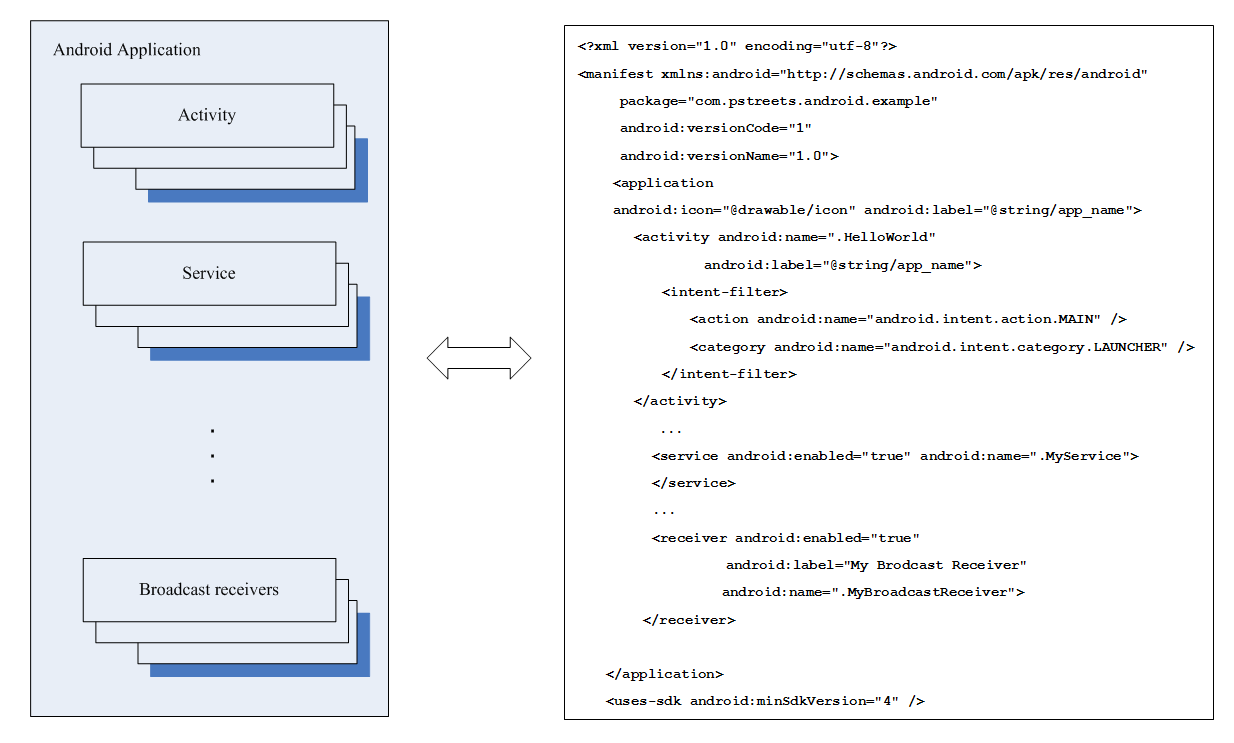 Android 簡明開發教程四:Android 應用的基本概念
Android 平台最顯著的特點之一是「低耦合」。Activity 是 Android 應用最基本的 UI 模組,若拿 Windows Form 應用來類比,它相當於 W
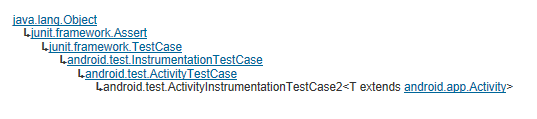 Android 測試教程(10):ActivityInstrumentationTestCase2 示例
ActivityInstrumentationTestCase2 主要用於測試一個或多個 Activity 的功能,它的特色是「用與最終應用相同的運行環境來測試」。 具體
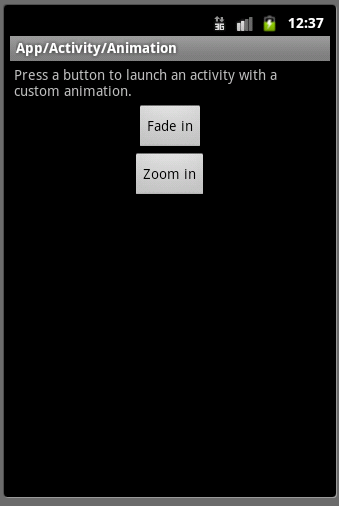 ApiDemos 解析(3):Activity 切換的補間動畫
App->Activity->Animation 示例示範如何為 Activity 之間的切換加上動態效果。示例中定義了兩種動畫:Fade In 讓新出現的
 Android 開發入門:ScrollView 滾動視圖
ScrollView 是一種可讓使用者捲動內容的容器,常用於內容高度超過螢幕的畫面。它只能包含一個子 View 或 ViewGroup,通常會搭配 LinearLayou