

編輯:Android 開發教學
SimpleAdapter 的本質是一個資料集,負責把資料灌進 ListView、GridView 這類 AdapterView 容器中。它最大的好處是不必自己寫 Adapter,只要給它一份 Map 清單,再告訴它哪個欄位對應哪個控制項即可。
最簡單的應用是搭配系統內建的 simple_list_item_1 版面,讓每一列只顯示一行文字:
public class myListItem1 extends Activity{
 @Override
 public void onCreate(Bundle savedInstanceState){
  super.onCreate(savedInstanceState);
  ListView listView = new ListView(this);
  List<Map<String, String>> mList = new ArrayList<Map<String, String>>();
  for(int i=0; i<10; i++){
    Map<String, String> map = new HashMap<String, String>();
    map.put("TITLE", "Test Title");
    map.put("CONTENT", "Test Content");
    mList.add(map);
  }
  SimpleAdapter adapter = new SimpleAdapter(this, mList,
    android.R.layout.simple_list_item_1, // List 顯示一行
    new String[]{ "CONTENT" }, // 對應的資料鍵
    new int[]{ android.R.id.text1 } // 對應的目標控制項
  );
  listView.setAdapter(adapter);
  setContentView(listView);
 }
}
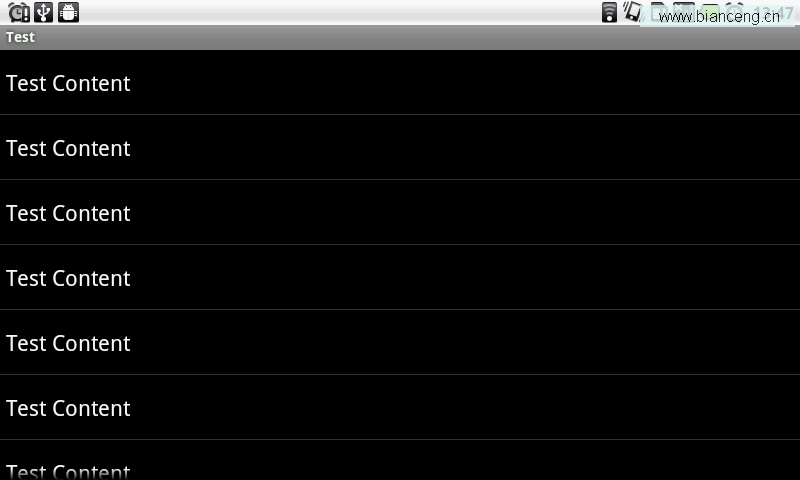
這裡的資料準備了 TITLE 與 CONTENT 兩個鍵,但版面只畫一個文字區塊,所以只對應了 CONTENT。若改用 simple_list_item_2 這類雙行版面,就能把 TITLE 也一併帶進來,這也是 SimpleAdapter 最常見的擴充方式。
執行結果如下:
SimpleAdapter 的極限在於「欄位對控制項」是一對一的靜態映射。一旦需要客製版面、要在列內放圖片並做非同步載入,或是需要監聽單列的點擊以外的複雜互動,就該往 BaseAdapter 或自定義 Adapter 邁進。它最適合的位置,是那種純文字清單、資料來源就是一組 Map 的輕量場景。
 Android 版 KMPlayer 登場:功能一次看
在 PC 上頗受歡迎的播放器 KMPlayer 開始進軍行動平台,推出了 Android 版本,支援 Android 4.0 以上系統。 主要功能 媒體庫功能,方便快速找
 自定義 View 探索(一):用日誌實際跑一遍 View 的生命週期
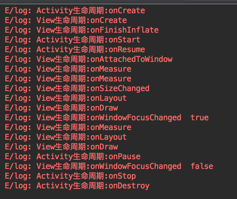
自定義 View 最怕「憑感覺猜執行順序」。最直接的解法是在每個回呼裡都打一行 log,跑一次,順序自然清楚。以下就用這個笨但有效的方法,把 View 從建立到顯示的過程
 Android 開機自動啟動應用實作
Android 開機完成後會送出 ACTION_BOOT_COMPLETED 廣播。應用可註冊 BroadcastReceiver 接收此訊息,進而啟動指定 Activi
 Android ApiDemos 解析(32):App → Preferences → Preference dependencies
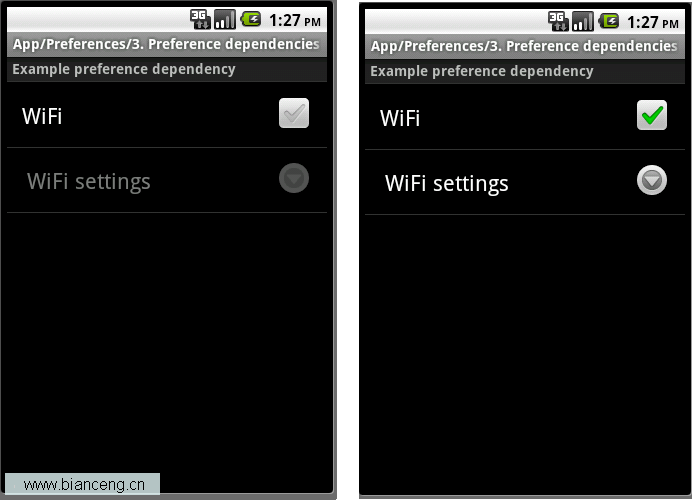
Preference 之間可以建立相依關係。被依賴的那一方通常稱為 Parent preference,規則很直覺:只有當 Parent 處於啟用(勾選)狀態時,子 Pr