

編輯:Android 開發教學
如果每次切換都重新建立 Fragment,畫面就得重畫一次;當 Fragment 結構龐大、初始化成本高的時候,使用者會明顯感覺到卡頓。以下分享一種保留狀態的做法。
1. 不使用 ViewPager;
2. 不能用 replace 切換 Fragment,因為 replace 會走到 onDestroyView,把檢視樹整個拆掉。
替代方案是用 add 一次加入全部 Fragment,切換時只控制 hide/show,這樣各頁的狀態自然被保留下來。
<LinearLayout xmlns:android="https://schemas.android.com/apk/res/android"
    android:layout_width="match_parent"
    android:layout_height="match_parent"
    android:orientation="vertical" >

    <FrameLayout
        android:id="@+id/container"
        android:layout_width="match_parent"
        android:layout_height="0dip"
        android:layout_weight="1.0" >

    </FrameLayout>

    <RadioGroup
        android:id="@+id/main_radio"
        android:layout_width="fill_parent"
        android:layout_height="wrap_content"
        android:layout_gravity="bottom"
        android:gravity="bottom"
        android:layout_marginBottom="-6dp"
        android:orientation="horizontal" >

        <RadioButton
            android:id="@+id/radio_button0"
            style="@style/main_tab_bottom"
            android:drawableTop="@drawable/bottom_1" />
        <RadioButton
            android:id="@+id/radio_button1"
            style="@style/main_tab_bottom"
            android:drawableTop="@drawable/bottom_2" />
        <RadioButton
            android:id="@+id/radio_button2"
            style="@style/main_tab_bottom"
            android:drawableTop="@drawable/bottom_3" />
        <RadioButton
            android:id="@+id/radio_button3"
            style="@style/main_tab_bottom"
            android:drawableTop="@drawable/bottom_4" />
        <RadioButton
            android:id="@+id/radio_button4"
            style="@style/main_tab_bottom"
            android:drawableTop="@drawable/bottom_5" />
    </RadioGroup>
</LinearLayout>
這是很常見的結構:底部放五個 RadioButton,點擊時切換對應的 Fragment。實作時只要記住「第一次點到才 add,之後一律 hide/show」,並在切換前先隱藏目前顯示的那一個即可。
 Android 4.4 與 iOS 7 功能比較
Android 與 iOS 的比較一直是行動平台討論焦點。Android 4.4 KitKat 與 iOS 7 都更漂亮、快速且功能完整,但兩者在鎖屏、通知與個人化上仍有
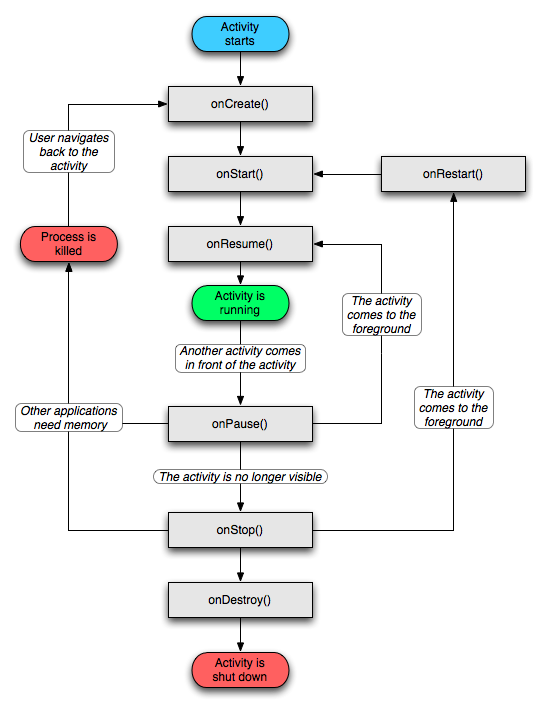 Android 簡明開發教程五:Activity 與它的生命週期
Android 應用中的 Activity 指的是具備螢幕顯示、能與使用者互動的基本模組,角色上近似 Java ME 中的 MIDlet,或 Windows 應用中的 F
 Android 版 KMPlayer 登場:功能一次看
在 PC 上頗受歡迎的播放器 KMPlayer 開始進軍行動平台,推出了 Android 版本,支援 Android 4.0 以上系統。 主要功能 媒體庫功能,方便快速找
 Android 網路狀態判斷與設定引導
應用連網前應先判斷網路狀態,避免在無網路時造成錯誤。權限需加入 ACCESS_NETWORK_STATE 與 INTERNET 權限。判斷使用 ConnectivityM