

編輯:Android 開發教學
使用 AbsoluteLayout,可以指定其中子 View 的精確位置。以下看 main.xml:
<?xml version="1.0" encoding="utf-8"?>
<AbsoluteLayout xmlns:android="https://schemas.android.com/apk/res/android"
    android:layout_width="fill_parent"
    android:layout_height="fill_parent" >

    <Button
        android:layout_width="188dp"
        android:layout_height="wrap_content"
        android:layout_x="126px"
        android:layout_y="361px"
        android:text="Button" />

    <Button
        android:layout_width="113dp"
        android:layout_height="wrap_content"
        android:layout_x="12px"
        android:layout_y="361px"
        android:text="Button" />
</AbsoluteLayout>
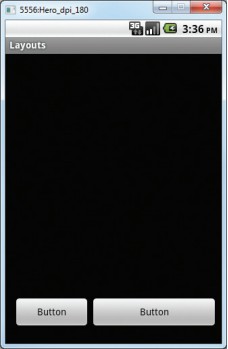
效果如下,使用 android:layout_x 與 android:layout_y 屬性,把兩個 Button 放在精確的位置上:
但當 Activity 被繪製在高解析度螢幕上時,問題就出现了。以下同樣的程式碼,在高解析度螢幕上的呈現:
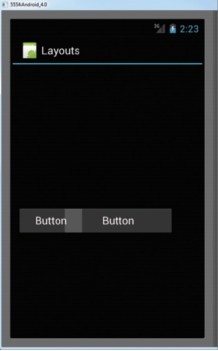
原因很直白:layout_x 與 layout_y 使用的是 px(實體像素),而非 dp。在解析度更高的螢幕上,同樣的像素數字代表的物理距離變小,於是元件全部擠到左上角。
正是出於這個原因,從 Android 1.5 開始,Google 官方就已不建議使用這個版面,儘管它目前仍可使用。建立 UI 時應避免 AbsoluteLayout,因為 Android 並不保證未來版本還會繼續支援它。
替代品很明確:需要絕對位置時用 ConstraintLayout 的相對約束;需要表格式排列時用 GridLayout;需要堆疊時用 FrameLayout。這幾個都能在不同解析度上正確縮放,而 AbsoluteLayout 天生做不到。
 Android 版 Outlook 強化收件箱:未讀篩選與郵件追蹤
微軟再次升級了 Android 平台的 Outlook 應用。這一版除了修掉大量使用者回報的問題,還強化了收件箱功能:新增未讀與已標記的篩選、郵件追蹤,以及把信件標記為垃
 Android 使用 Tesseract OCR 進行圖片文字辨識
Tesseract OCR 可在 Android 上實現圖片文字辨識。實作時需準備 OCR 函式庫、語言包與對應的 native 文庫,並將相關 jar 與 lib 加入
 greenDAO 3.2.3 配置踩坑記:問題出在 Gradle 版本,不在 Android Studio
這兩天一直在研究 greenDAO 這個 ORM 框架。從 GitHub 抓下原始碼(https://github.com/greenrobot/greenDAO),照著
 更換 Android 的 package name 與 ui refactoring error 排錯
package name 是 Android 系統用來標識每一個應用程式的唯一名稱,任何兩個應用都不能相同。開發過程中,難免會遇到需要更換 package name 的時