

編輯:Android 開發教學
Fragment 真正的價值在於能在程式執行過程中動態加入,而不是只寫死在版面檔裡。
作為容器的版面故意留空,因為 Fragment 稍後才會被塞進來:
<?xml version="1.0" encoding="utf-8"?>
<LinearLayout xmlns:android="https://schemas.android.com/apk/res/android"
    android:layout_width="fill_parent"
    android:layout_height="fill_parent"
    android:orientation="horizontal" >
</LinearLayout>
<?xml version="1.0" encoding="utf-8"?>
<LinearLayout xmlns:android="https://schemas.android.com/apk/res/android"
    android:layout_width="fill_parent"
    android:layout_height="fill_parent"
    android:background="#00FF00"
    android:orientation="vertical" >

    <TextView
        android:id="@+id/lblFragment1"
        android:layout_width="fill_parent"
        android:layout_height="wrap_content"
        android:text="This is fragment #1"
        android:textColor="#000000"
        android:textSize="25sp" />
</LinearLayout>
<?xml version="1.0" encoding="utf-8"?>
<LinearLayout xmlns:android="https://schemas.android.com/apk/res/android"
    android:layout_width="fill_parent"
    android:layout_height="fill_parent"
    android:background="#FFFE00"
    android:orientation="vertical" >

    <TextView
        android:layout_width="fill_parent"
        android:layout_height="wrap_content"
        android:text="This is fragment #2"
        android:textColor="#000000"
        android:textSize="25sp" />
</LinearLayout>
public class Fragment1 extends Fragment {
    @Override
    public View onCreateView(LayoutInflater inflater, ViewGroup container,
                             Bundle savedInstanceState) {
        // --- Inflate the layout for this fragment ---
        return inflater.inflate(R.layout.fragment1, container, false);
    }
}
public class Fragment2 extends Fragment {
    @Override
    public View onCreateView(LayoutInflater inflater, ViewGroup container,
                             Bundle savedInstanceState) {
        // --- Inflate the layout for this fragment ---
        return inflater.inflate(R.layout.fragment2, container, false);
    }
}
關鍵是 FragmentTransaction,而容器必須先有版面,才能作為掛載點:
FragmentTransaction ft = getFragmentManager().beginTransaction();
ft.add(R.id.container, new Fragment1());
ft.addToBackStack(null);
ft.commit();
這裡有三個細節容易出錯。第一,inflate 的第三個參數必須是 false——若傳 true,Fragment 會直接把 container 當成自己的父容器並掛上去,之後 Activity 再 add 一次就會出問題。第二,add 的容器 id 要指向 main.xml 中實際存在的檢視,若那個位置沒有元件就會拋出例外,因此實務上通常放一個 FrameLayout 當佔位。第三,commit 是異步的,呼叫後不能立刻假設畫面已更新;需要保證順序時應改用 commitNow 或在 commit 後透過 executePendingTransactions() 強制執行。
最後提醒:本範例使用 getFragmentManager(),這是 framework 內建的版本;若專案使用 support-v4 或 AndroidX,應改用 getSupportFragmentManager(),兩者不可混用。
 Android 簡明開發教程十:Adapter 與資料綁定
前面提過 AndroidGraphics2DTutorial 是從 ListActivity 派生出來的。ListActivity 中顯示的是 ListView,而 Li
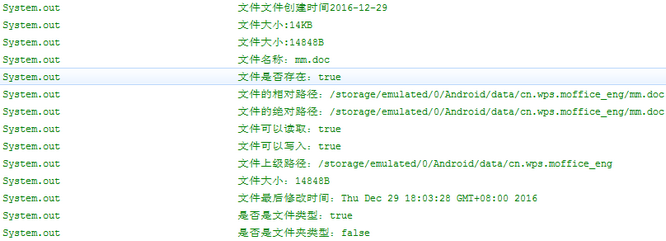 用 File 類讀取檔案資訊:名稱、大小、時間與路徑一次看
Android 中若已知一個檔案路徑,想取得檔名、大小、建立時間、相對路徑、絕對路徑等資訊,靠 java.io.File 提供的方法就能全部搞定。 public cla
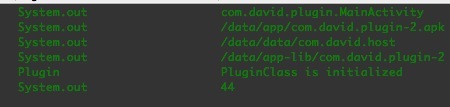 Android DexClassLoader 簡單使用:製作插件
類載入器概念Android 中的 DexClassLoader 可用來動態載入外部 dex 或 apk。與一般 import 不同,import 需要編譯時存在,而 Cl
 Android 4.3 相機界面更新觀察
根據洩露的資訊,Android 4.3 可能針對系統應用與啟動器行為進行調整,包括依使用頻率排序應用與小工具。相機界面變化新版的拍照界面重點在於設定菜單與模式選擇的調整。