

編輯:Android 開發教學
RoboGuice 對存取 res 目錄下的各類資源——drawable、array、string 等——也提供了注入支援。透過 @InjectResource,可以相当方便地把所需資源直接送進變數。
本例修改 ApiDemos 中的 Content → Resources → Resources,改用 Inject Resource 的方式來存取資源。
public class InjectResourceDemo extends RoboActivity {

    @InjectView(R.id.styled_text) TextView styled_text;
    @InjectView(R.id.plain_text)  TextView plain_text;
    @InjectView(R.id.res1)        TextView res1;

    @Inject Resources res;
    @InjectResource(R.string.styled_text) String str;

    @Override
    public void onCreate(Bundle savedInstanceState) {
        super.onCreate(savedInstanceState);
        setContentView(R.layout.injectresource);

        // 用 res 取得字串資源
        CharSequence cs = res.getText(R.string.styled_text);

        // 注意這裡用的是 CharSequence 而非 String,
        // 這樣才不會失去樣式資訊
        styled_text.setText(cs);

        // 同一份資源,但轉成 String,
        // 這會導致樣式資訊遺失
        plain_text.setText(str);

        res1.setText(cs);
    }
}
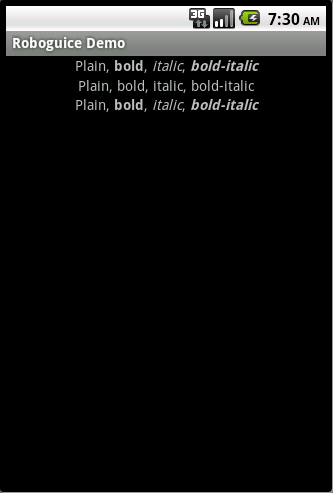
這個範例最值得學的不是 @InjectResource,而是它刻意示範了 CharSequence 與 String 的差異。
Android 的字串資源檔支援 HTML 風格標記,例如 <b>、<i>、<font>。當你用 getText() 讀取時,回傳的是 CharSequence,樣式資訊完整保留,畫面上的文字該粗就粗、該斜就斜。
但一旦轉成 String,樣式就被抹平了——所有文字都變成同一種樣式。
這解釋了為什麼範例要準備 styled_text 與 plain_text 兩個 TextView 做對照:同樣的資源,用不同型別接收,呈現結果完全不同。
而 @InjectResource(R.string.styled_text) String str 這行,因為宣告型別是 String,框架會自動幫你完成轉換,也就順帶把樣式丟掉了。
規則很簡單:只要資源檔裡可能有標記,就用 CharSequence 接收。用 getText() 而非 getString(),並把變數型別宣告為 CharSequence 或 Spanned。
另一個容易忽略的點是 @Inject Resources res 這行——它把 Resources 物件本身也注入了進來。這在需要動態決定資源 ID 的場景下很有用,例如依條件從陣列資源中挑字串,或格式化帶參數的 plurals。
本例子下載:https://www.imobilebbs.com/download/android/roboguice/InjectResourceDemo.zip
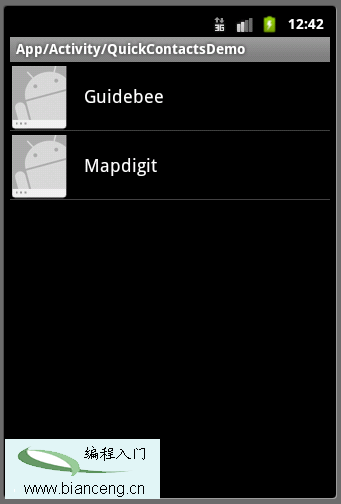 ApiDemos 解析(10):用 Content Provider 讀取聯絡人
QuickContactsDemo 示範如何透過 Content Provider 存取 Android 系統的聯絡人資料庫。 Content Provider 的定位
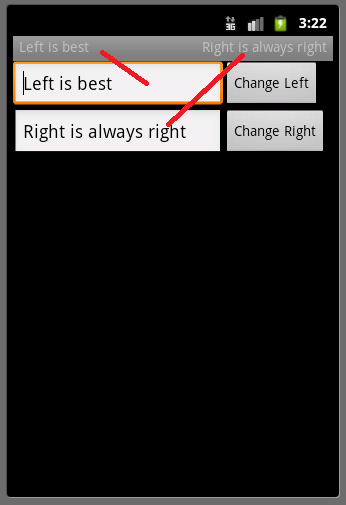 Android ApiDemos 解析(5):App → Activity → Custom Title
Android UI 預設的標題欄由 android:label 決定內容,固定顯示在螢幕左上角。這個位置幾乎被浪費掉了——為什麼不能放點更有用的東西?Android 允
 Office Mobile for Android 移動辦公軟體
微軟正式推出 Office Mobile for Android,讓 Android 使用者也能在手機上處理 Word、Excel 與 PowerPoint 文件。Off
 Android高仿微信實時聊天:基於百度雲推送
本文展示如何以百度雲推送為基礎,製作類似微信的即時聊天效果。透過雲端推送,訊息可在不同裝置之間即時傳遞。功能重點畫面包含好友列表與聊天介面,使用者可在模擬器與真機之間互傳