

編輯:Android 開發教學
在 Android 中,凡是 <intent-filter> 同時含有下列兩項的 Activity,就會被應用程式管理器(Launcher)列出來,通常這就是該應用的主畫面:
<action android:name="android.intent.action.MAIN" />
<category android:name="android.intent.category.LAUNCHER" />
此外,如果使用者想在裝置的 Home Screen 上放一個捷徑,只要長按該應用的圖示,系統就會自動建立,名稱與圖示都沿用 Launcher 中的樣子。
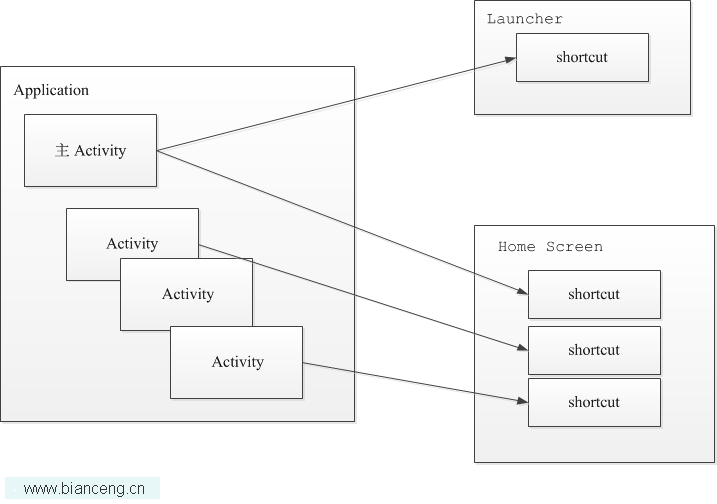
除了指向主 Activity 的捷徑,Android 也允許你在 Home Screen 上建立指向應用內任意 Activity 的捷徑。
為什麼需要這個?想像你的應用裡有個高頻功能,例如地圖中的地址查詢。正常情況下使用者得先開主畫面,再經過幾層選單才能抵達。若能為這個功能單獨建立捷徑,使用者一按就直接進入該功能頁,即使它並不是主 Activity。
Launcher Shortcuts 示範的就是這件事。實作可以拆成兩步:
1. 宣告這個 Activity 支援建立捷徑
在其 <intent-filter> 中加入 action android:name="android.intent.action.CREATE_SHORTCUT",標示它可被加為捷徑。本例採用 activity-alias 的做法——activity-alias 是 Target 的別名,使用方式類似 Activity,可以讓你在不改動原 Activity 的前提下另開一個入口。
2. 回傳捷徑資訊給 Launcher
一般在 Activity 的 onCreate 中攔截這個 action,組裝好捷徑的 Intent、名稱與圖示後透過 setResult 交回去:
if (Intent.ACTION_CREATE_SHORTCUT.equals(action)) {
    setupShortcut();
    finish();
    return;
}
...

private void setupShortcut() {
    // 先建立捷徑本身的 Intent。
    // 這裡為了示範,直接把我們自己叫回來;
    // 實務上更常見的是帶 data Uri 顯示特定結果,
    // 或用自訂 action 啟動某個具体操作。
    Intent shortcutIntent = new Intent(Intent.ACTION_MAIN);
    shortcutIntent.setClassName(this, this.getClass().getName());
    shortcutIntent.putExtra(EXTRA_KEY, "ApiDemos Provided This Shortcut");

    // 再建立承載用的容器 Intent(也就是回應呼叫者的內容)
    Intent intent = new Intent();
    intent.putExtra(Intent.EXTRA_SHORTCUT_INTENT, shortcutIntent);
    intent.putExtra(Intent.EXTRA_SHORTCUT_NAME,
            getString(R.string.shortcut_name));

    Parcelable iconResource =
            Intent.ShortcutIconResource.fromContext(this, R.drawable.app_sample_code);
    intent.putExtra(Intent.EXTRA_SHORTCUT_ICON_RESOURCE, iconResource);

    // 把結果交還給 Launcher
    setResult(RESULT_OK, intent);
}
關鍵在於三個 extra:EXTRA_SHORTCUT_INTENT 決定點擊後去哪裡,EXTRA_SHORTCUT_NAME 決定顯示的名稱,EXTRA_SHORTCUT_ICON_RESOURCE 決定圖示。只要這三者齊備,Launcher 就能完成捷徑的建立。
 Hierarchy Viewer 使用指南:透視你的 UI 版面結構
Android SDK 工具包裡藏著不少好用的幫手,能大幅提升開發與測試的效率。Hierarchy Viewer 就是其中之一,它是一款視覺化除錯工具,能幫助開發者分析、
 Windows 建置 Android 開發環境的準備工作
在 Windows 上開發 Android,首先需要準備 Java JDK 與 Eclipse。JDK 提供 Java 編譯與執行環境,Eclipse 則作為整合開發工具
 Galaxy Nexus 與 Nexus 7 的 Android 4.2 ROM 下載教學
目前 Google 已逐步以 OTA 升級的形式,向 Galaxy Nexus 用戶推送全新的 Android 4.2 果凍豆系統。不過,如果你缺乏耐心、希望能直接手動升
 基於 Openfire 的即時通訊開發:伺服器搭建
使用 Openfire 可省去自建伺服器的工作,快速建立即時通訊基礎環境。技術組成Openfire 是基於 XMPP 的 Java 開源即時協作伺服器;Smack 是常見