

編輯:Android 開發教學
AndroidTestCase 是 Android 平台下通用的測試基底類別,它支援所有 JUnit 的 assert 方法,以及標準的 setUp 與 tearDown。當你的測試需要存取應用資源,或者測試邏輯依賴 Context 時,就可以用它作為基底。
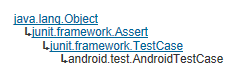
Focus2AndroidTest 測試的對象仍是 ApiDemos 中的 Views → Focus → 2. Horizontal,但側重點與原本完全不同。
原本那個範例測的是「執行起來之後焦點怎麼跑」;而 Focus2AndroidTest 完全不需要啟動 Activity,它測的是 R.layout.focus_2 這個版面配置本身——焦點順序是否符合設計預期。這可以視為 Activity 的一種靜態屬性。
能做到這件事,靠的是 FocusFinder:它把版面 inflate 出來、手動測量配置,然後就能在不啟動任何 Activity 的情況下詢問焦點跳躍規則。
public class Focus2AndroidTest extends AndroidTestCase {

    private FocusFinder mFocusFinder;
    private ViewGroup mRoot;
    private Button mLeftButton;
    private Button mCenterButton;
    private Button mRightButton;

    @Override
    protected void setUp() throws Exception {
        super.setUp();
        mFocusFinder = FocusFinder.getInstance();

        // 把版面 inflate 出來
        final Context context = getContext();
        final LayoutInflater inflater = LayoutInflater.from(context);
        mRoot = (ViewGroup) inflater.inflate(R.layout.focus_2, null);

        // 手動測量並配置版面
        mRoot.measure(500, 500);
        mRoot.layout(0, 0, 500, 500);

        mLeftButton = (Button) mRoot.findViewById(R.id.leftButton);
        mCenterButton = (Button) mRoot.findViewById(R.id.centerButton);
        mRightButton = (Button) mRoot.findViewById(R.id.rightButton);
    }

    @SmallTest
    public void testPreconditions() {
        assertNotNull(mLeftButton);
        assertTrue("center button should be right of left button",
                mLeftButton.getRight() < mCenterButton.getLeft());
        assertTrue("right button should be right of center button",
                mCenterButton.getRight() < mRightButton.getLeft());
    }

    @SmallTest
    public void testGoingRightFromLeftButtonJumpsOverCenterToRight() {
        assertEquals("right should be next focus from left",
                mRightButton,
                mFocusFinder.findNextFocus(mRoot, mLeftButton, View.FOCUS_RIGHT));
    }

    @SmallTest
    public void testGoingLeftFromRightButtonGoesToCenter() {
        assertEquals("center should be next focus from right",
                mCenterButton,
                mFocusFinder.findNextFocus(mRoot, mRightButton, View.FOCUS_LEFT));
    }
}
最後兩個測試方法透過 mFocusFinder 的 findNextFocus,驗證 mLeftButton 與 mRightButton 在左右方向上的下一個可獲焦點元件是否符合設計。
它示範了一個重要的觀念:不是所有測試都需要把整個應用跑起來。版面配置、資源內容、焦點順序這些靜態屬性,都能靠 AndroidTestCase 提供的 Context 直接驗證,速度快、不受環境干擾。
另外注意 setUp 中的 measure 與 layout 是手動呼叫的。在沒有真正視窗的測試環境中,View 不會自動完成測量配置,若不手動處理,getRight()、getLeft() 全都會是 0,斷言自然毫無意義。
還有 @SmallTest 這個標註也值得留意——它標示這是一個小型測試,讓測試框架能依規模分類執行。
 Android 系統短信 App 原始碼分析入門
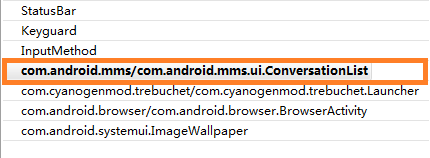
分析 Android 系統 App 時,可先找出目前前景 Activity,再定位對應原始碼。以 AOSP 短信應用為例,啟動 Activity 通常是 Conversa
 Android 4.4 用戶最期待的新功能:備份與通訊
在 Android 4.4 KitKat 問世前,用戶期待 Google 能補強兩大痛點:完整備份與順暢通訊。備份與訊息理想的備份方案應能還原 App 資料、帳號狀態、訊
 Android 實作帶進度條的 WebView
若不使用系統標題列,就必須自行處理網頁載入進度。常見做法是建立一個自定義 WebView,在頂部加入水平 ProgressBar,並透過 WebChromeClient
 Android 簡明開發教程八:引路蜂二維繪圖範例的功能定義
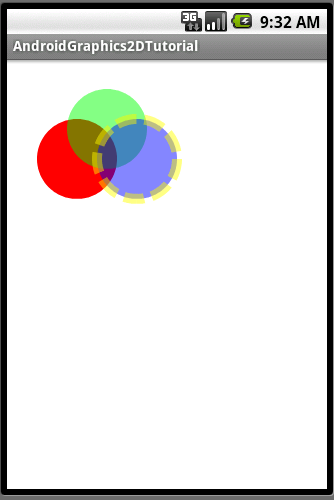
有了前面對 Android 平台的介紹,基本上就可以開始動手寫應用了。這裡以繪製二維圖形為例,把 Android 開發的一般方法整個走一遍。 這個範例會練到哪些技能 看似