

編輯:Android 開發教學
用 Scala 寫 Android 應用聽起來是個有趣的命題。本文走一遍完整流程,並做一個實際可運行的範例。
本文要在 Android 裝置上建立一個可運行的應用。你需要安裝 Android SDK(本文使用 V1.5)。應用程式碼以 Scala 撰寫——如果你沒用過 Scala 也無妨,文中會解釋所有程式碼;但即使如此,建議你至少熟悉 Java 語言。本文以 Scala V2.7.5 開發。
Android 與 Scala 都有不錯的 Eclipse 插件。本文使用 Eclipse V3.4.2、Android Development Tools(ADT)V0.9.1 以及 Scala IDE 插件 V2.7.5。
Android 應用運行於自己的虛擬機器——Dalvik VM。但建置路徑是開放的,這正是 Scala 得以介入的空間。

基本策略如下:
首先把所有 Scala 程式碼編譯成 Java 的 .class 檔。這是 Scala 編譯器的本职工作,沒什麼複雜的。
接著用 Android 的 dex 編譯器把 .class 檔轉成 Dalvik VM 使用的格式。這就是所謂的 dexing,也是 Android 應用的常規建置路徑——通常是從 .java 到 .class 再到 .dex,本文唯一的差別是起點換成 .scala。
最後,.dex 檔與其他應用資源一起被壓縮成 APK 檔,即可安裝到 Android 裝置上。
要讓這一切真正跑起來,還需要 Scala 標準庫的程式碼。在典型的 Scala 安裝中,它是 /lib/scala-library.jar 裡的一個獨立 JAR。
問題是:這個 JAR 包含一些 Android 不支援的程式碼。有些需要稍作調整,有些則必須移除。實測經驗是——為 Android 客製建置一份 scala-library.jar 運行得最好。我們稱它為 Android 庫 JAR。
有了這個 JAR,剩下的就簡單了:用 Eclipse 的 ADT 插件建立 Android 專案,為專案加上 Scala nature,用 Android 庫 JAR 取代標準 Scala 庫,最後把輸出目錄加入 classpath。
我們要做的應用是一個簡單的單位轉換器,能在英制與公制之間來回轉換。功能很基本,但足以說明 Scala 在 Android 上的可行性。
並非所有行動開發程式碼都該用 Scala 或 Java 寫。Android SDK 提供了很好的方式,用基於 XML 的佈局系統把使用者介面程式碼與應用邏輯分離開來。
主要佈局檔如下:
<?xml version="1.0" encoding="utf-8"?>
<RelativeLayout xmlns:android="https://schemas.android.com/apk/res/android"
    android:layout_width="fill_parent"
    android:layout_height="fill_parent"
    android:gravity="center_horizontal"
    android:padding="10px">

    <TextView android:id="@+id/prompt_label"
        android:layout_width="wrap_content"
        android:layout_height="wrap_content"
        android:text="@string/prompt_metric"/>

    <EditText android:id="@+id/amount"
        android:layout_below="@id/prompt_label"
        android:layout_width="fill_parent"
        android:layout_height="wrap_content"/>

    <TextView android:id="@+id/uom_label"
        android:layout_below="@id/amount"
        android:layout_width="wrap_content"
        android:layout_height="wrap_content"
        android:text="@string/uom"/>

    <Spinner android:id="@+id/uom_value"
        android:layout_below="@id/uom_label"
        android:layout_width="wrap_content"
        android:layout_height="wrap_content"/>

    <Button android:id="@+id/convert_button"
        android:layout_below="@id/uom_value"
        android:layout_width="wrap_content"
        android:layout_height="wrap_content"
        android:text="@string/convert_button_label"/>

    <TextView android:id="@+id/result_value"
        android:layout_below="@id/convert_button"
        android:layout_width="fill_parent"
        android:layout_height="fill_parent"/>

</RelativeLayout>
以今天的眼光看,這套流程相当繁瑣:客製 scala-library.jar、手動調整 classpath、依賴 Eclipse 插件鏈。它之所以可行,關鍵在於 Android 的建置鏈只認 .class 與 .dex,而不關心 .class 是誰編出來的。
這個「只認產物、不認來源」的特性,讓 JVM 生態系上數十種語言都能運行於 Android。Scala 之外,Kotlin、Clojure、Groovy 都曾走過類似路徑。
而其中真正勝出的,是 Kotlin。它贏的原因恰好對應了 Scala 在這個場景的困境:函式庫體積小得多(對行動裝置至關重要)、與 Java 的互操作性更好、建置時間更短,並且在 2017 年獲得 Google 官方 first-class 支援。
所以這篇教程的意義,與其說是「教你用 Scala 寫 Android」,不如說是示範了一個重要觀念:當一個平台的建置鏈只依賴標準產物格式時,它就天然對其他語言開放。理解這點,你就能預判哪些新語言有機會進入某個生態系。
 Android 應用程式專案結構解析
用 Eclipse 打開一個 Android 應用程式的專案,可以看到如下圖所示的檔案結構。 其中,src 資料夾保存的是我們編寫的 Java 源檔,我們撰寫的程式碼一
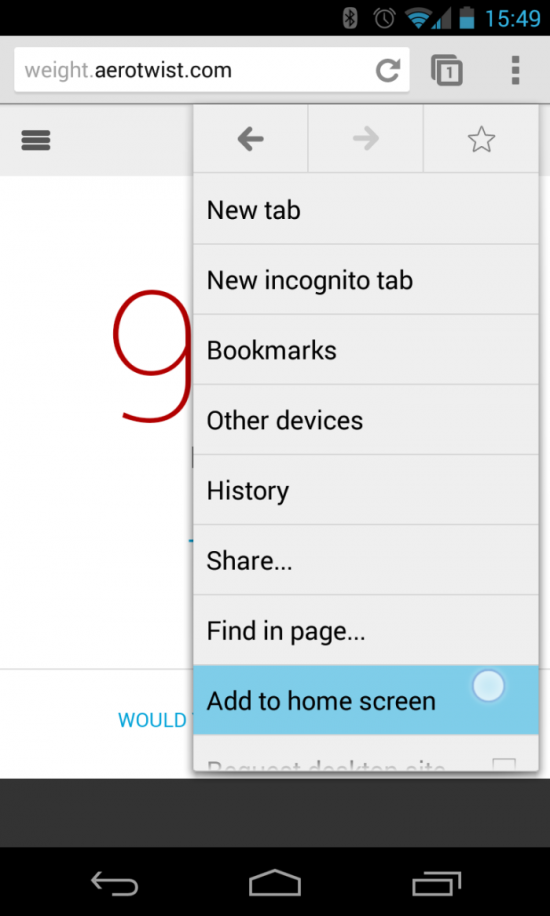 Chrome 31 beta for Android 網頁快捷方式與自動填表
Chrome 31 beta for Android 讓使用者可將網頁以快捷方式加入主畫面,開啟後呈現接近全螢幕的瀏覽體驗,少了部分瀏覽器介面元素。 新版也改善自動完成功
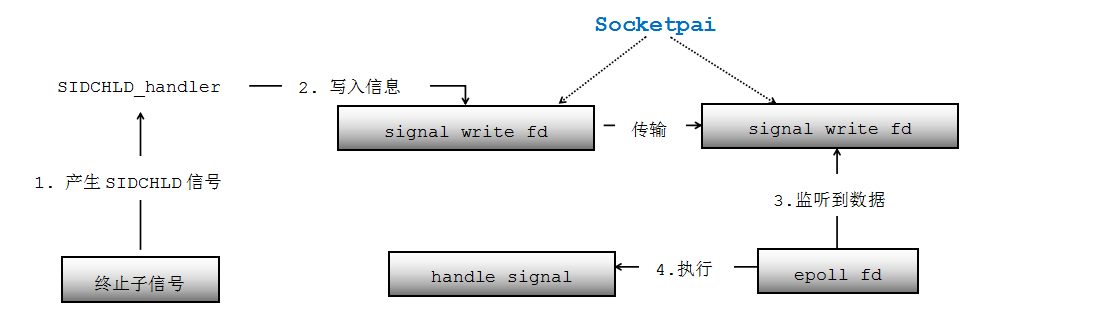 Android 啟動流程剖析(一):init 進程的 main 函式到底做了哪些事
研究 Android 源碼,第一步繞不開 init。它是「天字第一號」進程,程式碼晦澀但地位關鍵;搞懂它,後續 Zygote、SystemServer 乃至各核心服務的源
 Android 4.0 Launcher 全部應用列表分析
Android 4.0 的 Launcher 全部應用列表與早期版本相比,增加了 Widget 顯示與分頁配置。其主要介面由 AppsCustomizeTabHost 與