

編輯:Android 程式設計入門
由於 HTTP 上傳要求把數據轉化為字符串,直接上傳圖片並不容易。常見做法是先把圖片轉成字節流,再把字節流轉為字符串。這個過程容易出錯,因此更穩妥的方案是先將字節流用 Base64 編碼,到了服務器端(或客戶端)再用 Base64 解碼還原成字節流,進而寫回為圖片文件。
import java.io.ByteArrayOutputStream;
import java.util.ArrayList;
import java.util.List;
import org.apache.http.HttpEntity;
import org.apache.http.HttpResponse;
import org.apache.http.NameValuePair;
import org.apache.http.client.HttpClient;
import org.apache.http.client.entity.UrlEncodedFormEntity;
import org.apache.http.client.methods.HttpPost;
import org.apache.http.impl.client.DefaultHttpClient;
import org.apache.http.message.BasicNameValuePair;
import org.apache.http.util.EntityUtils;
import com.hexiaochun.utils.Base64Coder;
import android.graphics.Bitmap;

public class updaImage {
    public static void updata(Bitmap upbitmap) {
        ByteArrayOutputStream stream = new ByteArrayOutputStream();
        upbitmap.compress(Bitmap.CompressFormat.JPEG, 60, stream);
        byte[] b = stream.toByteArray();
        /*
         * 將圖片流以字符串形式存儲,Base64Coder 是常用的編碼類,
         * 多用於網絡數據傳輸時的加解密,用來確保數據的唯一性
         */
        String file = new String(Base64Coder.encodeLines(b));
        HttpClient client = new DefaultHttpClient();
        // 設置上傳參數
        List<NameValuePair> formparams = new ArrayList<NameValuePair>();
        formparams.add(new BasicNameValuePair("file", file));
        HttpPost post = new HttpPost(MainActivity.HOST);
        UrlEncodedFormEntity entity;
        try {
            entity = new UrlEncodedFormEntity(formparams, "UTF-8");
            post.addHeader("Accept", "text/javascript, text/html, application/xml, text/xml");
            post.addHeader("Accept-Charset", "GBK,utf-8;q=0.7,*;q=0.3");
            // 加消息報頭,進行 gzip 壓縮,提高網絡傳輸效率
            post.addHeader("Accept-Encoding", "gzip,deflate,sdch");
            post.addHeader("Connection", "Keep-Alive");
            post.addHeader("Cache-Control", "no-cache");
            post.addHeader("Content-Type", "application/x-www-form-urlencoded");
            post.setEntity(entity);
            HttpResponse response = client.execute(post);
            System.out.println(response.getStatusLine().getStatusCode());
            HttpEntity e = response.getEntity();
            System.out.println(EntityUtils.toString(e));
            if (200 == response.getStatusLine().getStatusCode()) {
                System.out.println("上傳完成");
            } else {
                System.out.println("上傳失敗");
            }
            client.getConnectionManager().shutdown();
        } catch (Exception e) {
            e.printStackTrace();
        }
    }
}
import android.graphics.Bitmap;
import android.graphics.Matrix;

/** 裁剪圖片類 */
public class ZoomBitmap {
    /**
     * @param bgimage 傳入的圖片
     * @param newWidth 需要裁剪的目標寬
     * @param newHeight 需要裁剪的目標高
     * @return 裁剪後的圖片
     */
    public static Bitmap zoomImage(Bitmap bgimage, double newWidth, double newHeight) {
        // 獲取原圖的寬和高
        float width = bgimage.getWidth();
        float height = bgimage.getHeight();
        // 創建操作圖片的 Matrix 對象
        Matrix matrix = new Matrix();
        // 計算寬高縮放率
        float scaleWidth = ((float) newWidth) / width;
        float scaleHeight = ((float) newHeight) / height;
        // 縮放圖片
        matrix.postScale(scaleWidth, scaleHeight);
        return Bitmap.createBitmap(bgimage, 0, 0, (int) width, (int) height, matrix, true);
    }
}
import java.io.File;
import java.io.FileOutputStream;
import java.io.IOException;
import javax.servlet.ServletException;
import javax.servlet.http.HttpServlet;
import javax.servlet.http.HttpServletRequest;
import javax.servlet.http.HttpServletResponse;
import com.hexiaochun.utils.Base64Coder;

public class UpServer extends HttpServlet {
    private String file;

    @Override
    protected void doPost(HttpServletRequest req, HttpServletResponse resp)
            throws ServletException, IOException {
        file = req.getParameter("file");
        if (file != null) {
            byte[] b = Base64Coder.decodeLines(file);
            String filepath = req.getSession().getServletContext().getRealPath("/files");
            File file = new File(filepath);
            if (!file.exists()) file.mkdirs();
            FileOutputStream fos = new FileOutputStream(
                    file.getPath() + "/image" + (int) (Math.random() * 100) + ".bmp");
            System.out.println(file.getPath());
            fos.write(b);
            fos.flush();
            fos.close();
        }
    }
}
整體思路是:客戶端先壓縮圖片,再將字節流 Base64 編碼後作為表單參數 POST 上傳;服務端接收後 Base64 解碼,還原並寫入文件,即可實現跨端的圖片上傳。
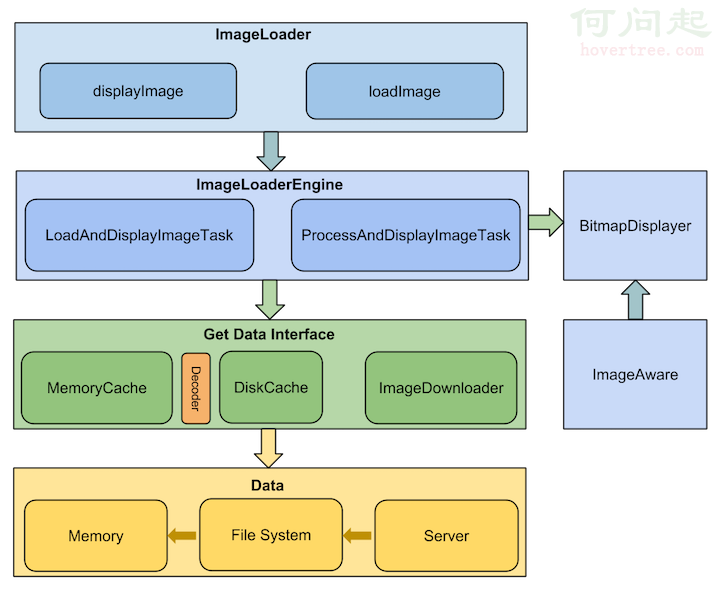 Android 圖片載入庫原理與實務:ImageLoader 與 Fresco
前言 這是「基礎自測」系列的第三篇,以 Android 開發者應該熟悉的技術點為切入。這次談圖片載入庫。 在 Android 上最麻煩的莫過於從網路抓圖、顯示、再回收。這
 Android Content Provider解析:跨應用共享數據的標準方式
什麼是Content Provider? Content Provider是Android中用於在不同應用之間共享數據的元件。它負責將數據集中管理,並讓其他應用透過標準介
 Android 系統內部整體架構圖解
理解 Android 系統的內部架構,是深入學習 Android 開發的重要基礎。下圖展示了 Android 系統的分層結構與各層之間的關係:
 Android Fragment完整介紹:讓Activity更模組化的關鍵元件
Fragment是什麼? Fragment可以視為Activity的一部分,它讓畫面與行為能夠更模組化。簡單來說,Fragment就像一個可嵌入Activity的子畫面或