

編輯:Android 程式設計入門
本文系統梳理 Android 進階知識,涵蓋四大組件、異步消息處理、跨進程通信、自定義控件以及系統分層架構。
生命週期:
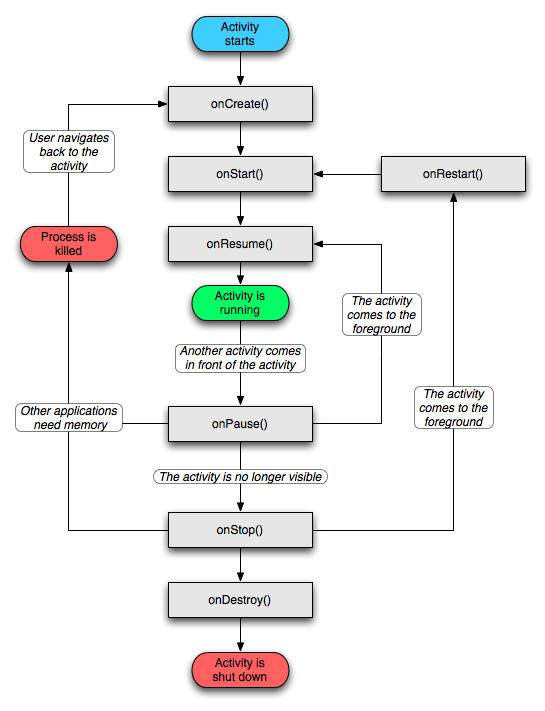
生命週期:
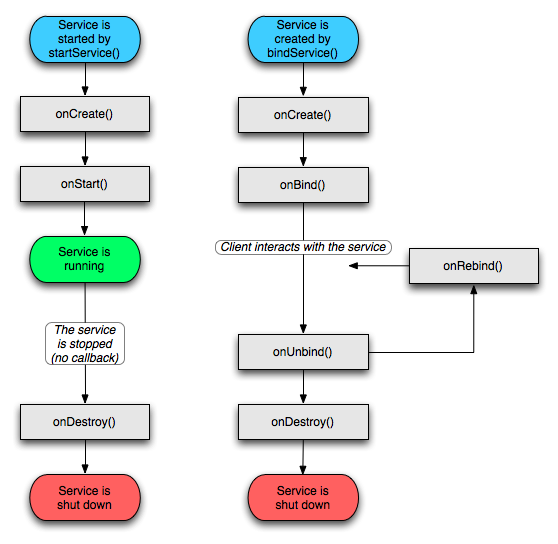
Service 生命週期長,沒有用戶界面,可用於開發監控程序。它有兩種調用方式:
廣播接收器的生命週期只有十幾秒,因此不能在 onReceive() 中做耗時操作,否則會引發 ANR;也不能開子線程,因為子線程可能還沒執行完,廣播接收器就已結束。應通過發送 Intent 給 Service 來處理。動態註冊的廣播接收器會隨註冊它的 Activity 關閉而關閉;靜態註冊的廣播接收器即便 App 關閉,只要設備開啟,收到廣播後仍能觸發。
Handler 處於創建它的主線程中,可在子線程中通過 post(Runnable) 或 sendMessage(msg) 通知主線程更新 UI。
Runnable:執行 handler.post(Runnable),Handler 將 Runnable 放入 MessageQueue,一旦取出便可自動運行其 run 方法更新 UI。主要方法有:post(取出後立即執行)、postAtTime(指定時間執行)、postDelayed(延遲執行)、removeCallbacks(從隊列刪除)。
Message:執行 handler.sendMessage() 或 msg.sendToTarget(),Handler 將 msg 放入 MessageQueue,但 msg 不會自動執行,需重寫 handleMessage 方法,通過獲取 msg 信息更新 UI。可用 setData(Bundle) 攜帶數據,Bundle 可通過 putParcelable 或 putSerializable 傳遞對象。Message 是 final 類不能繼承,有四個參數 arg1、arg2、obj、what。主要方法有 obtainMessage、sendMessage、sendMessageDelayed、removeMessage。
Handler 用法——開子線程,在 post 的 run 方法中更新 UI:
public class MainActivity extends Activity {
    ProgressDialog progressDialog;
    Handler handler;
    Button btn;
    TextView tv;

    @Override
    protected void onCreate(Bundle savedInstanceState) {
        super.onCreate(savedInstanceState);
        setContentView(R.layout.activity_main);
        btn = (Button) findViewById(R.id.load_pic);
        tv = (TextView) findViewById(R.id.tv);
        progressDialog = new ProgressDialog(this);
        progressDialog.setTitle("提示");
        progressDialog.setMessage("正在加載,請稍後...");
        progressDialog.setCancelable(false);
        handler = new Handler();
        btn.setOnClickListener(new View.OnClickListener() {
            @Override
            public void onClick(View v) {
                progressDialog.show();
                new Thread(new Runnable() {
                    @Override
                    public void run() {
                        try {
                            Thread.sleep(3000);
                        } catch (InterruptedException e) {
                            e.printStackTrace();
                        }
                        handler.post(new Runnable() {
                            @Override
                            public void run() {
                                tv.setText("執行完畢");
                                progressDialog.dismiss();
                            }
                        });
                    }
                }).start();
            }
        });
    }
}
Message 用法示例(Message.obtain() 搭配 sendMessage):
public class MainActivity extends Activity {
    ProgressDialog progressDialog;
    Handler handler;
    Button btn;
    TextView tv;

    @Override
    protected void onCreate(Bundle savedInstanceState) {
        super.onCreate(savedInstanceState);
        setContentView(R.layout.activity_main);
        btn = (Button) findViewById(R.id.load_pic);
        tv = (TextView) findViewById(R.id.tv);
        progressDialog = new ProgressDialog(this);
        progressDialog.setCancelable(false);
        handler = new Handler() {
            @Override
            public void handleMessage(Message msg) {
                Bundle bundle = msg.getData();
                tv.setText(bundle.getString("tv"));
                progressDialog.dismiss();
            }
        };
        btn.setOnClickListener(new View.OnClickListener() {
            @Override
            public void onClick(View v) {
                progressDialog.show();
                new Thread(new Runnable() {
                    @Override
                    public void run() {
                        try {
                            Thread.sleep(3000);
                        } catch (InterruptedException e) {
                            e.printStackTrace();
                        }
                        Message msg = Message.obtain();
                        Bundle bundle = new Bundle();
                        bundle.putString("tv", "執行完畢");
                        msg.setData(bundle);
                        handler.sendMessage(msg);
                    }
                }).start();
            }
        });
    }
}
另一種寫法是 Message.obtain(handler),傳入 handler 參數後可直接調用 msg.sendToTarget(),因為 Message 內部有一個 Target 屬性指向該 Handler。
用於簡單單一的異步操作,主要方法:
調用者用 Intent 啟動被調用 Activity,被調用 Activity 需在 AndroidManifest 中配置 action 和 data(action 為字符串 ID,data 為訪問協議 Uri)。調用者用 Intent(action, Uri) 啟動;被調用方通過 getIntent().getData() 獲取整體 Uri,getHost() 獲取主體部分。若被調用方 setResult,還可返回數據,實現雙向通信。
// 調用者
Intent intent = new Intent("com.wwwsealss.action.another", Uri.parse("ok://go and fight!"));
intent.putExtra("value", "Hello world!");
startActivity(intent);
finish();

// 被調用者 AndroidManifest 註冊
<activity android:name=".Main2Activity">
    <intent-filter>
        <action android:name="com.wwwsealss.action.another" />
        <data android:scheme="ok" />
        <category android:name="android.intent.category.DEFAULT" />
    </intent-filter>
</activity>

// 被調用者
if (getIntent().getData() != null) {
    tv.setText(getIntent().getData().getHost() + getIntent().getStringExtra("value"));
}
向其他應用共享數據,並允許其增刪改查。
一個應用作電台發送廣播,其他應用作收音機接收,只能被動接收。
// 發送廣播,需加 Action
Intent intent = new Intent("com.wwwsealss.receivebroadcast");
intent.putExtra("value", "Hello World!");
sendBroadcast(intent);

// 註冊廣播接收器
public class MyReceiver extends BroadcastReceiver {
    @Override
    public void onReceive(Context context, Intent intent) {
        String get = intent.getStringExtra("value");
        Toast.makeText(context, get, Toast.LENGTH_SHORT).show();
        Intent it = new Intent(context, MainActivity.class);
        it.setFlags(Intent.FLAG_ACTIVITY_NEW_TASK);
        context.startActivity(it);
    }
}

// AndroidManifest 中註冊
<receiver android:name=".MyReceiver" android:enabled="true" android:exported="true">
    <intent-filter>
        <action android:name="com.wwwsealss.receivebroadcast" />
    </intent-filter>
</receiver>
先在服務端創建 AIDL 文件(一個接口,抽象方法即共享給客戶端的內容),編譯後生成對應 Java 文件;再定義 Service 實現該接口,重寫 onBind 返回實現類實例;然後把 AIDL 文件放到客戶端(包名須與服務端一致),定義 ServiceConnection 在綁定成功後獲取 AIDL 實現類實例。
// 創建 AIDL 文件
interface IMyAidlInterface {
    String getValue();
}

// 服務端
public class MyService extends Service {
    public class MyAidlInterface extends IMyAidlInterface.Stub {
        @Override
        public String getValue() throws RemoteException {
            return "從 AIDL 服務獲取的值";
        }
    }
    @Override
    public IBinder onBind(Intent intent) {
        return new MyAidlInterface();
    }
}

// 客戶端
private IMyAidlInterface myAidlInterface = null;
private ServiceConnection serviceConnection = new ServiceConnection() {
    @Override
    public void onServiceConnected(ComponentName name, IBinder service) {
        myAidlInterface = IMyAidlInterface.Stub.asInterface(service);
        try {
            Toast.makeText(MainActivity.this, myAidlInterface.getValue(), Toast.LENGTH_SHORT).show();
        } catch (RemoteException e) {
            e.printStackTrace();
        }
    }
    @Override
    public void onServiceDisconnected(ComponentName name) { }
};
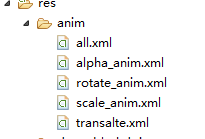 Android 補間動畫 TweenAnimation 用法整理
補間動畫(Tween Animation)是 Android 最直覺的動畫方案:你只要描述「從哪個狀態變到哪個狀態、花多久時間」,系統就會自動補上中間的過渡影格。以下把程
 Android 主題切換實作:SkinUtils 與沉浸式狀態欄
主題切換思路先在 styles 或 themes 準備多套主題,再用工具類保存目前主題編號,最後在 BaseActivity 初始化。SkinUtils工具類可透過 Sh
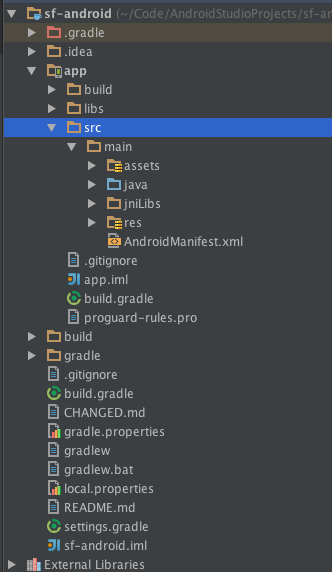 Android Studio 專案目錄結構全解析
來快速認識一下 Android Studio 中不同檔案與目錄的位置與用途。先看一個 App 最簡單的目錄結構: 面對這麼多檔案,可以先把它們拆成三大塊: 1. 編譯系
 Android Studio 開發必備:六款提升效率的實用插件推薦
在 Android Studio 的日常開發中,善用插件往往能起到事半功倍的效果。合適的插件不僅能大幅簡化繁瑣的重複操作,還能顯著提升整體開發效率。以下精選六款值得一試的