

編輯:Android 程式設計入門
有些代碼寫過一次就再也不會忘,有些則是每寫一次都要翻文檔。下面把幾個高頻又容易忘的片段整理在一起,直接拷走就能用。
思路是發一個 ACTION_VIEW 的 Intent,指定 MIME 類型為 application/vnd.android.package-archive,系統就會調起安裝器。
private void installAPK(File file) {
    Intent intent = new Intent(Intent.ACTION_VIEW);
    Uri data = Uri.fromFile(file);
    String type = "application/vnd.android.package-archive";
    intent.setDataAndType(data, type);
    startActivity(intent);
}
注意:Android 7.0 之後 Uri.fromFile 會拋 FileUriExposedException,需要改用 FileProvider 生成 content:// 形式的 URI,並在清單里配置 provider 與 FLAG_GRANT_READ_URI_PERMISSION。
同樣是 ACTION_VIEW,不過 URI 換成 package:包名 這種 scheme:
private void uninstallAPK(String packageName) {
    Intent intent = new Intent(Intent.ACTION_VIEW);
    intent.setData(Uri.parse("package:" + packageName));
    startActivity(intent);
}
「保持不變形」的關鍵在於取寬高縮放比例中較大的那個作為統一 scale,先放大鋪滿目標區域,再從中心裁出目標尺寸。這也是列表縮略圖、頭像裁切的通用做法。
/**
 * 縮放圖片並保持比例不變形,最終返回 resetWidth x resetHeight 的位圖
 */
public static Bitmap resetImage(Bitmap sourceBitmap, int resetWidth, int resetHeight) {
    int width  = sourceBitmap.getWidth();
    int height = sourceBitmap.getHeight();

    float scaleWidth  = (float) resetWidth  / (float) width;
    float scaleHeight = (float) resetHeight / (float) height;
    // 取較大比例,保證鋪滿目標區域
    float maxTmpScale = scaleWidth >= scaleHeight ? scaleWidth : scaleHeight;

    int tmpWidth  = (int) (maxTmpScale * width);
    int tmpHeight = (int) (maxTmpScale * height);

    Matrix m = new Matrix();
    m.setScale(maxTmpScale, maxTmpScale, tmpWidth, tmpHeight);
    sourceBitmap = Bitmap.createBitmap(sourceBitmap, 0, 0,
            sourceBitmap.getWidth(), sourceBitmap.getHeight(), m, false);

    // 居中裁剪
    int x = (tmpWidth  - resetWidth)  / 2;
    int y = (tmpHeight - resetHeight) / 2;
    return Bitmap.createBitmap(sourceBitmap, x, y, resetWidth, resetHeight);
}
SIM 卡聯繫人的 content URI 是 content://sim/adn,字段與通訊錄不同,只有 name 和 phone 兩個常用列。
private Cursor getContacts() {
    Uri uri = Uri.parse("content://sim/adn");
    String[] projection = new String[] { "name", "phone" };
    return managedQuery(uri, projection, null, null, null);
}
使用時記得聲明 READ_CONTACTS 權限;Android 6.0 及以上還需要動態申請。另外 managedQuery 已被廢棄,新項目請直接用 getContentResolver().query() 並自行管理 Cursor 的關閉。
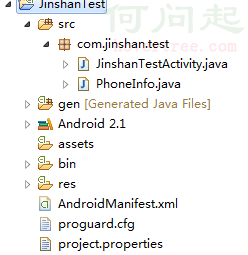 Android 讀取設備資訊與手機號碼的實作教學
從開發者角度理解設備資訊在 Android 應用中,讀取設備資訊與手機號碼常用於設備識別、客服連繫或帳號輔助。本文以 Java 開發角度說明,重點是 TelephonyM
 Android 學習筆記:ActionBar 完整使用指南
一、基本概念 最權威的說明當然還是 Google 官方文件: https://developer.android.com/training/basics/actionba
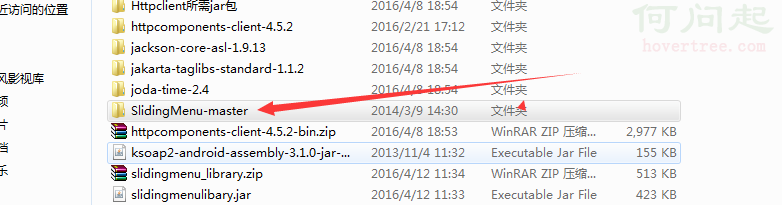 Android Studio 導入第三方庫(SlidingMenu)完整教程
身為 Android 初學者,看著網上各種例子,特此記錄一下導入第三方庫的過程。注意:本教程針對像 SlidingMenu 這樣使用 Android Studio 結構的
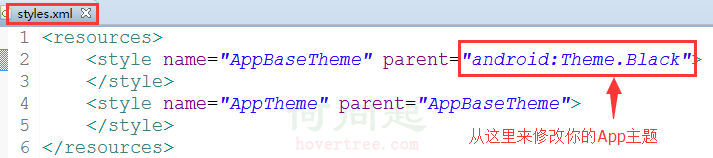 Android 主題 Theme 的正確玩法
Android 主題通常在 AndroidManifest.xml 的 application 標籤中指定,例如 AppTheme。實際套用哪一份樣式,會受到 value