注冊各類 App 或網站賬號時,手機短信驗證碼幾乎是標配環節。曾經只覺得「手機收驗證碼」這件事挺新奇,卻沒深究背後是怎麼實現的。如今手上的項目正好需要通過手機號注冊、並發送驗證碼來完成驗證,於是索性把整套流程梳理清楚,順帶分享如何用正則表達式校驗手機號是否合法(覆蓋電信、移動、聯通號段)。
第一步:ApiClient 中封裝獲取驗證碼的方法
先在网络層封裝請求邏輯,拼接接口地址、發起請求並把返回的 JSON 解析為實體對象。
Java代碼
- /**
- * 說明:獲取驗證碼
- * 作者:丁國華
- * 時間:2015-8-27 下午5:47:36
- */
- public static String getValidateCode(AppContext appContext,
- Map<String, Object> map) throws AppException {
-
- // 定義要訪問的接口和要強轉的實體
- String validateUrl = _MakeURL(URLs.VALIDATE_CODE_URL, map);
- ValidateCode validateCode = null;
-
- try {
-
- // 獲取服務器端Json數據
- String json = http_get(appContext, validateUrl);
-
- // 解析為制定的實體對象
- validateCode = (ValidateCode) JSON.parseObject(json,
- ValidateCode.class);
-
- } catch (Exception e) {
- if (e instanceof AppException)
- throw (AppException) e;
- throw AppException.network(e);
- }
-
- // 返回驗證碼
- return validateCode.getCode();
- }
第二步:AppContent 中編寫接口方法
這一步先判斷網絡是否可用,再調用上面的方法,異常時按情況拋出。
Java代碼
- /**
- * 說明:獲取服務器驗證碼(不需要緩存)
- * 作者:丁國華
- * @date 2015-8-28 上午9:07:14
- */
- public String getCode(Map<String, Object> map) throws AppException {
-
- String validateCode = "" ;
-
- // 如果網絡可連接且解析無誤返回正確的驗證碼,否則返回空字符串
- if (isNetworkConnected()) {
- try {
- validateCode = ApiClient.getValidateCode(this, map);
- } catch (AppException e) {
- if (validateCode == "") {
- throw e;
- }
- }
- }
- return validateCode;
- }
第三步:用正則表達式校驗手機號
在 StringUtils 中封裝一個校驗方法,判斷輸入是否為合法的手機或固話號碼。
Java代碼
- /* 說明:移動:134、135、136、137、138、139、150、151、157(TD)、158、159、187、188
- * 聯通:130、131、132、152、155、156、185、186
- * 電信:133、153、180、189
- * 總結起來就是第一位必定為1,第二位必定為3或5或8,其他位置的可以為0-9
- * 驗證號碼 手機號 固話均可
- * 作者:丁國華
- * 2015年9月20日 13:52:35
- */
- public static boolean isPhoneNumberValid(String phoneNumber) {
- boolean isValid = false;
-
- String expression = "((^(13|15|18)[0-9]{9}$)|(^0[1,2]{1}\\d{1}-?\\d{8}$)|(^0[3-9] {1}\\d{2}-?\\d{7,8}$)|(^0[1,2]{1}\\d{1}-?\\d{8}-(\\d{1,4})$)|(^0[3-9]{1}\\d{2}-? \\d{7,8}-(\\d{1,4})$))";
- CharSequence inputStr = phoneNumber;
-
- Pattern pattern = Pattern.compile(expression);
-
- Matcher matcher = pattern.matcher(inputStr);
-
- if (matcher.matches() ) {
- isValid = true;
- }
-
- return isValid;
-
- }
第四步:編寫注冊頁面的 XML 布局
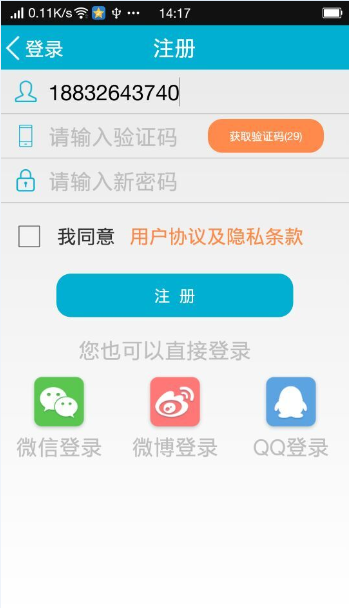
注冊頁包含返回登錄按鈕、用戶名/手機號輸入框、驗證碼輸入框與「獲取驗證碼」按鈕、密碼輸入框、協議勾選,以及微信/微博/QQ 三種第三方登錄入口。
XML/HTML代碼
- <?xml version="1.0" encoding="utf-8"?>
- <LinearLayout xmlns:android="https://schemas.android.com/apk/res/android"
- android:layout_width="match_parent"
- android:layout_height="match_parent"
- android:orientation="vertical" >
-
- <LinearLayout style="@style/top_title_style" >
-
- <Button
- android:id="@+id/register_back_login"
- android:layout_width="wrap_content"
- android:layout_height="wrap_content"
- android:layout_marginTop="5dp"
- android:background="@null"
- android:drawableLeft="@drawable/back"
- android:paddingLeft="5dp"
- android:text=" 登錄"
- android:textColor="#FFFFFF"
- android:textSize="18sp" />
-
- <!-- 注冊的布局 -->
-
- <TextView
- android:layout_width="wrap_content"
- android:layout_height="wrap_content"
- android:layout_margin="5dp"
- android:layout_marginTop="2dp"
- android:layout_weight="1"
- android:gravity="center"
- android:paddingLeft="4dp"
- android:text="注冊"
- android:textColor="#FFFFFF"
- android:textSize="20sp" />
-
- <!-- 注冊的布局 -->
-
- <TextView
- android:id="@+id/nickname_confirm"
- android:layout_width="wrap_content"
- android:layout_height="match_parent"
- android:layout_marginTop="2dp"
- android:gravity="center"
- android:paddingLeft="60dp"
- android:paddingRight="10dp"
- android:textColor="#FFFFFF"
- android:textSize="20sp" />
- </LinearLayout>
-
- <RelativeLayout
- android:layout_width="fill_parent"
- android:layout_height="45dp"
- android:minHeight="50.0dip"
- android:paddingLeft="14.0dip"
- android:paddingRight="12.0dip" >
-
- <ImageView
- android:layout_width="23.0dip"
- android:layout_height="23.0dip"
- android:layout_centerVertical="true"
- android:src="@drawable/user_picture" />
-
- <EditText
- android:id="@+id/et_register_username_id"
- android:layout_width="wrap_content"
- android:layout_height="wrap_content"
- android:layout_marginLeft="20dp"
- android:background="@null"
- android:hint="用戶名/手機號"
- android:paddingLeft="15dip"
- android:paddingTop="8dp"
- android:textColorHint="#BEBEBE"
- android:textSize="20sp" />
- </RelativeLayout>
-
- <View style="@style/PersonalLine" />
-
- <RelativeLayout
- android:layout_width="fill_parent"
- android:layout_height="45dp"
- android:minHeight="50.0dip"
- android:paddingLeft="14.0dip"
- android:paddingRight="12.0dip" >
-
- <ImageView
- android:layout_width="23.0dip"
- android:layout_height="23.0dip"
- android:layout_centerVertical="true"
- android:src="@drawable/phone_picture" />
-
- <EditText
- android:id="@+id/et_register_code_id"
- android:layout_width="wrap_content"
- android:layout_height="wrap_content"
- android:layout_marginLeft="20dp"
- android:background="@null"
- android:hint="請輸入驗證碼"
- android:paddingLeft="15dip"
- android:paddingTop="8dp"
- android:textColorHint="#BEBEBE"
- android:textSize="20sp" />
-
- <Button
- android:id="@+id/bt_getcode_id"
- android:layout_width="120dp"
- android:layout_height="35dp"
- android:layout_marginLeft="200dp"
- android:layout_marginTop="5dp"
- android:background="@drawable/shape1"
- android:text="獲取驗證碼"
- android:textColor="#FFFFFF"
- android:textSize="10sp" />
- </RelativeLayout>
-
- <View style="@style/PersonalLine" />
-
- <RelativeLayout
- android:layout_width="fill_parent"
- android:layout_height="45dp"
- android:minHeight="50.0dip"
- android:paddingLeft="14.0dip"
- android:paddingRight="12.0dip" >
-
- <ImageView
- android:layout_width="23.0dip"
- android:layout_height="23.0dip"
- android:layout_centerVertical="true"
- android:src="@drawable/lock" />
-
- <EditText
- android:id="@+id/et_register_password_id"
- android:layout_width="wrap_content"
- android:layout_height="wrap_content"
- android:layout_marginLeft="20dp"
- android:background="@null"
- android:hint="請輸入新密碼"
- android:paddingLeft="15dip"
- android:paddingTop="8dp"
- android:textColorHint="#BEBEBE"
- android:textSize="20sp" />
- </RelativeLayout>
-
- <View style="@style/PersonalLine" />
-
- <LinearLayout
- android:layout_width="fill_parent"
- android:layout_height="wrap_content"
- android:orientation="horizontal" >
-
- <!-- 小對勾的布局 -->
-
- <CheckBox
- android:layout_width="wrap_content"
- android:layout_height="wrap_content"
- android:layout_margin="10dp"
- android:layout_marginLeft="-10dp"
- android:scaleX="0.8"
- android:scaleY="0.8" />
-
- <TextView
- android:layout_width="wrap_content"
- android:layout_height="wrap_content"
- android:layout_gravity="center_vertical"
- android:text="我同意"
- android:textSize="18sp" />
-
- <TextView
- android:id="@+id/user_protocol"
- android:layout_width="200dp"
- android:layout_height="match_parent"
- android:layout_gravity="center_vertical"
- android:layout_marginLeft="5dp"
- android:gravity="center"
- android:text="用戶協議及隱私條款"
- android:textColor="#FE8B4A"
- android:textSize="18sp" />
- </LinearLayout>
-
- <Button
- android:id="@+id/bt_register_id"
- android:layout_width="245dp"
- android:layout_height="45dp"
- android:layout_gravity="center_horizontal"
- android:layout_marginBottom="14dp"
- android:layout_marginLeft="15dp"
- android:layout_marginRight="15dp"
- android:layout_marginTop="5dp"
- android:background="@drawable/shape2"
- android:gravity="center"
- android:text="注 冊"
- android:textColor="#FFFFFF"
- android:textSize="15sp" />
-
- <TextView
- android:layout_width="wrap_content"
- android:layout_height="wrap_content"
- android:layout_marginLeft="80dp"
- android:paddingTop="5dp"
- android:text="您也可以直接登錄"
- android:textColor="#BEBEBE"
- android:textSize="20sp" />
-
- <LinearLayout
- android:layout_width="match_parent"
- android:layout_height="wrap_content"
- android:layout_marginTop="10dp"
- android:baselineAligned="false"
- android:gravity="center"
- android:orientation="horizontal" >
-
- <LinearLayout
- android:layout_width="0dp"
- android:layout_height="wrap_content"
- android:layout_weight="1"
- android:gravity="center"
- android:orientation="vertical" >
-
- <Button
- android:layout_width="60dp"
- android:layout_height="60dp"
- android:background="@drawable/weixin_login" />
-
- <TextView
- android:layout_width="wrap_content"
- android:layout_height="wrap_content"
- android:text="微信登錄"
- android:textColor="#BEBEBE"
- android:textSize="20sp" />
- </LinearLayout>
-
- <LinearLayout
- android:layout_width="0dp"
- android:layout_height="wrap_content"
- android:layout_weight="1"
- android:gravity="center"
- android:orientation="vertical" >
-
- <Button
- android:layout_width="60dp"
- android:layout_height="60dp"
- android:background="@drawable/weibo_login" />
-
- <TextView
- android:layout_width="wrap_content"
- android:layout_height="wrap_content"
- android:text="微博登錄"
- android:textColor="#BEBEBE"
- android:textSize="20sp" />
- </LinearLayout>
-
- <LinearLayout
- android:layout_width="0dp"
- android:layout_height="wrap_content"
- android:layout_weight="1"
- android:gravity="center"
- android:orientation="vertical" >
-
- <Button
- android:layout_width="60dp"
- android:layout_height="60dp"
- android:background="@drawable/qq_login" />
-
- <TextView
- android:layout_width="wrap_content"
- android:layout_height="wrap_content"
- android:text="QQ登錄"
- android:textColor="#BEBEBE"
- android:textSize="20sp" />
- </LinearLayout>
- </LinearLayout>
-
- </LinearLayout>
第五步:編寫 RegisterActivity 邏輯
核心邏輯都在這裡:點擊「獲取驗證碼」時先校驗手機號,再啟動倒計時線程更新按鈕文案,同時開子線程請求服務器;點擊「注冊」時校驗各項輸入並比對驗證碼,最後發起注冊請求。這裡用帶弱引用的靜態 Handler 來避免內存洩漏。
Java代碼
- package com.jczb.car.ui;
-
- import java.lang.ref.WeakReference;
- import java.util.HashMap;
- import java.util.Map;
-
- import android.app.Activity;
- import android.content.Intent;
- import android.os.Bundle;
- import android.os.Handler;
- import android.os.Message;
- import android.view.View;
- import android.view.View.OnClickListener;
- import android.widget.Button;
- import android.widget.EditText;
- import android.widget.TextView;
- import android.widget.Toast;
-
- import com.jczb.car.AppContext;
- import com.jczb.car.AppException;
- import com.jczb.car.R;
- import com.jczb.car.common.StringUtils;
-
- /**
- * 說明:注冊功能頁面 我們實現了取消線程的機制,從而保證它不會洩露 onDestroy()常常被用來在Activity推出前取消線程
- * 作者: 吳利昌
- * 時間: 2015-9-3上午9:19:15
- */
- public class RegisterActivity extends Activity implements OnClickListener {
-
- // 聲明用到的頁面控件
- private EditText etRegisterName;
- private EditText etCode;
- private EditText etPassword;
- private Button btCode;
- private Button btRegister;
- private TextView tvUserProtocol;
- private Button btRegisterLoginBack;
-
- // 定義變量
- private String userName;
- private String passWord;
-
- public boolean isChange = false;
- private boolean tag = true;
- private int i = 60;
- Thread thread = null;
-
- /**客戶端輸入的驗證碼*/
- private String valicationCode;
-
- /**服務器端獲取的驗證碼*/
- private static String serverValicationCode;
-
- /** 注冊時所帶的參數 */
- private Map<String, Object> registerParams = new HashMap<String, Object>();
-
- /** 獲取驗證碼時所帶的參數 */
- private Map<String, Object> codeParams = new HashMap<String, Object>();
-
- /** 注冊是否成功 */
- private String regisgerStatus;
-
- @Override
- protected void onCreate(Bundle savedInstanceState) {
- super.onCreate(savedInstanceState);
-
- setContentView(R.layout.register);
- initView();
- }
-
-
- /**
- * 說明:初始化頁面控件和事件
- * 作者: 吳利昌
- * 時間: 2015-9-3 上午9:23:42
- */
- public void initView() {
- // 初始化控件
- etRegisterName = (EditText) findViewById(R.id.et_register_username_id);
- etCode = (EditText) findViewById(R.id.et_register_code_id);
- etPassword = (EditText) findViewById(R.id.et_register_password_id);
- btCode = (Button) findViewById(R.id.bt_getcode_id);
- btRegister = (Button) findViewById(R.id.bt_register_id);
- tvUserProtocol=(TextView)findViewById(R.id.user_protocol);
- btRegisterLoginBack=(Button)findViewById(R.id.register_back_login);
-
- // 初始化監聽事件
- btCode.setOnClickListener(this);
- btRegister.setOnClickListener(this);
- tvUserProtocol.setOnClickListener(this);
- btRegisterLoginBack.setOnClickListener(this);
- }
-
- private boolean isvalidate() {
- // TODO Auto-generated method stub
- // 獲取控件輸入的值
- String userName = etRegisterName.getText().toString().trim();
-
-
- if (StringUtils.isEmpty(userName)) {
- Toast.makeText(this, "手機號不能為空", Toast.LENGTH_SHORT).show();
- return false;
- }
- if (!StringUtils.isPhoneNumberValid(userName)) {
- Toast.makeText(this, "手機號有誤", Toast.LENGTH_SHORT).show();
- return false;
- }
- return true;
-
- }
-
- @Override
- public void onClick(View v) {
- switch (v.getId()) {
- case R.id.bt_getcode_id:
- if(!isvalidate())
- break;
-
- btCode.setText("獲取驗證碼");
- btCode.setClickable(true);
- isChange = true;
- changeBtnGetCode();
- getValidateCode();
- break;
- case R.id.bt_register_id:
- register();
-
- break;
- case R.id.user_protocol:
- Intent intentUserProtocol = new Intent(this,UserProtocolActivity.class);
- startActivity(intentUserProtocol);
- break;
- case R.id.register_back_login:
- this.finish();
- break;
-
- default:
- break;
- }
-
- }
-
- private void changeBtnGetCode() {
- thread = new Thread() {
- @Override
- public void run() {
- if (tag) {
- while (i > 0) {
- i--;
- if (RegisterActivity.this == null) {
- break;
-
-
- RegisterActivity.this
- .runOnUiThread(new Runnable() {
- @Override
- public void run() {
- btCode.setText("獲取驗證碼("
- + i + ")");
- btCode
- .setClickable(false);
- }
- });
- try {
- Thread.sleep(1000);
- } catch (InterruptedException e) {
- throw new RuntimeException(e);
- }
- };
- tag = false;
- }
- i = 60;
- tag = true;
- if (RegisterActivity.this != null) {
- RegisterActivity.this.runOnUiThread(new Runnable() {
- @Override
- public void run() {
- btCode.setText("獲取驗證碼");
- btCode.setClickable(true);
- }
- });
- }
- };
- };
- thread.start();
- }
-
- /**
- * 說明:獲取驗證碼
- *
- * 作者: 吳利昌
- * 時間: 2015-9-3 下午3:26:55
- */
- public boolean getValidateCode() {
-
- String name = etRegisterName.getText().toString().trim();
- String code = etCode.getText().toString().trim();
- if (name.equals("")) {
- Toast.makeText(this, "請輸入用戶名或手機號!", Toast.LENGTH_SHORT).show();
- return false;
- }else {
- userName = name;
- valicationCode = code;
- Thread codeThread = new Thread(codeRunnable);
- codeThread.start();
- }
- return true;
- }
-
- /**
- * 說明:注冊
- *
- * 作者: 吳利昌
- * 時間: 2015-9-3 下午3:27:23
- */
- public void register() {
- // 1.首先判斷輸入的值是否有效
- // 2.然後判斷輸入的驗證碼是否有效(防止沒有點擊獲取驗證碼自己填的錯誤驗證碼)
- // 3.最後注冊
- if (isValid()) {
-
- if (valicationCode.equals(serverValicationCode)) {
- Thread thread = new Thread(sRunnable);
- thread.start();
- }else {
- Toast.makeText(this, "輸入的驗證碼不正確!", Toast.LENGTH_SHORT).show();
-
- }
- }
- }
-
- //--------------------------------獲取驗證碼線程處理過程---開始-----------------------------
- /**
- * 自定義一個靜態的具有弱引用的Handler,解決內存洩漏的問題,本handler用來獲取驗證碼
- */
- private static class CodeHandler extends Handler {
- // 持有對本外部類的弱引用
- private final WeakReference<RegisterActivity> mActivity;
-
- public CodeHandler(RegisterActivity activity) {
- mActivity = new WeakReference<RegisterActivity>(activity);
- }
-
- @Override
- public void handleMessage(Message msg) {
-
- // 獲取上下文對象
- RegisterActivity activity = mActivity.get();
- if (activity != null) {
- switch (msg.what) {
- case 1:
- serverValicationCode = (String)msg.obj;
- //activity.etCode.setText(serverValicationCode);
- break;
- case -1:
- Toast.makeText(activity, "獲取驗證碼失敗!", Toast.LENGTH_SHORT).show();
- break;
- case 0:
- Toast.makeText(activity, "哎呀,出錯啦..", Toast.LENGTH_SHORT).show();
- break;
- default:
- break;
- }
- }
- }
- }
-
- /**實例化自定義的handler*/
- private final CodeHandler codeHandler = new CodeHandler(this);
-
- private String serverCode=null;
-
-
- /**定義獲取驗證碼的子線程*/
- private Runnable codeRunnable = new Runnable() {
- @Override
- public void run() {
- Message msg = new Message();
- Map<String, Object> map = new HashMap<String, Object>();
- map.put("jbPhone", userName);
- // 獲取全局對象Application
- AppContext appContext = (AppContext) getApplication();
-
- try {
- // 獲取服務器數據
- serverValicationCode = appContext.getCode(map);
-
- // 返回true則將消息的what值為1,為false則what為-1,異常為0
- if (serverValicationCode.equals("")) {
- msg.what = -1;
- }else {
- msg.what = 1;
- msg.obj = serverValicationCode;
- }
-
- } catch (AppException e) {
- msg.what = 0;
- e.printStackTrace();
- }
- codeHandler.sendMessage(msg);
- }
- };
-
- //--------------------------------獲取驗證碼線程處理過程----完成------------------------------
-
- //--------------------------------注冊線程處理過程--開始----------------------------------
- /**
- * 自定義一個靜態的具有弱引用的Handler,解決內存洩漏的問題,注冊使用
- */
- private static class MyHandler extends Handler {
- // 持有對本外部類的弱引用
- private final WeakReference<RegisterActivity> mActivity;
-
- public MyHandler(RegisterActivity activity) {
- mActivity = new WeakReference<RegisterActivity>(activity);
- }
-
- @Override
- public void handleMessage(Message msg) {
-
- // 獲取上下文對象
- RegisterActivity activity = mActivity.get();
- if (activity != null) {
- switch (msg.what) {
- case 1:
- Toast.makeText(activity, "注冊成功!", Toast.LENGTH_SHORT).show();
- activity.finish();
- break;
- case -1:
- Toast.makeText(activity, "注冊失敗!", Toast.LENGTH_SHORT).show();
- break;
- case -2:
- Toast.makeText(activity, "該號已經注冊!", Toast.LENGTH_SHORT).show();
- break;
- case 0:
- Toast.makeText(activity, "哎呀,出錯啦..", Toast.LENGTH_SHORT).show();
- break;
- default:
- break;
- }
- }
- }
- }
-
- /**實例化自定義的handler*/
- private final MyHandler mHandler = new MyHandler(this);
-
- /**自定義子線程*/
- private Runnable sRunnable = new Runnable() {
- @Override
- public void run() {
- Message msg = new Message();
-
- // 獲取全局對象Application
- AppContext appContext = (AppContext) getApplication();
-
- try {
- // 獲取服務器數據
- regisgerStatus = appContext.register(registerParams);
-
- // 返回true則將消息的what值為1,為false則what為-1,異常為0
- if (regisgerStatus.equals("true")) {
- msg.what = 1;
-
- msg.obj = regisgerStatus;
- }else if(regisgerStatus.equals("1")){
- msg.what = -2;
-
- }else if(regisgerStatus.equals("false")){
- msg.what = -1;}
-
- } catch (AppException e) {
- msg.what = 0;
- e.printStackTrace();
- }
- mHandler.sendMessage(msg);
- }
- };
-
- //--------------------------------注冊線程處理過程---完成-----------------------------------
-
- /**
- * 說明:注冊之前判斷數據是否為空
- *
- * @return
- * 作者: 吳利昌
- * 時間: 2015-9-3 下午3:29:04
- */
- public boolean isValid() {
-
- userName = etRegisterName.getText().toString().trim();
- valicationCode = etCode.getText().toString().trim();
- passWord = etPassword.getText().toString().trim();
-
-
- if (userName.equals("")) {
- Toast.makeText(this, "用戶名不能為空!", Toast.LENGTH_SHORT).show();
- return false;
- }
-
- if (valicationCode.equals("")) {
- Toast.makeText(this, "驗證碼不能為空!", Toast.LENGTH_SHORT).show();
- return false;
- }
-
- if(!serverValicationCode.equals(valicationCode))
- {
- Toast.makeText(this, "驗證碼錯誤", Toast.LENGTH_SHORT).show();
- return false;
- }
-
- if (passWord.equals("")) {
- Toast.makeText(this, "密碼不能為空!", Toast.LENGTH_SHORT).show();
- return false;
- }else if (passWord.length() < 6) {
- Toast.makeText(this, "密碼至少6位!", Toast.LENGTH_SHORT).show();
- return false;
- }
-
- registerParams.put("username", userName);
- registerParams.put("psd", passWord);
-
- return true;
- }
- }
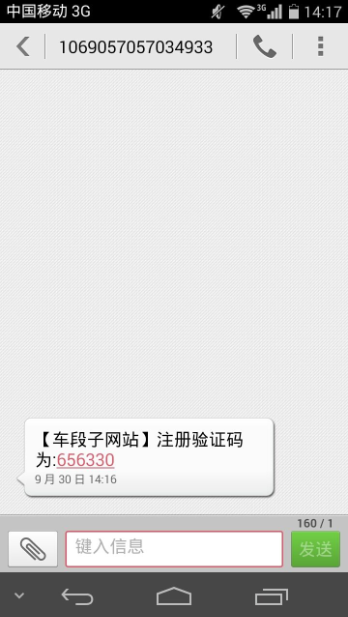
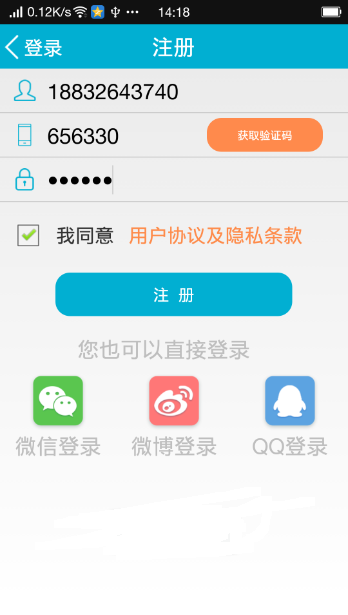
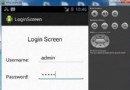
最後跑一遍看看效果。用一個號碼注冊,輸入手機號、點擊獲取驗證碼,倒計時會自動開啟,填好驗證碼與密碼後即可完成注冊。下面幾張圖展示了整個流程:


 Android 應用程式本地化實作
 Android 登入畫面教學:帳密欄位設計與三次錯誤後鎖定的實作
 Android 實作:完整實現 QQ 表情的發送與接收
 Android 進階:手機與 BLE 終端通信實戰