

編輯:Android 開發實例
在 Android 裡做載入提示,直覺做法是 ProgressDialog。ApiDemos 中的 ProgressBar3.java 就示範了兩種典型用法:
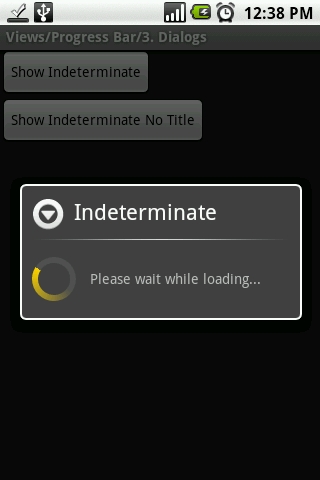
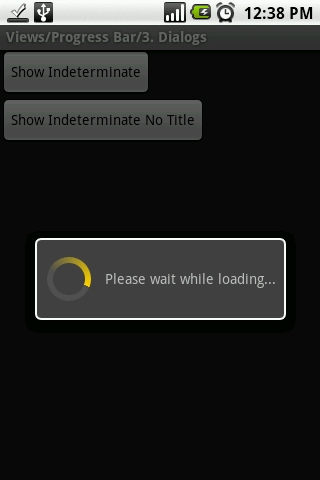
但仔細看 Android Market 的載入畫面,發現它其實不是 ProgressDialog——而是一層鋪在畫面上的 Loading 版面,帶著一行說明文字。
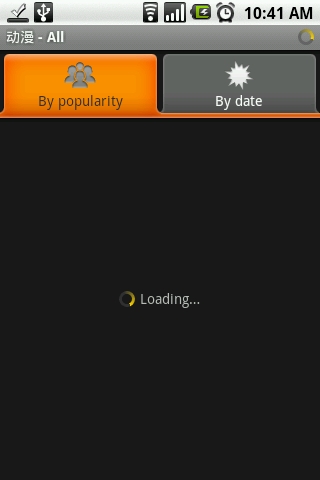
效果既然不同,做法自然也要換。關鍵是:把 Loading 做成一個普通的版面檔,用可見性來控制顯示與隱藏。
res/layout/fullscreen_loading_indicator.xml:
<?xml version="1.0" encoding="utf-8"?>
<LinearLayout xmlns:android="https://schemas.android.com/apk/res/android"
    android:gravity="center_vertical|center_horizontal"
    android:orientation="horizontal"
    android:id="@+id/fullscreen_loading_style"
    android:layout_width="fill_parent"
    android:layout_height="fill_parent" >
    <ProgressBar
        android:layout_gravity="center_vertical"
        android:layout_width="wrap_content"
        android:layout_height="wrap_content" />
    <TextView
        android:id="@+id/current_action"
        android:layout_width="wrap_content"
        android:layout_height="wrap_content"
        android:layout_marginLeft="5.0dip"
        android:text="@+string/loading" />
</LinearLayout>
一個 ProgressBar 加上一行狀態文字,水平置中。這裡刻意沒用 ProgressDialog,因為 Dialog 會獨立成一個視窗、蓋在最上層且難以客製;做成版面則能完全融入自己的畫面結構。
main.xml:
<?xml version="1.0" encoding="utf-8"?>
<LinearLayout xmlns:android="https://schemas.android.com/apk/res/android"
    android:orientation="vertical"
    android:layout_width="fill_parent"
    android:layout_height="fill_parent">

    <LinearLayout
        android:orientation="vertical"
        android:id="@+id/main_info"
        android:visibility="gone"
        android:layout_width="fill_parent"
        android:layout_height="fill_parent">
        <TextView
            android:layout_width="fill_parent"
            android:layout_height="fill_parent"
            android:text="abc" />
    </LinearLayout>

    <LinearLayout
        android:orientation="vertical"
        android:id="@+id/main_Loading"
        android:layout_width="fill_parent"
        android:layout_height="fill_parent">
        <include
            android:visibility="visible"
            android:layout_width="fill_parent"
            android:layout_height="fill_parent"
            layout="@layout/fullscreen_loading_style" />
    </LinearLayout>
</LinearLayout>
結構是兩層並列:內容區(預設 gone)與 Loading 區(預設 visible)。切換時只要對調兩者的 visibility 就好,不必建立或銷毀任何物件。
package com.tymx.fullloading;

import android.app.Activity;
import android.os.Bundle;
import android.os.Handler;
import android.os.Message;
import android.view.View;
import android.widget.LinearLayout;

public class myFullLoading extends Activity {
    private LinearLayout mLoadingLayout;

    @Override
    public void onCreate(Bundle savedInstanceState) {
        super.onCreate(savedInstanceState);
        setContentView(R.layout.main);

        final Handler handler = new Handler() {
            @Override
            public void handleMessage(Message msg) {
                super.handleMessage(msg);
                if (msg.what == 1) {
                    mLoadingLayout = (LinearLayout) findViewById(R.id.fullscreen_loading_style);
                    mLoadingLayout.setVisibility(View.GONE);

                    LinearLayout mMain = (LinearLayout) findViewById(R.id.main_info);
                    mMain.setVisibility(View.VISIBLE);
                }
            }
        };

        new Thread() {
            public void run() {
                for (int i = 0; i < 1000; i++) {
                    System.out.print(i + "");
                }
                Message msg = handler.obtainMessage(1, "flash");
                handler.sendMessage(msg);
            }
        }.start();
    }
}
背景執行緒跑完工作後發訊息,主執行緒收到就切換可見性。這裡的 for 迴圈只是模擬耗時作業,實務上會換成真正的網路請求或檔案讀取。
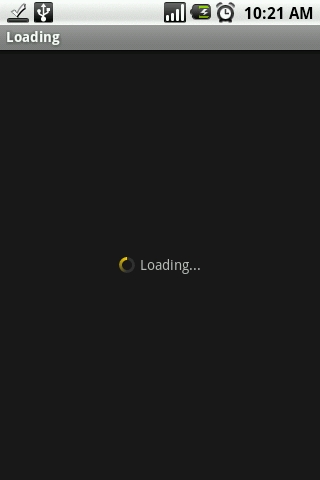
相比 ProgressDialog,自訂 Loading 版面的優勢在於:可以放品牌圖、可以顯示多行狀態、可以依階段更新文字(把 current_action 的內容換掉即可),而且不會像 Dialog 那樣在旋轉螢幕時引發 lifecycle 相關的崩潰。
限制則是它需要你自行管理兩層版面的可見性,程式碼若散落在各處很容易出錯。實務上比較穩健的寫法是把 Loading 抽成一個自訂 View 或 Fragment,對外只暴露 show()、hide()、setMessage() 三個方法,讓呼叫方不必知道內部的版面結構。
另外提醒一個新版系統的注意事項:Android 已不鼓勵使用 ProgressDialog(官方文件直接標記為棄用),若只是想顯示不確定進度的忙碌狀態,ProgressBar 搭配 indeterminate="true" 放在自己的版面裡,正是本文這種思路的延伸,也是目前較受推薦的做法。
 Android 教學:用程式碼實作常用佈局
關於 Android 常用佈局,利用 XML 檔實作的範例已經很多。那麼該如何用程式碼來實作呢?雖然純用程式碼佈局沒有太大必要、也不太被鼓勵,但我認為透過程式碼實作這些佈
 多語系 App 怎麼做?Android 資源本地化完整說明
一個上架 Google Play 的 App,潛在使用者遍布全球。要讓不同語言的使用者都覺得順手,本地化是基本功。它涵蓋的不只是文字翻譯,還包括日期寫法、數字格式、貨幣符
 Android 五種資料儲存方式全解析:SharedPreferences、檔案、SQLite、ContentProvider 與網路
資料儲存是開發中最頻繁面對的課題之一。Android 提供了多種互補的機制,本文逐一說明五種主要方式,並附上各自的關鍵程式碼與適用情境。 SharedPreferen
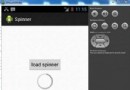 Android 進度條教學:Spinner 的宣告、切換與常用 API
使用者按下按鈕之後,如果畫面兩三秒沒反應,多半會以為 App 當機了。所以任何耗時的背後工作,都該配一個進度提示。Android 的 ProgressBar 有兩種常見外