

編輯:Android 開發實例
後台線程負責幹活,UI 線程負責展現,兩者之間需要一條安全的通道。本文以圖片下載與解碼為例,示範如何把後台任務的執行結果交回 UI 線程上的界面對象。
Handler 是 Android 線程管理框架的組成部分。它接收消息並執行相應的處理代碼。通常我們為新線程創建 Handler,但也可以把 Handler 綁定到一個已存在的線程上——一旦綁定到 UI 線程,處理消息的代碼就會跑在 UI 線程裡。
合適的位置是在管理線程池那個類的構造方法中實例化 Handler,並保存為成員變量。使用 Handler(Looper) 構造方法,傳入 Looper 對象即可指定所屬線程;Looper 的靜態方法 getMainLooper() 返回的正是 UI 線程的 Looper。
private PhotoManager() {
...
    // Defines a Handler object that's attached to the UI thread
    mHandler = new Handler(Looper.getMainLooper()) {
    ...
接著覆寫 handleMessage()。當 Handler 所屬線程收到新消息時,系統會回調這個方法;同一線程上的所有 Handler 都會收到相同的消息。
        /*
         * handleMessage() defines the operations to perform when
         * the Handler receives a new Message to process.
         */
        @Override
        public void handleMessage(Message inputMessage) {
            // Gets the image task from the incoming Message object.
            PhotoTask photoTask = (PhotoTask) inputMessage.obj;
            ...
        }
    ...
    }
}
要把數據從後台任務送到 UI 線程,思路是:先在 UI 相關對象裡存好數據引用,然後把任務對象和狀態碼交給 Handler,由 Handler 發出消息。因為 Handler 運行在 UI 線程,它就有資格去更新界面。
先看運行在後台線程的 Runnable。它負責解析 Bitmap,把結果寫回父對象,並標記狀態為 DECODE_STATE_COMPLETED。
// A class that decodes photo files into Bitmaps
class PhotoDecodeRunnable implements Runnable {
    ...
    PhotoDecodeRunnable(PhotoTask downloadTask) {
        mPhotoTask = downloadTask;
    }
    ...
    // Gets the downloaded byte array
    byte[] imageBuffer = mPhotoTask.getByteBuffer();
    ...
    // Runs the code for this task
    public void run() {
        ...
        // Tries to decode the image buffer
        returnBitmap = BitmapFactory.decodeByteArray(
                imageBuffer,
                0,
                imageBuffer.length,
                bitmapOptions
        );
        ...
        // Sets the ImageView Bitmap
        mPhotoTask.setImage(returnBitmap);
        // Reports a status of "completed"
        mPhotoTask.handleDecodeState(DECODE_STATE_COMPLETED);
        ...
    }
    ...
}
...
值得注意的是,PhotoTask 裡同時持有 Bitmap 和用于展示它的 ImageView 引用。即使兩者在同一個對象中,由於當前不在 UI 線程,你依然不能直接調用 ImageView 去顯示這張圖。
PhotoTask 在收到狀態碼後,需要把它翻譯成整體流程的狀態,再繼續向上傳遞:
public class PhotoTask {
    ...
    // Gets a handle to the object that creates the thread pools
    sPhotoManager = PhotoManager.getInstance();
    ...
    public void handleDecodeState(int state) {
        int outState;
        // Converts the decode state to the overall state.
        switch(state) {
            case PhotoDecodeRunnable.DECODE_STATE_COMPLETED:
                outState = PhotoManager.TASK_COMPLETE;
                break;
            ...
        }
        ...
        // Calls the generalized state method
        handleState(outState);
    }
    ...
    // Passes the state to PhotoManager
    void handleState(int state) {
        /*
         * Passes a handle to this task and the
         * current state to the class that created
         * the thread pools
         */
        sPhotoManager.handleState(this, state);
    }
    ...
}
PhotoManager 拿到狀態碼與 PhotoTask 句柄後,判斷任務已完成,於是構造一個 Message 把兩者打包,發送給 Handler。
public class PhotoManager {
    ...
    // Handle status messages from tasks
    public void handleState(PhotoTask photoTask, int state) {
        switch (state) {
            ...
            // The task finished downloading and decoding the image
            case TASK_COMPLETE:
                /*
                 * Creates a message for the Handler
                 * with the state and the task object
                 */
                Message completeMessage =
                        mHandler.obtainMessage(state, photoTask);
                completeMessage.sendToTarget();
                break;
            ...
        }
        ...
    }
最後,Handler.handleMessage() 會逐一檢查每條消息的狀態碼。當狀態為 TASK_COMPLETE 時,任務已經完成,Message 中攜帶的 PhotoTask 對象裡就有了解碼好的 Bitmap 和目標 ImageView。由於 handleMessage() 本身運行在 UI 線程,此時為 ImageView 設置 Bitmap 是完全安全的。
把這三步串起來看:Handler 提供「合法的執行場所」,Message 提供「數據載體」,而層層上報的狀態碼則負責觸發時機。這套模式幾乎是所有 Android 異步回主線程場景的通用骨架。
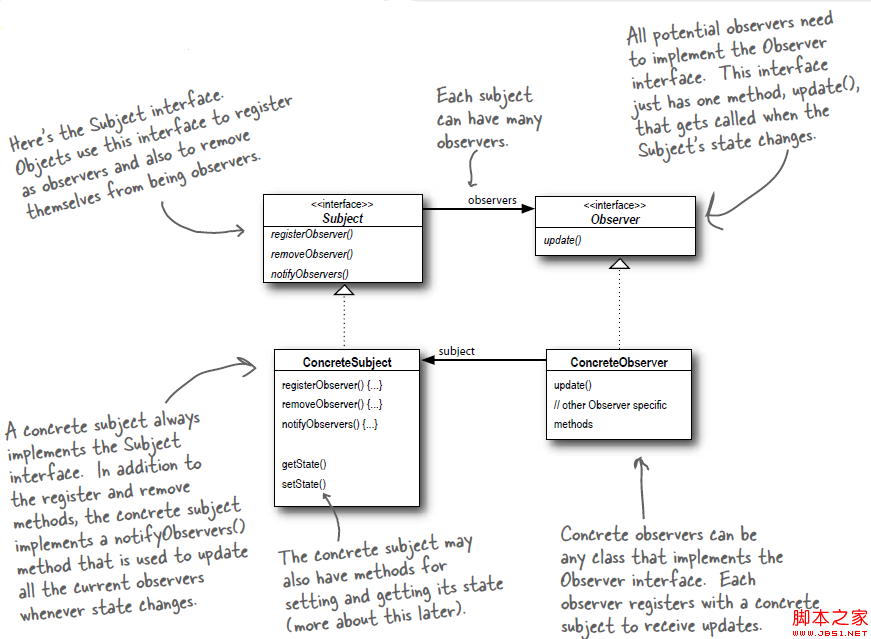 Android 源碼中的觀察者模式:事件監聽模型解析
定義 Define a one-to-many dependency between objects so that when one object changes st
 Android 多媒體播放:MediaPlayer 常用 API 與播放控制
要在 App 裡播放音訊或影片,Android 提供了好幾條路。其中最通用的一條是 MediaPlayer 類別——它包裝了系統內建的播放服務,讓音訊與影片的播放都能用同
 Android Spinner 載入動畫:按鈕觸發與顯示控制
Spinner 是 Android 中常見的載入提示方式,適合用在不知道完成時間的任務。它通常只是一個持續旋轉的進度圖形,不會顯示百分比。 基本用法 先在版面配置中加入
 用 Handler 實現 ViewPager 廣告頁自動輪播的完整方案
很多電商網站和 App 都有自動輪播的商品推廣圖,看起來體驗很不錯。正好今天在學習 ViewPager,於是就動手做了一個功能類似的 Demo。 下面是其中兩個效果的截圖