

編輯:Android 開發實例
後台服務把活幹完了,總得讓發起方知道結果。本節介紹一種既安全又輕量的做法:借助 LocalBroadcastManager 收發狀態廣播。相比全局廣播,它的廣播範圍被限制在本應用進程內,既避免了信息外洩,也省下了跨進程的開銷。
思路分兩步。第一步,構造一個攜帶狀態與數據的 Intent,按需還可以附加 action 與 URI;第二步,調用 LocalBroadcastManager.sendBroadcast() 把它發出去,應用內所有注册了該廣播的接收器都會收到。實例通過 LocalBroadcastManager.getInstance() 獲取。
public final class Constants {
    ...
    // Defines a custom Intent action
    public static final String BROADCAST_ACTION =
            "com.example.android.threadsample.BROADCAST";
    ...
    // Defines the key for the status "extra" in an Intent
    public static final String EXTENDED_DATA_STATUS =
            "com.example.android.threadsample.STATUS";
    ...
}
public class RSSPullService extends IntentService {
...
    /*
     * Creates a new Intent containing a Uri object
     * BROADCAST_ACTION is a custom Intent action
     */
    Intent localIntent =
            new Intent(Constants.BROADCAST_ACTION)
            // Puts the status into the Intent
            .putExtra(Constants.EXTENDED_DATA_STATUS, status);
    // Broadcasts the Intent to receivers in this app.
    LocalBroadcastManager.getInstance(this).sendBroadcast(localIntent);
...
}
接收方式與普通廣播一致:寫一個 BroadcastReceiver 子類並實現 onReceive()。
// Broadcast receiver for receiving status updates from the IntentService
private class ResponseReceiver extends BroadcastReceiver
{
    // Prevents instantiation
    private DownloadStateReceiver() {
    }
    // Called when the BroadcastReceiver gets an Intent it's registered to receive
    public void onReceive(Context context, Intent intent) {
...
        /*
         * Handle Intents here.
         */
...
    }
}
接著定義意圖過濾器,用來匹配指定的 action、category 與 data。
// Class that displays photos
public class DisplayActivity extends FragmentActivity {
    ...
    public void onCreate(Bundle stateBundle) {
        ...
        super.onCreate(stateBundle);
        ...
        // The filter's action is BROADCAST_ACTION
        IntentFilter mStatusIntentFilter = new IntentFilter(
                Constants.BROADCAST_ACTION);

        // Adds a data filter for the HTTP scheme
        mStatusIntentFilter.addDataScheme("http");
        ...
注册環節略有差異,需要改用 LocalBroadcastManager.registerReceiver():
 // Instantiates a new DownloadStateReceiver
        DownloadStateReceiver mDownloadStateReceiver =
                            new DownloadStateReceiver();
        // Registers the DownloadStateReceiver and its intent filters
        LocalBroadcastManager.getInstance(this).registerReceiver(
                            mDownloadStateReceiver,
                            mStatusIntentFilter);
        ...
一個 BroadcastReceiver 可以同時處理多種類型的廣播,這意味著你能依據不同 action 分派不同邏輯,而不必為每種事件各寫一個接收器:
 /*
     * Instantiates a new action filter.
     * No data filter is needed.
     */
        statusIntentFilter = new IntentFilter(Constants.ACTION_ZOOM_IMAGE);
        ...
        // Registers the receiver with the new filter
        LocalBroadcastManager.getInstance(getActivity()).registerReceiver(
                            mDownloadStateReceiver,
                            mIntentFilter);
發送廣播既不會啟動也不會恢復 Activity。BroadcastReceiver 的作用是讓 Activity 有機會接收並處理數據——哪怕應用此時正在後台——但它絕不會把 App 硬拽回前台。如果你的目標是在用戶看不到應用時通知他發生了某事,正確工具是 Notification。反過來說,為了響應一條廣播而去啟動 Activity,是應當避免的反模式。
 Android 進度條實作:用 Loading Spinner 表示「還不知道要等多久」
Android 的 ProgressBar 有兩種常見形態:一種是帶有百分比的進度條(progress bar),另一種是持續旋轉的轉圈動畫,也就是本章的主角 Spinn
 Android 加載 Spinner 教學:用進度轉盤提示未知等待
在 Android 中,若任務完成時間未知,可使用不確定模式的進度條,也就是常見的加載 Spinner。它通常會持續旋轉,用來告知使用者系統仍在處理中。 在版面配置中加入
 Android 開發實作:ListView 與 GridView 用法全解析
ListView 與 GridView 是 Android 開發裡最常被使用的兩個檢視元件,兩者都必須搭配 Adapter 才能發揮作用。本文以兩個可運行的實例,分別說明
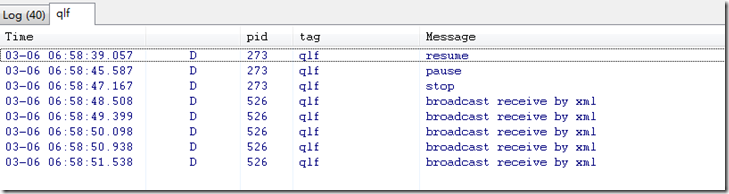 Android 廣播(Broadcast)機制詳解:概念、用途與兩種註冊方式
廣播是 Android 裡分佈最廣的元件之一,但它的運作模型其實可以用收音機一次講明白。 一、用廣播電台理解 Broadcast 日常聽廣播是這樣的:無數電台各自用固定