

編輯:Android 開發實例
layout_weight 是 LinearLayout 裡最容易被誤解也最好用的屬性。它真正的語意是「剩餘空間的分配比例」,而不是「寬度」。下面用三段配置對照說明。
這是最推薦的寫法。兩個子檢視的 layout_width 都設為 0dip,讓系統完全透過權重來分配寬度,此時畫面呈現 1:2 的比例。
<?xml version="1.0" encoding="utf-8"?>
<LinearLayout xmlns:android="https://schemas.android.com/apk/res/android"
    android:layout_width="match_parent"
    android:layout_height="match_parent"
    android:orientation="horizontal" >

    <fragment
        android:id="@+id/titles"
        android:layout_width="0dip"
        android:layout_height="match_parent"
        android:layout_weight="1"
        class="com.a2bgeek.fragmentdemo.TitlesFragment" />

    <FrameLayout
        android:id="@+id/details"
        android:layout_width="0dip"
        android:layout_height="match_parent"
        android:layout_weight="2" >
    </FrameLayout>

</LinearLayout>
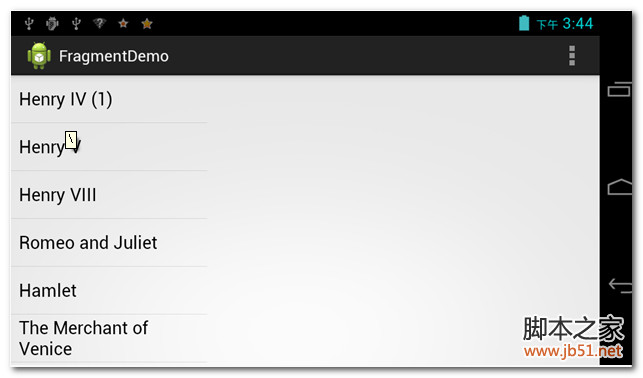
把兩個子檢視的寬度都改成 match_parent,權重數字雖然一樣,結果卻完全不同。因為此時每個子檢視先各自佔滿整個父容器,剩下的「負空間」再依權重去扣,最終比例會與情況一明顯不同,甚至出現某個區塊被壓縮的情形。
<?xml version="1.0" encoding="utf-8"?>
<LinearLayout xmlns:android="https://schemas.android.com/apk/res/android"
    android:layout_width="match_parent"
    android:layout_height="match_parent"
    android:orientation="horizontal" >

    <fragment
        android:id="@+id/titles"
        android:layout_width="match_parent"
        android:layout_height="match_parent"
        android:layout_weight="1"
        class="com.a2bgeek.fragmentdemo.TitlesFragment" />

    <FrameLayout
        android:id="@+id/details"
        android:layout_width="match_parent"
        android:layout_height="match_parent"
        android:layout_weight="2" >
    </FrameLayout>

</LinearLayout>
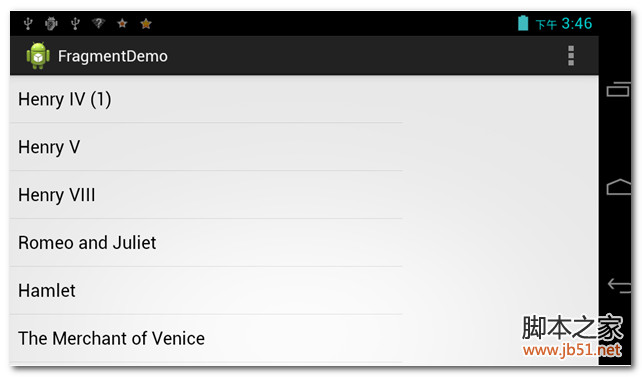
Fragment 這個標籤在 wrap_content 的情形下會佔滿全部空間,行為與一般控制項不同。這是許多人使用 Fragment 時遇到「布局跑掉」的常見原因。
想做等比例或固定比例分割時,請一律使用「layout_width="0dip" + layout_weight」的組合。這種寫法不僅語意清楚,也能避免不必要的量測與配置,效能表現優於「先給滿寬再扣」的做法。若需要固定寬度加可伸縮區塊,則把固定那側的權重設為 0、寬度寫實際值即可。
 Android 多語系本地化實作:values-it 與字串資源
Android 的資源系統可以依裝置語言自動選擇字串。若要讓應用支援多語系,最直接的方式是建立不同語言的 values 資料夾。 建立 values-it 以義大利文為例
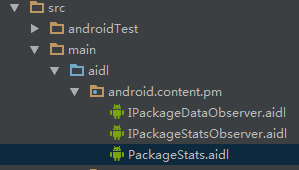 Android 取得 App 應用程式佔用大小的方法(反射 + AIDL)
PackageManager 雖然內建了計算套件大小的能力,但 getPackageSizeInfo 是隱藏 API,一般應用沒有權限直接呼叫。繞過限制的思路是:透過 J
 用 NDK 加速彩圖轉灰階:Java 與原生碼的效能對比
把彩色圖片轉成灰階,用 Java 寫並不難,做法跟 J2ME 時代幾乎一樣:讀出每個像素的 RGB,取平均,再組回一個像素。問題出在規模——圖片一大,或者需要連續處理多張
 Android 錄音實作:MediaRecorder 搭配 MediaPlayer 完整流程
幾乎每支 Android 手機都內建麥克風,錄下聲音後存檔或播放都不是難事。做法有好幾種,最常見的是 MediaRecorder 類別;錄完之後再用 MediaPlaye